I Have a Memory Leak.

Lady Fitzgerald

Senioritis Member
Guru
VIP
Local time
12:47 PM
Messages
9,540
Location
AZ, SSA (Squabbling States of America)
Yeah, I know, that one too but I'm referring to the one in my computer.

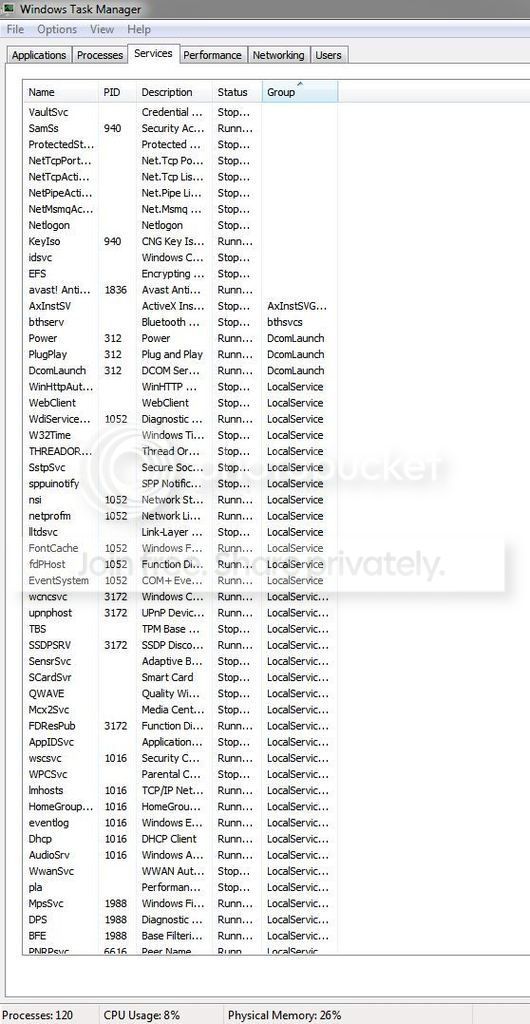
Normally, my memory usage would go from 10-12% of 32GB to no more than 20-30% by the end of the week when I normally would do my weekly reboot. Recently, it's really gone nuts. I might get to 20-30% in as little as one day. I did my last reboot this morning at 4 AM and now—10 PM—it's already up to 25%. I installed several programs around the same time the memory use started to escalate—two gadgets, Crystal Disk Info, and the programs associated with my TV tuners (SiliconDust HDHomeRun Extend)—and activated Windows Media Center. I eliminated the two gadgets and Crystal Disk Info to see if they were the culprits (they but need to keep the TV tuners' programs (although they aren't running and haven't been run in several days) and WMC. How can I find the memory leak?

(Edit: I'm having trouble uploading some screen shots. In the time I've been fight with it—15 minutes or so, my memory use has gone up to 28%).
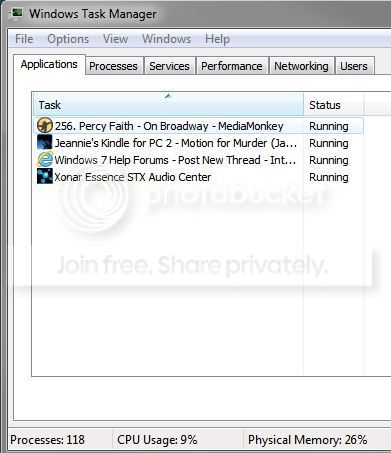
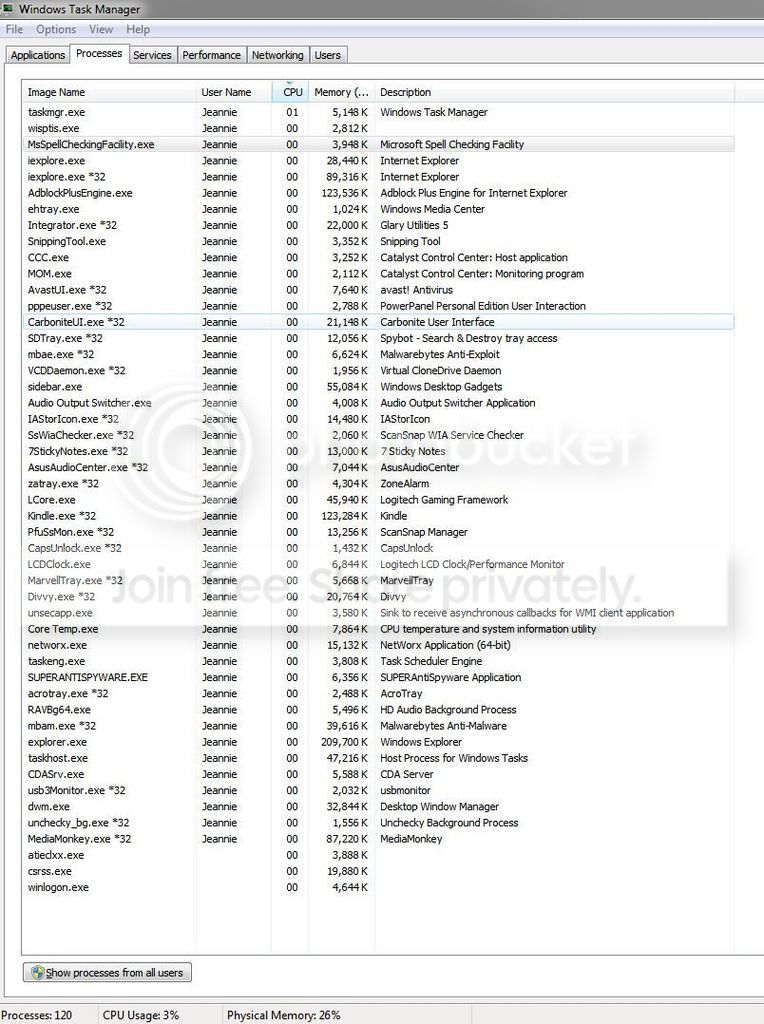
Memory%202_zpshgarxxf0.jpg


Memory%201_zpsj3ssbzd1.jpg


Memory%203_zpsm9t58ldj.jpg


Memory%204_zpslrng9va0.jpg
 

My Computer

Computer type
PC/Desktop
Computer Manufacturer/Model Number
Custom Build
OS
Win 7 Ultimate 64 bit
CPU
Intel i7-3930K
Motherboard
ASUS P9X79 WS
Memory
Kingston HyperX Genesis 32GB Kit (8x4GB Modules) 1600MHz DDR
Graphics Card(s)
MSI R7850 Twin Frozr 2GD5/OC Radeon HD 7850 2GB 256-bit GDDR
Sound Card
Asus Xonar Essence STX
Monitor(s) Displays
3x Asus VG248QE 24", Vizio 32" TV
Screen Resolution
1920 x 1080, ?
Hard Drives
Samsung 128GB 840 Pro SSD (1),
Samsung 4TB 850 EVO SSDs (4)
Samsung 4TB 850 EVO SSDs (16) external backup drives used in 2.5" hot swap bays in the computer.
PSU
Corsair HX750w
Case
Antec Two Hundred v2 (modified)
Cooling
Cooler Master GeminII S524 120mm (fan replaced with a 140mm)
Keyboard
Logitech G510s
Mouse
Logitech M525 (two in use)
Internet Speed
=< 32Mbps down, 8Mbps up
Antivirus
AVAST!, MBAM, SAS, Spybot S&D (all but MBAM free) Glary Util
Browser
IE11
Other Info
LSI 9211-8i HBA card (8 SATA III ports), 2.5" & 3.5" Hot Swap Bays, HooToo HT-CR001 PCI-E to USB 3.0 Internal Hub + 6 Slot Card Reader, and LG Model CH12LS28 BD-ROM Optical Drive. Also, ScanSnap S1500 ADF duplexing scanner, Canon 9000F flat bed scanner, Corsair SP2500 2.1 speakers, Samsung CLP 415nw laser color printer, Cyberpower PP2200SW UPS
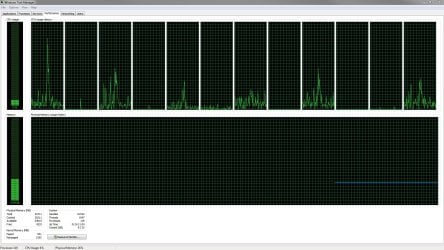

I keep trying to upload pictures directly with the paperclip but the blasted
thing won't let me; it keeps crashing the browser.


Good grief! When I hit the Post button the blasted picture decided to show up. I'm going to bed before I start destroying things.
 

Attachments

  • Memory 4.JPG
    Memory 4.JPG
    499.6 KB · Views: 15

My Computer

Computer type
PC/Desktop
Computer Manufacturer/Model Number
Custom Build
OS
Win 7 Ultimate 64 bit
CPU
Intel i7-3930K
Motherboard
ASUS P9X79 WS
Memory
Kingston HyperX Genesis 32GB Kit (8x4GB Modules) 1600MHz DDR
Graphics Card(s)
MSI R7850 Twin Frozr 2GD5/OC Radeon HD 7850 2GB 256-bit GDDR
Sound Card
Asus Xonar Essence STX
Monitor(s) Displays
3x Asus VG248QE 24", Vizio 32" TV
Screen Resolution
1920 x 1080, ?
Hard Drives
Samsung 128GB 840 Pro SSD (1),
Samsung 4TB 850 EVO SSDs (4)
Samsung 4TB 850 EVO SSDs (16) external backup drives used in 2.5" hot swap bays in the computer.
PSU
Corsair HX750w
Case
Antec Two Hundred v2 (modified)
Cooling
Cooler Master GeminII S524 120mm (fan replaced with a 140mm)
Keyboard
Logitech G510s
Mouse
Logitech M525 (two in use)
Internet Speed
=< 32Mbps down, 8Mbps up
Antivirus
AVAST!, MBAM, SAS, Spybot S&D (all but MBAM free) Glary Util
Browser
IE11
Other Info
LSI 9211-8i HBA card (8 SATA III ports), 2.5" & 3.5" Hot Swap Bays, HooToo HT-CR001 PCI-E to USB 3.0 Internal Hub + 6 Slot Card Reader, and LG Model CH12LS28 BD-ROM Optical Drive. Also, ScanSnap S1500 ADF duplexing scanner, Canon 9000F flat bed scanner, Corsair SP2500 2.1 speakers, Samsung CLP 415nw laser color printer, Cyberpower PP2200SW UPS
The problem is the Nonpaged pool at 3195 MB. Typically this would be less than the Paded pool, currently at 931 MB. This would usually be caused by a driver problem.
 

My Computer

Computer type
PC/Desktop
Computer Manufacturer/Model Number
HP
OS
Windows 7 Pro 64 bit
CPU
Xeon W3520
Memory
8 GB
Graphics Card(s)
Nvidia Geforce 210
The problem is the Nonpaged pool at 3195 MB. Typically this would be less than the Paded pool, currently at 931 MB. This would usually be caused by a driver problem.

Ok, how do I go about fixing this?

Btw, when I got up at 4:30 AM, my RAM was up to 41%. I rebooted (this is getting old) and it started back up at 15%, then went to 18% when I opened four programs: MediaMonkey, Kindle for PC, Zonar Essence STX dashboard, and IE 11. It has since dropped down to 15% (it's now 5 AM). I've been running the first three all the computer runs for a couple of years without this happening.
 

My Computer

Computer type
PC/Desktop
Computer Manufacturer/Model Number
Custom Build
OS
Win 7 Ultimate 64 bit
CPU
Intel i7-3930K
Motherboard
ASUS P9X79 WS
Memory
Kingston HyperX Genesis 32GB Kit (8x4GB Modules) 1600MHz DDR
Graphics Card(s)
MSI R7850 Twin Frozr 2GD5/OC Radeon HD 7850 2GB 256-bit GDDR
Sound Card
Asus Xonar Essence STX
Monitor(s) Displays
3x Asus VG248QE 24", Vizio 32" TV
Screen Resolution
1920 x 1080, ?
Hard Drives
Samsung 128GB 840 Pro SSD (1),
Samsung 4TB 850 EVO SSDs (4)
Samsung 4TB 850 EVO SSDs (16) external backup drives used in 2.5" hot swap bays in the computer.
PSU
Corsair HX750w
Case
Antec Two Hundred v2 (modified)
Cooling
Cooler Master GeminII S524 120mm (fan replaced with a 140mm)
Keyboard
Logitech G510s
Mouse
Logitech M525 (two in use)
Internet Speed
=< 32Mbps down, 8Mbps up
Antivirus
AVAST!, MBAM, SAS, Spybot S&D (all but MBAM free) Glary Util
Browser
IE11
Other Info
LSI 9211-8i HBA card (8 SATA III ports), 2.5" & 3.5" Hot Swap Bays, HooToo HT-CR001 PCI-E to USB 3.0 Internal Hub + 6 Slot Card Reader, and LG Model CH12LS28 BD-ROM Optical Drive. Also, ScanSnap S1500 ADF duplexing scanner, Canon 9000F flat bed scanner, Corsair SP2500 2.1 speakers, Samsung CLP 415nw laser color printer, Cyberpower PP2200SW UPS
I'm starting to think that Windows Media Center is the culprit. Yesterday, memory usage stayed fairly low until I quit checking it after the news yesterday evening and started watching some of the recordings before knocking off for the night. When I got up this morning, the usage had doubled from the last time I had checked it early yesterday evening before starting to watch the recordings.

I've eschewed watching recordings today although I've allowed WMC to continue making new ones. So far, usage seems to be pretty stable. I've been logging the usage off and on during the day (rounded off to the nearest hour):

7 AM still 15%

10 AM 15%

11 AM 16%

1 PM 16%

3 PM 16%

I'm going to continue to avoid watching recordings until tomorrow to see if the memory remains fairly stable, then I'll start watching them to see what happens to the memory usage.

Yes, I'm grasping at straws.


My Computer

Computer type
PC/Desktop
Computer Manufacturer/Model Number
Custom Build
OS
Win 7 Ultimate 64 bit
CPU
Intel i7-3930K
Motherboard
ASUS P9X79 WS
Memory
Kingston HyperX Genesis 32GB Kit (8x4GB Modules) 1600MHz DDR
Graphics Card(s)
MSI R7850 Twin Frozr 2GD5/OC Radeon HD 7850 2GB 256-bit GDDR
Sound Card
Asus Xonar Essence STX
Monitor(s) Displays
3x Asus VG248QE 24", Vizio 32" TV
Screen Resolution
1920 x 1080, ?
Hard Drives
Samsung 128GB 840 Pro SSD (1),
Samsung 4TB 850 EVO SSDs (4)
Samsung 4TB 850 EVO SSDs (16) external backup drives used in 2.5" hot swap bays in the computer.
PSU
Corsair HX750w
Case
Antec Two Hundred v2 (modified)
Cooling
Cooler Master GeminII S524 120mm (fan replaced with a 140mm)
Keyboard
Logitech G510s
Mouse
Logitech M525 (two in use)
Internet Speed
=< 32Mbps down, 8Mbps up
Antivirus
AVAST!, MBAM, SAS, Spybot S&D (all but MBAM free) Glary Util
Browser
IE11
Other Info
LSI 9211-8i HBA card (8 SATA III ports), 2.5" & 3.5" Hot Swap Bays, HooToo HT-CR001 PCI-E to USB 3.0 Internal Hub + 6 Slot Card Reader, and LG Model CH12LS28 BD-ROM Optical Drive. Also, ScanSnap S1500 ADF duplexing scanner, Canon 9000F flat bed scanner, Corsair SP2500 2.1 speakers, Samsung CLP 415nw laser color printer, Cyberpower PP2200SW UPS
I have to ask. Why does it matter? If you are so concerned with your *HUGE* stockpile of RAM being used, take it out of the machine and store it some place safe. Really you are not even close to fully utilizing that stock pile. Just leave it alone and use the computer you paid so much money for.

When you get to 90% then come back and worry about. Until then follow this adive: If it ain't broke, don't fix it.
 

My Computer

Computer type
PC/Desktop
Computer Manufacturer/Model Number
Alienware Aurora ALX R4
OS
Windows 10 Pro (x64)
CPU
Intel Core i7-3930K (3.2GHz - 4.5GHz)
Motherboard
Alienware Aurora-R4 x79
Memory
4x Samsung 4GB PC3-12800 DDR3 (16GB 1600MHz)
Graphics Card(s)
Nvidia Geforce GTX 690
Sound Card
SteelSeries Siberia Elite
Monitor(s) Displays
Dell UltraSharp U3011
Screen Resolution
2560x1600
Hard Drives
Samsung 850 Pro 256 GB, Seagate 1TB Desktop Hybrid HDD, 2x Western Digital 4TB Green HDD
PSU
875W Some Dell PSU <.<
Case
Alienware Aurora ALX
Cooling
Custom Liquid Cooling (EK CPU & GPU blocks) dual EK 480RAD
Keyboard
Logitech G710+ Mechanical
Mouse
Logitech G700s
Internet Speed
Verizon Fios (50 mbps average)
Other Info
Server: Intel NUC D54250WYK: i5-4250U, 16GB, 256 GB mSATA, Windows Server 2012 R2
I have to ask. Why does it matter? If you are so concerned with your *HUGE* stockpile of RAM being used, take it out of the machine and store it some place safe. Really you are not even close to fully utilizing that stock pile. Just leave it alone and use the computer you paid so much money for.

When you get to 90% then come back and worry about. Until then follow this adive: If it ain't broke, don't fix it.

You don't get it. It definitely is "broke"; badly! It used to run 24/7 all week (occasionally longer) between reboots without a problem. The memory would creep up slowly from about 10% and level off around 20% or so and never go above 25-30% during the week Unless I was using some RAM intensive jobs, such as photo editing, after which the RAM usage would drop back down). Now that I have added the external TV tuners (they are received by my computer via Wi-Fi) and am using WMC to record shows (I'm still having issues with the sound being garbled on three channels only on WMC but I'll worry about that once I get this damned memory leak fixed), I can get it to go only a day or so before the usage goes out of control. I went on an overnight out of town trip a couple of weekends ago. The computer was at 30% when I left Saturday morning (the last reboot was the day before). When I got back about 5 PM Sunday afternoon, the computer was frozen at 89% with no display showing on the monitors. I had to do a cold reboot to get it back. Based on the missing TV shows that should have recorded, it froze up a little after 8AM Sunday morning. I go out of town several times a year for as much as a week or two (late last year and into early this year, I was out of town for two months) and want to be able record my TV series and some movies while I'm gone so I can catch up when I get back. So, the way the machine is currently behaving is unprecedented and is completely unacceptable.

I still haven't watched any of my recordings since I last reported so here is the latest report before I start watching some of my recorded shows:

4 PM 17%

6 PM 21% (I ran my AV and anti-malware scans so this increase is probably normal)

7 PM 19%

9 PM 19%

10 PM 20%

11 PM 19%

12 PM 20%

7 AM 20%

8 AM 20%

9 AM 20%

1 PM 21%


Last edited:

My Computer

Computer type
PC/Desktop
Computer Manufacturer/Model Number
Custom Build
OS
Win 7 Ultimate 64 bit
CPU
Intel i7-3930K
Motherboard
ASUS P9X79 WS
Memory
Kingston HyperX Genesis 32GB Kit (8x4GB Modules) 1600MHz DDR
Graphics Card(s)
MSI R7850 Twin Frozr 2GD5/OC Radeon HD 7850 2GB 256-bit GDDR
Sound Card
Asus Xonar Essence STX
Monitor(s) Displays
3x Asus VG248QE 24", Vizio 32" TV
Screen Resolution
1920 x 1080, ?
Hard Drives
Samsung 128GB 840 Pro SSD (1),
Samsung 4TB 850 EVO SSDs (4)
Samsung 4TB 850 EVO SSDs (16) external backup drives used in 2.5" hot swap bays in the computer.
PSU
Corsair HX750w
Case
Antec Two Hundred v2 (modified)
Cooling
Cooler Master GeminII S524 120mm (fan replaced with a 140mm)
Keyboard
Logitech G510s
Mouse
Logitech M525 (two in use)
Internet Speed
=< 32Mbps down, 8Mbps up
Antivirus
AVAST!, MBAM, SAS, Spybot S&D (all but MBAM free) Glary Util
Browser
IE11
Other Info
LSI 9211-8i HBA card (8 SATA III ports), 2.5" & 3.5" Hot Swap Bays, HooToo HT-CR001 PCI-E to USB 3.0 Internal Hub + 6 Slot Card Reader, and LG Model CH12LS28 BD-ROM Optical Drive. Also, ScanSnap S1500 ADF duplexing scanner, Canon 9000F flat bed scanner, Corsair SP2500 2.1 speakers, Samsung CLP 415nw laser color printer, Cyberpower PP2200SW UPS

My Computer

Computer type
Laptop
Computer Manufacturer/Model Number
ASUS
OS
Microsoft Windows 7 Home Premium 64-bit 7601 Multiprocessor Free Service Pack 1
CPU
AMD C-60 APU with Radeon(tm) HD Graphics
Motherboard
ASUSTeK COMPUTER INC. X501U
Memory
4.00 GB
Graphics Card(s)
AMD Radeon HD 6290 Graphics
Sound Card
(1) AMD High Definition Audio Device (2) Realtek High Defi
Screen Resolution
1366 x 768 x 32 bits (4294967296 colors) @ 60 Hz
Hard Drives
Hitachi HTS545050A7E380 SATA Disk Device
Antivirus
Comodo CIS & FW, SecureAplus App Whitelisting, Threatfire
Browser
Cyberfox 64bit, Opera 64bit, Airfox
Other Info
Spy-The-Spy, HitmanPro.Alert, Norton Connect Safe, MJRegWatcher, BitDefender TrafficLight, Voodoo Shield, Zemana AntiMalware
I just noticed that you mentioned nearly 90% RAM usage! When that happens have you looked at running processes and determined what's using the most RAM?
 

My Computer

Computer type
Laptop
Computer Manufacturer/Model Number
ASUS
OS
Microsoft Windows 7 Home Premium 64-bit 7601 Multiprocessor Free Service Pack 1
CPU
AMD C-60 APU with Radeon(tm) HD Graphics
Motherboard
ASUSTeK COMPUTER INC. X501U
Memory
4.00 GB
Graphics Card(s)
AMD Radeon HD 6290 Graphics
Sound Card
(1) AMD High Definition Audio Device (2) Realtek High Defi
Screen Resolution
1366 x 768 x 32 bits (4294967296 colors) @ 60 Hz
Hard Drives
Hitachi HTS545050A7E380 SATA Disk Device
Antivirus
Comodo CIS & FW, SecureAplus App Whitelisting, Threatfire
Browser
Cyberfox 64bit, Opera 64bit, Airfox
Other Info
Spy-The-Spy, HitmanPro.Alert, Norton Connect Safe, MJRegWatcher, BitDefender TrafficLight, Voodoo Shield, Zemana AntiMalware
Re: Crystal Disk Info. How did you remove/ disable it. Did you remove the scheduled task? I'm only asking as research shows that it has suffered from memory leaks in the past.

Also take a look at RAMMap: Details are here:

Introduction to the new Sysinternals tool: RAMMap - Ask the Performance Team - Site Home - TechNet Blogs

Have a look at the file summary tab and see if you can spot anything. I'n not sure that it will be obvious as you're not looking for extremely high memory usage.

Thanks for your sensible, helpful response!

I had the portable (aka crapware free) version of Crystal disk so all I did was delete it. I just now did a search and found the zip folder on my versioning drive (the drive for the files and folders FreeFileSync deletes when doing a backup) so I zapped that one just in case.

I downloaded and unzipped RAM Map, then ran it but nothing jumped out at me (it doesn't help that I'm not really sure what I am looking for), including no references to Crystal disk at the upper end of the list (I didn't go through the whole thing because it was seriously long!). Keep in mind the RAM usage level has been behaving itself all day (still holding at 21% with occasional brief dips to 20%; these figures are for when IE11 is running, which adds 1%). I never did get around to watching any of my recordings and I have to knock off early tonight and get up early tomorrow morning so I might not watch anything until Saturday. I have been on the computer doing research and taking notes all afternoon, though.

I'm going to be starting my daily anti-malware in a bit and it will be curious to see what happens because, when I ran them yesterday, my RAM usage was up 2% after the dust settled.
 

My Computer

Computer type
PC/Desktop
Computer Manufacturer/Model Number
Custom Build
OS
Win 7 Ultimate 64 bit
CPU
Intel i7-3930K
Motherboard
ASUS P9X79 WS
Memory
Kingston HyperX Genesis 32GB Kit (8x4GB Modules) 1600MHz DDR
Graphics Card(s)
MSI R7850 Twin Frozr 2GD5/OC Radeon HD 7850 2GB 256-bit GDDR
Sound Card
Asus Xonar Essence STX
Monitor(s) Displays
3x Asus VG248QE 24", Vizio 32" TV
Screen Resolution
1920 x 1080, ?
Hard Drives
Samsung 128GB 840 Pro SSD (1),
Samsung 4TB 850 EVO SSDs (4)
Samsung 4TB 850 EVO SSDs (16) external backup drives used in 2.5" hot swap bays in the computer.
PSU
Corsair HX750w
Case
Antec Two Hundred v2 (modified)
Cooling
Cooler Master GeminII S524 120mm (fan replaced with a 140mm)
Keyboard
Logitech G510s
Mouse
Logitech M525 (two in use)
Internet Speed
=< 32Mbps down, 8Mbps up
Antivirus
AVAST!, MBAM, SAS, Spybot S&D (all but MBAM free) Glary Util
Browser
IE11
Other Info
LSI 9211-8i HBA card (8 SATA III ports), 2.5" & 3.5" Hot Swap Bays, HooToo HT-CR001 PCI-E to USB 3.0 Internal Hub + 6 Slot Card Reader, and LG Model CH12LS28 BD-ROM Optical Drive. Also, ScanSnap S1500 ADF duplexing scanner, Canon 9000F flat bed scanner, Corsair SP2500 2.1 speakers, Samsung CLP 415nw laser color printer, Cyberpower PP2200SW UPS
RAMMap: If you sort the columns so that the highest numbers are at the top it might provide a clue. Same with the processes tab.

Re: A few percent increase in RAM usage - As far as I know once you start an application windows caches some of those files in RAM for a faster program launch next time around. Against all advice from experienced members I tend to use software that clears RAM cache at intervals and automatically and intelligently smart trims working sets. Aslo the RAM file cache can be cleared manually on demand. However my system is not standard as I use a RAMdisk so clearing the cache doesn't hinder performance.
 

My Computer

Computer type
Laptop
Computer Manufacturer/Model Number
ASUS
OS
Microsoft Windows 7 Home Premium 64-bit 7601 Multiprocessor Free Service Pack 1
CPU
AMD C-60 APU with Radeon(tm) HD Graphics
Motherboard
ASUSTeK COMPUTER INC. X501U
Memory
4.00 GB
Graphics Card(s)
AMD Radeon HD 6290 Graphics
Sound Card
(1) AMD High Definition Audio Device (2) Realtek High Defi
Screen Resolution
1366 x 768 x 32 bits (4294967296 colors) @ 60 Hz
Hard Drives
Hitachi HTS545050A7E380 SATA Disk Device
Antivirus
Comodo CIS & FW, SecureAplus App Whitelisting, Threatfire
Browser
Cyberfox 64bit, Opera 64bit, Airfox
Other Info
Spy-The-Spy, HitmanPro.Alert, Norton Connect Safe, MJRegWatcher, BitDefender TrafficLight, Voodoo Shield, Zemana AntiMalware
Ok. I finished my scans and backups about an hour ago. My RAM usage went up briefly to 24% (not surprising), dropped to 22% after I finished and has been bouncing between 23% and 24% since then (that is a little surprising since the scans are long over). It's at 24% right now. My daily scans do give the system a bit of a work out (even more so on the weekly full scans).

I've tried sorting the columns in RAMMap but they aren't really telling me anything other than I have or have had a little of a lot going on. WMP is recording a show right now but I didn't see anything about it in RAMMap. Curiously (but not surprisingly), RAMMap is a bit of a RAM hog; usage jumps 5% while it's running but drops back down when I shut it off.

I'm going to do some reading for a while, then roll over and go to sleep. I have a bunch of errands to run tomorrow (or, in my case, waddle...heck, I'll just drive) and I don't like to drive with toothpicks holding my eyes open (they kinda hurt).
 

My Computer

Computer type
PC/Desktop
Computer Manufacturer/Model Number
Custom Build
OS
Win 7 Ultimate 64 bit
CPU
Intel i7-3930K
Motherboard
ASUS P9X79 WS
Memory
Kingston HyperX Genesis 32GB Kit (8x4GB Modules) 1600MHz DDR
Graphics Card(s)
MSI R7850 Twin Frozr 2GD5/OC Radeon HD 7850 2GB 256-bit GDDR
Sound Card
Asus Xonar Essence STX
Monitor(s) Displays
3x Asus VG248QE 24", Vizio 32" TV
Screen Resolution
1920 x 1080, ?
Hard Drives
Samsung 128GB 840 Pro SSD (1),
Samsung 4TB 850 EVO SSDs (4)
Samsung 4TB 850 EVO SSDs (16) external backup drives used in 2.5" hot swap bays in the computer.
PSU
Corsair HX750w
Case
Antec Two Hundred v2 (modified)
Cooling
Cooler Master GeminII S524 120mm (fan replaced with a 140mm)
Keyboard
Logitech G510s
Mouse
Logitech M525 (two in use)
Internet Speed
=< 32Mbps down, 8Mbps up
Antivirus
AVAST!, MBAM, SAS, Spybot S&D (all but MBAM free) Glary Util
Browser
IE11
Other Info
LSI 9211-8i HBA card (8 SATA III ports), 2.5" & 3.5" Hot Swap Bays, HooToo HT-CR001 PCI-E to USB 3.0 Internal Hub + 6 Slot Card Reader, and LG Model CH12LS28 BD-ROM Optical Drive. Also, ScanSnap S1500 ADF duplexing scanner, Canon 9000F flat bed scanner, Corsair SP2500 2.1 speakers, Samsung CLP 415nw laser color printer, Cyberpower PP2200SW UPS
I'm officially P.O.ed. I got up a little later than I planned on (a little after 4 AM) after a rough night and my miserable, misbegotten, magnificently malevolent mess of a computer had jumped up to 45%.

:mad2:

It makes me want to start drinking. I made a bazillion screen shots from RAMMap and the Task Manager but I have a busy day ahead of me so I rebooted, then made an image. Last night, while I was having problems sleeping (from time to time my ADHD goes into overtime and my mind races with defective brakes), I read some of the related threads linked below and learned of a program called Cleanmem (more info here) that uses a native Windows process to clear out excess RAM usage, such as from a memory leak (I'm not going to pretend to understand it). So I downloaded it and installed it this morning after I made the image (far more effective than a Restore Point). I left it at the default settings for now and I'm going to hit the shower (poor shower) in a bit. I'm just going to let it run today to see if slows or eliminates the effects of the memory leak (I understand it won't cure it).
 

My Computer

Computer type
PC/Desktop
Computer Manufacturer/Model Number
Custom Build
OS
Win 7 Ultimate 64 bit
CPU
Intel i7-3930K
Motherboard
ASUS P9X79 WS
Memory
Kingston HyperX Genesis 32GB Kit (8x4GB Modules) 1600MHz DDR
Graphics Card(s)
MSI R7850 Twin Frozr 2GD5/OC Radeon HD 7850 2GB 256-bit GDDR
Sound Card
Asus Xonar Essence STX
Monitor(s) Displays
3x Asus VG248QE 24", Vizio 32" TV
Screen Resolution
1920 x 1080, ?
Hard Drives
Samsung 128GB 840 Pro SSD (1),
Samsung 4TB 850 EVO SSDs (4)
Samsung 4TB 850 EVO SSDs (16) external backup drives used in 2.5" hot swap bays in the computer.
PSU
Corsair HX750w
Case
Antec Two Hundred v2 (modified)
Cooling
Cooler Master GeminII S524 120mm (fan replaced with a 140mm)
Keyboard
Logitech G510s
Mouse
Logitech M525 (two in use)
Internet Speed
=< 32Mbps down, 8Mbps up
Antivirus
AVAST!, MBAM, SAS, Spybot S&D (all but MBAM free) Glary Util
Browser
IE11
Other Info
LSI 9211-8i HBA card (8 SATA III ports), 2.5" & 3.5" Hot Swap Bays, HooToo HT-CR001 PCI-E to USB 3.0 Internal Hub + 6 Slot Card Reader, and LG Model CH12LS28 BD-ROM Optical Drive. Also, ScanSnap S1500 ADF duplexing scanner, Canon 9000F flat bed scanner, Corsair SP2500 2.1 speakers, Samsung CLP 415nw laser color printer, Cyberpower PP2200SW UPS
Okay well a few percent difference isn't much to worry about I guess. However if you run RAMmap and nothing obvious shows up try looking at the "File Summary" tab and sort by "Active" which shows you which files are actively using RAM.

Nearly every experienced member here will tell you not to worry about RAM usage. Personally I'd say that unless performance is affected there's nothing to worry about. However I do make use of the following programs. Note: Just my personal preference. You can test if you like.

About CleanMem free version. You will see lots of arguments about what is written here. If you want RAM usage to stay level give it a try. If you don't find it useful just stop the process using task manager and manually delete the scheduled tasks. No harm done.

Download CleanMem - MajorGeeks

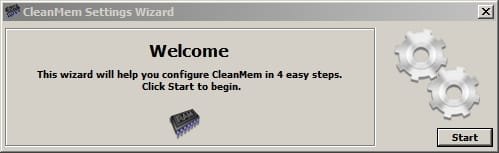
Setting it up:

It's portable. Open the folder and click the executable Mini_Monitor.exe and you should see a notification area icon and a small desktop gadget. You can move the gadget (monitor) or hide it.

Right click the system tray icon to get options.

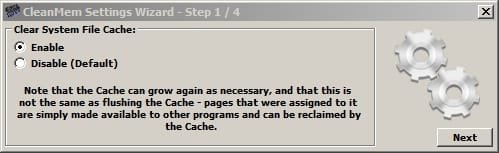
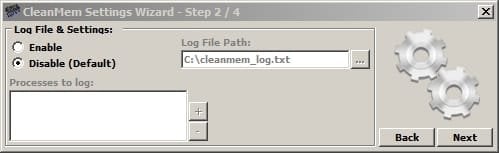
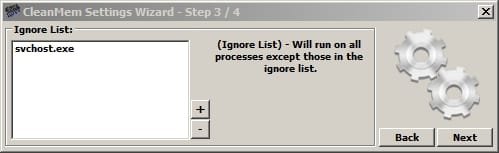
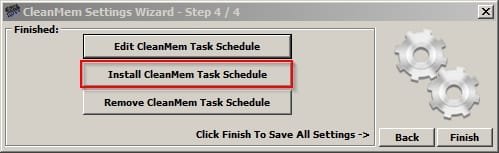
Run settings wizard.

CleanMem Settings Wizard 1.jpg

CleanMem Settings Wizard 2.jpg

CleanMem Settings Wizard 3.jpg

CleanMem Settings Wizard 4.jpg

CleanMem Settings Wizard 5.jpg

CleanMem Settings Wizard 6.jpg

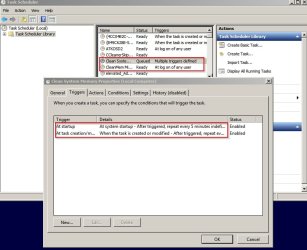
Edit the two scheduled tasks manually via task scheduler.

Run more often than every 15 minutes if you like. Mine is set to run every 5 minutes.
Scheduled Task.jpg
 

My Computer

Computer type
Laptop
Computer Manufacturer/Model Number
ASUS
OS
Microsoft Windows 7 Home Premium 64-bit 7601 Multiprocessor Free Service Pack 1
CPU
AMD C-60 APU with Radeon(tm) HD Graphics
Motherboard
ASUSTeK COMPUTER INC. X501U
Memory
4.00 GB
Graphics Card(s)
AMD Radeon HD 6290 Graphics
Sound Card
(1) AMD High Definition Audio Device (2) Realtek High Defi
Screen Resolution
1366 x 768 x 32 bits (4294967296 colors) @ 60 Hz
Hard Drives
Hitachi HTS545050A7E380 SATA Disk Device
Antivirus
Comodo CIS & FW, SecureAplus App Whitelisting, Threatfire
Browser
Cyberfox 64bit, Opera 64bit, Airfox
Other Info
Spy-The-Spy, HitmanPro.Alert, Norton Connect Safe, MJRegWatcher, BitDefender TrafficLight, Voodoo Shield, Zemana AntiMalware
I said progam(s) but actually only mentioned one of them! Let us know if you try it and if so - how you get on with it.

The other program that I didn't mention yet takes a little more configuration.
 

My Computer

Computer type
Laptop
Computer Manufacturer/Model Number
ASUS
OS
Microsoft Windows 7 Home Premium 64-bit 7601 Multiprocessor Free Service Pack 1
CPU
AMD C-60 APU with Radeon(tm) HD Graphics
Motherboard
ASUSTeK COMPUTER INC. X501U
Memory
4.00 GB
Graphics Card(s)
AMD Radeon HD 6290 Graphics
Sound Card
(1) AMD High Definition Audio Device (2) Realtek High Defi
Screen Resolution
1366 x 768 x 32 bits (4294967296 colors) @ 60 Hz
Hard Drives
Hitachi HTS545050A7E380 SATA Disk Device
Antivirus
Comodo CIS & FW, SecureAplus App Whitelisting, Threatfire
Browser
Cyberfox 64bit, Opera 64bit, Airfox
Other Info
Spy-The-Spy, HitmanPro.Alert, Norton Connect Safe, MJRegWatcher, BitDefender TrafficLight, Voodoo Shield, Zemana AntiMalware
The only issue I see in the screenshot is the very large value for NonPaged pool, but that is a big one. The value of 3195 MB is not even remotely reasonable. It is unlikely this is caused by an application. Applications do not and cannot use either of the kernel pools directly but the OS can use it on behalf of an application. But even 1 MB would be very high for a single process usage. Most likely cause is a device driver. Sorry but I cannot help with that.

The bad thing about a high Nonpaged pool usage is that it is not pageable. Virtually all application RAM usage is pageable and most OS usage as well. But the NonPaged pool must remain in RAM at all times, even in the case of the most extreme memory pressure.

I have little good to say about CleanMem and similar utilities. I won't talk about them at this time. Except to say that they can do little about high NonPaged pool usage. Some of the NonPaged pool is used for management of other memory usage so if other usage drops it will as well, but not by much.

Personally I would do something about such high NonPaged pool usage, not cover it up with some third party utility.
 

My Computer

Computer type
PC/Desktop
Computer Manufacturer/Model Number
HP
OS
Windows 7 Pro 64 bit
CPU
Xeon W3520
Memory
8 GB
Graphics Card(s)
Nvidia Geforce 210
Actually, in my post just before yours, I mentioned I had learned about CleanMem and had installed it; I just haven't fooled with the settings with it yet. The memory leak has been pretty bad. I've seen it jump from 30% to 89% in less than 24 hours, which froze the computer; slower jumps to highg RAM usage would also foul things up. I used to be able to go a week or more and it wouldn't go and stay much higher than 20% unless I had a program (or programs) using a lot of RAM, such as a photo editor and I'm editing a few dozen photos; I've seen it go as high as 50% but, once I finished and saved the photos, it would drop back down. Now, it still creeps up after a reboot but, once it hits 22%, it starts skyrocketing. I don't have an issue with my RAM being used and I know higher amounts of RAM will have more of it cached. It's when it goes up and keeps going up until the computer freezes that I have issues, especially since I have 32GB of RAM to avoid this problem (also, so I would still have plenty if a stick should die; I could manage fine with 24GB of RAM).

I installed Cleanmem this morning around 5 AM immediately after a reboot and making an image with Macrium Reflect. The RAM went from 13% down to 12%, not much but it has stayed at 12% so far (it's now 2 PM). After the previous reboot, before the one I installed Cleanmem after, the Ram usage had gained 2% in 9 hours (and kept going up after that) so today's performance is encouraging.

I have to go right now. In addition to today's chores and errands, I just found out a couple of hours ago there is a massive FUBAR with one of my prescriptions between my idiot (polite term; extremely polite) insurance company, my doctor's office, and the pharmacy which is driving me nuts. Right now, I'm mad enough to chew nails and spit out thumbtacks hard enough to sink them to their heads in oak!
 
Last edited:

My Computer

Computer type
PC/Desktop
Computer Manufacturer/Model Number
Custom Build
OS
Win 7 Ultimate 64 bit
CPU
Intel i7-3930K
Motherboard
ASUS P9X79 WS
Memory
Kingston HyperX Genesis 32GB Kit (8x4GB Modules) 1600MHz DDR
Graphics Card(s)
MSI R7850 Twin Frozr 2GD5/OC Radeon HD 7850 2GB 256-bit GDDR
Sound Card
Asus Xonar Essence STX
Monitor(s) Displays
3x Asus VG248QE 24", Vizio 32" TV
Screen Resolution
1920 x 1080, ?
Hard Drives
Samsung 128GB 840 Pro SSD (1),
Samsung 4TB 850 EVO SSDs (4)
Samsung 4TB 850 EVO SSDs (16) external backup drives used in 2.5" hot swap bays in the computer.
PSU
Corsair HX750w
Case
Antec Two Hundred v2 (modified)
Cooling
Cooler Master GeminII S524 120mm (fan replaced with a 140mm)
Keyboard
Logitech G510s
Mouse
Logitech M525 (two in use)
Internet Speed
=< 32Mbps down, 8Mbps up
Antivirus
AVAST!, MBAM, SAS, Spybot S&D (all but MBAM free) Glary Util
Browser
IE11
Other Info
LSI 9211-8i HBA card (8 SATA III ports), 2.5" & 3.5" Hot Swap Bays, HooToo HT-CR001 PCI-E to USB 3.0 Internal Hub + 6 Slot Card Reader, and LG Model CH12LS28 BD-ROM Optical Drive. Also, ScanSnap S1500 ADF duplexing scanner, Canon 9000F flat bed scanner, Corsair SP2500 2.1 speakers, Samsung CLP 415nw laser color printer, Cyberpower PP2200SW UPS
...Personally I would do something about such high NonPaged pool usage, not cover it up with some third party utility.

I would love to do something about but I have no idea how so, until someone can tell me how to find out why it is happening and what to do about it, I may have to settle for covering it up.
 

My Computer

Computer type
PC/Desktop
Computer Manufacturer/Model Number
Custom Build
OS
Win 7 Ultimate 64 bit
CPU
Intel i7-3930K
Motherboard
ASUS P9X79 WS
Memory
Kingston HyperX Genesis 32GB Kit (8x4GB Modules) 1600MHz DDR
Graphics Card(s)
MSI R7850 Twin Frozr 2GD5/OC Radeon HD 7850 2GB 256-bit GDDR
Sound Card
Asus Xonar Essence STX
Monitor(s) Displays
3x Asus VG248QE 24", Vizio 32" TV
Screen Resolution
1920 x 1080, ?
Hard Drives
Samsung 128GB 840 Pro SSD (1),
Samsung 4TB 850 EVO SSDs (4)
Samsung 4TB 850 EVO SSDs (16) external backup drives used in 2.5" hot swap bays in the computer.
PSU
Corsair HX750w
Case
Antec Two Hundred v2 (modified)
Cooling
Cooler Master GeminII S524 120mm (fan replaced with a 140mm)
Keyboard
Logitech G510s
Mouse
Logitech M525 (two in use)
Internet Speed
=< 32Mbps down, 8Mbps up
Antivirus
AVAST!, MBAM, SAS, Spybot S&D (all but MBAM free) Glary Util
Browser
IE11
Other Info
LSI 9211-8i HBA card (8 SATA III ports), 2.5" & 3.5" Hot Swap Bays, HooToo HT-CR001 PCI-E to USB 3.0 Internal Hub + 6 Slot Card Reader, and LG Model CH12LS28 BD-ROM Optical Drive. Also, ScanSnap S1500 ADF duplexing scanner, Canon 9000F flat bed scanner, Corsair SP2500 2.1 speakers, Samsung CLP 415nw laser color printer, Cyberpower PP2200SW UPS
Okay well a few percent difference isn't much to worry about I guess. However if you run RAMmap and nothing obvious shows up try looking at the "File Summary" tab and sort by "Active" which shows you which files are actively using RAM.

Nearly every experienced member here will tell you not to worry about RAM usage. Personally I'd say that unless performance is affected there's nothing to worry about. However I do make use of the following programs. Note: Just my personal preference. You can test if you like.

About CleanMem free version. You will see lots of arguments about what is written here. If you want RAM usage to stay level give it a try. If you don't find it useful just stop the process using task manager and manually delete the scheduled tasks. No harm done.

Download CleanMem - MajorGeeks

Setting it up:

It's portable. Open the folder and click the executable Mini_Monitor.exe and you should see a notification area icon and a small desktop gadget. You can move the gadget (monitor) or hide it.

Right click the system tray icon to get options.

Run settings wizard.

View attachment 365446

View attachment 365447

View attachment 365448

View attachment 365449

View attachment 365450

View attachment 365451

Edit the two scheduled tasks manually via task scheduler.

Run more often than every 15 minutes if you like. Mine is set to run every 5 minutes.
View attachment 365452

Ok, I'm in for a little bit before I have to head out again (forget the calendar; I swear today is the 13th) so I've taken some time to go over the settings you have shown.

Step 1 makes sense even to me. I reset to enable.

Step 2, for now, I'm going to leave disabled, same as you. I wonder though if, a later time, I could use that log to help determine what is responsible for the memory leak.

Step 3, for now, I've left on the default—All Processes—until I find out why you put svchost.exe on the ignore list (I have it entered on the second half of Step 3 since I feeling you will give me a good reason to enable the Ignore List). I looked up what svchost.exe is and kinda sorta understand it (I'll admit to not being the brightest crayon in the box). As I understand it, it's the vehicle .ddl files, such as drivers, run on. Larry mentioned that a driver could be the cause of the problem so I'm wondering if I really should Ignore svchost.exe files?

Step 4 threw me for a loop when I tried Install CleanMem Task Schedule until it finally penetrated the jumble of thoughts clogging my brain that it was already installed (that massive FUBAR I mentioned won't get resolved before Monday, if then, and I'm still trying to sort out who dropped what balls to get it fixed and ensure it doesn't happen again). I did fool around in Edit to suss out how to make changes but, for now, I'm leaving it at 15 minutes. That seems to be often enough for my needs (it's been at 12% for 12 hours now, only occasionally going up a percent until the next time CM runs).

Now, it's hurry up and wait to see if it will survive overnight. Btw, Paged Kernel Memory has been fairly steady for the past hour or so at around 1262MB and Nonpaged has been rock solid at 208MB for the past 11 or so hours.
 

My Computer

Computer type
PC/Desktop
Computer Manufacturer/Model Number
Custom Build
OS
Win 7 Ultimate 64 bit
CPU
Intel i7-3930K
Motherboard
ASUS P9X79 WS
Memory
Kingston HyperX Genesis 32GB Kit (8x4GB Modules) 1600MHz DDR
Graphics Card(s)
MSI R7850 Twin Frozr 2GD5/OC Radeon HD 7850 2GB 256-bit GDDR
Sound Card
Asus Xonar Essence STX
Monitor(s) Displays
3x Asus VG248QE 24", Vizio 32" TV
Screen Resolution
1920 x 1080, ?
Hard Drives
Samsung 128GB 840 Pro SSD (1),
Samsung 4TB 850 EVO SSDs (4)
Samsung 4TB 850 EVO SSDs (16) external backup drives used in 2.5" hot swap bays in the computer.
PSU
Corsair HX750w
Case
Antec Two Hundred v2 (modified)
Cooling
Cooler Master GeminII S524 120mm (fan replaced with a 140mm)
Keyboard
Logitech G510s
Mouse
Logitech M525 (two in use)
Internet Speed
=< 32Mbps down, 8Mbps up
Antivirus
AVAST!, MBAM, SAS, Spybot S&D (all but MBAM free) Glary Util
Browser
IE11
Other Info
LSI 9211-8i HBA card (8 SATA III ports), 2.5" & 3.5" Hot Swap Bays, HooToo HT-CR001 PCI-E to USB 3.0 Internal Hub + 6 Slot Card Reader, and LG Model CH12LS28 BD-ROM Optical Drive. Also, ScanSnap S1500 ADF duplexing scanner, Canon 9000F flat bed scanner, Corsair SP2500 2.1 speakers, Samsung CLP 415nw laser color printer, Cyberpower PP2200SW UPS
Okay I'm learning something. The nonpaged pool usage shown in task manager may be different to RAMmap.

https://support.microsoft.com/en-gb/kb/2762246

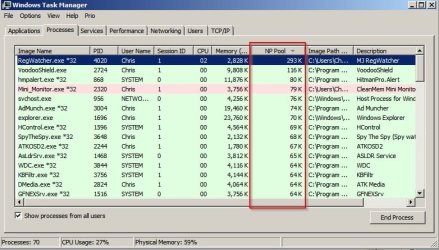
Anyway let's take a look at LMiller7's idea and see if the nonpaged pool tab per process in task manager reveals anything.

TaskManager.jpg
 

My Computer

Computer type
Laptop
Computer Manufacturer/Model Number
ASUS
OS
Microsoft Windows 7 Home Premium 64-bit 7601 Multiprocessor Free Service Pack 1
CPU
AMD C-60 APU with Radeon(tm) HD Graphics
Motherboard
ASUSTeK COMPUTER INC. X501U
Memory
4.00 GB
Graphics Card(s)
AMD Radeon HD 6290 Graphics
Sound Card
(1) AMD High Definition Audio Device (2) Realtek High Defi
Screen Resolution
1366 x 768 x 32 bits (4294967296 colors) @ 60 Hz
Hard Drives
Hitachi HTS545050A7E380 SATA Disk Device
Antivirus
Comodo CIS & FW, SecureAplus App Whitelisting, Threatfire
Browser
Cyberfox 64bit, Opera 64bit, Airfox
Other Info
Spy-The-Spy, HitmanPro.Alert, Norton Connect Safe, MJRegWatcher, BitDefender TrafficLight, Voodoo Shield, Zemana AntiMalware
Back
Top