This is a Security issue, but more!!!

Status
Not open for further replies.
Hi Paul,

Thanks for clearing up my suspicions with that directory. I don't have HP (home built PC), so I hadn't come across it before, which is why I flagged it up.

There is a folder Installer on the drive, but it is a sub-folder of the Windows folder. This looks normal (if it is in that location - elsewhere is suspicious). When you hover over these files, what does the pop-up say (note that not all have such a pop-up)?

Finally, what security issues have you got, as the flag is showing that you have some problems?
 

My Computer

Computer type
PC/Desktop
Computer Manufacturer/Model Number
Dwarf Dwf/11/2012 r09/2013
OS
Windows 8.1 Pro RTM x64
CPU
Intel Core-i5-3570K 4-core @ 3.4GHz (Ivy Bridge) (OC 4.4GHz)
Motherboard
ASRock Z77 Extreme4-M
Memory
4 x 4GB DDR3-1600 Corsair Vengeance CMZ8GX3M2A1600C9B (16GB)
Graphics Card(s)
MSI GeForce GTX770 Gaming OC 2GB
Sound Card
Realtek High Definition on board solution (ALC 898)
Monitor(s) Displays
ViewSonic VA1912w Widescreen (VGA)
Screen Resolution
1440x900
Hard Drives
OCZ Agility 3 SSD 120GB SATA III x2 (RAID 0)
Samsung HD501LJ 500GB SATA II x2
Hitachi HDS721010CLA332 1TB SATA II
Iomega 1.5TB Ext USB 2.0
WD 2.0TB Ext USB 3.0
PSU
XFX Pro Series 850W Semi-Modular
Case
Gigabyte IF233
Cooling
1 x 120mm Front Inlet 1 x 120mm Rear Exhaust
Keyboard
Microsoft Comfort Curve Keyboard 3000 (USB)
Mouse
Microsoft Comfort Mouse 3000 for Business (USB)
Internet Speed
NetGear DG834Gv3 ADSL Modem/Router (Ethernet) ~4.0 Mb/s (O2)
Antivirus
Avast! 8.0.1497
Browser
IE 11
Other Info
Optical Drive: HL-DT-ST BD-RE BH10LS30 SATA Bluray
Lexmark S305 Printer/Scanner/Copier (USB)
WEI Score: 8.1/8.1/8.5/8.5/8.25
Asus Eee PC 1011PX Netbook (Windows 7 x86 Starter)
Dwarf:

I edited my post as I realized my error. But this directory is unusual insofar as its contents. The subfolder is hidden, but I can look at the files at the command line after I run attrib. Here is the output for c:\windows\attrib -a -h -s -i *.*:

Access denied - C:\Windows\bfsvc.exe
Access denied - C:\Windows\explorer.exe
Access denied - C:\Windows\fveupdate.exe
Access denied - C:\Windows\HelpPane.exe
Access denied - C:\Windows\hh.exe
Access denied - C:\Windows\mib.bin
Access denied - C:\Windows\notepad.exe
Access denied - C:\Windows\regedit.exe
Access denied - C:\Windows\splwow64.exe
Access denied - C:\Windows\twain.dll
Access denied - C:\Windows\twain_32.dll
Access denied - C:\Windows\twunk_16.exe
Access denied - C:\Windows\twunk_32.exe
Access denied - C:\Windows\winhlp32.exe
Access denied - C:\Windows\WMSysPr9.prx
Access denied - C:\Windows\write.exe


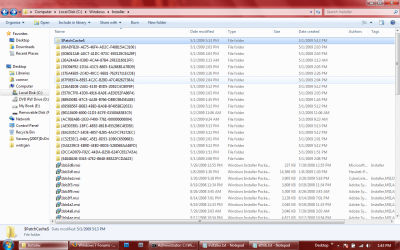
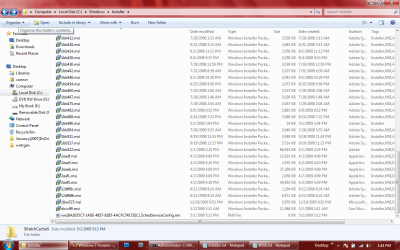
Then once I switch to the installer directory, I run the same attrib command with no problem. So here is the contents of the c:\windows\installer (hidden) directory.


Volume in drive C has no label.
Volume Serial Number is A269-346A

Directory of C:\Windows\Installer

05/02/2009 11:07 AM <DIR> .
05/02/2009 11:07 AM <DIR> ..
05/01/2009 05:13 PM <DIR> $PatchCache$
06/12/2008 08:24 AM 6,626,304 12df686.msi
06/12/2008 08:24 AM 2,349,056 12df68c.msi
12/19/2005 10:52 PM 6,019,584 18ea727.msi
07/29/2008 12:55 PM 242,176 1bb3d9.msi
01/08/2009 02:30 PM 14,909,440 1bb3df.msi
03/20/2009 05:18 PM 3,998,208 1bb3ed.msi
09/19/2008 11:34 PM 3,899,392 1bb3f3.msi
08/26/2008 03:45 AM 5,426,688 1bb3f9.msi
08/14/2008 07:01 PM 3,213,824 1bb3ff.msi
08/08/2008 02:44 AM 3,106,816 1bb405.msi
08/08/2008 02:46 AM 3,106,816 1bb40b.msi
07/29/2008 02:13 AM 3,108,864 1bb412.msi
08/31/2008 05:15 AM 3,772,416 1bb418.msi
07/31/2008 11:53 PM 5,470,728 1bb41e.msi
08/01/2008 11:13 PM 3,129,344 1bb424.msi
07/28/2008 04:08 PM 3,115,520 1bb42a.msi
08/04/2008 09:33 PM 3,110,912 1bb430.msi
07/29/2008 12:56 PM 3,111,936 1bb436.msi
08/29/2008 06:57 AM 3,737,088 1bb43c.msi
07/31/2008 06:39 AM 3,181,568 1bb442.msi
08/01/2008 10:29 PM 3,115,008 1bb448.msi
05/29/2008 10:04 AM 29,696 1bb44e.msi
08/25/2008 09:58 PM 3,146,240 1bb454.msi
08/14/2008 07:18 PM 3,121,664 1bb45a.msi
07/29/2008 02:06 AM 3,109,376 1bb460.msi
07/29/2008 01:48 AM 3,108,864 1bb467.msi
07/29/2008 01:53 AM 3,109,888 1bb46e.msi
07/29/2008 02:04 AM 3,109,376 1bb475.msi
08/12/2008 06:12 PM 3,108,864 1bb47b.msi
08/06/2008 09:52 PM 6,025,728 1bb482.msi
08/14/2008 07:22 PM 3,119,104 1bb488.msi
05/01/2009 02:04 PM 24,064 1bb496.msi
07/29/2008 02:47 AM 3,122,688 1bb49c.msi
09/19/2008 11:33 PM 3,112,448 1bb4a2.msi
07/29/2008 03:03 AM 3,119,104 1bb4a8.msi
09/12/2008 10:54 PM 4,936,192 1bb4ae.msi
08/12/2008 10:39 AM 4,930,048 1bb4b5.msi
08/01/2008 01:23 AM 3,134,464 1bb4bc.msi
08/13/2008 10:16 PM 3,124,736 1bb4c2.msi
08/14/2008 07:15 PM 3,761,664 1bb4c8.msi
08/29/2008 06:42 AM 3,319,296 1bb4ce.msi
08/25/2008 10:05 PM 3,146,240 1bb4d4.msi
07/29/2008 02:17 AM 3,131,904 1bb4da.msi
07/29/2008 02:32 AM 3,131,392 1bb4e0.msi
07/26/2008 05:37 AM 3,152,384 1bb4e6.msi
07/26/2008 05:39 AM 3,152,384 1bb4ec.msi
07/29/2008 02:55 AM 3,122,688 1bb4f2.msi
07/29/2008 03:06 AM 3,119,104 1bb4f8.msi
07/26/2008 05:49 AM 3,112,448 1bb4fe.msi
07/26/2008 05:53 AM 3,112,448 1bb504.msi
08/14/2008 01:06 AM 3,113,984 1bb50a.msi
09/19/2008 11:34 PM 3,121,152 1bb511.msi
09/19/2008 11:23 PM 5,850,624 1bb517.msi
09/19/2008 11:30 PM 6,215,680 1bb51d.msi
05/01/2009 02:25 PM 68,519,424 1bb522.msi
04/02/2009 04:09 PM 14,265,344 2eadf.msi
04/02/2009 04:10 PM 2,083,840 2eae5.msi
04/02/2009 04:09 PM 27,953,664 2eaeb.msi
04/02/2009 04:09 PM 2,713,088 2eaf1.msi
04/02/2009 04:29 PM 41,832,960 2eaf5.msi
05/02/2009 02:11 AM 12,253,184 dccc99.msi
05/01/2009 05:12 PM 0 wix{BA1035C7-14DE-4857-8285-4ACFC74172EC}.SchedServiceConfig.rmi
(previously this was a midi file under filetype)
05/01/2009 02:03 PM <DIR> {00ADFB20-AE75-46F4-AD2C-F48B15AC3100}
05/01/2009 02:03 PM <DIR> {0D6013AB-A0C7-41DC-973C-E93129C9A29F}
05/01/2009 05:12 PM <DIR> {216AB108-2AE1-4130-B3D5-20B2C4C80F8F}
05/02/2009 02:13 AM <DIR> {26A24AE4-039D-4CA4-87B4-2F83216013FF}
05/01/2009 02:05 PM <DIR> {35D94F92-1D3A-43C5-8605-EA268B1A7BD9}
05/01/2009 02:25 PM <DIR> {37EA4EB5-2C4D-40CC-9EB1-762F1711ECDE}
05/01/2009 02:03 PM <DIR> {5570C7F0-43D0-4916-8A9E-AEDD52FA86F4}
05/01/2009 02:04 PM <DIR> {67F0E67A-8E93-4C2C-B29D-47C48262738A}
05/01/2009 05:12 PM <DIR> {6956856F-B6B3-4BE0-BA0B-8F495BE32033}
05/01/2009 01:45 PM <DIR> {889450B1-87C5-4A38-B766-DBBC9845EABE}
05/02/2009 11:06 AM <DIR> {90110409-6000-11D3-8CFE-0150048383C9}
05/02/2009 09:24 AM <DIR> {AC76BA86-1033-F400-7761-000000000004}
05/01/2009 05:13 PM <DIR> {AE303591-1BFC-48B3-881B-655298C4EDE0}
05/01/2009 05:12 PM <DIR> {BA1035C7-14DE-4857-8285-4ACFC74172EC}
05/01/2009 02:01 PM <DIR> {C52E3EC1-048C-45E1-8D53-10B0C6509683}
05/01/2009 05:12 PM <DIR> {DAE239CE-EB9D-4EB3-B0D4-528D6BAA48FD}
05/01/2009 01:51 PM <DIR> {DCCAD079-F92C-44DA-B258-624FC6517A5A}
05/01/2009 02:08 PM <DIR> {E4848436-0345-47E2-B648-8B522FCDA623}
62 File(s) 367,429,128 bytes
21 Dir(s) 228,082,671,616 bytes free

I do not know if the file above was a midi file or not (but it did say this under file type), and when I tried to run it in WMP, it was unable to play it, and when I ran it with VLC, it immediately said I needed a version which corrected a bug that caused problems with multi-screen systems.
In the two screenshots of the installer directory from Windows, I see the what now looks rather benign.
moz-screenshot.jpg
moz-screenshot-1.jpg
[[EDIT: Note: I did not type this (purple text) into this post. Is this automated text? Further, when I saved them, I saved them as .png files from paint. Perhpas this is just the "prt sc" default directory and filetype.. I thought I would mention this anyway since I was unsure]

Also, while I have installed WIN7 (build 7077) for 64 bit, I keep getting errors that I am not running a 64 bit platform, but rather a 32 bit platform. What type of virtualization programs exist which someone could use to bridge 32 bit applications to 64 bit? Does it emulate a 32 bit machine/OS?

Paul
 

Attachments

  • installerA1.png
    installerA1.png
    69 KB · Views: 72
  • installerA2.png
    installerA2.png
    63.5 KB · Views: 46

My Computer

OS
Windows 7
DWARF:

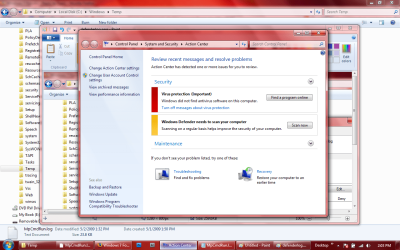
To answer your last question re the action center flag. It says that I need AV software... which I describe in my last post as an impossible feat (and even if I do manage to get an AV application installed, I am notified every 2 minutes to "Turn On" firewall protection. I keep turning it on, but it continues to tell me it is not on.

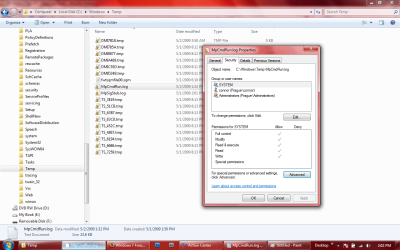
Second the action center says that Windows Defender needs to be run (among other things -- see screenshot of action center). I have never seen windows defender run nor update (and there are never any windows updates either). But oddly, have a look at this log file from c:\windows\temp. File is called "MpCmdRun.log". And it appears that Defender is running (and quite frequently too):

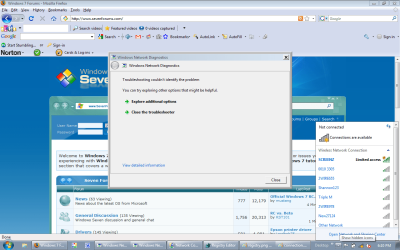
moz-screenshot-2.jpg
moz-screenshot-3.jpg

-------------------------------------------------------------------------------------
MpCmdRun: Command Line: "c:\program files\windows defender\MpCmdRun.exe" SignaturesUpdateService -ScheduleJob
Start Time: Fri May 01 2009 13:50:34

Start: Signatures Update Service
Update Started
Search Started (windows update)...
Time Info - Fri May 01 2009 13:50:48 Search Completed
Download Started...
Download Progress-
Update Index:0 of 1 - 0%
Download Progress-
Update Index:0 of 1 - 0%
Time Info - Fri May 01 2009 13:51:06 Download Progress-
Update Index:0 of 1 - 2%
Time Info - Fri May 01 2009 13:51:18 Download Progress-
Update Index:0 of 1 - 4%
Time Info - Fri May 01 2009 13:51:29 Download Progress-
Update Index:0 of 1 - 6%
Time Info - Fri May 01 2009 13:51:39 Download Progress-
Update Index:0 of 1 - 8%
Time Info - Fri May 01 2009 13:51:49 Download Progress-
Update Index:0 of 1 - 10%
Time Info - Fri May 01 2009 13:52:01 Download Progress-
Update Index:0 of 1 - 13%
Time Info - Fri May 01 2009 13:52:13 Download Progress-
Update Index:0 of 1 - 15%
Time Info - Fri May 01 2009 13:52:29 Download Progress-
Update Index:0 of 1 - 17%
Time Info - Fri May 01 2009 13:52:42 Download Progress-
Update Index:0 of 1 - 19%
Time Info - Fri May 01 2009 13:52:54 Download Progress-
Update Index:0 of 1 - 21%
Time Info - Fri May 01 2009 13:53:05 Download Progress-
Update Index:0 of 1 - 23%
Time Info - Fri May 01 2009 13:53:18 Download Progress-
Update Index:0 of 1 - 26%
Time Info - Fri May 01 2009 13:53:33 Download Progress-
Update Index:0 of 1 - 28%
Time Info - Fri May 01 2009 13:53:48 Download Progress-
Update Index:0 of 1 - 30%
Time Info - Fri May 01 2009 13:54:00 Download Progress-
Update Index:0 of 1 - 32%
Time Info - Fri May 01 2009 13:54:14 Download Progress-
Update Index:0 of 1 - 34%
Time Info - Fri May 01 2009 13:54:28 Download Progress-
Update Index:0 of 1 - 36%
Time Info - Fri May 01 2009 13:54:43 Download Progress-
Update Index:0 of 1 - 39%
Time Info - Fri May 01 2009 13:54:59 Download Progress-
Update Index:0 of 1 - 41%
Time Info - Fri May 01 2009 13:55:12 Download Progress-
Update Index:0 of 1 - 43%
Time Info - Fri May 01 2009 13:55:32 Download Progress-
Update Index:0 of 1 - 45%
Time Info - Fri May 01 2009 13:55:47 Download Progress-
Update Index:0 of 1 - 47%
Time Info - Fri May 01 2009 13:56:00 Download Progress-
Update Index:0 of 1 - 49%
Time Info - Fri May 01 2009 13:56:13 Download Progress-
Update Index:0 of 1 - 52%
Time Info - Fri May 01 2009 13:56:27 Download Progress-
Update Index:0 of 1 - 54%
Time Info - Fri May 01 2009 13:56:40 Download Progress-
Update Index:0 of 1 - 56%
Time Info - Fri May 01 2009 13:56:54 Download Progress-
Update Index:0 of 1 - 58%
Time Info - Fri May 01 2009 13:57:07 Download Progress-
Update Index:0 of 1 - 60%
Time Info - Fri May 01 2009 13:57:23 Download Progress-
Update Index:0 of 1 - 62%
Time Info - Fri May 01 2009 13:57:36 Download Progress-
Update Index:0 of 1 - 65%
Time Info - Fri May 01 2009 13:57:51 Download Progress-
Update Index:0 of 1 - 67%
Time Info - Fri May 01 2009 13:58:06 Download Progress-
Update Index:0 of 1 - 69%
Time Info - Fri May 01 2009 13:58:23 Download Progress-
Update Index:0 of 1 - 71%
Time Info - Fri May 01 2009 13:58:37 Download Progress-
Update Index:0 of 1 - 73%
Time Info - Fri May 01 2009 13:58:48 Download Progress-
Update Index:0 of 1 - 76%
Time Info - Fri May 01 2009 13:58:58 Download Progress-
Update Index:0 of 1 - 78%
Download Progress-
Update Index:0 of 1 - 80%
Time Info - Fri May 01 2009 13:59:20 Download Progress-
Update Index:0 of 1 - 82%
Time Info - Fri May 01 2009 13:59:37 Download Progress-
Update Index:0 of 1 - 84%
Time Info - Fri May 01 2009 13:59:55 Download Progress-
Update Index:0 of 1 - 86%
Time Info - Fri May 01 2009 14:00:13 Download Progress-
Update Index:0 of 1 - 89%
Time Info - Fri May 01 2009 14:00:29 Download Progress-
Update Index:0 of 1 - 91%
Time Info - Fri May 01 2009 14:00:46 Download Progress-
Update Index:0 of 1 - 93%
Time Info - Fri May 01 2009 14:01:03 Download Progress-
Update Index:0 of 1 - 95%
Time Info - Fri May 01 2009 14:01:16 Download Progress-
Update Index:0 of 1 - 97%
Time Info - Fri May 01 2009 14:01:29 Download Progress-
Update Index:0 of 1 - 99%
Download Progress-
Update Index:0 of 1 - 100%
Download Progress-
Update Index:0 of 1 - 100%
Download Completed
Installation Started...
Installation Progress-
Percent Complete:0,
Current Update Index:0 (of 1)
Installation Progress-
Percent Complete:0,
Current Update Index:0 (of 1)
Installation Progress-
Percent Complete:100,
Current Update Index:0 (of 1)
Installation Progress-
Percent Complete:100,
Current Update Index:0 (of 1)
Installation Completed
Update completed succesfuly
End: Signatures Update Service
MpCmdRun: End Time: Fri May 01 2009 14:01:38
-------------------------------------------------------------------------------------


-------------------------------------------------------------------------------------
MpCmdRun: Command Line: "c:\program files\windows defender\MpCmdRun.exe" SpyNetService -RestrictPrivileges -AccessKey 688A2260-A1E7-BC35-ACC9-AF5ACB4EA416
Start Time: Fri May 01 2009 14:12:12

MpCmdRun: End Time: Fri May 01 2009 14:12:12
-------------------------------------------------------------------------------------


-------------------------------------------------------------------------------------
MpCmdRun: Command Line: "c:\program files\windows defender\MpCmdRun.exe" SpyNetService -RestrictPrivileges -AccessKey 18C2F5F8-6472-70D3-3A85-F0AA2C3F9294
Start Time: Fri May 01 2009 14:22:37

MpCmdRun: End Time: Fri May 01 2009 14:22:37
-------------------------------------------------------------------------------------


-------------------------------------------------------------------------------------
MpCmdRun: Command Line: "c:\program files\windows defender\MpCmdRun.exe" SpyNetService -RestrictPrivileges -AccessKey A435D565-CD56-08AF-CD7C-C681E37DB9A2
Start Time: Fri May 01 2009 14:33:38

MpCmdRun: End Time: Fri May 01 2009 14:33:38
-------------------------------------------------------------------------------------


-------------------------------------------------------------------------------------
MpCmdRun: Command Line: "c:\program files\windows defender\MpCmdRun.exe" SpyNetService -RestrictPrivileges -AccessKey 0D469D41-B778-B13A-662B-D12CC3991065
Start Time: Fri May 01 2009 17:52:33

MpCmdRun: End Time: Fri May 01 2009 17:52:33
-------------------------------------------------------------------------------------


-------------------------------------------------------------------------------------
MpCmdRun: Command Line: "c:\program files\windows defender\MpCmdRun.exe" SpyNetService -RestrictPrivileges -AccessKey C3997AFA-AA96-A7D7-EC02-A7D94A4F4055
Start Time: Sat May 02 2009 00:12:00

MpCmdRun: End Time: Sat May 02 2009 00:12:00
-------------------------------------------------------------------------------------


-------------------------------------------------------------------------------------
MpCmdRun: Command Line: "c:\program files\windows defender\MpCmdRun.exe" SpyNetService -RestrictPrivileges -AccessKey 2D4A620D-37E0-105E-7F92-E1C303AE73F8
Start Time: Sat May 02 2009 00:22:06

MpCmdRun: End Time: Sat May 02 2009 00:22:06
-------------------------------------------------------------------------------------


-------------------------------------------------------------------------------------
MpCmdRun: Command Line: "c:\program files\windows defender\MpCmdRun.exe" SpyNetService -RestrictPrivileges -AccessKey F54A173C-EDB0-E5CD-F0A3-B8C413D1C8C5
Start Time: Sat May 02 2009 01:17:34

MpCmdRun: End Time: Sat May 02 2009 01:17:35
-------------------------------------------------------------------------------------


-------------------------------------------------------------------------------------
MpCmdRun: Command Line: "c:\program files\windows defender\MpCmdRun.exe" SpyNetService -RestrictPrivileges -AccessKey D87F1E2A-8FF4-B11E-E964-DE98DCC8C22A
Start Time: Sat May 02 2009 02:09:46

MpCmdRun: End Time: Sat May 02 2009 02:09:46
-------------------------------------------------------------------------------------


-------------------------------------------------------------------------------------
MpCmdRun: Command Line: "c:\program files\windows defender\MpCmdRun.exe" SpyNetService -RestrictPrivileges -AccessKey 732C2C66-487D-7964-9980-83E8D7B071C5
Start Time: Sat May 02 2009 02:29:51

MpCmdRun: End Time: Sat May 02 2009 02:29:51
-------------------------------------------------------------------------------------


-------------------------------------------------------------------------------------
MpCmdRun: Command Line: "c:\program files\windows defender\MpCmdRun.exe" SpyNetService -RestrictPrivileges -AccessKey 60D00063-68E2-0758-599B-5294687728A4
Start Time: Sat May 02 2009 02:40:26

MpCmdRun: End Time: Sat May 02 2009 02:40:26
-------------------------------------------------------------------------------------


-------------------------------------------------------------------------------------
MpCmdRun: Command Line: "c:\program files\windows defender\MpCmdRun.exe" SpyNetService -RestrictPrivileges -AccessKey 96902F4A-6420-41A4-D662-7C7EA173ACAB
Start Time: Sat May 02 2009 03:23:09

MpCmdRun: End Time: Sat May 02 2009 03:23:09
-------------------------------------------------------------------------------------


-------------------------------------------------------------------------------------
MpCmdRun: Command Line: "c:\program files\windows defender\MpCmdRun.exe" SpyNetService -RestrictPrivileges -AccessKey 348685F5-9768-82F5-9535-666BE0A0835C
Start Time: Sat May 02 2009 03:33:20

MpCmdRun: End Time: Sat May 02 2009 03:33:20
-------------------------------------------------------------------------------------


-------------------------------------------------------------------------------------
MpCmdRun: Command Line: "c:\program files\windows defender\MpCmdRun.exe" SpyNetService -RestrictPrivileges -AccessKey 3060F66B-75D3-3834-01FB-CC858D38C4BD
Start Time: Sat May 02 2009 09:26:28

MpCmdRun: End Time: Sat May 02 2009 09:26:28
-------------------------------------------------------------------------------------


-------------------------------------------------------------------------------------
MpCmdRun: Command Line: "c:\program files\windows defender\MpCmdRun.exe" SpyNetService -RestrictPrivileges -AccessKey 625A7DED-3E72-02A3-F807-0D4315E4F10A
Start Time: Sat May 02 2009 09:36:16

MpCmdRun: End Time: Sat May 02 2009 09:36:16
-------------------------------------------------------------------------------------


-------------------------------------------------------------------------------------
MpCmdRun: Command Line: "c:\program files\windows defender\MpCmdRun.exe" SpyNetService -RestrictPrivileges -AccessKey 2DD73736-4A9E-AA1B-FE5A-2ECBE7DAB6F3
Start Time: Sat May 02 2009 10:34:13

MpCmdRun: End Time: Sat May 02 2009 10:34:13
-------------------------------------------------------------------------------------


-------------------------------------------------------------------------------------
MpCmdRun: Command Line: "c:\program files\windows defender\MpCmdRun.exe" SpyNetService -RestrictPrivileges -AccessKey 44D40EB4-9B70-2A34-412C-7BEDED998283
Start Time: Sat May 02 2009 11:04:16

MpCmdRun: End Time: Sat May 02 2009 11:04:16
-------------------------------------------------------------------------------------


-------------------------------------------------------------------------------------
MpCmdRun: Command Line: "c:\program files\windows defender\MpCmdRun.exe" SpyNetService -RestrictPrivileges -AccessKey A2A5B72E-62B5-C6BC-7E12-C7124817AF81
Start Time: Sat May 02 2009 13:32:27

MpCmdRun: End Time: Sat May 02 2009 13:32:27
-------------------------------------------------------------------------------------

And when I look at the securities tab of this log file, why are the administrators group and the system group shared??? [See screenshot called defenderlog.]

Paul
 

Attachments

  • actioncenter.png
    actioncenter.png
    123 KB · Views: 90
  • defenderlog.png
    defenderlog.png
    73.3 KB · Views: 67

My Computer

OS
Windows 7
go into the bios and turn off the bluetooth radio if your that paranoid, while yes with a really high power signal you can broadcast for quite some distance, its not happening with your laptop. It would be simple one-way communication if only "his" end had the high power radio. Since you claim that he knows what you are doing, then this can't be the case as your laptop doesnt have that kind of transmit power.

If you are this concerned with it, just pop the hard drive out and nuke it in another machine prior to re-installing the OS. You can get all the drivers you need from www.hp.com/#support/

Might i suggest an end to all this wonderful madness, just sell the damned laptop to someone else and get a different one. ;)
 

My Computer

Computer Manufacturer/Model Number
Black_Box (homebuilt)
OS
windows 7 RTM x64
CPU
Phenom II 965 Quad Core 3.4Ghz
Motherboard
Asus M4A79T Deluxe
Memory
Mushkin Blackline 8GB (4x2gb)
Graphics Card(s)
XFX Radeon 5970 Black Edition
Sound Card
onboard
Monitor(s) Displays
Dell 2408WPF-main Dell E248WFP-secondary
Screen Resolution
1920x1200-main 1920x1200-secondary
Hard Drives
OCZ Vertex Limited Edition 100GB (OS)
x1 WD Black Edition 500GB drive (Storage)
PSU
XFX 850w Black Edition (Modular)
Case
Mountian Mods H2go
Cooling
CoolITSystems ECO A.L.C.
Keyboard
Logitech MX 5500 wireless keyboard
Mouse
Razor Copperhead
Internet Speed
16Mb down/2Mb up Wowway Cable Internet
Thank you for your reply....

Unfortunately, my bios does not have bluetooth radio. And what I am suggesting is that the trojan broadcasts an address long enough for the UDP packets to pass through any near enough AP to connect. Then with that connection (this is why I was so confused earlier because I would just get near a wifi router and I would see familiar TCP/UDP routes..... every time..

And, I did dump my old laptop....sold it for $50.

Then after a week I got a new one, and because I had been using a flash drive in the old laptop and then at internet cafe's -- I completely spaced and put it in the new laptop. The framework of this virus is a lot like "Downadup". If you go to the Norton page on this virus it refers to fake or created services from certain combinations of keywords. I have almost every one of these services...

And I WANT to stop the madness, except HP doesn't ahve a bootable iso -- which I know I could do by unpacking the drivers and creating a boot CD, but HP does not put all the drivers needed on their download boards. For example my SATA drive is a Toshiba...but on the page at HP for my model, there is only a driver for certain models which had a Hitachi drive....

So, I ordered the damn disks...and hopefully I wil be through with this.

But, after trying Spotmau wipe, Darik Boot and Nuke, and a few others, the freeware from HDDguru -- all without success because they are recognized and hooked and made inoperable before they can run properly.....

So, before I remove the HD, and find another machine to wipe it, if someone can suggest a good but perhaps not so well known utility...I would appreciate it.

Thanks again for everyone's help. I know this is annoying...but like I said, it is like having a new roommate that you are not particularly fond of-- day after day.

Paul
 

My Computer

OS
Windows 7
id have to say, disable your wireless, change ur password for your Ap, they could use that to get into your laptop, as angryman said earlier.
 

My Computer

Computer Manufacturer/Model Number
Custom Build
OS
W7 RTM Ultimate x64
CPU
Intel Q8400 @ 2.66GHZ
Motherboard
Gigabyte GA-EG45M-UD2H
Memory
4GB DDR2-800
Graphics Card(s)
Gainward GTS 450 GLH 1GB Edition
Sound Card
Integrated 8 Channel
Monitor(s) Displays
AOC 23.6 Inch Widescreen LCD
Screen Resolution
1920x1080
Hard Drives
Seagate 500GB Internal
Western Digital 1TB Internal

Hitachi 1TB External
PSU
Apevia Java Power 500W
Case
Cooler Master HAF 922 Black
Cooling
Stock Intel CPU Fan
Keyboard
HP SK-2960 Multimedia Keyboard
Mouse
Logitech M350 Wireless Gaming Mouse
Internet Speed
1.5MB
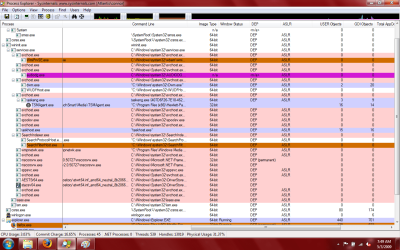
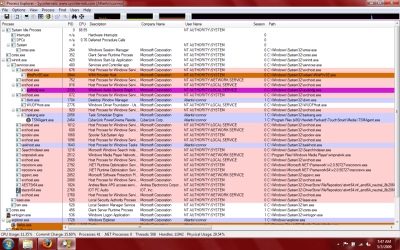
first all can you show us a process explorer log or a pic of it?
for the bluetooth
goto start and type run
there type this...
"C:\Windows\system32\rundll32.exe" Shell32.dll,Control_RunDLL bthprops.cpl,,1
you should come up with the blutooth control panel
follow this..
blutooth.PNG
it should completely disable blutooth and letting you at the same time advise you if nye
you have done the down
check it every few minutes and see if it changing...
is this laptop under warranty?
if not what i would do is this...
i would do physically remove it (the bluetooth dongle)...
that would end the whole blutooth hole in your security...
also boot up under a linux live cd and repartition *everything* that touched your old computer....
(i mean everything, that is yours of course...)
 

My Computer

Computer Manufacturer/Model Number
Tx2500z Tablet Pc/Homemade Server
OS
Windows 7 Ult x64(x2), HomePrem x32(x4), Server 08 (+VM), 08 R2 (VM) , SuSe 11.2 (VM), XP 32 (VM)
CPU
Turion X2 ultra (oh well came with laptop)/P4 @3.2 (yes P4)
Motherboard
IDK HP Motherboard / Intel DG965SS
Memory
OCZ Dual Channel 4GB kit/ 1gb Dual Channel
Graphics Card(s)
HD 3200 graphics /GMA x3100 (yay for intergrated!!)
Sound Card
Realtek HD Audio(mic working, well sort of)/Siig IC-70012
Monitor(s) Displays
built-in Hp 12" laptop screen/ Acer 19"
Screen Resolution
1280x800 /1440x900
Cooling
All Air Cooled
Mouse
Logi MX Rev. /MS Wheel Optical 1.1A /Logitech Optical Mouse
Internet Speed
College baby but its still routed through vpn to 1536k...
Other Info
love my wacom pen and pressure sensitivity...
wished it worked in 7, SUSE for that matter though
Thank you for you reply D.A. The tone of your post made me both pleased that you sounded like you had heard of this type of bug, and also worried because you sounded grave.

First, I ran the rundll command just as you typed it, and quickly my "Run" dialog box faded away, the mouse pointer "busy circle" spun for about 3 minutes.... I thought my system was going to crash. Then, as if nothing was wrong, everything just snapped back into working order. I double checked it what I had typed and it was correct. I would have tried running it a second time, but I thought I would have to restart my laptop. And in any regard, if I know this bug (this guy), he now has anticipated me doing this, and running that command again will have no effect. So, is there anything else I can to check BT? Also, is the dongle typically easy to remove like a wireless NIC, or does it vary from laptop to laptop?

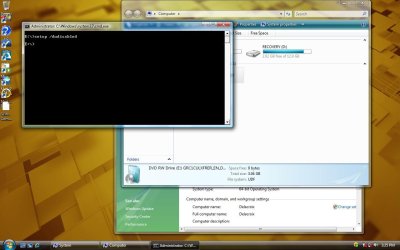
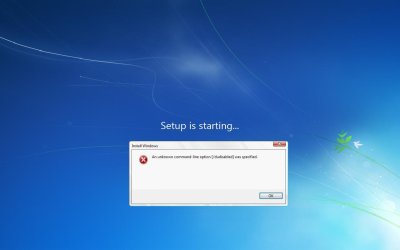
There are many times in the past I have done something he or it did not like, but I got no second chances....two off the top of my head were i) when I realized under the DISKPART utility you could select a disk and type "clean all", and ii) when I figured out that if I reinstalled Win 7 from the command line and added the switch/modifier "/dudisabled" which disabled dynamic changes made to the installation process.... in each case when I tried it a second time..... there were no fireworks.... For instance, wHen I used "diskpart clean all" the second time, my disk light went on, it stayed on, but nothing inside was moving at all, and the light does not flicker the least bit...so I know that is merely a red herring.... (i.e., lights are on, but nobody's home), and secondly, if I try the switch "setup /dudisabled" now, I will always get a dialog box which says that the modifier "/dudisabled" is unrecognized and I get to sit at the blue screen that says "Setup is loading" until I restart.

I am telling you, it or he makes up errors ALL THE TIME... I could tell you at least 10 more errors I know are BS...but just responses so the PC seems somewhat legitmate.

And trust me, all my peripheral storage devices....from my WD back up drive, every flash drive, my ipod, my camera.... all of them will be thoroughly cleaned even that means I have to douse them with gasoline and set them on fire.


Paul
 

My Computer

OS
Windows 7
My apologies, I forgot the process explorer shots. I used the sysinternals PROCEX64 utility....which has a lot of additional information. I did two pages so you could get full detail.

Also, I am attaching a print from the command line app "Tasklist /svc" which shows associated services running with the process in question, and also a print out of "Tasklist /M" which shows the dlls loaded for each process.


Also, just to see if I was right.... I ran the Rundll command again. This time, my laptop didn't even blink. I might as well have been yelling at it. No reaction whatsoever.

Paul

NB: browser is having problems... I will send attachments in the next post.... I am going to restart laptop.
 

My Computer

OS
Windows 7
I think in retrospect that command you had me run did terminate my wireless connection. I didn't realize it, but that is why I had to restart my browser. I did not have to restart the PC.

I am attaching the documents mentioned in my last post. Remember that they are from after I ran the Rundll command that stopped BT.

Paul

Finally...they are attached... That rundll command did something which screwed up my connection.
 

Attachments

Last edited:

My Computer

OS
Windows 7
My suggestion would be to stay off that computer untill you can wipe it and do a clean install with Win7 RC 7100 (Tuesday May, 5th public download). I would download the ISO from someone else's known 'clean' computer, then burn the image to a DVD.

As I said in the past, change all your passwords!

Get rid of that infected flash drive.... throw it away, buy a new one.

If you are showing all symptoms of Downadup.... that is also called Conficker. :(
 

My Computer

Computer type
PC/Desktop
Computer Manufacturer/Model Number
Bruce ... somewhere in his 40's
OS
Windows 7 Ultimate 32bit SP1
CPU
Intel(R) Core(TM)2 Quad CPU @ 2.40GHz, 2400 MHz
Motherboard
INTEL/D975XBX2
Memory
4 GB
Graphics Card(s)
ATI Radeon HD 2600 Pro
Monitor(s) Displays
Samsung SyncMaster 914v
Screen Resolution
1280 x 1024
Hard Drives
2/500GB each ... ST3500630AS ATA Device.
One is not connected
PSU
Rocketfish 700 W
Case
G.Skill Gigabyte Chassis
Keyboard
Standard PS/2 Keyboard
Mouse
Microsoft PS/2 Mouse
Internet Speed
DSL
Antivirus
Avira Internet Security
Browser
IE 11
Other Info
ATI HDMI Audio
Application Host Helper Service? well start with removing that. Usually any helper service is an EXTREME security threat...also known as a BHO or Browser Helper Object...should be called a Browser Hacker Object. A program that does good at removing all BHO's is Vista Manager, but it does have some glitches with W7. Soon they will have a version for W7. Another thing that you might want to consider...your copy of W7...did you D'load it from Pirate Bay or BitTorrent? If so, delete it and find a copy from mininova where there are several user comments supporting the legitimacy of it. I hope that information might lead you in the right direction.

EDIT: The beta version for Windows 7 Manager is now avalable. Click Here to get it.
 

My Computer

OS
Windows 7 (Build 7068)
My suggestion would be to stay off that computer untill you can wipe it and do a clean install with Win7 RC 7100 (Tuesday May, 5th public download). I would download the ISO from someone else's known 'clean' computer, then burn the image to a DVD.

As I said in the past, change all your passwords!

Get rid of that infected flash drive.... throw it away, buy a new one.

If you are showing all symptoms of Downadup.... that is also called Conficker. :(


1) As well as reformatting the ENTIRE drive (delete ALL partitions on the disk) you must also do a SECURITY ERASE ON EVERY WRITEABLE SECTOR ON THE ENTIRE DISK.
In Particular the MBR on sector 0 must also be security erased.

There's plenty of utilities to do this -- just google security erase.

2) "Bin" the USB stick -- and get another one if you MUST use these type of devices. Security erasing these is a bit more tricky so I wouldn't bother -- just sling it.

3) Install a Live CD of say a Linux distro and run any AV software to check that your EMPTY computer is clean. This will also check that the disks don't contain ANY data before you start to install your OS.

I say use a Linux live CD as these are reasonably available -- Unless you can make something like a Bartpe or VistaPE type of live Windows CD then it's difficult to check your computer is CLEAN until you've installed an OS -- which itslef might not be clean.

(Any people designing AV software -- How about a Bootable stand alone version that can check a machine for infections WITHOUT having to run from say within Windows itself).

4) Install Windows from a 100% CLEAN install DVD / CD.

Cheers
jimbo
 

My Computer

Computer type
PC/Desktop
Computer Manufacturer/Model Number
Custom built, several laptops HP/ASUS
OS
Linux CENTOS 7 / various Windows OS'es and servers
CPU
Intel i7 Intel i5
Memory
8GB, 16GB
Graphics Card(s)
On Motherboard
Sound Card
Realtek HD audio
Monitor(s) Displays
Apple Cinema display, Samsung LCD
Screen Resolution
1920 X 1080
Hard Drives
4 X 1TB SATA
Mouse
Toshiba wireless laser
Internet Speed
> 20MB up

My Computer

Computer Manufacturer/Model Number
Tx2500z Tablet Pc/Homemade Server
OS
Windows 7 Ult x64(x2), HomePrem x32(x4), Server 08 (+VM), 08 R2 (VM) , SuSe 11.2 (VM), XP 32 (VM)
CPU
Turion X2 ultra (oh well came with laptop)/P4 @3.2 (yes P4)
Motherboard
IDK HP Motherboard / Intel DG965SS
Memory
OCZ Dual Channel 4GB kit/ 1gb Dual Channel
Graphics Card(s)
HD 3200 graphics /GMA x3100 (yay for intergrated!!)
Sound Card
Realtek HD Audio(mic working, well sort of)/Siig IC-70012
Monitor(s) Displays
built-in Hp 12" laptop screen/ Acer 19"
Screen Resolution
1280x800 /1440x900
Cooling
All Air Cooled
Mouse
Logi MX Rev. /MS Wheel Optical 1.1A /Logitech Optical Mouse
Internet Speed
College baby but its still routed through vpn to 1536k...
Other Info
love my wacom pen and pressure sensitivity...
wished it worked in 7, SUSE for that matter though
I posted a 1000 word reply to everyone, but lost it because I had forgotten that I had taken my battery out of my laptop before I unplugged it to walk outside to get use an unsecured AP which I am using until my ISP comes monday (today). I take the battery out because it makes it easier to reboot cleanly by ensuring there is no charge still in the laptop which might be holding some code.

It was an interesting post. But the bottom line is that I have done what I can and I need to seek someone out in Chicago who can look at this. I replaced the hard drive and used factory disks that I ordered from HP without any other peripherals on my notebook, and the virus remains.

You can disbelieve all you want. But it is true. This is very very weird. Whatever you want to know though, I will provide. I have maybe 500 screenshots in Windows 7, Vista, Ubuntu and Mint Linux (both distros are Debian/Ubuntu based), all showing the craziest things you can imagine..... and pages and pages of handwritten notes over the last 4 months of this hell describing my theories and observations on this hijacking of my laptop. Been up for 72 hours with the first a reinstallation of the OS from the factory disks, and then two nights ago, I swapped out the hard drive. Since then I have thought of everything else in between---different steps I could take in the sequence from wiping to reinstalling and nothing has worked. This is like polio in the 1920s.

Paul
 

My Computer

OS
Windows 7
lol I've been following this thread in amazement and have come to the conclusion that it is God's way of telling you (and us too lol) that there is more to life than pcs and electronics.
 

My Computer

Computer Manufacturer/Model Number
self built
OS
7600.20510 x86
CPU
P4 550 3.4 GHz HT running at 3.5 GHz
Motherboard
MSI PM8M3-V (MS-7211 v1.x) Micro-ATX mainboard
Memory
OCZ 2 GB(2x1GB) DDR400mHz running @ 414 mHz
Graphics Card(s)
HIS Radeon HD 3850 IceQ 3 Turbo HDMI Dual DL-DVI AGP
Sound Card
MOTU Traveler firewire studio interface 192 kHz 24 bit
Monitor(s) Displays
22" widescreen Acer X223W LCD, 17" Compaq P75 CRT
Screen Resolution
1680x1050 and 1280x1024
Hard Drives
SATA I x2 WD, 400 GB and 120 GB, SATA 2 WD Caviar Black 1 TB
PSU
350W generic
Case
Cybertronpc, it glows blue
Cooling
stock cpu fan, Ice-Q 3 gpu and system, many case fans
Keyboard
Logitch Classical Keyboard 200
Mouse
Logitech Mediaplay cordless
Internet Speed
1792/448 kbits/sec
Other Info
SATA II PCI fake RAID adapter, 1 GB Readyboost, original ATI Remote Wonder (even works with WMC perfectly), Logitech Rumblepad 2 game controller x2
I am not so weary as I was when I wrote that last post. I am seriously having a very difficult time with this, and it is getting to me as I need this laptop for income. And having been in a financial crunch to begin with, after my first laptop I unloaded on some poor guy for $50, my parents bought me the new HP--and I feel terrible for them to have to buy me this laptop, spend $850, and then I get on the phone with them to tell them, exasperated why I cannot use my laptop with any real productivity. But they do not understand it. My dad thinks this "Linux" thing I installed must be some kind of a game that is causing it. They understandably cannot comprehend what I am dealing with (nor, I imagine can many of you).

I am not going to take this laptop to anyone only to pay $300 for what I can do if I know how. I did what was -- to me anyway -- the common sense thing. First I ordered the HP disks which were perfect and they contained windows and other software as disks like these do. For this first attempt, I did the following:

I unplugged the laptop, removed the battery, held down the power button for 30 seconds, then I left out the battery. and plugged the AC back in. I booted from a boot CD I obtained from a friend (it is not factory made--only burned, but my friend said he has used it countless times to recover drives or do whatever he needs to do). All I wanted to do was to wipe the drive (this would be my first drive on this laptop, a 250GB sata drive made by Toshiba. The application I used was called HDAT2, and it was the only one that showed all of the sectors which comprised the 250.06GB that was showing in system info in the parantheses--see earlier post). I watched for 55 minutes as my hard drive was being wiped. I only did 1 pass as wiping this drive is not so much for prevention of forensic recovery, only to get rid of a nasty bug.

I then used the factory hp disks for my vista install, which could not really be a problem, right, right? And before I did this, to double check the efficacy of my wipe, I hand checked using a sector editor to make sure all were zeroes. [didn't check every one obviously, but spot checked fairly thoroughly. You know what happens at the end of this story..... Nothing changes. But on a bright note, I did get to see and use for a brief moment all of the neat software from HP that came with the laptop originally.

So, I was tired enough from all of this and I read the helpful posts regarding a bootCD with a wipe utility and also one for virus removal. I did not want to take any chances and was so desperate, I thought, "hell with it" I will kill a spider with a brick of C4 (so to speak)... I went to Micro Center and got a WD 350GB sata drive. New. (I heard new meant "empty", so I thought that would be the end of it.)

In swapping out the hard drive, I did everything I did above, except I was in a basement, and for fun, I put electricians tape over the IR port. There was not a USB peripheral within 20 feet. My only regret now is that before putting in the new hard drive, I should have closed the laptop up and tried to reboot the machine from a clean Linux distro to see what happened, but I thought it was already overkill. I regret not checking that now.

Though I lost my screenshots (see below), I can tell you a bit more about what happened after VISTA came up after I installed it on the new drive. First, it came bundled with a 60 day trial of Norton. I activated the firewall, and then I turned on the wireless adapter to run a live update of virus definitions. Simultaneously, I ran windows update. Both had a lot of data to download--Norton had 12 mgs of updated definitions, windows had 44, most of which were "critical" or "important" . Norton finished first, and I gave windows update another 10 minutes to finish, and both processes required a restart which I did. Windows was able to install 3 updates out 44 (and the 41 that failed were all security updates). Norton seemed proud that it found 14 tracking cookies, but nothing else. Knowing this monster as I do, I ran Norton LiveUpdate a second time, and wow, look at that! Norton needed to download another 12 mgs of defintion updates! I know this is another red herring as everything I do on this laptop is... After norton ran a second time without finding anything. I restarted my PC, and opened up the history log on Norton. It stated that never had any updates been download, nor were there any scans that had been run since its intallation. Frankly, this was no surprise to me.

After writing 2 very long posts (one that I lost as described in my last post), and I lost the second because my wireless connection somehow stalled and my system freezes (this was last night). I was really at a dark point. But then I thought...if this is happening, people should know about it. I have the old Toshiba drive (which I almost wanted to remove from my laptop with a large forceps because in my mind it was so contaminated), and I now have the new drive just as contaminated, and I know all of the services and the methods that are vital to its survival. Unfortunately, the 500 screen shots I mentioned in my last post were on a flash drive that mysteriously became "degaussed" (i.e., it was blank, and unformatted and I tried to look at the sectors and they were zeroed-out. It happened at some point when I was using it in the laptop. It cannot take more than 15 minutes (or less even) to zero out a flash drive, and given the nature of this, I attribute it to my worm/virus/new roommate.

I was going to go today to a university (I am in Chicago), either Loyola, or Northwestern, or somewhere that had a decent Comp Sci department. I was hoping to see if I could find a professor or someone who could confirm this for me. I now needed to not only get rid of it, but to know that what happened -- actually happened.

Here are some questions for anyone reading this that I am currently thinking.....

Given all that I did, what is the liklihood that a) the offensive code in question is in the CMOS?
moz-screenshot.jpg
b) is there is someway to tunnel to my PC without it advertising or broadcasting my presence (or, in the alternative, can even a fresh, absolutely clean install of windows vista -- which does send out random advertisements of its adapters (and I do not know about bluetooth--how it functions upon install, or if the IR port can be used to receive BT) can an intruder access these devices if it has an address of some sort (like a MAC but for a software based adapter like ISATAP, or Teredo?

I took a few screen shots today, but my heart really is not into it after losing so many. They are as follows...(btw, they are not as spellbinding as the others, but they are not ordinary by any means).

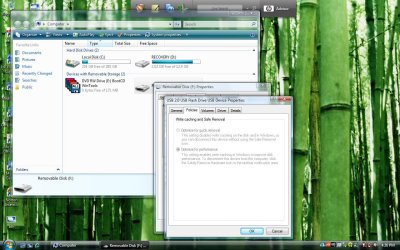
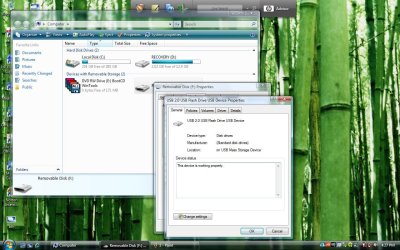
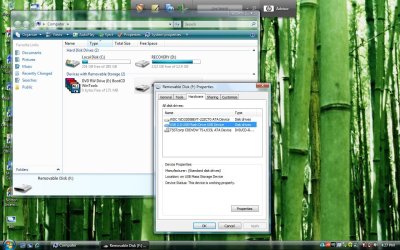
Shots 1,3 and 4: I am trying to look at the flash drive which was coming up as "Needed to be formatted"). In shot 1, I show the flash drive properties dialog box, and under the hardware tab, it lists all the storage devices, I choose my flashdrive and click properties again here. A second dialog box opens which appears to be the actual properties of the flash drive (see shot 3). First, I click on the "Policies" tab, and there are no options (see shot fu4)...the optoins are greyed out..but I do not know if this is normal or not. Then I decide to click on the "Change Settings" button under the "General" tab of the properties box, and suddenly, this properties box disappears, and reappears in the upper left corner (see shot 4). Same box, but the button is gone. It seemed odd, and this window jumping thing happens all the time (along with boxes opening twice in immediate succession, but only one box remains when I click on it).

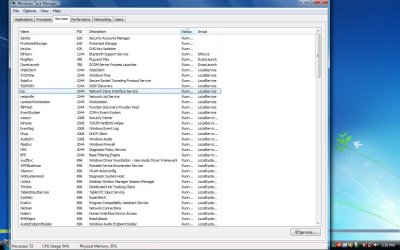
Shot bth just shows the bluetooth service running. Which I cannot shutdown -- I get "access denied".

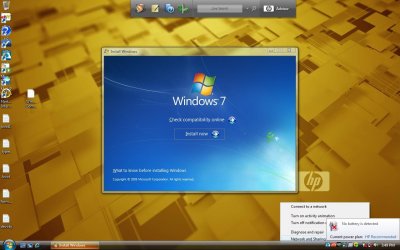
Shots dsdsd and bs error show what happens when I try to run the setup of WIN 7 with the option switch /dudisabled. It starts fine, then I get the error.

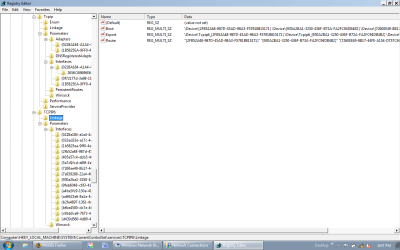
Shot registry is under currentcomponentset/services/ and it shows all of the added keys besides your standard tcpip. Notice the ipv6tunnel.....


One last thing for any of you who are naysayers. What this bug does is allow someone access to anything I am doing with this laptop. That is if windows is on it (well, that is a theory, which is why tonight, I may remove the hard drive and boot from a Linux Distro -- anyone know a good distro that does not install with auto-SSH agents enabled????) then my laptop can be accessed. I do not care if I boot from any other applicatino or OS, sooner or later it manages to get into it. WIth Linux for example, I am certain that during the live CD boot, it can stop and start files, move them in the foreground and background, and change things so whether it is LIVE or a full install , I may be called root, but I am userid "1000", which is not root. I see during installations that init is changed to multiuser... this is in harmony with the consistent system crashes I get when I enter Telinit 1 or Telinit S in a terminal. In Linux, it is using the X-Org server. I am not terribly well versed in Linux and do not know enough about it. But I know that someone does. Commands and devices dissappear (although he has not been able to make a Builtin command go away).

So, if this theory (but it my firm belief) that he/she/it can get into the boot process of a linux distro, why can't it also get involved in a Windows installation, or a windows boot process?

Also, I wanted to add that the devilishly clever fiend behind this delays the end of startup screens in order to give him/her time to do whatever it needs to do. Once I was watching windows "update"... it was the standard screen with two lines: "Windows is configuring your updates" and "Stage X of Y - XX% completed". And in the midst of this. I hear the familiar windows tone which indicates there should be a login screen in front of me. I hit ctrl-alt-del, and the update screen disappears and there is my login screen. Is this a software bug??? Also, I have been told -- out of the blue on startup -- that one my drives needs to be checked for consistency. Chkdsk runs, but the disklight does not comeone at all. Not once. Then, bootup continues. If I wanted to give myself time to configure things to my favor, I would do something like this. I just think I am a little more perceptive (or paranoid).

There doesn't seem to exist anyway I can isolate and run a process, i.e. lock it, so no one else can touch it until it completes.


Thank you very much for your help,

Paul

NB: If you note that this post seems a bit jaded and dejected, then you are perceptive.

 

Attachments

  • taskman install.jpg
    taskman install.jpg
    122 KB · Views: 17
  • registry.png
    registry.png
    29.4 KB · Views: 16
  • limited access.png
    limited access.png
    81.1 KB · Views: 18
  • fu4.jpg
    fu4.jpg
    151.2 KB · Views: 17
  • connection.png
    connection.png
    109.1 KB · Views: 15
  • 4.jpg
    4.jpg
    156.1 KB · Views: 15
  • 3.jpg
    3.jpg
    149.8 KB · Views: 14
  • 1.jpg
    1.jpg
    155.1 KB · Views: 17
  • battery.jpg
    battery.jpg
    92.6 KB · Views: 18
  • dsdsd.jpg
    dsdsd.jpg
    85.2 KB · Views: 19
  • bs error.jpg
    bs error.jpg
    35.5 KB · Views: 21

My Computer

OS
Windows 7
Have you considered building a Faraday cage?
 

My Computer

Computer Manufacturer/Model Number
self built
OS
7600.20510 x86
CPU
P4 550 3.4 GHz HT running at 3.5 GHz
Motherboard
MSI PM8M3-V (MS-7211 v1.x) Micro-ATX mainboard
Memory
OCZ 2 GB(2x1GB) DDR400mHz running @ 414 mHz
Graphics Card(s)
HIS Radeon HD 3850 IceQ 3 Turbo HDMI Dual DL-DVI AGP
Sound Card
MOTU Traveler firewire studio interface 192 kHz 24 bit
Monitor(s) Displays
22" widescreen Acer X223W LCD, 17" Compaq P75 CRT
Screen Resolution
1680x1050 and 1280x1024
Hard Drives
SATA I x2 WD, 400 GB and 120 GB, SATA 2 WD Caviar Black 1 TB
PSU
350W generic
Case
Cybertronpc, it glows blue
Cooling
stock cpu fan, Ice-Q 3 gpu and system, many case fans
Keyboard
Logitch Classical Keyboard 200
Mouse
Logitech Mediaplay cordless
Internet Speed
1792/448 kbits/sec
Other Info
SATA II PCI fake RAID adapter, 1 GB Readyboost, original ATI Remote Wonder (even works with WMC perfectly), Logitech Rumblepad 2 game controller x2
answering your questions..
a) it cannot being in your cmos...
1st because the attacker would have to have access to the cmos source (i take it you dont know this is a corporate secret so to speak)
2nd and if he did acces the source there is not enough storage in your cmos to be able to handle both a virus and a cmos
and 3rd because most have so to say security features which check if the bios (this is the actually software Cmos is the chip/s that contain it) file came from from the manufacturer....

as to the broadcasting (that is the proper term) problem the only thing you can do is go into safe mode disable all the adapters except the ethernet (do not for whatever reason disable any of the network adapters that are hidden (remember this is a clean install...;)) then restart and only and only use ethernet to connect...
unless he has access to the plans of the building and is able to cut thru the building walls then he cannot have access since you have a clean system (and is only if you have a clean system)
any kind of wireless technology broadcasts out (execpt for bluetooth as the spec specifically say that the user must initiate the connection and both users must accept as the computer is not discoverable, we covered this before and then and only then is the radio is disabled (which is by default...) so there is no way (unless the entity is already in the computer in which such change is fruitless and the best thing to do is reinstall...;)) the key here is that it encrypts most of the data so if you are using WPA-CCMP or WPA2-CCMP (which uses AES as the base for encryption which as of this moment has been been cracked, and my guess it wont be until a number of years later but by that time we will have AES2...:))
and please do not (if you already have delete these files),download torrent files/p2p/warez as this can be a product of a trojan that is self installing on your pc as you access these files...

and i cannot understand why you are using /DUdisable...
this command was only for NT 5.x....
NT 6.x does not use these commands and uses different syntax....
okay download this Prio - Priority Saver
and install it...
now restart and look at the task manager and look at look at the process tab....
you will see a bunch of green and red higlighting on the each process..
can you detail which ones are in red?
 
Last edited:

My Computer

Computer Manufacturer/Model Number
Tx2500z Tablet Pc/Homemade Server
OS
Windows 7 Ult x64(x2), HomePrem x32(x4), Server 08 (+VM), 08 R2 (VM) , SuSe 11.2 (VM), XP 32 (VM)
CPU
Turion X2 ultra (oh well came with laptop)/P4 @3.2 (yes P4)
Motherboard
IDK HP Motherboard / Intel DG965SS
Memory
OCZ Dual Channel 4GB kit/ 1gb Dual Channel
Graphics Card(s)
HD 3200 graphics /GMA x3100 (yay for intergrated!!)
Sound Card
Realtek HD Audio(mic working, well sort of)/Siig IC-70012
Monitor(s) Displays
built-in Hp 12" laptop screen/ Acer 19"
Screen Resolution
1280x800 /1440x900
Cooling
All Air Cooled
Mouse
Logi MX Rev. /MS Wheel Optical 1.1A /Logitech Optical Mouse
Internet Speed
College baby but its still routed through vpn to 1536k...
Other Info
love my wacom pen and pressure sensitivity...
wished it worked in 7, SUSE for that matter though
I'll be truthful and admit that I've not read absolutely this entire thread but so far I'm seeing a couple problems. If you're convinced that someone is getting to you wirelessly, why haven't you disabled wireless, bluetooth and ethernet (for good measure) in the BIOS prior to a nice boot from readonly media (DVD burned from a known clean machine) followed by destruction of the execution path. That's a simple as shift+f10 at the first screen of the Windows 7 installer (again off readonly media) and a few commands available from it. Then install and don't plug ANYTHING with storage into the box and test. That means no network of any kind and no external storage. If you still get "infected" then I'll drive on up to where you're at and fix it. You see, I am in the Chicago area and I am a computer science instructor.

The other thing I've noticed is that you seem to change several variables between tests when troubleshooting. You cannot perform root cause analysis that way. Your results can never be 100% trusted.
 

My Computer

Computer type
Laptop
Computer Manufacturer/Model Number
Apple
OS
El Capitan / Windows 10
CPU
i7-4980HQ
Memory
16GB
Graphics Card(s)
Iris 5200
Status
Not open for further replies.
Back
Top