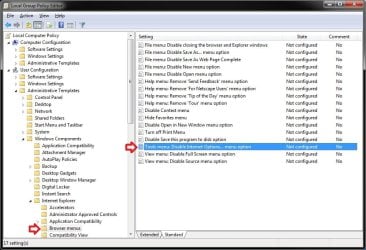
When trying to access internet options in IE 8. I had F-Secure/Shaw Secure AV running previously. I believe it messed things up adding a parental block.
I tried the below but I am lost when I reach #7. Any help?
I tried the below but I am lost when I reach #7. Any help?
-
- Click Start > Run. Type MMC and then click OK.
- Click Console and then click Add/remove Snap-in.
- In the Add/remove Snap-in dialog box, click Add.
- In the Add Standalone Snap-in list, click Group Policy, and then click Add.
- In the Group Policy object window, click Finish.
- Click Close, and then click OK.
- Go to Local Computer Policy > User Configuration > Administrative Templates.
- Click Desktop.
- In the right-pane, Right-click Hide my Network Places icon on desktop, and then click Properties.
- Click Not Configured, and then click OK.
- Expand Windows Components, and then click Windows explorer.
- In the right pane, right-click Prevent access to drives from my Computer, and then click Properties.
- Click Not Configured, and then click OK.
- Quit the Local Computer Policy MMC snap-in.
My Computer
At a glance
Windows 7, Windows 10 ProIntel Core i7 930G.SKILL F3-12800CL9T-6GBNQ 6GB DDR3 3X2GB DDR...ATI Radeon HD 5700
- Computer type
- PC/Desktop
- Computer Manufacturer/Model Number
- Asus P6X58D-E, Lenovo
- OS
- Windows 7, Windows 10 Pro
- CPU
- Intel Core i7 930
- Motherboard
- Asus X58 P6X58D-E
- Memory
- G.SKILL F3-12800CL9T-6GBNQ 6GB DDR3 3X2GB DDR3-1600 CL 9-9-9
- Graphics Card(s)
- ATI Radeon HD 5700
- Hard Drives
- Seagate Barracuda 1TB x2 SATA3 6GB/S 7200RPM 64MB
WD 1TB SATA3
- PSU
- Coolermaster Silent Pro 700W Modular Power Supply