Thumbnail Previews - Enable or Disable

How to Enable or Disable Explorer Thumbnail Previews in Windows 7 and Windows 8

   Information
This tutorial will show you how to enable or disable thumbnail previews in Windows Explorer for all or specific users in Windows 7 and Windows 8.

   Note
Displaying thumbnails in Windows Explorer will require that Windows Photo Viewer is set as the default program with all of it's default associations (except .gif files) set with it as well.

If you disable thumbnail previews, then they will also not display in the preview pane in Windows 7 or Windows 8.

   Tip
If there are a lot of thumbnails in a Windows Explorer window, then it can slow down your computer while you wait for the thumbnails to load. If this happens, then disabling thumbnails will speed up how fast a Windows Explorer window will open by displaying only icons instead of thumbnails.

   Warning
When thumbnail previews is enabled, you will need to have the icon view size in the Windows Explorer window set to either Medium Icons, Large Icons, or Extra Large Icons to see a thumbnail of the file or folder.


EXAMPLE: Thumbnails Enabled in Windows Explorer

images.jpgFolder_ON.jpgImage_On.jpg
EXAMPLE: Thumbnails Disabled in Windows Explorer Folder_OFF.jpgImage_Off.jpg



OPTION ONE

To Enable or Disable Thumbnail Previews in Folder Options


NOTE: This option will only enable or disable thumbnails in your account. If this option is not available in Folder Options, then you will need to enable either OPTION THREE or OPTION FOUR below to enable for all users. 1. Open Folder Options in Windows 7 or Windows 8, and click/tap on the View tab. (see screenshot below) Folder_Options.jpg
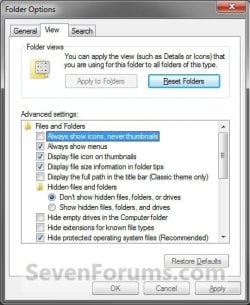
2. Do step 3 or 4 below for what you would like to do.

3. To Turn Off Thumbnails A) Check Always show icons, never thumbnails, and click/tap on OK. (See screenshot above)
4. To Turn On Thumbnails
NOTE: This is the default setting. A) Uncheck Always show icons, never thumbnails, and click/tap on OK. (See screenshot below step 2)


OPTION TWO

To Enable or Disable Thumbnail Previews in Visual Effects


NOTE: This option will only enable or disable thumbnails in your user account. 1. Open Visual Effects settings in Windows 7 or Windows 8. (see screenshot below) Visual_Effects.jpg
2. To Turn Off Thumbnails A) Uncheck Show thumbnails instead of icons, and click/tap on OK. (See screenshot above)
3. To Turn On Thumbnails
NOTE: This is the default setting. A) Check Show thumbnails instead of icons, and click/tap on OK. (See screenshot below step 1)
NOTE: If this option will not stay checked when you reopen this window, then you will need to enable either OPTION THREE or OPTION FOUR below.


OPTION THREE

To Enable or Disable Thumbnail Previews using a REG File

1. To Disable All Users Thumbnails
NOTE: This option will disable thumbnails for all users on the computer and overrides step 3 and 4 below. This is the same as doing OPTION FOUR with Group Policy. You must be logged in as an administrator to be able to do this option. A) Click/tap on the Download button below to download the file below, and go to step 5 below. Disable_Explorer_Thumbnails_All_Users.reg


Download


2. To Enable All Users Thumbnails
NOTE: This is the default setting. This option will enable thumbnails for all users on the computer and overrides step 3 and 4 below. This is the same as doing OPTION FOUR with Group Policy. You must be logged in as an administrator to be able to do this option. A) Click/tap on the Download button below to download the file below, and go to step 5 below. Enable_Explorer_Thumbnails_All_Users.reg

Download


3. To Disable Only Your Thumbnails
NOTE: This option will disable thumbnails for only the currently logged in user. This is the same as doing OPTION ONE or OPTION TWO above. A) Click/tap on the Download button below to download the file below, and go to step 5 below. Disable_Explorer_Thumbnails_Current_User.reg


Download


4. To Enable Only Your Thumbnails
NOTE: This is the default setting. This option will enable thumbnails for only the currently logged in user. This is the same as doing OPTION ONE or OPTION TWO above. A) Click/tap on the Download button below to download the file below, and go to step 5 below. Enable_Explorer_Thumbnails_Current_User.reg

Download


5. Save the .reg file to your desktop.

6. Double click/tap on the downloaded .reg file to merge it.

7. Click/tap on Run, Yes (UAC), Yes, and OK when prompted.

8. Log off and log on, or restart the computer to apply.

9. When finished, you can delete the downloaded .reg file if you like.


OPTION FOUR

To Enable or Disable Thumbnail Previews in Group Policy


NOTE: You must be logged in as an administrator to be able to do this option. 1. Open the all users, specific users or groups, or all users except administrators Local Group Policy Editor for how you want this policy applied.

2. In the left pane, click on the arrow to expand User Configuration, Administrative Templates, Windows Components, and Windows Explorer (Windows 7) or File Explorer (Windows 8). (see screenshot below) Group_Policy.jpg
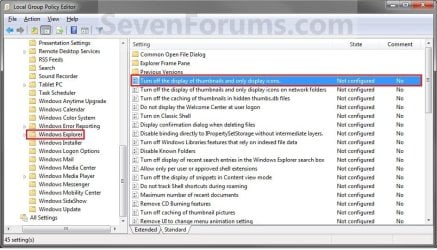
3. In the right pane of Windows Explorer (Windows 7) or File Explorer (Windows 8), double click/tap on Turn off the display of thumbnails and only display icons to edit it. (see screenshot above)

4. Do step 5 or 6 below for what you would like to do.

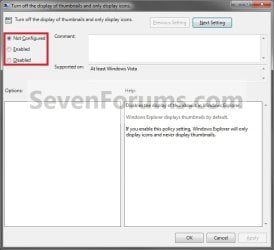
5. To Enable Thumbnails A) Select (dot) Not Configured or Disabled, and go to step 7 below. (see screenshot below step 7)
NOTE: Not Configured is the default setting.
6. To Disable Thumbnails A) Select (dot) Enabled, and go to step 7 below. (see screenshot below step 7)
7. Click/tap on OK. (See screenshot below) Poperties.jpg
8. Close the Local Group Policy Editor.
That's it,
Shawn


Attachments

Last edited:
Format

I have a series with 24 episodes and only 3 show the rest are icons and they are all the same format.


what format are they?

They are both MP4 and AVI's I know MKV's will show icons but these use to show thumbnails and just stopped about 4 days ago after I uninstalled McAfee.
 
Last edited by a moderator:

My Computer

Computer type
PC/Desktop
Computer Manufacturer/Model Number
HP Omni
OS
win7

My Computer

Computer type
PC/Desktop
Computer Manufacturer/Model Number
Self built custom
OS
64-bit Windows 11 Pro for Workstations
CPU
Intel i7-8700K OC'd to 5 GHz
Motherboard
ASUS ROG Maximus XI Formula Z390
Memory
64 GB (4x16GB) G.SKILL TridentZ RGB DDR4 3600 MHz
Graphics Card(s)
ASUS ROG-STRIX-GTX1080TI-O11G-GAMING
Sound Card
Integrated
Monitor(s) Displays
2 x Samsung Odyssey G7 27"
Screen Resolution
2560x1440
Hard Drives
1TB Samsung 990 PRO M.2,
4TB Samsung 990 PRO PRO M.2,
TerraMaster F8 SSD Plus NAS
PSU
Seasonic Prime Titanium 850W
Case
Thermaltake Core P3
Cooling
Corsair Hydro H115i
Keyboard
Logitech wireless K800
Mouse
Logitech MX Master 4
Internet Speed
2 Gb/s Download and 100 Mb/s Upload
Antivirus
Malwarebyte Anti-Malware Premium
Browser
Google Chrome
Other Info
Logitech Z625 speaker system,
Logitech BRIO 4K Pro webcam,
HP Color LaserJet Pro MFP M477fdn,
APC SMART-UPS RT 1000 XL - SURT1000XLI,
Galaxy S23 Plus phone
thank you

I want to thank you guys for trying to help... nothing worked and for some reason I don't even have windows media player active... I use VLC but Windows media player should still be active but oh well... based on that I restored my computer back to the date they all disappeared and they are back again. At least I didn't have to go back to a fresh start :)
 

My Computer

Computer type
PC/Desktop
Computer Manufacturer/Model Number
HP Omni
OS
win7

My Computer

Computer Manufacturer/Model Number
Hewlett packard/p6512uk
OS
Microsoft Windows 7 Home Premium 64-bit 7600
CPU
IIx4 amd athelon 635 processor
Motherboard
FOXCONN 2AA9
Memory
2x2gb
Graphics Card(s)
ati radeon HD 5450
Sound Card
(1) Realtek High Definition Audio (2) AMD High Definition
Monitor(s) Displays
samsung lcd tv 32"
Screen Resolution
1360x 768
Hard Drives
(1) WDC WD10 01FAES-60Z2A0 SATA Disk Device (2) Maxtor OneTouch USB Device (3) ST310003 33AS USB Device (4) WD My Book 1111 USB Device
PSU
?
Cooling
air!
Keyboard
wireless hp
Mouse
wireless Hp,optical
Internet Speed
1.10mb/s
Antivirus
MSE
Browser
Firefox
Hi,

I've just downloaded the Disable_Explorer_Thumbnails_All_Users.reg from the OPTION THREE area only to find that it's set to operate on HKEY_CURRENT_USER.

Similarly, Enable_Explorer_Thumbnails_All_Users.reg operates on HKEY_CURRENT_USER.

Shouldn't these operate on HKEY_LOCAL_MACHINE, i.e. system-wide, to affect all users (or am I just confused)?
 

My Computer

Computer type
PC/Desktop
OS
Windows 7 Ultimate 32-bit
Hello Rick, and welcome to Seven Forums.

Normally, HKEY_CURRENT_USER is only applied to the current user, but when it's a policy setting, it gets applied to all users. The registry location below is the same as what OPTION FOUR changes for all users.


HKEY_CURRENT_USER\Software\Microsoft\Windows\CurrentVersion\Policies\Explorer


When you set a Computer Configuration policy in group policy, it's changed in HKEY_LOCAL_MACHINE.

When you set a User Configuration policy in group policy, it's changed in HKEY_CURRENT_USER.


Hope this helps to better explain it, :)
Shawn
 

My Computer

Computer type
PC/Desktop
Computer Manufacturer/Model Number
Self built custom
OS
64-bit Windows 11 Pro for Workstations
CPU
Intel i7-8700K OC'd to 5 GHz
Motherboard
ASUS ROG Maximus XI Formula Z390
Memory
64 GB (4x16GB) G.SKILL TridentZ RGB DDR4 3600 MHz
Graphics Card(s)
ASUS ROG-STRIX-GTX1080TI-O11G-GAMING
Sound Card
Integrated
Monitor(s) Displays
2 x Samsung Odyssey G7 27"
Screen Resolution
2560x1440
Hard Drives
1TB Samsung 990 PRO M.2,
4TB Samsung 990 PRO PRO M.2,
TerraMaster F8 SSD Plus NAS
PSU
Seasonic Prime Titanium 850W
Case
Thermaltake Core P3
Cooling
Corsair Hydro H115i
Keyboard
Logitech wireless K800
Mouse
Logitech MX Master 4
Internet Speed
2 Gb/s Download and 100 Mb/s Upload
Antivirus
Malwarebyte Anti-Malware Premium
Browser
Google Chrome
Other Info
Logitech Z625 speaker system,
Logitech BRIO 4K Pro webcam,
HP Color LaserJet Pro MFP M477fdn,
APC SMART-UPS RT 1000 XL - SURT1000XLI,
Galaxy S23 Plus phone
Hi Shawn,

Many thanks for the explanation.

Rick
 

My Computer

Computer type
PC/Desktop
OS
Windows 7 Ultimate 32-bit
You're most welcome. :)
 

My Computer

Computer type
PC/Desktop
Computer Manufacturer/Model Number
Self built custom
OS
64-bit Windows 11 Pro for Workstations
CPU
Intel i7-8700K OC'd to 5 GHz
Motherboard
ASUS ROG Maximus XI Formula Z390
Memory
64 GB (4x16GB) G.SKILL TridentZ RGB DDR4 3600 MHz
Graphics Card(s)
ASUS ROG-STRIX-GTX1080TI-O11G-GAMING
Sound Card
Integrated
Monitor(s) Displays
2 x Samsung Odyssey G7 27"
Screen Resolution
2560x1440
Hard Drives
1TB Samsung 990 PRO M.2,
4TB Samsung 990 PRO PRO M.2,
TerraMaster F8 SSD Plus NAS
PSU
Seasonic Prime Titanium 850W
Case
Thermaltake Core P3
Cooling
Corsair Hydro H115i
Keyboard
Logitech wireless K800
Mouse
Logitech MX Master 4
Internet Speed
2 Gb/s Download and 100 Mb/s Upload
Antivirus
Malwarebyte Anti-Malware Premium
Browser
Google Chrome
Other Info
Logitech Z625 speaker system,
Logitech BRIO 4K Pro webcam,
HP Color LaserJet Pro MFP M477fdn,
APC SMART-UPS RT 1000 XL - SURT1000XLI,
Galaxy S23 Plus phone
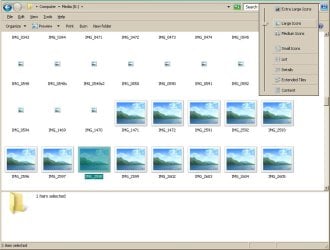
Hey, i hope this is still active. My problem is that i didnt change anything, and i know all the ways how to enable and disable the thumbnails, and tried them already, but this just started a few days ago by itself.
I have "large icons" selected, but it looks like this

thumbnails not showing.jpg

If i scroll down, some photos stay "blank" icon, or dont even show ANY icon at all, just filename.
In preview panel where it says "1 items slected" usually showed the thumbnail, but thats gone too.

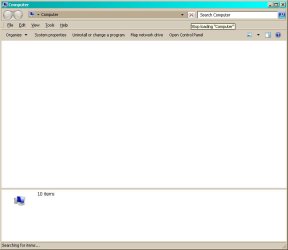
Also, at the same time i noticed this, on Explorer the stupid loading bar started to go on forever, and finally the window stays blank ... saying "10 items" in preview panel

loading.jpg

Anyway, i first thought this was a thumbnail problem but i dont know what it is now.
Any ideas? ... virus?
 

My Computer

Computer type
PC/Desktop
OS
Windows 7 Ultimate x64
Hello LiSkynden, and welcome to Seven Forums.

Are these image files very large in file size? If so, when there's a lot of them in a single folder, it could cause a delay in loading their thumbnail previews, or not even load at all.

You might see if resetting the thumbnail cache for now may help if it may be corrupted.
 

My Computer

Computer type
PC/Desktop
Computer Manufacturer/Model Number
Self built custom
OS
64-bit Windows 11 Pro for Workstations
CPU
Intel i7-8700K OC'd to 5 GHz
Motherboard
ASUS ROG Maximus XI Formula Z390
Memory
64 GB (4x16GB) G.SKILL TridentZ RGB DDR4 3600 MHz
Graphics Card(s)
ASUS ROG-STRIX-GTX1080TI-O11G-GAMING
Sound Card
Integrated
Monitor(s) Displays
2 x Samsung Odyssey G7 27"
Screen Resolution
2560x1440
Hard Drives
1TB Samsung 990 PRO M.2,
4TB Samsung 990 PRO PRO M.2,
TerraMaster F8 SSD Plus NAS
PSU
Seasonic Prime Titanium 850W
Case
Thermaltake Core P3
Cooling
Corsair Hydro H115i
Keyboard
Logitech wireless K800
Mouse
Logitech MX Master 4
Internet Speed
2 Gb/s Download and 100 Mb/s Upload
Antivirus
Malwarebyte Anti-Malware Premium
Browser
Google Chrome
Other Info
Logitech Z625 speaker system,
Logitech BRIO 4K Pro webcam,
HP Color LaserJet Pro MFP M477fdn,
APC SMART-UPS RT 1000 XL - SURT1000XLI,
Galaxy S23 Plus phone
Hello LiSkynden, and welcome to Seven Forums.

Thanks. I have been viewing this forum for years already, but always found what i was looking for and have done many tweaks found from here, so thanks for the good stuff :D

Are these image files very large in file size? If so, when there's a lot of them in a single folder, it could cause a delay in loading their thumbnail previews, or not even load at all.
Well i dont know ... big and small, all the image files seem to do that. I noticed this quite soon after starting to use Win7, cause i dont remember ever having this problem on XP. ... cant be sure tho. I first noticed this when scrolling fast a big folder, like camera's memory card, which contains about 5-6MB files usually, but they loaded anyway, so i thought this was just one more "fix it till its broken" Win7 bugs, but now when it started to stop loading the thumbnails completely, even with slow scroll it started bother me.

You might see if resetting the thumbnail cache for now may help if it may be corrupted.
I will try that now...
 

My Computer

Computer type
PC/Desktop
OS
Windows 7 Ultimate x64
Nope, that didnt help. I wonder what it is...? Images that i saved just now on desktop show as thumbnails, but older images doesnt. ... looks like not all of them, haha, that would have been simple :P If i copy /paste a thumbnail image, the pasted image doesnt show as thumbnail.
 

My Computer

Computer type
PC/Desktop
OS
Windows 7 Ultimate x64
Odd. As a test, rename one of the old images you copied to the desktop to see if it shows it's thumbnail afterwards. You may need to refresh (F5) the desktop afterwards though.

Are these images on a local drive, or one from a network location?
 

My Computer

Computer type
PC/Desktop
Computer Manufacturer/Model Number
Self built custom
OS
64-bit Windows 11 Pro for Workstations
CPU
Intel i7-8700K OC'd to 5 GHz
Motherboard
ASUS ROG Maximus XI Formula Z390
Memory
64 GB (4x16GB) G.SKILL TridentZ RGB DDR4 3600 MHz
Graphics Card(s)
ASUS ROG-STRIX-GTX1080TI-O11G-GAMING
Sound Card
Integrated
Monitor(s) Displays
2 x Samsung Odyssey G7 27"
Screen Resolution
2560x1440
Hard Drives
1TB Samsung 990 PRO M.2,
4TB Samsung 990 PRO PRO M.2,
TerraMaster F8 SSD Plus NAS
PSU
Seasonic Prime Titanium 850W
Case
Thermaltake Core P3
Cooling
Corsair Hydro H115i
Keyboard
Logitech wireless K800
Mouse
Logitech MX Master 4
Internet Speed
2 Gb/s Download and 100 Mb/s Upload
Antivirus
Malwarebyte Anti-Malware Premium
Browser
Google Chrome
Other Info
Logitech Z625 speaker system,
Logitech BRIO 4K Pro webcam,
HP Color LaserJet Pro MFP M477fdn,
APC SMART-UPS RT 1000 XL - SURT1000XLI,
Galaxy S23 Plus phone
Its weird indeed.

As a test, rename one of the old images you copied to the desktop to see if it shows it's thumbnail afterwards. You may need to refresh (F5) the desktop afterwards though.
No, that didnt help.
Are these images on a local drive, or one from a network location?
Any place ... Desktop is of course on C: but camera's memorycard is USB ... but no difference.

To make this more fun (haha) i just tried to browse same locations with Photoshop, and it shows the thumbnails just fine, and a lot more faster than Explorer does. Also tried with REALLY old Animation Shop 3 (looks like 2003) and it shows thumbnails in realtime, no lag ... ok, if i scroll REEALLY fast then it shows some lag but i would say fast.
This seems to be a Windows Explorer problem ... hmmm...
 

My Computer

Computer type
PC/Desktop
OS
Windows 7 Ultimate x64
Yeah, explorer never was very good with thumbnails when there's a lot of them with large file sizes.

You might stick to viewing them with those programs, or use an explorer alternative like FreeCommander.
 

My Computer

Computer type
PC/Desktop
Computer Manufacturer/Model Number
Self built custom
OS
64-bit Windows 11 Pro for Workstations
CPU
Intel i7-8700K OC'd to 5 GHz
Motherboard
ASUS ROG Maximus XI Formula Z390
Memory
64 GB (4x16GB) G.SKILL TridentZ RGB DDR4 3600 MHz
Graphics Card(s)
ASUS ROG-STRIX-GTX1080TI-O11G-GAMING
Sound Card
Integrated
Monitor(s) Displays
2 x Samsung Odyssey G7 27"
Screen Resolution
2560x1440
Hard Drives
1TB Samsung 990 PRO M.2,
4TB Samsung 990 PRO PRO M.2,
TerraMaster F8 SSD Plus NAS
PSU
Seasonic Prime Titanium 850W
Case
Thermaltake Core P3
Cooling
Corsair Hydro H115i
Keyboard
Logitech wireless K800
Mouse
Logitech MX Master 4
Internet Speed
2 Gb/s Download and 100 Mb/s Upload
Antivirus
Malwarebyte Anti-Malware Premium
Browser
Google Chrome
Other Info
Logitech Z625 speaker system,
Logitech BRIO 4K Pro webcam,
HP Color LaserJet Pro MFP M477fdn,
APC SMART-UPS RT 1000 XL - SURT1000XLI,
Galaxy S23 Plus phone
Yeah, explorer never was very good with thumbnails when there's a lot of them with large file sizes.

You might stick to viewing them with those programs, or use an explorer alternative like FreeCommander.

Thanks. I think it was something i have done in a few days cause it started maybe 2-4 days ago. I will keep finding the fix, and let you know if i do.
 

My Computer

Computer type
PC/Desktop
OS
Windows 7 Ultimate x64
If you like, you could do a system restore using a restore point dated before this happened to hopefully undo and fix it.
 

My Computer

Computer type
PC/Desktop
Computer Manufacturer/Model Number
Self built custom
OS
64-bit Windows 11 Pro for Workstations
CPU
Intel i7-8700K OC'd to 5 GHz
Motherboard
ASUS ROG Maximus XI Formula Z390
Memory
64 GB (4x16GB) G.SKILL TridentZ RGB DDR4 3600 MHz
Graphics Card(s)
ASUS ROG-STRIX-GTX1080TI-O11G-GAMING
Sound Card
Integrated
Monitor(s) Displays
2 x Samsung Odyssey G7 27"
Screen Resolution
2560x1440
Hard Drives
1TB Samsung 990 PRO M.2,
4TB Samsung 990 PRO PRO M.2,
TerraMaster F8 SSD Plus NAS
PSU
Seasonic Prime Titanium 850W
Case
Thermaltake Core P3
Cooling
Corsair Hydro H115i
Keyboard
Logitech wireless K800
Mouse
Logitech MX Master 4
Internet Speed
2 Gb/s Download and 100 Mb/s Upload
Antivirus
Malwarebyte Anti-Malware Premium
Browser
Google Chrome
Other Info
Logitech Z625 speaker system,
Logitech BRIO 4K Pro webcam,
HP Color LaserJet Pro MFP M477fdn,
APC SMART-UPS RT 1000 XL - SURT1000XLI,
Galaxy S23 Plus phone
If you like, you could do a system restore using a restore point dated before this happened to hopefully undo and fix it.

That didnt do anything,but hey i fixed it!!!
I noticed that dllhost.exe uses a lot of cpu so i started to search that, and then i found this
Windows 7 dllhost.exe memory leak - Microsoft Community

3rd post says "The cause is probably an error in the integrated mp4 windows codec..."
Well i didnt install any Media Preview
cause i remembered that i have a mp4 video file on desktop that didnt convert properly and when i tried to delete it, it couldnt be deleted "because some mysterious program is using it" haha. I have so much work that i have have time to think about that video file more, so i kind of forgot it.
Anyway, what i did was install MoveOnBoot MoveOnBoot Free - Rename/Move/Delete Locked Files on Reboot and deleted that bad video file and WOW, that did the job :D YAY, now the thumbnails load normally again!
I hope this help anyone who may have this.
 

My Computer

Computer type
PC/Desktop
OS
Windows 7 Ultimate x64
Great news. Thank you for posting back with your findings. :)
 

My Computer

Computer type
PC/Desktop
Computer Manufacturer/Model Number
Self built custom
OS
64-bit Windows 11 Pro for Workstations
CPU
Intel i7-8700K OC'd to 5 GHz
Motherboard
ASUS ROG Maximus XI Formula Z390
Memory
64 GB (4x16GB) G.SKILL TridentZ RGB DDR4 3600 MHz
Graphics Card(s)
ASUS ROG-STRIX-GTX1080TI-O11G-GAMING
Sound Card
Integrated
Monitor(s) Displays
2 x Samsung Odyssey G7 27"
Screen Resolution
2560x1440
Hard Drives
1TB Samsung 990 PRO M.2,
4TB Samsung 990 PRO PRO M.2,
TerraMaster F8 SSD Plus NAS
PSU
Seasonic Prime Titanium 850W
Case
Thermaltake Core P3
Cooling
Corsair Hydro H115i
Keyboard
Logitech wireless K800
Mouse
Logitech MX Master 4
Internet Speed
2 Gb/s Download and 100 Mb/s Upload
Antivirus
Malwarebyte Anti-Malware Premium
Browser
Google Chrome
Other Info
Logitech Z625 speaker system,
Logitech BRIO 4K Pro webcam,
HP Color LaserJet Pro MFP M477fdn,
APC SMART-UPS RT 1000 XL - SURT1000XLI,
Galaxy S23 Plus phone
No problem. Thanks for your help :)
 

My Computer

Computer type
PC/Desktop
OS
Windows 7 Ultimate x64
Back
Top