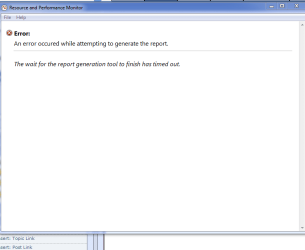
Time-out error generating system health report tool

tabooo

New member
Local time
5:38 PM
Messages
5
spacer.gif

Hi, After upgrading from vista to windows 7 i tried to generate a system health report. now , i never had problems with this before, i ran the windows scannow in cmd and all is fine , i checked the performance and logs service and that was started and manual , the reports are being registered in the perflogs folder but the tool used to generate the report in HTML seems to time out and is incapable of generating a report like in vista before the upgrade. By the way i'm running 64 bit home premium windows 7 , asus P5Q motherboard and an ATI Radeon 4850 graphic card,
Thank's for any help in solving this issue ,much appreciated :confused:
 

Attachments

  • Capture%20error.PNG
    Capture%20error.PNG
    10.5 KB · Views: 61
Last edited:

My Computer My Computer

At a glance

windows 7 home premiumIntel Q9550 Quad core8 GB DDR2 800mghATI Radeon 4850 1GB
Computer Manufacturer/Model Number
Asus
OS
windows 7 home premium
CPU
Intel Q9550 Quad core
Motherboard
Asus P5Q deluxe
Memory
8 GB DDR2 800mgh
Graphics Card(s)
ATI Radeon 4850 1GB
Monitor(s) Displays
LG 22"
Hard Drives
2x 500GB sata WD
inplace upgrade

Hi Gregrocker , if you mean by in place upgrade ,that i simply upgraded from windows vista home premium to windows 7 home premium well yes ,that is what i did to preserve all my programs and settings. And to answer your other question about performance issues ,well no ,to be frank , no other issues have arisen whatsoever. Everything is working perf, all my programs and hardware are ok. that is why i am hesitant about a clean install ,Alot of time and effort just to fix a glitch in the report generation tool. That is why i was looking for a fix to my problem instead of a whole reinstall. thanks for your support but i will definitely do a clean install if i cannot fix this issue in the near future.
 

My Computer My Computer

At a glance

windows 7 home premiumIntel Q9550 Quad core8 GB DDR2 800mghATI Radeon 4850 1GB
Computer Manufacturer/Model Number
Asus
OS
windows 7 home premium
CPU
Intel Q9550 Quad core
Motherboard
Asus P5Q deluxe
Memory
8 GB DDR2 800mgh
Graphics Card(s)
ATI Radeon 4850 1GB
Monitor(s) Displays
LG 22"
Hard Drives
2x 500GB sata WD
Hi Gregrocker,

I have already done a complete scan of my files in cmd (sfc /scannow)
windows found no integrity violations
I did a repair install and this did not resolve the problem.

I also did a clean boot and disabled all services except those from microsoft
and this also did not resolve the issue. I think this is a bug with the win 7 os and probably will need an update to fix this issue
 

My Computer My Computer

At a glance

windows 7 home premiumIntel Q9550 Quad core8 GB DDR2 800mghATI Radeon 4850 1GB
Computer Manufacturer/Model Number
Asus
OS
windows 7 home premium
CPU
Intel Q9550 Quad core
Motherboard
Asus P5Q deluxe
Memory
8 GB DDR2 800mgh
Graphics Card(s)
ATI Radeon 4850 1GB
Monitor(s) Displays
LG 22"
Hard Drives
2x 500GB sata WD
If it was a bug we would see more reports of it. Have you?

Absent that it is surely some corruption imported from Vista. This is common with in-place Upgrades, and has a fix as you are aware of the Clean Reinstall Option.
 
Clean install. The Upgrade option should not even exist.
 

My Computer My Computer

At a glance

Windows 7 Ultimate x86-64[email protected] 1066MHz FSB6GB DDR3 1066MHz9300M GS 256MB Dedicated (Speed) + Intel4500M...
Computer Manufacturer/Model Number
Sony Vaio Z46GDU
OS
Windows 7 Ultimate x86-64
CPU
[email protected] 1066MHz FSB
Motherboard
Sony branded
Memory
6GB DDR3 1066MHz
Graphics Card(s)
9300M GS 256MB Dedicated (Speed) + Intel4500MHD (Stamina)
Sound Card
Realtek HD Audio
Monitor(s) Displays
13.1' WXGA
Screen Resolution
1600x900
Hard Drives
320GB 7200RPM w/ 16MB cache
Internet Speed
1MB/s
Hello ,
Well sure looks like this problem is being reported on google. Alot of people do not even know the problem exists
and they do not even know they can generate a system health report

Maybe that is why it's not as obvious to find many reports of this glitch, but hey ,
you guys have been helpful in pointing out that a clean install is probably the only way to fix this.
I have more than 100 programs to install , i guess i will be rebooting alot on the weekend

thanks for your help

Best Regards
Tabooo
 

My Computer My Computer

At a glance

windows 7 home premiumIntel Q9550 Quad core8 GB DDR2 800mghATI Radeon 4850 1GB
Computer Manufacturer/Model Number
Asus
OS
windows 7 home premium
CPU
Intel Q9550 Quad core
Motherboard
Asus P5Q deluxe
Memory
8 GB DDR2 800mgh
Graphics Card(s)
ATI Radeon 4850 1GB
Monitor(s) Displays
LG 22"
Hard Drives
2x 500GB sata WD
Hello,
Well just to give you some feedback, I performed a clean install and the problem is resolved.
I was wondering though?? can i safely delete the Windows .old folder after retrieving what i need ??
If so give me some feedback.

Thanks for your help

Best regards
Tabooo
 

My Computer My Computer

At a glance

windows 7 home premiumIntel Q9550 Quad core8 GB DDR2 800mghATI Radeon 4850 1GB
Computer Manufacturer/Model Number
Asus
OS
windows 7 home premium
CPU
Intel Q9550 Quad core
Motherboard
Asus P5Q deluxe
Memory
8 GB DDR2 800mgh
Graphics Card(s)
ATI Radeon 4850 1GB
Monitor(s) Displays
LG 22"
Hard Drives
2x 500GB sata WD

My Computer My Computer

At a glance

Win 7 Ultimate 32bitC2D E6600 2.4Ghz4G Kingston KHX5400D2EVGA GTX 570 HD SC (012-P3-1573-KR)
Computer Manufacturer/Model Number
Self Built
OS
Win 7 Ultimate 32bit
CPU
C2D E6600 2.4Ghz
Motherboard
Intel D965WH
Memory
4G Kingston KHX5400D2
Graphics Card(s)
EVGA GTX 570 HD SC (012-P3-1573-KR)
Sound Card
On-Board
Monitor(s) Displays
Samsung 226BW
Screen Resolution
1680 x 1050
Hard Drives
2 x 250 Seagate Barracuda
2 x 500 Seagate Barracuda (Raid1)
PSU
Corsair TX750W
Case
In-Win C589
Cooling
Stock Intel Cooling

My Computer My Computer

At a glance

windows 7 professional & ultimate 64bit laptops2.27 boost to 2.53 & 2.53 boost to 2.804GBIntel® Graphics Media Accelerator HD
Computer Manufacturer/Model Number
Gateway/NV7923u & NV79C52u Laptops
OS
windows 7 professional & ultimate 64bit laptops
CPU
2.27 boost to 2.53 & 2.53 boost to 2.80
Motherboard
Mobile Intel® HM55 Express Chipset ???
Memory
4GB
Graphics Card(s)
Intel® Graphics Media Accelerator HD
Sound Card
realtek High-definition audio support
Monitor(s) Displays
17.3 " HD 1600 x 900
Hard Drives
hatachi Travelstar 5400 500GB & west digital 500GB
Internet Speed
35MB fios
spacer.gif

Hi, After upgrading from vista to windows 7 i tried to generate a system health report. now , i never had problems with this before, i ran the windows scannow in cmd and all is fine , i checked the performance and logs service and that was started and manual , the reports are being registered in the perflogs folder but the tool used to generate the report in HTML seems to time out and is incapable of generating a report like in vista before the upgrade. By the way i'm running 64 bit home premium windows 7 , asus P5Q motherboard and an ATI Radeon 4850 graphic card,
Thank's for any help in solving this issue ,much appreciated :confused:

I had a same problem, I managed to fix it!
Open action center in control panel then view performance information then go to advanced tools then open performance monitor tool then go to data collector sets from the left hand side menu then under system folder run both System diagnostics and System Performance by right clicking on each then choose start! A Triangular shape will appear on them, wait until it finishes then click on System diagnostics. in other words select it then click on View latest report button on top toolbar "The green button", now you should see the report, now click on the yellow button in toolbar "Open data folder" .... then check there see if the html file named as report has been generated. If yes then try generating report again using the way you had the problem ... now it should work.
By the way make sure that event logging and resources monitoring are enabled.
Other things I also tried was resetting my internet explorer settings But I don't think that had any effect....
If above did not help try restarting your pc with event logging and other enabled and then repeat above or try deleting the reports and regenerate new one using above method...
 
Last edited:

My Computer My Computer

At a glance

windows 7 home permium x64
OS
windows 7 home permium x64
Check to see if the System diagnostics Data collector set is running while running the report....

if not you would need to rebuild the data collecter set
 

My Computer My Computer

At a glance

Windows 7 ultimate x64
Computer Manufacturer/Model Number
Nothing specific....what ever the clients provide for Repair
OS
Windows 7 ultimate x64
Back
Top