Tiny Font Size + How to Change

CtrlAltDel

New member
Member
Local time
9:13 AM
Messages
42
Location
Birmingham, Alabama, USA
Does anyone know how to change the font size of this menu?

Menu.jpg


I have tried every setting in Advance Apperance Settings/Window Color and Apperance and none of them seem to affect it.

And if I need to change my system font or something, could someone tell me how to do that.

I'm just trying to make it a little bit bigger.

Thanks.
 

My Computer My Computer

At a glance

Windows 7 (Home Premium) x64Pentium(R) Dual-Core CPU E5300 @ 2.60GHz4.00 GB DDR2 (PC2-6400) @ 400MHz (DDR2 800)Intel(R) G41 Express Chipset
Computer Manufacturer/Model Number
Dell 537s
OS
Windows 7 (Home Premium) x64
CPU
Pentium(R) Dual-Core CPU E5300 @ 2.60GHz
Motherboard
Dell OU880P v.AO1
Memory
4.00 GB DDR2 (PC2-6400) @ 400MHz (DDR2 800)
Graphics Card(s)
Intel(R) G41 Express Chipset
Sound Card
Realtek High Definition Audio
Monitor(s) Displays
Dell ST2210 22'' HD
Screen Resolution
1920x1080
Hard Drives
Seagate Barracuda 500GB
Internet Speed
20Mbps
You may try this setting:

Capture.PNG
 

My Computer My Computer

At a glance

Windows 7 Professional x64Intel i7 2600K OC'd @ 4620 MHz16GB GSkill Sniper 2133 Mhz (4x4GB)EVGA GeForce GTX 480 SuperClocked+
Computer Manufacturer/Model Number
Custom
OS
Windows 7 Professional x64
CPU
Intel i7 2600K OC'd @ 4620 MHz
Motherboard
Asus P8Z68-V Pro
Memory
16GB GSkill Sniper 2133 Mhz (4x4GB)
Graphics Card(s)
EVGA GeForce GTX 480 SuperClocked+
Sound Card
Realtek High Definition Audio
Monitor(s) Displays
2x Acer S273HLbmii 27"
Screen Resolution
2 x 1920x1080
Hard Drives
64GB Crucial M4 SSD

Storage: Hitachi 1TB 5400RPM, Samsung 1.5TB 5400RPM
PSU
Corsair HW Series 750w (modular)
Case
Cooler Master HAF 932 Advanced Blue Edition
Cooling
CM Hyper 212+ CPU cooler, 3x 230mm + 1x 140mm case fans
Keyboard
Logitech MK320 (wireless)
Mouse
Logitech MK320 (wireless)
Internet Speed
30 Mb/s : 2 Mb/s
Font size of what menu?
 

My Computer My Computer

At a glance

Windows 7 UltimateAMD Athlon II X2 245 2.90Ghz3.00 GB8800GTS 512MB
Computer Manufacturer/Model Number
Custom Built
OS
Windows 7 Ultimate
CPU
AMD Athlon II X2 245 2.90Ghz
Motherboard
Some Gigabyte one, dont remember model
Memory
3.00 GB
Graphics Card(s)
8800GTS 512MB
Sound Card
Sound Blaster X-Fi Titanium Fatal1ty
Monitor(s) Displays
Dual 22" widescreen
Hard Drives
250GB internal, 500GB internal
PSU
CORSAIR CMPSU-850TX 850W Power Supply
Case
Thermalkake Tsunami Dream
Cooling
Thermaltake Golden Orb II
Keyboard
Saitek Eclipse 2
Mouse
Logitech MX518
Font size of what menu?

The menu in the sky that is above the Earth, Kirsch.

What? Did I not properly identify the "menu" that has a large black arrow pointing at it?

Is "menu" not the proper name and instead of trying to help me, you decide to teach me a lesson?

Don't worry about it and thanks anyway.
 

My Computer My Computer

At a glance

Windows 7 (Home Premium) x64Pentium(R) Dual-Core CPU E5300 @ 2.60GHz4.00 GB DDR2 (PC2-6400) @ 400MHz (DDR2 800)Intel(R) G41 Express Chipset
Computer Manufacturer/Model Number
Dell 537s
OS
Windows 7 (Home Premium) x64
CPU
Pentium(R) Dual-Core CPU E5300 @ 2.60GHz
Motherboard
Dell OU880P v.AO1
Memory
4.00 GB DDR2 (PC2-6400) @ 400MHz (DDR2 800)
Graphics Card(s)
Intel(R) G41 Express Chipset
Sound Card
Realtek High Definition Audio
Monitor(s) Displays
Dell ST2210 22'' HD
Screen Resolution
1920x1080
Hard Drives
Seagate Barracuda 500GB
Internet Speed
20Mbps

My Computer My Computer

At a glance

Windows 7 (Home Premium) x64Pentium(R) Dual-Core CPU E5300 @ 2.60GHz4.00 GB DDR2 (PC2-6400) @ 400MHz (DDR2 800)Intel(R) G41 Express Chipset
Computer Manufacturer/Model Number
Dell 537s
OS
Windows 7 (Home Premium) x64
CPU
Pentium(R) Dual-Core CPU E5300 @ 2.60GHz
Motherboard
Dell OU880P v.AO1
Memory
4.00 GB DDR2 (PC2-6400) @ 400MHz (DDR2 800)
Graphics Card(s)
Intel(R) G41 Express Chipset
Sound Card
Realtek High Definition Audio
Monitor(s) Displays
Dell ST2210 22'' HD
Screen Resolution
1920x1080
Hard Drives
Seagate Barracuda 500GB
Internet Speed
20Mbps

My Computer My Computer

At a glance

Windows 8, Ubuntu 12.04 64bit, Pear Linux Tri...AMD AthlonTM 64 X2 dual-core3 GBATI Radeon HD 4350 1GB
Computer Manufacturer/Model Number
Dell Dimension E521
OS
Windows 8, Ubuntu 12.04 64bit, Pear Linux Triple Boot
CPU
AMD AthlonTM 64 X2 dual-core
Memory
3 GB
Graphics Card(s)
ATI Radeon HD 4350 1GB
Sound Card
M-Audio Mobile Pre USB External
Monitor(s) Displays
Acer 1916W x2
Screen Resolution
1440X900
Hard Drives
250 GB internal main, 500 GB internal backup, 1TB External
PSU
300 Watt
Keyboard
Dell

My Computer My Computer

At a glance

Windows 7 (Home Premium) x64Pentium(R) Dual-Core CPU E5300 @ 2.60GHz4.00 GB DDR2 (PC2-6400) @ 400MHz (DDR2 800)Intel(R) G41 Express Chipset
Computer Manufacturer/Model Number
Dell 537s
OS
Windows 7 (Home Premium) x64
CPU
Pentium(R) Dual-Core CPU E5300 @ 2.60GHz
Motherboard
Dell OU880P v.AO1
Memory
4.00 GB DDR2 (PC2-6400) @ 400MHz (DDR2 800)
Graphics Card(s)
Intel(R) G41 Express Chipset
Sound Card
Realtek High Definition Audio
Monitor(s) Displays
Dell ST2210 22'' HD
Screen Resolution
1920x1080
Hard Drives
Seagate Barracuda 500GB
Internet Speed
20Mbps
Terminology is everything. Your pointer isn't pointing to a "menu." That is a file open dialogue box. You won't find a separate font setting for it. Changing the DPI or setting "Large Fonts" is your only option.
 

My Computer My Computer

At a glance

Windows 7 Ultimate RTM (Technet)3.00 gigahertz Intel Core2 Duo E84004GBATI Radeon X1950 Pro
Computer Manufacturer/Model Number
Custom
OS
Windows 7 Ultimate RTM (Technet)
CPU
3.00 gigahertz Intel Core2 Duo E8400
Motherboard
ASUSTeK Computer INC. P5K/EPU Rev 1.xx
Memory
4GB
Graphics Card(s)
ATI Radeon X1950 Pro
Sound Card
Built in HD Audio
Monitor(s) Displays
22" Gateway LCD
Screen Resolution
1920 x 1200
Hard Drives
ST3160023A [Hard drive] (160.04 GB) -- drive 0, rev 8.01, ST3500630AS [Hard drive] (500.11 GB) -- drive 2, rev 3.AAK
ST3500630AS [Hard drive] (500.11 GB) -- drive 1, rev 3.AAK
Keyboard
Logitech G11
Mouse
Microsoft Wireless Laser Mouse 5000
Internet Speed
13.44 Mbps
Terminology is everything. Your pointer isn't pointing to a "menu." That is a file open dialogue box.

Incorrect. This is a file open dialog box:

FileOpenDialogBox.jpg


What I incorrectly identified as a menu, while I was thinking drop down menu, is actually called a drop down list.

Seems you may wish to work on your terminology also.

Drop-down list - Wikipedia, the free encyclopedia


You won't find a separate font setting for it. Changing the DPI or setting "Large Fonts" is your only option.

Large Fonts has no effect on the size of the drop down list font size and I don't wish to distort every font on my computer by using DPI.

The DPI setting has no effect on it anyway. The DPI will slightly enlarge the pop out menu for Control Panel, which is horribly small, but does not affect the drop down list.

Do you know how to change the system font size?
 

My Computer My Computer

At a glance

Windows 7 (Home Premium) x64Pentium(R) Dual-Core CPU E5300 @ 2.60GHz4.00 GB DDR2 (PC2-6400) @ 400MHz (DDR2 800)Intel(R) G41 Express Chipset
Computer Manufacturer/Model Number
Dell 537s
OS
Windows 7 (Home Premium) x64
CPU
Pentium(R) Dual-Core CPU E5300 @ 2.60GHz
Motherboard
Dell OU880P v.AO1
Memory
4.00 GB DDR2 (PC2-6400) @ 400MHz (DDR2 800)
Graphics Card(s)
Intel(R) G41 Express Chipset
Sound Card
Realtek High Definition Audio
Monitor(s) Displays
Dell ST2210 22'' HD
Screen Resolution
1920x1080
Hard Drives
Seagate Barracuda 500GB
Internet Speed
20Mbps
Terminology is everything. Your pointer isn't pointing to a "menu." That is a file open dialogue box.

Incorrect. This is a file open dialog box:

FileOpenDialogBox.jpg


What I incorrectly identified as a menu, while I was thinking drop down menu, is actually called a drop down list.

Seems you may wish to work on your terminology also.

Drop-down list - Wikipedia, the free encyclopedia


You won't find a separate font setting for it. Changing the DPI or setting "Large Fonts" is your only option.

Large Fonts has no effect on the size of the drop down list font size and I don't wish to distort every font on my computer by using DPI.

The DPI setting has no effect on it anyway. The DPI will slightly enlarge the pop out menu for Control Panel, which is horribly small, but does not affect the drop down list.

Do you know how to change the system font size?


Actually, the drop down list is an element or object. The window itself is a file open dialogue, which is what I was referring to. Trust me, I know my terminology :)

Unfortunately, I know of no option for changing the system font size.
 

My Computer My Computer

At a glance

Windows 7 Ultimate RTM (Technet)3.00 gigahertz Intel Core2 Duo E84004GBATI Radeon X1950 Pro
Computer Manufacturer/Model Number
Custom
OS
Windows 7 Ultimate RTM (Technet)
CPU
3.00 gigahertz Intel Core2 Duo E8400
Motherboard
ASUSTeK Computer INC. P5K/EPU Rev 1.xx
Memory
4GB
Graphics Card(s)
ATI Radeon X1950 Pro
Sound Card
Built in HD Audio
Monitor(s) Displays
22" Gateway LCD
Screen Resolution
1920 x 1200
Hard Drives
ST3160023A [Hard drive] (160.04 GB) -- drive 0, rev 8.01, ST3500630AS [Hard drive] (500.11 GB) -- drive 2, rev 3.AAK
ST3500630AS [Hard drive] (500.11 GB) -- drive 1, rev 3.AAK
Keyboard
Logitech G11
Mouse
Microsoft Wireless Laser Mouse 5000
Internet Speed
13.44 Mbps
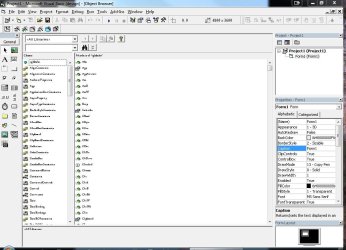
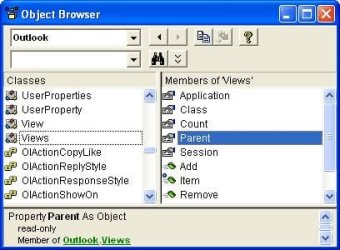
Visual Basics Object Browser has super small text.

I am having a issue with Visual Basics Object Browser it has super small font. Cant figure it out.
One of the pics shows the small and the other shows normal. Cant figure it out. I also accidentally hit some key combo the other day that I think caused it. But I can not duplicate it again. Any help would be appreciated.
 

Attachments

  • smalltext.JPG
    smalltext.JPG
    93.1 KB · Views: 10
  • largetext.jpg
    largetext.jpg
    26.3 KB · Views: 2

My Computer My Computer

At a glance

Windows 7 Ultimate 32bitIntel(R) Core(TM)2 CPU 6420 @ 2.13Ghz 2.13 Ghz2 GigNvidia Geoforce 9500 GT
Computer Manufacturer/Model Number
PowerSpec E320
OS
Windows 7 Ultimate 32bit
CPU
Intel(R) Core(TM)2 CPU 6420 @ 2.13Ghz 2.13 Ghz
Motherboard
Intel Core2 DUO
Memory
2 Gig
Graphics Card(s)
Nvidia Geoforce 9500 GT
Sound Card
SigmaTel High Definition Audio/Hauppauge WinTV HVR-1600 NTSC
Monitor(s) Displays
2- 1-(E Machines) 2-(Envision)
Back
Top