

- Local time
- 2:55 AM
- Messages
- 334
Hey guys I know I haven't made a post for quite some time but I felt like sharing some ideas to make web browsing a safer experience.
First Im going to share some interesting add-ons for Mozilla. Feel free to add anything to our list so long as they pertain to the forum rules. ( I hope everything I put pertains to the rules... ) Thanks.
Firstly WOT (Web Of Trust): This program looks at all the websites listed on your preferred search engine and reports if it is safe based on user feedback. ( This is fairly well known)
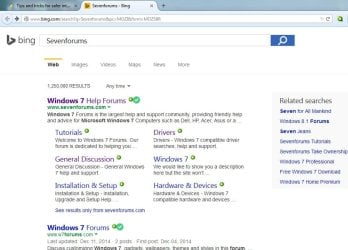
Next Ghostry: This add on is nice for blocking trackers, cookies or other unwanted stuff. You can simply slide the switch on what you don't want to see you.
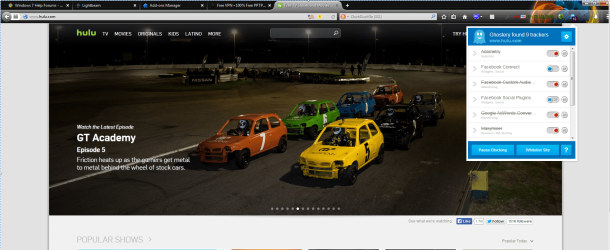
AnonymoX: This is a free proxy system for anyone who wishes to change their IP address. It has 3 options Stealth, fast, or (premium(not free)). I usually go with stealth and fast. You can test it on whatsmyip.
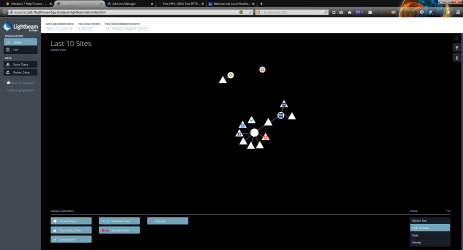
Lightbeam: It is a little bit tricky at times but if it works properly it will tell you all the websites connected to the site you are currently viewing. For example: weather.com talks to google , bing, and all their tracking buddies
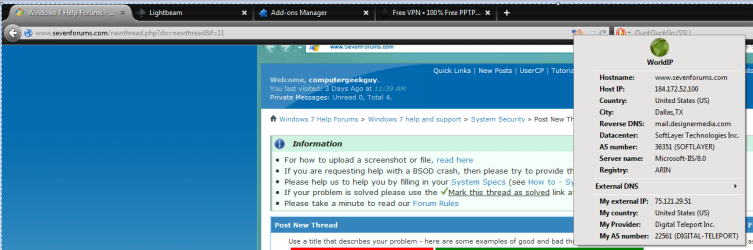
World IP: this tells you everything about a site you a currently veiwing such as: the Country, state and city. The ip addresses of everyone including you. It also tells you several other things that im not going to go into detail about.
SSL version control forces a website to run in only the ssl version you want as it has been discovered that certain ssl versions are more worthless than others.
Free VPN
This is called VPN book. Free VPN • 100% Free PPTP and OpenVPN Service
It both encrypts you connection and acts like a proxy. It is fairly simple to use. Simply go to network and sharing center and set up a vpn network connection. Add one of there free server addresses plus there username and password. You can find there password on the PPTP tab of there homepage. (Just scroll down a little)
Note, since anyone can have the same password it isn't completely secure. It is just made for securing your connection if you are at McDonalds or something. If you have any other ideas about (securing and becoming invisible look into their dedicated servers. )
)
P.S. obviously you must pay for those
Hope everyone likes these. I have
First Im going to share some interesting add-ons for Mozilla. Feel free to add anything to our list so long as they pertain to the forum rules. ( I hope everything I put pertains to the rules...
) Thanks.Firstly WOT (Web Of Trust): This program looks at all the websites listed on your preferred search engine and reports if it is safe based on user feedback. ( This is fairly well known)
Next Ghostry: This add on is nice for blocking trackers, cookies or other unwanted stuff. You can simply slide the switch on what you don't want to see you.
AnonymoX: This is a free proxy system for anyone who wishes to change their IP address. It has 3 options Stealth, fast, or (premium(not free)). I usually go with stealth and fast. You can test it on whatsmyip.
Lightbeam: It is a little bit tricky at times but if it works properly it will tell you all the websites connected to the site you are currently viewing. For example: weather.com talks to google , bing, and all their tracking buddies
World IP: this tells you everything about a site you a currently veiwing such as: the Country, state and city. The ip addresses of everyone including you. It also tells you several other things that im not going to go into detail about.
SSL version control forces a website to run in only the ssl version you want as it has been discovered that certain ssl versions are more worthless than others.
Free VPN
This is called VPN book. Free VPN • 100% Free PPTP and OpenVPN Service
It both encrypts you connection and acts like a proxy. It is fairly simple to use. Simply go to network and sharing center and set up a vpn network connection. Add one of there free server addresses plus there username and password. You can find there password on the PPTP tab of there homepage. (Just scroll down a little)
Note, since anyone can have the same password it isn't completely secure. It is just made for securing your connection if you are at McDonalds or something. If you have any other ideas about (securing and becoming invisible look into their dedicated servers.
) P.S. obviously you must pay for those
- Server #1: euro217.vpnbook.com
- Server #2: euro214.vpnbook.com
- Server #3: us1.vpnbook.com (US VPN - optimized for fast web surfing; no p2p downloading)
- Server #4: us2.vpnbook.com (US VPN - optimized for fast web surfing; no p2p downloading)
- Server #5: ca1.vpnbook.com (Canada VPN - optimized for fast web surfing; no p2p downloading)
Hope everyone likes these. I have
My Computer
- Computer type
- PC/Desktop
- Computer Manufacturer/Model Number
- self build
- OS
- 7 home premium 64 bit
- CPU
- AMD Phenom II X6 1055T
- Motherboard
- Asus M4A785TD-M EVO
- Memory
- DDR3 1333 6144 MBytes each modual 2048 mb
- Graphics Card(s)
- Power Color ATI R9 270x bluescreen edition
- Sound Card
- s/pdif part of my motherboard
- Monitor(s) Displays
- It is a 42" lcd tv :D
- Screen Resolution
- 1920 X 1080
- Hard Drives
- Samsung 120gb SSD (EVO 840)
Hitachi 500gb 3gb\s sata hard drive, slow boring but gets the job done
- PSU
- Orion 585w psu Model# HP585D (updated to EVGA 600W)
- Case
- A shoebox
- Cooling
- Box fan....
- Keyboard
- I telepathically convay what I want said.
- Mouse
- Cat
- Internet Speed
- Loading...
- Antivirus
- A facial mask
- Browser
- Firefail, Internet Exploder
- Other Info
- I love my gaming rig, FreeCell and Solitaire never looked so good.


