If you are reading this it seems that the weird title got your attention, thanks.
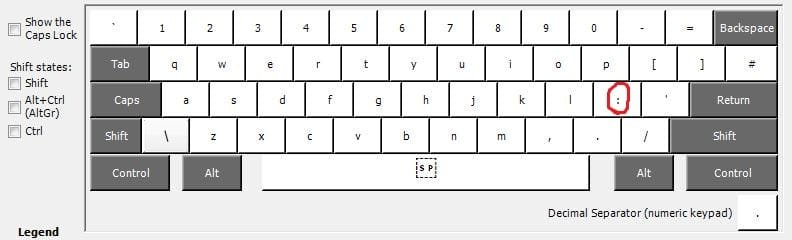
I have an HP Pavilion g6 laptop and wish to change the use of one key, the colon/semi-colon key, (" : ; ").
What I want to do is to just swap the way the key is used, at the moment it is as normal, one press ' ; ' or shift+press ' : ' I'd like to do a complete reversal to, one press ' : ' and ' ; '
I used to do this many years ago using DoS, but now can't remember how or even if it is possible using Windows 7.
I would be grateful for any help.
John
I have an HP Pavilion g6 laptop and wish to change the use of one key, the colon/semi-colon key, (" : ; ").
What I want to do is to just swap the way the key is used, at the moment it is as normal, one press ' ; ' or shift+press ' : ' I'd like to do a complete reversal to, one press ' : ' and ' ; '
I used to do this many years ago using DoS, but now can't remember how or even if it is possible using Windows 7.
I would be grateful for any help.
John
My Computer
At a glance
Windows 7 Home Premium - Service Pack 1Intel Pentium B940 @ 2.00Hz 2.00 GHz4.00 GB
- Computer Manufacturer/Model Number
- HP Pavilion g6 Notebook PC
- OS
- Windows 7 Home Premium - Service Pack 1
- CPU
- Intel Pentium B940 @ 2.00Hz 2.00 GHz
- Memory
- 4.00 GB
- Hard Drives
- Hitachi HTS54757A9E384