Too many Processes?

frogmike

New member
Local time
9:22 AM
Messages
12
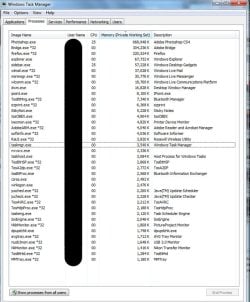
This is my task manager, and all the processes. Is it normal for this many to be functioning? My computer feels like its been running a bit slower lately... (check specs)

I deleted the relevant knowledge malware recently, and my gadgets said the CPU was running around 55-85% at times, with up to 50% of the ram being used. That sounds like a bit much for the few applications I have running.

Is there anything I can do to speed up my system or remove the processes that don't need to be there? Thanks.
 

My Computer

OS
Windows 7 HP
CPU
i5 - 750
Motherboard
ASUS P7P55D-E PRO
Memory
8GB DDR3 (4x2)
Graphics Card(s)
Nvidia GTS 250
Sound Card
-
Monitor(s) Displays
HP 24"
Screen Resolution
1920x1080
Hard Drives
64GB SSD - OS
500GB 7200rpm storage
PSU
OCZ 700W
Case
Cooler Master
Cooling
Case Fan
Keyboard
MS arc
Mouse
Lenovo
Internet Speed
DSL
This is my task manager, and all the processes. Is it normal for this many to be functioning? My computer feels like its been running a bit slower lately... (check specs)

I deleted the relevant knowledge malware recently, and my gadgets said the CPU was running around 55-85% at times, with up to 50% of the ram being used. That sounds like a bit much for the few applications I have running.

Is there anything I can do to speed up my system or remove the processes that don't need to be there? Thanks.


Um what task manager? no picture attached.
 

My Computer

Computer Manufacturer/Model Number
HP Pavillion dv-7 1005 Tx
OS
Win 8 Release candidate 8400
CPU
[email protected]
Memory
4 gigs
Graphics Card(s)
Nvidia 9600M
Sound Card
HD built-in
Monitor(s) Displays
17" Wxga
Screen Resolution
1440x900
Cooling
none
Internet Speed
45Mb down 5Mb up
:D Invisible ink?
 

My Computer

Computer type
PC/Desktop
Computer Manufacturer/Model Number
Self build
OS
Windows 10 Home
CPU
Intel Core i5 3550
Motherboard
ASUS P8Z77-V LX (LGA1155)
Memory
Corsair Vengeance DDR3 16GB
Graphics Card(s)
Nvidia GEForce GTX 970 SSC
Monitor(s) Displays
Hanns-G 23.6", Acer 17"
Screen Resolution
1920x1080, 1440x900
Hard Drives
Sandisk SSD 256 GB
WD500GB
WD640GB
Seagage Ultra + 1TB ext.
BWD 800GB
WD 1TB ext
PSU
Antec 650w
Case
Cooler Master Centurion 534
Cooling
COOLER MASTER GeminII S524, 3 120 mm case fans.
Keyboard
Logitech MK300
Mouse
Logitech MK300
Internet Speed
Cable
Antivirus
MSSE, Malwarebytes
Browser
IE 10, Chrome
Oops! Forget to attach it! lol
 

Attachments

  • taskman.jpg
    taskman.jpg
    148.5 KB · Views: 222

My Computer

OS
Windows 7 HP
CPU
i5 - 750
Motherboard
ASUS P7P55D-E PRO
Memory
8GB DDR3 (4x2)
Graphics Card(s)
Nvidia GTS 250
Sound Card
-
Monitor(s) Displays
HP 24"
Screen Resolution
1920x1080
Hard Drives
64GB SSD - OS
500GB 7200rpm storage
PSU
OCZ 700W
Case
Cooler Master
Cooling
Case Fan
Keyboard
MS arc
Mouse
Lenovo
Internet Speed
DSL

My Computer

Computer type
PC/Desktop
Computer Manufacturer/Model Number
Dell XPS 420
OS
Windows 10, Home Clean Install
CPU
Intel Core2 processsor Q8200(2.33Ghz 1333FSB) Quad Core Tech
Motherboard
Dell
Memory
6 gb
Graphics Card(s)
ATI Radeon 256MB HD3650
Sound Card
Intergrated 7.1 Channel Audio
Monitor(s) Displays
Dell SP2009W 20"
Hard Drives
640 GB Serial ATA Hard drive
Cooling
Fan
Keyboard
Dell USB Keyboard
Mouse
Dell Premium Optical USB
Internet Speed
DSL 2.85
Obviously, Photoshop, Bridge and FF are using a ton.

FF is the least of the three. Still 220 mb is savage.

I have never seen Palemoon go over 100mb or so on my machine.
 

My Computers

System One System Two

  • Computer type
    PC/Desktop
    OS
    7 X64
    CPU
    i5 8400
    Motherboard
    gigabyte b365m ds3h
    Memory
    2x8gb 3200mhz
    Hard Drives
    various
    PSU
    pure power 11 400w cm
    Case
    Coolermaster
    Cooling
    cryorig m9i
  • Computer type
    PC/Desktop
    OS
    7x64
    CPU
    g5400
    Motherboard
    ga b365m ds3h
    Memory
    8gb ddr4 2400
    PSU
    xfx pro 450w
FF is the least of the three. Still 220 mb is savage.

The OP has 8 GB of RAM, usage should be the least of his concern. 220 mb is nothing.
 

My Computer

Computer type
PC/Desktop
Computer Manufacturer/Model Number
Alienware Aurora ALX R4
OS
Windows 10 Pro (x64)
CPU
Intel Core i7-3930K (3.2GHz - 4.5GHz)
Motherboard
Alienware Aurora-R4 x79
Memory
4x Samsung 4GB PC3-12800 DDR3 (16GB 1600MHz)
Graphics Card(s)
Nvidia Geforce GTX 690
Sound Card
SteelSeries Siberia Elite
Monitor(s) Displays
Dell UltraSharp U3011
Screen Resolution
2560x1600
Hard Drives
Samsung 850 Pro 256 GB, Seagate 1TB Desktop Hybrid HDD, 2x Western Digital 4TB Green HDD
PSU
875W Some Dell PSU <.<
Case
Alienware Aurora ALX
Cooling
Custom Liquid Cooling (EK CPU & GPU blocks) dual EK 480RAD
Keyboard
Logitech G710+ Mechanical
Mouse
Logitech G700s
Internet Speed
Verizon Fios (50 mbps average)
Other Info
Server: Intel NUC D54250WYK: i5-4250U, 16GB, 256 GB mSATA, Windows Server 2012 R2
You might want to look at your startup list.
The only thing I have running is MS Security Essentials.
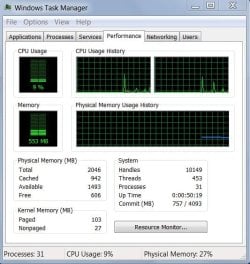
Here is a shot of my task manager. I only have 2 gig of memory and running Win7 32 bit
 

Attachments

  • Capture.JPG
    Capture.JPG
    76.3 KB · Views: 24

My Computer

Computer type
PC/Desktop
Computer Manufacturer/Model Number
Self Built
OS
Windows 10 Pro
CPU
Intel i5
Motherboard
I have a fatherboard
Memory
I'm old and lost a few chips
Graphics Card(s)
Yup
Sound Card
Yup
Monitor(s) Displays
Samsung 32" UHD
Screen Resolution
3840 x 2160
Hard Drives
Samsung 860 EVO drives
PSU
450 Watt and some fans that blow
Case
Small tower
Cooling
Yes I am cool. lol
Keyboard
Who needs a keyboard?
Mouse
Logitech Laser G7 wireless
Internet Speed
Zippy fast UP and DOWN
Antivirus
I got a shot
Browser
The new Improved EDGE 2020
You are not showing the whole picture. You have to click "Processes from all users" on the bottom. A picture of your startups would also help.
 

My Computer

Computer Manufacturer/Model Number
HP, Dell, Gateway, Toshiba - 4 laptops and 2 desktops
OS
Vista, Windows7, Mint Mate, Zorin, Windows 8
CPU
from 1.6GHz Duo to i7
Monitor(s) Displays
2x HP w2207
Hard Drives
5x HDD, 7x SSD, 12x Externals
Keyboard
with trackball - no mices
Mouse
Trackball mice
Internet Speed
DSL 6000

My Computers

System One System Two

  • Computer type
    PC/Desktop
    OS
    7 X64
    CPU
    i5 8400
    Motherboard
    gigabyte b365m ds3h
    Memory
    2x8gb 3200mhz
    Hard Drives
    various
    PSU
    pure power 11 400w cm
    Case
    Coolermaster
    Cooling
    cryorig m9i
  • Computer type
    PC/Desktop
    OS
    7x64
    CPU
    g5400
    Motherboard
    ga b365m ds3h
    Memory
    8gb ddr4 2400
    PSU
    xfx pro 450w
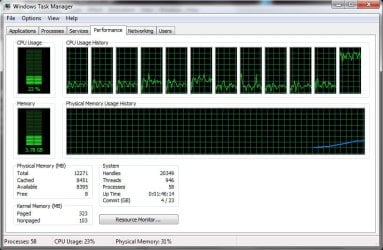
This is mine


I use alot of ram due to having afew screens and apps running all the time
 

Attachments

  • taskmanager.jpg
    taskmanager.jpg
    176.7 KB · Views: 33
Last edited:

My Computer

Computer Manufacturer/Model Number
build it myself
OS
Windows 8 X64 M3 8102 / Windows 7 Ultimate X64
CPU
Core i7 2600K @3.7ghz
Motherboard
GA-Z68XP-UD3R
Memory
32GB DDR-3 1866mhz
Graphics Card(s)
AMD Radeon 6990 + Geforce GTX560
Sound Card
SB Xfi Fatality
Monitor(s) Displays
4x 23" + 30" Dell
Screen Resolution
4x 1920x1080 + Main 2560x1600 Dell
Hard Drives
2x OCZ Agility 3 120gb SATA3
1x Kingston 120gb SATA3
1x Corsair 120gb SATA3
1x Intel 512gb SATA3 (STEAM)
5x 3TB SATA 3 WD Black (Storage)
PSU
Antec 1300W HC
Case
HAF X (USB3)
Cooling
Swiftech H20-320 Edge Liquid Cooling Kit
Keyboard
Optimus Maximus replaced G19
Mouse
Saitek Cyborg R.A.T. 7 Replaced Sidewinder X5
Internet Speed
Internode 1TB Cap ADSL2+ (NBN Optic)
Irrelevant how much ram he has - 220mb is a lot for FF to be using.

FF is the least of the three. Still 220 mb is savage.

The OP has 8 GB of RAM, usage should be the least of his concern. 220 mb is nothing.

No it isn't. You obviously know very little about Firefox's typical memory usage. stop basing it on IE.

OP, 50+% memory use in 7/vista is entirely normal during normal use.
Your sidebar using 25% cpu use definitely abnormal though, what gadgets do you have running?
 

My Computer

OS
Windows 7
CPU
Core i7 920 D0
Motherboard
Rampage II Gene
Memory
Corsair Dominator 1600
Graphics Card(s)
Geforce GTX 275
Sound Card
Auzentech Prelude
Monitor(s) Displays
BenQ G2400WD
Screen Resolution
1920x1200
Hard Drives
WD AAKS 500GB
WD 1TB
Seagate 160GB
PSU
Corsair HX620
Case
NZXT Rogue
Cooling
TRUE Copper
Keyboard
Logitech G15
Internet Speed
Anywhere from 2.5 to 3.5mb
The number of things that could slow down a system are legion. Along similar lines of what has already been posted, two things to consider, especially using FF (which I also use).

OS's in general and FF in particular have well-documented slow-down issues with a large HOSTS file. A suggested fix is to set the DNS Client to manual: go to <RUN> type <services.msc> (without the brackets), find DNS Client, right-click, select <PROPERTIES>, click <STOP>, then click <STARTUP TYPE> select <MANUAL> then <APPLY/OK> and boot.

The other thing to do (mentioned in Richc46's link) is to fine-tune all Services. I suggest that the quintessential guide for doing this is Black Viper's guide a must for those who wish to tweak Services.

As we all know, however, there is no limit to the activities that are able to slow down one's system other than the group's not being able to recall all of them.

Monk
 

My Computer

Computer Manufacturer/Model Number
Custom
OS
Dual boot XP Pro SP3x86 and Win7 Pro x64
CPU
AMD Phenom II x3 720 BE OCed to 3.3 GHz
Motherboard
Asus M3A79T Deluxe
Memory
2x2GB OCZ OCZ2RPR10664GK PC2-8500 DDR2
Graphics Card(s)
Sapphire ATi Radeon 4830 HD x2 (XFire)
Sound Card
Integrated (SoundMax)
Monitor(s) Displays
Dual: LG L227WTG/LG M237WD
Screen Resolution
1680 x 1050; 1920 x1280
Hard Drives
3 WDC WD7501AALS-00J7B0
PSU
Zalman 750HD Modular
Case
Antec 900
Cooling
4 120mm, 1 200mm fans
Keyboard
Black with lots of keys
Mouse
Razer Lachesis, Logitech RumbePad2, Logitech Marble
Internet Speed
Who counts
Other Info
7:1 SS
Can we stop giving the guy generic advice and actually find out what gadgets hes running first.

Sidebar should definitely NOT be using 25% cpu,. Ever.
 

My Computer

OS
Windows 7
CPU
Core i7 920 D0
Motherboard
Rampage II Gene
Memory
Corsair Dominator 1600
Graphics Card(s)
Geforce GTX 275
Sound Card
Auzentech Prelude
Monitor(s) Displays
BenQ G2400WD
Screen Resolution
1920x1200
Hard Drives
WD AAKS 500GB
WD 1TB
Seagate 160GB
PSU
Corsair HX620
Case
NZXT Rogue
Cooling
TRUE Copper
Keyboard
Logitech G15
Internet Speed
Anywhere from 2.5 to 3.5mb
Can we stop giving the guy generic advice and actually find out what gadgets hes running first.

Sidebar should definitely NOT be using 25% cpu,. Ever.

To each their own. I, for one, accomplish what I am able to, given the circumstances, and based on my willingness to expend my resources according to my whimsy.

Monk
 

My Computer

Computer Manufacturer/Model Number
Custom
OS
Dual boot XP Pro SP3x86 and Win7 Pro x64
CPU
AMD Phenom II x3 720 BE OCed to 3.3 GHz
Motherboard
Asus M3A79T Deluxe
Memory
2x2GB OCZ OCZ2RPR10664GK PC2-8500 DDR2
Graphics Card(s)
Sapphire ATi Radeon 4830 HD x2 (XFire)
Sound Card
Integrated (SoundMax)
Monitor(s) Displays
Dual: LG L227WTG/LG M237WD
Screen Resolution
1680 x 1050; 1920 x1280
Hard Drives
3 WDC WD7501AALS-00J7B0
PSU
Zalman 750HD Modular
Case
Antec 900
Cooling
4 120mm, 1 200mm fans
Keyboard
Black with lots of keys
Mouse
Razer Lachesis, Logitech RumbePad2, Logitech Marble
Internet Speed
Who counts
Other Info
7:1 SS
back to thread.. FF using 250% is normal. mine is 550% . For adobe program is acceptable.Now down to your windows desktop gadget

how many gadgets run?
windows gadget or custom?

just asking. thanks :)
 

My Computer

OS
window's 7
CPU
core 2 quad
Motherboard
gigabyte
Memory
2gb corsair
Graphics Card(s)
ati hd4850
Monitor(s) Displays
lg
Screen Resolution
1600 X 900
Case
power logic
Other Info
none of the spec above is accurate
back to thread.. FF using 250% is normal. mine is 550% . For adobe program is acceptable.Now down to your windows desktop gadget

how many gadgets run?
windows gadget or custom?

just asking. thanks :)

mines currently using 567MB... but then im running a tweaked profile with 61 tabs.... a stock profile would probably be 1.5x higher.
 

My Computer

OS
Windows 7
CPU
Core i7 920 D0
Motherboard
Rampage II Gene
Memory
Corsair Dominator 1600
Graphics Card(s)
Geforce GTX 275
Sound Card
Auzentech Prelude
Monitor(s) Displays
BenQ G2400WD
Screen Resolution
1920x1200
Hard Drives
WD AAKS 500GB
WD 1TB
Seagate 160GB
PSU
Corsair HX620
Case
NZXT Rogue
Cooling
TRUE Copper
Keyboard
Logitech G15
Internet Speed
Anywhere from 2.5 to 3.5mb
I guess tabs and windows affecting the ram use. Im running two windows of FF with more than 10 tabs on each.
 
Last edited:

My Computer

OS
window's 7
CPU
core 2 quad
Motherboard
gigabyte
Memory
2gb corsair
Graphics Card(s)
ati hd4850
Monitor(s) Displays
lg
Screen Resolution
1600 X 900
Case
power logic
Other Info
none of the spec above is accurate
in about:config, change browser.sessionhistory.max_total_viewers to 1.

this reduces the memory use by a large margin.
 

My Computer

OS
Windows 7
CPU
Core i7 920 D0
Motherboard
Rampage II Gene
Memory
Corsair Dominator 1600
Graphics Card(s)
Geforce GTX 275
Sound Card
Auzentech Prelude
Monitor(s) Displays
BenQ G2400WD
Screen Resolution
1920x1200
Hard Drives
WD AAKS 500GB
WD 1TB
Seagate 160GB
PSU
Corsair HX620
Case
NZXT Rogue
Cooling
TRUE Copper
Keyboard
Logitech G15
Internet Speed
Anywhere from 2.5 to 3.5mb
in about:config, change browser.sessionhistory.max_total_viewers to 1.

this reduces the memory use by a large margin.

Are you sure,where do I start? couldn't find that about;config thing
 

My Computer

OS
window's 7
CPU
core 2 quad
Motherboard
gigabyte
Memory
2gb corsair
Graphics Card(s)
ati hd4850
Monitor(s) Displays
lg
Screen Resolution
1600 X 900
Case
power logic
Other Info
none of the spec above is accurate
Back
Top