JavaScript is disabled. For a better experience, please enable JavaScript in your browser before proceeding.
You are using an out of date browser. It may not display this or other websites correctly.
You should upgrade or use an
alternative browser .
Toshiba L550 laptop web Camera not working Win 7 64
Please help. I have a Toshiba Satellite L550 laptop with web Camera not working but it did some moths ago--yet the face recognition works the camera so I know that driver camera combination works . I have uninstalled the current driver and reinstalled it and not only the original but supposed updates also..nothing will make the camera application work. I do not think the bios is the problem as I cannot find any references to the webcam in the bios.. Can anyone help please
PC/Desktop Compaq Presario Windows 7 64 bit
BSOD Analyst
Guru
Gold Member
VIP
When you say "Web camera" are you referring to using the camera online?
Windows 7 Ultimate 64-bit Intel G3420 3.2GHZ Dual Core Kingson 8GB 1600mhz MSI R7970 TF 3GD5/OC BE PC/Desktop Custom Build Windows 7 Ultimate 64-bit Intel G3420 3.2GHZ Dual Core Gigabyte H87-HD3 Kingson 8GB 1600mhz MSI R7970 TF 3GD5/OC BE 21" LG & "19 Vertical Samsung 120GB SSD - Boot Corsair CX 500 modular Zalman Z11 Plus (modified) Corsair H55, 2x 120mm SP Corsair, 1x 140 Coolermaster Corsair K50 CSL Gaming 164Mbps Avast, Malwarebytes Google Chrome, IE, Firefox
New member
Member
VIP
Thread Starter
Web Cam
PC/Desktop Compaq Presario Windows 7 64 bit
BSOD Analyst
Guru
Gold Member
VIP
Windows 7 Ultimate 64-bit Intel G3420 3.2GHZ Dual Core Kingson 8GB 1600mhz MSI R7970 TF 3GD5/OC BE PC/Desktop Custom Build Windows 7 Ultimate 64-bit Intel G3420 3.2GHZ Dual Core Gigabyte H87-HD3 Kingson 8GB 1600mhz MSI R7970 TF 3GD5/OC BE 21" LG & "19 Vertical Samsung 120GB SSD - Boot Corsair CX 500 modular Zalman Z11 Plus (modified) Corsair H55, 2x 120mm SP Corsair, 1x 140 Coolermaster Corsair K50 CSL Gaming 164Mbps Avast, Malwarebytes Google Chrome, IE, Firefox
New member
Member
VIP
Thread Starter
Web cam drivers
PC/Desktop Compaq Presario Windows 7 64 bit
BSOD Analyst
Guru
Gold Member
VIP
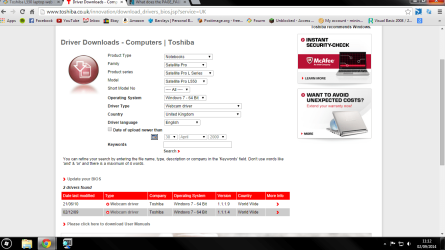
Of course, Here is a snapshot of what i searched for:
driver.png
74.5 KB
· Views: 3
Windows 7 Ultimate 64-bit Intel G3420 3.2GHZ Dual Core Kingson 8GB 1600mhz MSI R7970 TF 3GD5/OC BE PC/Desktop Custom Build Windows 7 Ultimate 64-bit Intel G3420 3.2GHZ Dual Core Gigabyte H87-HD3 Kingson 8GB 1600mhz MSI R7970 TF 3GD5/OC BE 21" LG & "19 Vertical Samsung 120GB SSD - Boot Corsair CX 500 modular Zalman Z11 Plus (modified) Corsair H55, 2x 120mm SP Corsair, 1x 140 Coolermaster Corsair K50 CSL Gaming 164Mbps Avast, Malwarebytes Google Chrome, IE, Firefox
New member
Member
VIP
Thread Starter
Toshiba webcam drivers
PC/Desktop Compaq Presario Windows 7 64 bit
BSOD Analyst
Guru
Gold Member
VIP
Brilliant,
Windows 7 Ultimate 64-bit Intel G3420 3.2GHZ Dual Core Kingson 8GB 1600mhz MSI R7970 TF 3GD5/OC BE PC/Desktop Custom Build Windows 7 Ultimate 64-bit Intel G3420 3.2GHZ Dual Core Gigabyte H87-HD3 Kingson 8GB 1600mhz MSI R7970 TF 3GD5/OC BE 21" LG & "19 Vertical Samsung 120GB SSD - Boot Corsair CX 500 modular Zalman Z11 Plus (modified) Corsair H55, 2x 120mm SP Corsair, 1x 140 Coolermaster Corsair K50 CSL Gaming 164Mbps Avast, Malwarebytes Google Chrome, IE, Firefox
New member
Member
VIP
Thread Starter
webcam toshiba
wecbam.PNG
3.9 KB
· Views: 12
Last edited: Sep 2, 2014
PC/Desktop Compaq Presario Windows 7 64 bit
BSOD Analyst
Guru
Gold Member
VIP
You should yes, have you tried the windows trouble shooting on your webcam?
Windows 7 Ultimate 64-bit Intel G3420 3.2GHZ Dual Core Kingson 8GB 1600mhz MSI R7970 TF 3GD5/OC BE PC/Desktop Custom Build Windows 7 Ultimate 64-bit Intel G3420 3.2GHZ Dual Core Gigabyte H87-HD3 Kingson 8GB 1600mhz MSI R7970 TF 3GD5/OC BE 21" LG & "19 Vertical Samsung 120GB SSD - Boot Corsair CX 500 modular Zalman Z11 Plus (modified) Corsair H55, 2x 120mm SP Corsair, 1x 140 Coolermaster Corsair K50 CSL Gaming 164Mbps Avast, Malwarebytes Google Chrome, IE, Firefox
New member
Member
VIP
Thread Starter
I have been abroad ..unexpectedly.... sorry for the delay still not idendified Web Cam the problems any other possible solutions?
PC/Desktop Compaq Presario Windows 7 64 bit