Solved toshiba nb 250 laptop

peally

New member
Member
Local time
1:36 PM
Messages
59
Location
uk
can anyone help me please my daughters laptop had windows 7 on it.
when it boots nothing loads up think i might have deleted bye accident.
dont have back up copy only windows xp the problem i have is this is a notebook and has know cd drive
can anyone give me any advice what to do please
thx
 

My Computer My Computer

At a glance

windows 7
OS
windows 7
What did you do which you think might have deleted Win7?

You can determine if Win7 is still on there by booting into Startup Repair via System Recovery Options.
If they won't run via F8 Advanced Boot Options then Option 2 in the blue link shows how to run them from bootable Win7 installer which can be written to flash stick from Step 5 of Troubleshooting Windows 7 Failure to Boot. Those steps also show everything that can be done to save unbootable Win7.

If Win7 is not reparable then everything you need is here to Clean Reinstall - Factory OEM Windows 7 the licensed version given on the COA sticker on bottom of laptop, or under battery.
 
toshiba nb 250

hi can you help me bit further please i put file on to usb stick didnt work it said NTLDR missing press any key to restart
not really that up on pcs i did try following what you said think must be doing something wrong?:(
 

My Computer My Computer

At a glance

windows 7
OS
windows 7
thx trying that now
 

My Computer My Computer

At a glance

windows 7
OS
windows 7
toshiba nb 250

just tried once it failed to install not sure if i am dloading right one got so far then stopped

:cry:
 

My Computer My Computer

At a glance

windows 7
OS
windows 7
think i got it going will i need to activate there is a number on bottom of lap top
thanks gregrocker you been great help to me
 

My Computer My Computer

At a glance

windows 7
OS
windows 7
i have just got one problem when starts up i have to press enter key there seems to be 2 windows 7 if i enter on the top one its fine if i choose lower one it errors will i have to remove this
thx again you been big help to me
 

My Computer My Computer

At a glance

windows 7
OS
windows 7
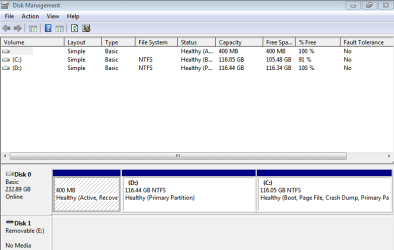
Please post back a screenshot of your maximized Disk Management drive map and listings:

1. Type Disk Management in Start Search box.
2. Open Disk Mgmt. window and maximize it.
3. Type Snipping Tool in Start Search box.
4. Open Snipping Tool, choose Rectangular Snip, draw a box around full map and all listings.
5, Save Snip, attach using paper clip in Reply Box.

Tell us what is on each partition to the best of your knowledge.
 
toshiba nb 250

Capture.PNG
 

My Computer My Computer

At a glance

windows 7
OS
windows 7
You have installed over the Recovery or data partition which was formerly D. This would have been avoided had you actually followed the explicit steps in Clean Reinstall - Factory OEM Windows 7.

What I would do is start over and this time follow the steps to delete all partitions during install, create a new partition for install, then install. Be sure to back up your data first, and this time try to follow the steps.
 
ok im sorry didn't follow instructions properly
ok you been really helpful to me would like to really thank you
just one more question when i look at bottom of laptop it says windows 7 starter
have i installed wrong one because just tried activate and failed i entered product key from bottom of laptop
thx again for your help
 

My Computer My Computer

At a glance

windows 7
OS
windows 7
Did you reinstall Win7 Starter version? Look at Control Panel>System at the installed version to see now.

If not I explained how to unlock Starter version in Post #7.
 
no i have done the wrong one im sorry for wasting your time helping me
 

My Computer My Computer

At a glance

windows 7
OS
windows 7
The time is only wasted if it doesn't get done correctly.

So download 32 bit Home Premium and run the ei.cfg removal tool on it until a box pops up saying Ei.cfg Removed. Then burn to DVD or write to flash stick again, boot into Custom install selecting Starter version from the Menu it now presents, delete all partitions, and follow the other install steps.
 
carnt find ei.cfg removal tool when click on it nothing happens i am dl right windows 7 now
think i have found it now
 

My Computer My Computer

At a glance

windows 7
OS
windows 7
nb250

followed everything exactly how u said got windows to load when i seem to do anything just seems to lock up any sugestions
 

My Computer My Computer

At a glance

windows 7
OS
windows 7
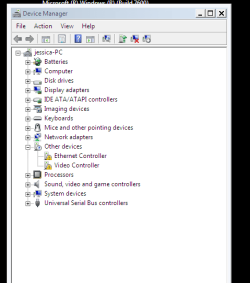
works fine in safe mode has this got anything to do with it
Capture.PNG
 

My Computer My Computer

At a glance

windows 7
OS
windows 7
Back
Top