
Solved toshiba nb 250 laptop

How exactly did it fail? If it failed during Updates then it may be a problem Update which needs isolating.

Instead of reinstalling I would System Restore to a point before it failed, then reinstall the Updates singly to find out which one is failing.

If you're concerned about the HD you can install CrystalDiskInfo - Software to get a SMART reading from the desktop, or you can burn to CD using Windows Image Burner, boot and run the HD Diagnostic extended CD scan. But I saw no evidence of HD corruption when I connected.
 
How exactly did it fail? If it failed during Updates then it may be a problem Update which needs isolating.

Instead of reinstalling I would System Restore to a point before it failed, then reinstall the Updates singly to find out which one is failing.

If you're concerned about the HD you can install CrystalDiskInfo - Software to get a SMART reading from the desktop, or you can burn to CD using Windows Image Burner, boot and run the HD Diagnostic extended CD scan. But I saw no evidence of HD corruption when I connected.

i carnt seem to get it to do anything at moment it will not even let me wipe hard drive from boot to reinstall.
carnt get windows to run.
it gets as far as the part where you have advance options to delete drive so you just have the one.
have you any sugestions what to do next.
the program you mention above can this be run from usb when boot pc up?
 

My Computer My Computer

At a glance

windows 7
OS
windows 7
Does it show the drive partitions when it boots to the screen where to install WIndows?

If so try selecting C to install straight away, without using Drive Options. If it fails describe exactly what happens.

If not Is the HD even detected in BIOS setup? run the HD tests at the beginning of Troubleshooting Windows 7 Failure to Start.
 
will not boot to windows at all have tried even in safe mode just will not boot up there is message at top of screen says something to do with software or hard where problem.
i try to reinstall windows the first screen is ok language one.
the next screen think is prep to intall then sit on that screen for ages then when get to next screen it shows me the drives but then carnt do anything have left it for a while but still will not do anything.
the hd is detected in boot area.
have looked at post before this one but still bit unsure what to do sorry i am a bit of a newbee at this
sorry greg but i do try to follow posts you link me to but still unsure the right way
 

My Computer My Computer

At a glance

windows 7
OS
windows 7
What exactly do you not understand about running the hardware tests in the beginning note at Troubleshooting Windows 7 Failure to Start?

At some point you're going to need to be able to complete some steps on your own. If you have problems ask back.

When I connected the other night everything was running fine with no evidence of hardware problems. Is all that you did since then install the Updates?
 
i have first tried windows defender offline i get error code 0x8004cc01
when try repair windows get error code 0xc00000e9
sorry but i am really struggling with this at the moment but im not giving up on this and it aint going to beat me
you guys make it sound so easy to do.
i feel we was getting somewhere now i feel i just gone backwards
 

My Computer My Computer

At a glance

windows 7
OS
windows 7
will not boot to windows at all have tried even in safe mode just will not boot up there is message at top of screen says something to do with software or hard where problem.
i try to reinstall windows the first screen is ok language one.
the next screen think is prep to intall then sit on that screen for ages then when get to next screen it shows me the drives but then carnt do anything have left it for a while but still will not do anything.

Please post back the exact verbatim error message you refer to above. You can also google it to get started on finding the solution.

I suggested you run the hardware tests at the beginning of tutorial before Step 1. Find the make of your HD to download the correct DOS (CD) ISO from HD Diagnostic link, then burn to CD using Windows Image Burner or ImgBurn. If you can't find the HD brand then use SeaTools for DOS | Seagate. Boot and run the Extended test to get the HD condition. If it passes, wipe the HD with Quick Wipe option on CD and try install again.
 
just managed to get windows 7 back on but i put wrong one on what an idiot i am
put premium on instead of starter
 

My Computer My Computer

At a glance

windows 7
OS
windows 7
Reinstall Starter.

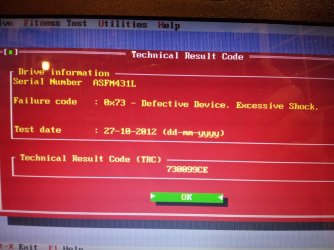
Edit: Connected to see what was crashing laptop after reinstall. Crystal Disk Info gives warning on the HD. Suggested he run Hitachi Drive Fitness test.
 
Last edited:
does this mean anything dont know if done right program
20121026_210941.jpg

does this mean drive is nackerd
the drive in my other daughters old dell laptop hard drive is the same make but just smaller gig wise could i put win 7 on it carnt see sticker very well on bottom of her laptop though
will wait for reply soon
 
Last edited:

My Computer My Computer

At a glance

windows 7
OS
windows 7
Yeah if you get that same reading a second time then the HD's toast.

Are you asking if you can swap another laptop HD into there?

What I would do to know for sure is google a video to replace/reinstall/remove HD in your model PC, pull it out and compare it to the other laptop's HD. If they match then try installing the other HD into problem PC.

You can also google replacement for both to compare if they match.

If the good HD will replace the bad one then you can boot to install Starter on it with the Toshiba key.
 
thx greg second time got same result so think its had it going to try other hd have read back of it same make just smaller in gig size i let you know how i get on soon
once got in will u set it up for me please.
 

My Computer My Computer

At a glance

windows 7
OS
windows 7
installed new hd seems to be working after all that trying to get old one going
thx gregrocker for your time helping me only one issue i have is the video controller driver
 

My Computer My Computer

At a glance

windows 7
OS
windows 7
Let's see if it comes in on the Updates but if not download it from Toshiba UK Downloads page for your model.
 
Back
Top