Touchpad Problem on Inspiron 1526

axmann

New member
Local time
6:39 AM
Messages
3
Today I installed Windows 7 Professional (64 bit) on my Dell Inspiron 1526 laptop. I previously ran Vista Home Premium (32 bit). I am currently having an issue with my touchpad. Specifically, it is no longer scrolling when I drag my finger across the far right of the touchpad. I have no idea how to fix this, and when I attempted to update the driver it said it was up to date. Any help would be appreciated.

Thanks
 

My Computer My Computer

At a glance

Windows 7AMD Turion 64x22 GB
Computer Manufacturer/Model Number
Dell Inspiron 1526
OS
Windows 7
CPU
AMD Turion 64x2
Memory
2 GB
Provide your Dell service tag number. We can see the manual and drivers download page for your specific configuration with that.
 
6nvnmd1
 

My Computer My Computer

At a glance

Windows 7AMD Turion 64x22 GB
Computer Manufacturer/Model Number
Dell Inspiron 1526
OS
Windows 7
CPU
AMD Turion 64x2
Memory
2 GB
Dell will never supply a 64-bit driver for that device. Your report implies that MS did. The only driver update Dell issued for the 32-bit version was to address the problem you report.

Confirm that you have thoroughly examined the device settings.

In the meantime, I am examining the driver to identify a possible mfgr driver source.
 
I tried installing the Synaptics 64 bit driver and this did not fix the problem. In device manager under mice and other pointing devices it now says synaptics ps/2 port compatible touchpad
 

My Computer My Computer

At a glance

Windows 7AMD Turion 64x22 GB
Computer Manufacturer/Model Number
Dell Inspiron 1526
OS
Windows 7
CPU
AMD Turion 64x2
Memory
2 GB
I had the same issue, The fix was quite easy if you still have your drivers install disk that came with your previous OS backups...search for the driver and install it, basically the new updated drivers are buggy for the touch pad find an older render of the driver and install it..it works fine for me!
 

My Computer My Computer

At a glance

VISTA HOME 32BIT CURRENTLY
OS
VISTA HOME 32BIT CURRENTLY
Same problem here, I have installed windows 7 64-bit on Dell laptop inspiron 1526 used to run vista 32-bit. Scroll on the touchpad doesn't work tried synaptic driver for 64-bit.. didnt work, also tried inserting driver CD that came with 32 bit vista, its not recognized by windows 7. Any other way around this as its a major inconvenience.
 

My Computer My Computer

At a glance

windows 7
OS
windows 7
hmmmm...i moved it onto a thumb drive and loaded the driver that way and it worked for me then again im not running 64bit
 

My Computer My Computer

At a glance

VISTA HOME 32BIT CURRENTLY
OS
VISTA HOME 32BIT CURRENTLY
I have a similar problem. I upgraded my Sony Vaio from Vista to Windows 7 Pro. Generally, the Touchpad works, but right side finger scroll function won't work. I called Sony and they said they don't support Windows 7. On my own, I uninstalled and reinstalled the Alps Pointing Driver software from Sony's website and rebooted. But nothing is different. When I go to Programs, I don't even see the Alps Pointer software as a program (so it seems like it didn't really install or the computer isn't recognizing it?). When I did the driver download from Sony's driver support website, they didn't have a Windows 7 version of the Alps Pointing Software...so the version I downloaded was the Vista version. Bottom line: I am stuck, and scroll is still not working, although the touchpad seems to otherwise be working , including tapping.​
 

My Computer My Computer

At a glance

W7 Pro
OS
W7 Pro
I had the same issues, my computer didn't list a touchpad and the drivers for my Dell 1526 would not work, the touchpad in the 1526 is an ALPS and I downloaded the 64bit drivers here ALPS ALPS Touchpad Driver | Catalog - X-DRIVERS.COM: eXtremly full software portal

I installed the first one and it is working great, I can now scroll, and also turn off tapping. Also scrolling is 100x better than with Vista and the original driver, and the pad seems more sensitive
 

My Computer My Computer

At a glance

Windows 7 Home Premium 64 bit
OS
Windows 7 Home Premium 64 bit
snowdog, your solution does indeed work, to an extent, on my dell inspiron 1526 with windows 7 ultimate, 64 bit. scrolling is restored and the mouse is completely usable...for a short period.

after a while, during each time the computer is turned on (i turn it off and back on, and it works again), it starts becoming convinced that my mouse is a keyboard device. and if i have a window open that it can type in, it starts typing random letters (if i try to type something then accidentally hit it, it sometimes even copies what it was i typed and pastes it over and over again) and beeping and being generally unruly.

im trying to determine which drivers on that site are best, as the first one is seemingly newest, BUT does not list windows 7 as supported, where the next is significantly older and does list win7 (and seems to be the one included with win7, as it doesnt enable scrolling.) im trying the next one down and will post my experience with it.

edit: scrolling works, we shall see if it bugs out
 
Last edited:

My Computer My Computer

At a glance

Windows
OS
Windows
hmmm. I wonder why it's not working right for you, I've been using it and haven't had a problem. I have Windows 7 Home Premium 64 bit, are you maybe using a different version? or maybe Dell used different touchpads for the same model?
 

My Computer My Computer

At a glance

Windows 7 Home Premium 64 bit
OS
Windows 7 Home Premium 64 bit
worked, just bugged out after a while.

i installed the third one at the time of my post, the one labeled 7.5.303.something and that has yet to have had a problem, i'll post again if there happens to be an issue, but for now, it worked fine
 

My Computer My Computer

At a glance

Windows
OS
Windows
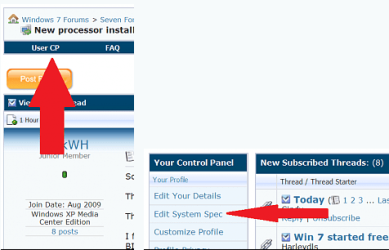
This request is for everyone on this thread except the OP. Please fill in your system specs. I will help others in case of future issues. Thanks and welcome to seven forums. Fabe usercp 1.png
 

My Computer My Computer

At a glance

Windows 7 ultimate 64 bit / XP Home sp3intel Core 2 Duo E8400 3.0ghz8 gigs 1066 OCZ Fata1tyEVGA GTX 580 Call of Duty Black Ops Edition
Computer Manufacturer/Model Number
Self Built
OS
Windows 7 ultimate 64 bit / XP Home sp3
CPU
intel Core 2 Duo E8400 3.0ghz
Motherboard
Asus P5ND bios 1401
Memory
8 gigs 1066 OCZ Fata1ty
Graphics Card(s)
EVGA GTX 580 Call of Duty Black Ops Edition
Sound Card
Creative Soundblaster Audigy 2zs
Monitor(s) Displays
Asus 24in LCD's 2MS X2
Screen Resolution
1920x1080p @60Hz
Hard Drives
WD Caviar 500 Black/ WD Caviar 200 Blue
PSU
OCZ 700W GameXtreme
Case
NZXT Apollo
Cooling
Corsair H50 CPU/120mm x3 /60mm x2 /Corsair Dominator Ram
Keyboard
Logitech Bluetooth Wireless MX5000
Mouse
Logitech Bluetooth Wireless MX1000
Internet Speed
Download 19.83 Upload 0.97
Other Info
Logitech Z2300 Speakers/ Bose Noise Cancelling Headphones/Avermedia PCI-e Hybrid TV Bravo/Epson NX415 all in one/ 4 Port Powered USB Hub/ LG 10x Bluray Burner /TSST Corp DVDRW External
I too am having trouble with my touchpad, but I installed Windows 7 32 bit. Can somebody link me the proper Alps drivers for this thanks?

I have a Dell Inspiron 1526.
 

My Computer My Computer

At a glance

Windows 7 32 BitAMD Athlon 64 X2 TK-57 (1.9GHz/512KB)4GB, DDR2, 667MHz 2 DimmATI RADEON Xpress1270 HyperMemory, Inspiron 1...
Computer Manufacturer/Model Number
Dell Inspiron 1526
OS
Windows 7 32 Bit
CPU
AMD Athlon 64 X2 TK-57 (1.9GHz/512KB)
Motherboard
Dell Inspiron 1526 AMD CPU Motherboard KY755
Memory
4GB, DDR2, 667MHz 2 Dimm
Graphics Card(s)
ATI RADEON Xpress1270 HyperMemory, Inspiron 1521 (Integrated
Sound Card
Integrated Sound Blaster Audigy
Monitor(s) Displays
15.4 inch Wide Screen WXGA LCD TrueLife for Inspiron 1526
Screen Resolution
1280x800
Hard Drives
Western Digital WD6400BEVT Scorpio Blue Mobile Hard Drive - 640GB, 2.5", 5400RPM, 8MB, SATA-300, OEM
PSU
Dell 65W-AC Adapter, 9 cell Battery
Case
Laptop
Cooling
DC 5V
Keyboard
Dell Standard Laptop Keyboard
Mouse
Dell Touchpad
Internet Speed
35 mbps DL 8 mpbs UL
Back
Top