Solved Transfer old Windows Classic display theme to Windows 7 machine?

DrJoanie

New member
Local time
2:21 PM
Messages
23
Location
Maine
I have been using a personally customized Windows Classic display theme for well over a decade on various Windows operating systems. It's in a file with the title My Preferred Display.Theme. Is there a folder in Windows 7 where I could put this theme file in order to access it from the Win7 display personalization area? I've tried using Personalize>Windows Classic but have not been able to configure the exact look I like.

Thanks!

Joan
 

My Computer My Computer

Computer Manufacturer/Model Number
Toshiba Satellite L745-S4110
OS
Windows® 7 Home Premium 64-bit
CPU
Intel® Core™ i3-2350M processor
Motherboard
???
Memory
4 GB
Graphics Card(s)
Mobile Intel® HD Graphics
Sound Card
Conexant SmartAudio HD
Monitor(s) Displays
Generic PnP Monitor
Hard Drives
TI106320W0D ?
500 GB
Hi Joan. Don't know if this will help but it looks promising (he says with fingers crossed.) It involves creating something called a Windows 7 Themepack.

How to Create Your Own Windows 7 Theme
 

My Computer My Computer

Computer type
Laptop
Computer Manufacturer/Model Number
Sony Vaio VPCEB47GM Laptop
OS
Win 7 Pro 64-bit
CPU
Intel i5 2.4 Ghz
Memory
8GB DDR3
Graphics Card(s)
Intel HD 3000
Sound Card
IDT High Definition
Monitor(s) Displays
15.6 WGXA Anti-Glare LED
Screen Resolution
1280x800
Hard Drives
640Gb 7200rpm
Antivirus
MSE
Browser
Opera (primary) with IE9 backup
Thanks, Marsmimar. I don't want to put together a new theme using disparate elements, I just want the them I have customized and saved and used on all my other Windows operating systems to function on the Win7 machine. I have placed the file in the two Themes folders (located in Windows>Resources>Themes and in the Themes file under AppData), but when I double-click to apply it, I get the message "This theme can't be applied to the desktop."

Why would Microsoft want to complicate a process that has been so straightforward in previous versions of Windows?
 

My Computer My Computer

Computer Manufacturer/Model Number
Toshiba Satellite L745-S4110
OS
Windows® 7 Home Premium 64-bit
CPU
Intel® Core™ i3-2350M processor
Motherboard
???
Memory
4 GB
Graphics Card(s)
Mobile Intel® HD Graphics
Sound Card
Conexant SmartAudio HD
Monitor(s) Displays
Generic PnP Monitor
Hard Drives
TI106320W0D ?
500 GB
I am not sure if I can help but put your theme in a zip folder and post it here and I will look and see if it's possible.

Jerry
 

My Computer My Computer

Computer type
Laptop
Computer Manufacturer/Model Number
Sager NP9170
OS
Win 7 Pro x64 / Win 10 Pro
CPU
Intel(R) Core(TM) i7-3630QM CPU @ 2.40GHz
Motherboard
CLEVO P170EM
Memory
12 GB
Graphics Card(s)
(1) Intel(R) HD Graphics 4000 (2) NVIDIA GeForce GTX 675M
Sound Card
(1) Realtek High Definition Audio (2) Intel(R) Display Aud
Monitor(s) Displays
17.3
Screen Resolution
1920x1080
Hard Drives
(1) Samsung 860 EVO 500GB(OS) (1) Samsung 860 EVO 500GB(Data)
Keyboard
Backlite
Antivirus
MSE, Malwarebytes Pro
Browser
Firefox
Other Info
DESKTOP: Custom-built.
OS: Win 10 Pro x64.
CASE: Rosewill R5.
CPU: Intel I5 4670K CPU @ 3.40GHz.
CPU COOLER: Cool Master Hyper 212 EVO.
MOTHERBOARD: Asus Z87-A.
MEMORY: Kingston HyperX 2x4 GB.
GPU: Nvidia Geforce 650 TI.
PSU: Corsair TX750.
DRIVES: (1) Samsung 840 120 GB SSD (2) Western Digital blue 500 GB 7200 RPM.
Thanks, Bongo. I'll try to attach the zip file. The file itself is only 6 KB. Please let me know if the file doesn't show up.

Joan
 

Attachments

My Computer My Computer

Computer Manufacturer/Model Number
Toshiba Satellite L745-S4110
OS
Windows® 7 Home Premium 64-bit
CPU
Intel® Core™ i3-2350M processor
Motherboard
???
Memory
4 GB
Graphics Card(s)
Mobile Intel® HD Graphics
Sound Card
Conexant SmartAudio HD
Monitor(s) Displays
Generic PnP Monitor
Hard Drives
TI106320W0D ?
500 GB
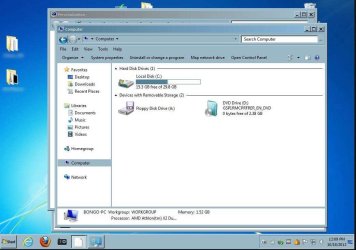
Your theme file is not setup for Windows 7, but I used your settings and and put them in a Windows 7 .theme file and tested it.
Does this look close to what you want(look at screenshot)?

Jerry
Capture.JPG
 

My Computer My Computer

Computer type
Laptop
Computer Manufacturer/Model Number
Sager NP9170
OS
Win 7 Pro x64 / Win 10 Pro
CPU
Intel(R) Core(TM) i7-3630QM CPU @ 2.40GHz
Motherboard
CLEVO P170EM
Memory
12 GB
Graphics Card(s)
(1) Intel(R) HD Graphics 4000 (2) NVIDIA GeForce GTX 675M
Sound Card
(1) Realtek High Definition Audio (2) Intel(R) Display Aud
Monitor(s) Displays
17.3
Screen Resolution
1920x1080
Hard Drives
(1) Samsung 860 EVO 500GB(OS) (1) Samsung 860 EVO 500GB(Data)
Keyboard
Backlite
Antivirus
MSE, Malwarebytes Pro
Browser
Firefox
Other Info
DESKTOP: Custom-built.
OS: Win 10 Pro x64.
CASE: Rosewill R5.
CPU: Intel I5 4670K CPU @ 3.40GHz.
CPU COOLER: Cool Master Hyper 212 EVO.
MOTHERBOARD: Asus Z87-A.
MEMORY: Kingston HyperX 2x4 GB.
GPU: Nvidia Geforce 650 TI.
PSU: Corsair TX750.
DRIVES: (1) Samsung 840 120 GB SSD (2) Western Digital blue 500 GB 7200 RPM.
The screenshot looks absolutely beautiful, Bongo! What should I do now?

Sorry to be so slow in getting back to you. I spent the whole rest of the day and night yesterday out of town.
 

My Computer My Computer

Computer Manufacturer/Model Number
Toshiba Satellite L745-S4110
OS
Windows® 7 Home Premium 64-bit
CPU
Intel® Core™ i3-2350M processor
Motherboard
???
Memory
4 GB
Graphics Card(s)
Mobile Intel® HD Graphics
Sound Card
Conexant SmartAudio HD
Monitor(s) Displays
Generic PnP Monitor
Hard Drives
TI106320W0D ?
500 GB
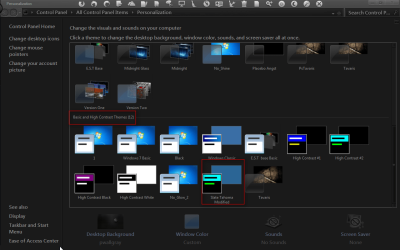
Download and extract the zip file at the bottom of this post and put the Slate Tahoma Modified.theme file in C:\Windows\Resources\Ease of Access Themes folder.

It should show up in Personalization under Basic and High Contrast Themes.
Personalization.png

Let me know how it looks to you after you install it.
Jerry
 

Attachments

My Computer My Computer

Computer type
Laptop
Computer Manufacturer/Model Number
Sager NP9170
OS
Win 7 Pro x64 / Win 10 Pro
CPU
Intel(R) Core(TM) i7-3630QM CPU @ 2.40GHz
Motherboard
CLEVO P170EM
Memory
12 GB
Graphics Card(s)
(1) Intel(R) HD Graphics 4000 (2) NVIDIA GeForce GTX 675M
Sound Card
(1) Realtek High Definition Audio (2) Intel(R) Display Aud
Monitor(s) Displays
17.3
Screen Resolution
1920x1080
Hard Drives
(1) Samsung 860 EVO 500GB(OS) (1) Samsung 860 EVO 500GB(Data)
Keyboard
Backlite
Antivirus
MSE, Malwarebytes Pro
Browser
Firefox
Other Info
DESKTOP: Custom-built.
OS: Win 10 Pro x64.
CASE: Rosewill R5.
CPU: Intel I5 4670K CPU @ 3.40GHz.
CPU COOLER: Cool Master Hyper 212 EVO.
MOTHERBOARD: Asus Z87-A.
MEMORY: Kingston HyperX 2x4 GB.
GPU: Nvidia Geforce 650 TI.
PSU: Corsair TX750.
DRIVES: (1) Samsung 840 120 GB SSD (2) Western Digital blue 500 GB 7200 RPM.
Oh my God, it looks fantastic, Jerry! Thank you so much--you are a miracle worker!

I'll click the Mark as Solved button.

Cheers,
Joan
 

My Computer My Computer

Computer Manufacturer/Model Number
Toshiba Satellite L745-S4110
OS
Windows® 7 Home Premium 64-bit
CPU
Intel® Core™ i3-2350M processor
Motherboard
???
Memory
4 GB
Graphics Card(s)
Mobile Intel® HD Graphics
Sound Card
Conexant SmartAudio HD
Monitor(s) Displays
Generic PnP Monitor
Hard Drives
TI106320W0D ?
500 GB
You're welcome
 

My Computer My Computer

Computer type
Laptop
Computer Manufacturer/Model Number
Sager NP9170
OS
Win 7 Pro x64 / Win 10 Pro
CPU
Intel(R) Core(TM) i7-3630QM CPU @ 2.40GHz
Motherboard
CLEVO P170EM
Memory
12 GB
Graphics Card(s)
(1) Intel(R) HD Graphics 4000 (2) NVIDIA GeForce GTX 675M
Sound Card
(1) Realtek High Definition Audio (2) Intel(R) Display Aud
Monitor(s) Displays
17.3
Screen Resolution
1920x1080
Hard Drives
(1) Samsung 860 EVO 500GB(OS) (1) Samsung 860 EVO 500GB(Data)
Keyboard
Backlite
Antivirus
MSE, Malwarebytes Pro
Browser
Firefox
Other Info
DESKTOP: Custom-built.
OS: Win 10 Pro x64.
CASE: Rosewill R5.
CPU: Intel I5 4670K CPU @ 3.40GHz.
CPU COOLER: Cool Master Hyper 212 EVO.
MOTHERBOARD: Asus Z87-A.
MEMORY: Kingston HyperX 2x4 GB.
GPU: Nvidia Geforce 650 TI.
PSU: Corsair TX750.
DRIVES: (1) Samsung 840 120 GB SSD (2) Western Digital blue 500 GB 7200 RPM.
1 More MIRACLE in ORDER?

Just when I thought there was no luck leftover for me to ever retrieve my long adored classic-based desktop theme, I stumbled upon this thread from more than a year ago! I just pray Bongo or someone as wondrous can help me too!! Since having to replace my XP tower with a Win7pro one, I've been trying to recover the .Theme file from my old hard drive to no avail. My problem sounds identical to the one in this thread that DrJoanie endured last year. I get the message I can't apply it to my Win7 desktop, and can neither find a way to so much as check its settings. I'd be so happy if only I could just at the very least salvage the textured wallpaper I had as I've found nil remotely resembling it anywhere. Is there anybody out there who can take a look at my .Theme file and/or assist me with applying it to Windows 7???

Many, many thanks!!!

Shel
 

My Computer My Computer

Computer type
PC/Desktop
Computer Manufacturer/Model Number
HP
OS
Windows 7 Pro 64 bit
CPU
3.0GHz
Motherboard
AMD
Memory
4.0GB
Graphics Card(s)
Integrated
Hard Drives
SATA
Antivirus
Malwarebytes
Browser
IE
Back
Top