
Transfer Rate is decreasing

adriansam

New member
Member
Local time
4:44 AM
Messages
69
Location
Tanza, Cavite
My backups are saved on my external HDD
Its about 450GB, when I copy/move the files from my External HDD to Local Disk
The transfer rate is 28.0MB/sec -> 27.9MB/sec -> 27.8MB/sec .....->8.0MB/second?
every second the transfer rate is decreasing?
Is it Normal?
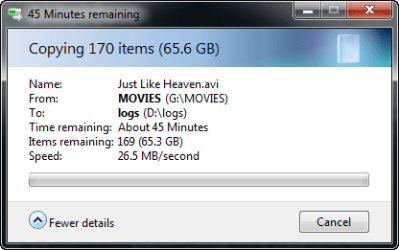
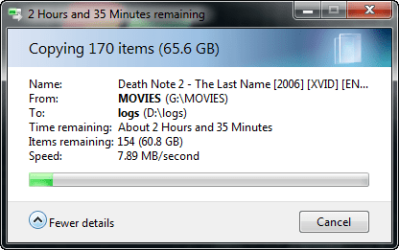
2013-05-20_134702.png
2013-05-20_135711.png
 
Last edited:

My Computer

Computer type
Laptop
Computer Manufacturer/Model Number
Lenovo
OS
Microsoft Windows 7 Ultimate 64-bit
CPU
Intel(R) Core(TM) i3 CPU M 370 @ 2.40GHz
Motherboard
LENOVO Base Board Product Name
Memory
465.76 GB
Graphics Card(s)
Intel(R) HD Graphics
Sound Card
(1) High Definition Audio Device (2) High Definition Audio
Hard Drives
(1) ST9500325AS
Exactly what is your backup mechanism. The transfer speed of many small files will be less than a large file where sequential transfer speeds should be higher.
Also, have a kook at how fragmented both drives are.
PS: I suggest you update your specs I doubt you have 400GB+ memory.
 

My Computer

Computer type
PC/Desktop
Computer Manufacturer/Model Number
Own build
OS
Windows 7x64 Home Premium SP1
CPU
Intel i7 2600k
Motherboard
ASUS P8Z68 Deluxe
Memory
G.Skill Ripjaws (DDR3-1600) 2x4GB
Graphics Card(s)
Nvidia GeForce GTS 450; Intel HD Graphics 3000(GT2+)
Monitor(s) Displays
Dell Ultrasharp IPS panel U2311H, Samsung SyncMaster P2350
Screen Resolution
1920x1080
Hard Drives
Samsung 850 Pro SSD 256GB, Samsung SSD 840 120GB, Seagates 1TB Barracuda ST31000528AS x2
PSU
Seasonic M12II 520W
Case
Lian Li Lancool PC-K60
Cooling
Case: 1x120mm, 3x140mm CPU: Hyper 212+
Keyboard
Logitech MK520 (wireless)
Mouse
Logitech MK520
Internet Speed
6-7 Mbps
Antivirus
Norton Security Premium, Malwarebytes on 2 (MSE on 3rd PC)
Browser
FireFox
Other Info
Audio: Logitech Z523 2.1
Exactly what is your backup mechanism. The transfer speed of many small files will be less than a large file where sequential transfer speeds should be higher.
Also, have a kook at how fragmented both drives are.
PS: I suggest you update your specs I doubt you have 400GB+ memory.

I noticed that
How to update my specs?
What if I compress the files on External HDD then copy the compressed file to local Disk?
 

My Computer

Computer type
Laptop
Computer Manufacturer/Model Number
Lenovo
OS
Microsoft Windows 7 Ultimate 64-bit
CPU
Intel(R) Core(TM) i3 CPU M 370 @ 2.40GHz
Motherboard
LENOVO Base Board Product Name
Memory
465.76 GB
Graphics Card(s)
Intel(R) HD Graphics
Sound Card
(1) High Definition Audio Device (2) High Definition Audio
Hard Drives
(1) ST9500325AS
Adriansam

First i sugest you to disable your antivirus . secondly I think your external Hdd cable is slower than your local hard drive, so it may cause of limit data transfer speed
There may be the initial estimates are not correct, or that there was compression coming in to play that's not applicable on the whole drive
 

My Computer

Computer type
PC/Desktop
OS
microsoft window7 Ultimate x64
Run a full Disk Check to check the file System on each drive.

Compression can cause problems on data drives, and can be disastrous on OS drives.

It would be interesting to try defrag on each drive to see how speeds are affected after each. I recommend Puran Defrag Free Edition for it's excellent Boot Time defrag.

I've also seen it suggested that data drives don't need defragging but dont' see how it could hurt, and it might help. Let us know.
 
Adriansam

First i sugest you to disable your antivirus . secondly I think your external Hdd cable is slower than your local hard drive, so it may cause of limit data transfer speed
There may be the initial estimates are not correct, or that there was compression coming in to play that's not applicable on the whole drive

Theres a sticker on my External HDD cable, "USB 2.0"
thanks it help, my transfer rate is about 30MB/sec but after 2 seconds ,still decreasing

Run a full Disk Check to check the file System on each drive.

Compression can cause problems on data drives, and can be disastrous on OS drives.

It would be interesting to try defrag on each drive to see how speeds are affected after each. I recommend Puran Defrag Free Edition for it's excellent Boot Time defrag.

I've also seen it suggested that data drives don't need defragging but dont' see how it could hurt, and it might help. Let us know.

My External HDD is my laptop HDD before this Drive has bac sectors cannot be use for OS but for storage only.
What does it mean?
2013-05-21_122554.png
 

My Computer

Computer type
Laptop
Computer Manufacturer/Model Number
Lenovo
OS
Microsoft Windows 7 Ultimate 64-bit
CPU
Intel(R) Core(TM) i3 CPU M 370 @ 2.40GHz
Motherboard
LENOVO Base Board Product Name
Memory
465.76 GB
Graphics Card(s)
Intel(R) HD Graphics
Sound Card
(1) High Definition Audio Device (2) High Definition Audio
Hard Drives
(1) ST9500325AS
Something is either running on it or it thinks there is. If you don't think so then Force Dismount.
 
HDDs function is short bursts. It is normal for the transfer rates to decrease as the time progresses. That is just how they function. Fill up their caches and slow down. On long jobs it can get very low, depending upon how busy the drive is.
 

My Computer

Computer type
PC/Desktop
Computer Manufacturer/Model Number
Alienware Aurora ALX R4
OS
Windows 10 Pro (x64)
CPU
Intel Core i7-3930K (3.2GHz - 4.5GHz)
Motherboard
Alienware Aurora-R4 x79
Memory
4x Samsung 4GB PC3-12800 DDR3 (16GB 1600MHz)
Graphics Card(s)
Nvidia Geforce GTX 690
Sound Card
SteelSeries Siberia Elite
Monitor(s) Displays
Dell UltraSharp U3011
Screen Resolution
2560x1600
Hard Drives
Samsung 850 Pro 256 GB, Seagate 1TB Desktop Hybrid HDD, 2x Western Digital 4TB Green HDD
PSU
875W Some Dell PSU <.<
Case
Alienware Aurora ALX
Cooling
Custom Liquid Cooling (EK CPU & GPU blocks) dual EK 480RAD
Keyboard
Logitech G710+ Mechanical
Mouse
Logitech G700s
Internet Speed
Verizon Fios (50 mbps average)
Other Info
Server: Intel NUC D54250WYK: i5-4250U, 16GB, 256 GB mSATA, Windows Server 2012 R2

My Computer

Computer type
Laptop
Computer Manufacturer/Model Number
Lenovo
OS
Microsoft Windows 7 Ultimate 64-bit
CPU
Intel(R) Core(TM) i3 CPU M 370 @ 2.40GHz
Motherboard
LENOVO Base Board Product Name
Memory
465.76 GB
Graphics Card(s)
Intel(R) HD Graphics
Sound Card
(1) High Definition Audio Device (2) High Definition Audio
Hard Drives
(1) ST9500325AS
In our case, using ASUS Z97-USB 3.1 series MOBOs and observing slow and slowing USB 3.0 file transfers, we found that reinstalling the USB Driver set (eHCI, xHCI), along with the Intel Rapid Storage driver, all found on the ASUS driver install CD, corrected our speed issues quite satisfactorily. We confirmed this on two separate devices that were built up independently, fully configured with Win7 Enterprise x64. Our SAT routines (site acceptance test) now include a USB 3.0 throughput verification and driver re-install if necessary. Our file transfer test was a 24GB file moving from onboard SATA HDD to external USB 3.0 HDD - the process improved from 45+mins to 3.5 mins.
 

My Computer

Computer type
PC/Desktop
Computer Manufacturer/Model Number
custom build
OS
Win7 x64
CPU
iCore 7
Motherboard
ASUS Z-97 Series
Memory
32MB
Hard Drives
Crucial 550GB SSD Sata
Seagate 1TB Sata
Antivirus
McAffee
Browser
IE 11
Back
Top