Solved Transfer speed test - eSata vs USB 3.0

Luckystar

Owner of The_HAFmeister
Guru
VIP
Local time
4:59 AM
Messages
529
Location
Cambridge, UK
Hey peeps,

I have a request to you all.

Now first off - I know each HDD has different speeds but i am after an average.

What i would like is for people on this forum to do a test for me to help me decide.

If you have eSata or USB 3.0 and an external HDD connected, could you copy a 1gb folder/file and a 200mb folder/file from your Windows drive to the ext device and then copy back again and possibly do a complete move of those folders/files as well.

I want to know how long each takes.

Please post with your results.

I want to see what is faster out of the two interfaces.
If you have a Western Digital drive, that will help no end but it does not have to be.

Many thanks in advance
Lucky
 

My Computer My Computer

Computer Manufacturer/Model Number
The HAFmeister (Custom)
OS
Windows 7 Ultimate x64 RTM + SP1
CPU
Intel Core i7 950 3.06GHZ (OC'd to 3.99Ghz)
Motherboard
Asus Rampage III Extreme x58 SATA 6GB & USB 3.0
Memory
6GB OCZ Reaper HPC Edition PC3-16000 (set 1606Mhz 8-8-8-26)
Graphics Card(s)
EVGA Nvidia Geforce GTX 570
Sound Card
Creative SB X-Fi Titanium Fatal1ty Professional Series
Monitor(s) Displays
Samsung SM2433BW 24" Widescreen Monitor
Screen Resolution
1920x1200
Hard Drives
Western Digital Caviar Black 500GB 32Mb Buffer SATA II
Western Digital Caviar Black 750GB 32Mb Buffer SATA II
Western Digital Caviar Blue 500GB 16Mb Buffer SATA II
Western Digital My Book Essential Edition 750GB USB
Samsung Spinpoint 2TB SATA II
PSU
Thermaltake Toughpower 1200w (Modular)
Case
CoolerMaster HAF-932
Cooling
Zalman Reserator XT and ZM-WB5 Plus - GPU uses Stock coolers
Keyboard
Logitech G510
Mouse
Logitech G9 Gaming Mouse
Internet Speed
3MB Profile - 350-400kbs (Real-Speed)
Other Info
IcyBox Hot-Swap Bay,
Logitech G27 Steering Wheel,
Xbox 360 Wirless Elite Controller with Microsoft Reciever and
Play & Charge Kit,
Belkin USB Wireless Adaptor,
GAME Generic Controller (Playstation Looky-Likey),
Epson SX125 All-in-One.
Well i have USB 3.0 and eSata with my new motherboard, but i do not have a external HDD. I will get one soon, and get back to you.
 

My Computer My Computer

Computer type
PC/Desktop
Computer Manufacturer/Model Number
Custom
OS
Windows 8.1 Pro x64
CPU
Intel Core i5-4570 CPU @ 3.20GHz
Motherboard
Gigabyte Z87-D3HP-CF
Memory
8GB DDR3-1596 - Dual Channel
Graphics Card(s)
NVIDIA GeForce GTX 750 Ti SC
Sound Card
Onboard
Monitor(s) Displays
Samsung
Screen Resolution
1920x1080
Hard Drives
SSD - 120GB
Second - 1TB
Antivirus
MSE
Browser
Chrome
Source Drive: Seagate ST9160411ASG. 160GB Seagate Momentus 7200.3, 7200RPM Laptop hard drive.
Ext. Drive: Samsung SpinPoint HD204UI, 2TB 5400RPM drive in ThermalTake BlacX dock (Amazon.com: Thermaltake BlacX eSATA USB Docking Station: Electronics)

My Source Files (sorry, not exactly the size you asked for, but as close as I could easily get with what I had on hand)
1). 2,327,937,024 byte ISO file
2). 299,660,232 byte ISO file
3). 310,038,999 bytes in 73 files and 8 folders

Testing over eSATA to Dell E6400 Laptop with internal eSATA port
My test results
Copy 1st source to external drive. 35 seconds. Avg 66,512,486 bytes per second
Copy 2nd source to external drive. 5.4 seconds. Avg 55,490,783 bytes per second
Copy 3rd source to external drive. 8.2 seconds. Avg 37,809,634 bytes per second

Copy 1st source back to C drive. 34.5 seconds. Avg 67,476,436 bytes per second
Copy 2nd source back to C drive. 5.8 seconds. Avg 51,663,833 bytes per second
Copy 3rd source back to C drive. 6.8 seconds. Avg 45,593,970 bytes per second

Move from Laptop HD to Ext. 1st source. 37.5 seconds. Avg of 62,078,320 bytes per second
Move from Laptop HD to Ext. 2nd source. 6.7 seconds. Avg of 44,723,915 bytes per second
Move from Laptop HD to Ext. 3rd source. 7.8 seconds. Avg of 39,748,589 bytes per second.
 

My Computer My Computer

Computer Manufacturer/Model Number
Self-Built in July 2009
OS
Windows 7 Ultimate x64
CPU
Intel Q9550 2.83Ghz OC'd to 3.40Ghz
Motherboard
Gigabyte GA-EP45-UD3R rev. 1.1, F12 BIOS
Memory
8GB G.Skill PI DDR2-800, 4-4-4-12 timings
Graphics Card(s)
EVGA 1280MB Nvidia GeForce GTX570
Sound Card
Realtek ALC899A 8 channel onboard audio
Monitor(s) Displays
23" Acer x233H
Screen Resolution
1920x1080
Hard Drives
Intel X25-M 80GB Gen 2 SSD
Western Digital 1TB Caviar Black, 32MB cache. WD1001FALS
PSU
Corsair 620HX modular
Case
Antec P182
Cooling
stock
Keyboard
ABS M1 Mechanical
Mouse
Logitech G9 Laser Mouse
Internet Speed
15/2 cable modem
Other Info
Windows and Linux enthusiast. Logitech G35 Headset.
Well, I have an eSATA drive with Seagate 1TBs SATA II drive in the case. The copy results from the C300 SSD drive to the eSATA has various results and I am not sure that Windows copying is accurate, at least in my tests.

Here are three copy test results:

  1. 1,023,386,131 bytes in 37 seconds, 2,185 files, 506 folders, 28 MB/s
  2. 2,824,436,924 in 22 seconds, 17 files, 128 MB/s
  3. 1,048,576,000 in 4 seconds, 1 file, 264 MB/s
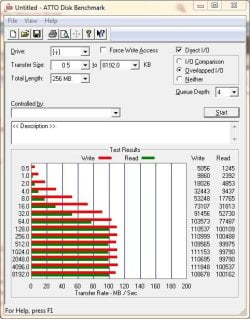
The transfer rate depends on the number of files, but the numbers look out of whack. The ATTO benchmark shows this for the eSATA drive:

Attogb.JPG

I am not sure as to why Windows shows different numbers? While the Seagate does have 32MB cashe, I doubt that it would impact the transfer rate that much.


My Computer My Computer

Computer type
PC/Desktop
Computer Manufacturer/Model Number
Custom built at Home
OS
Windows 7 64-bit, Windows 8.1 64-bit, OSX El Capitan, Windows 10 (VMware)
CPU
Intel i5-3350P 3.1 GHz
Motherboard
Gigabyte GA-Z77X-UP5 TH
Memory
16 GBs GSkill Sniper
Graphics Card(s)
Radeon HD 7850
Sound Card
VIA HD Audio
Monitor(s) Displays
Dell U2410 24"
Screen Resolution
1920x1200
Hard Drives
1 x Intel 520 240 GBs
1 x Seagate 1TBs SATA 2.0,
1 x Seagate 1TBs eSATA 2.0
PSU
Thermaltake 850W
Case
Antec P183
Cooling
Noctua NH-D14 Heatsink 2 x 120mm fans, 4 x 120mm case fans
Keyboard
Dell Multimedia keyboard
Mouse
Logitech Trackball
Internet Speed
28.5 Mb/s
Sorry I can't help right now, my MB is rma'd. If this helps - Macrium backup approx 25GB on a Vertex2. To External Samsung hd103SJ 7200 in a Rosewill esata case takes 3:40. Same backup to 7200 rpm Seagate usb 3.0 external 6:05. My specs will show a sata 6Gb/s sata and USB 3.0 MB.

BTW: The same backup to an internal drive is the same time as the eSATA external. The internal drive is a SATA3, the external is an eSATA2. My experience shows that eSATA will always be faster than USB. FWIW, I was told that eSATA is transmitting a sata signal to a sata drive. A USB is transferring a different type of signal and has to be converted to sata causing a bottleneck for the usb.
 

My Computers My Computers

System One System Two

  • Computer type
    PC/Desktop
    Computer Manufacturer/Model Number
    ALWAYS UNDER CONSTRUCTION
    OS
    Windows 11 Pro
    CPU
    Ryzen 9 5900X
    Motherboard
    Asus X570 Crosshair Viii Hero
    Memory
    32GB G Skill DDR4-3600
    Graphics Card(s)
    EVGA RTX 3080 FTW 3 Ultra
    Sound Card
    On Board/Sennheiser PC37X Headset
    Monitor(s) Displays
    3 X Asus 27"
    Screen Resolution
    2560x1440
    Hard Drives
    2 X 1 TB NVME drives
    PSU
    EVGA 850
    Case
    Phanteks Eclipse P400A
    Cooling
    EVGA 280 AIO
    Keyboard
    Logitech G510s/ Logitech G13
    Mouse
    Logitech G502
    Internet Speed
    24/1
    Antivirus
    ESET/MBAM Pro/SAS Pro
    Browser
    Chrome/ Firefox/ Edge
  • Computer type
    Laptop
    System Manufacturer/Model Number
    Dell 16 Plus
    OS
    Windows 11 Pro
    CPU
    Intel Ultra 9 288V
    Memory
    32 GB LPDDR5X 8533
    Monitor(s) Displays
    16" Mini-LED HDR600 Touch 90 Hz
    Screen Resolution
    2560X1600
    Hard Drives
    1 TB NVME
The signal/protocol is changed for the USB 3.0 devices, it is using the same 8b/10b encoding as the SATA does. Presumably, this will eliminate the bottleneck related to the conversion of the signals.

Keep in mind that in addition to the USB 3.0 port and devices, the USB 3.0 cable is also required. The latter one has two additional pairs of wires for high speed transfers, next to the standard USB 2.0 and the power wires.

The USB 3.0's nominal speed of 5Gbs is still slower than eSATA 3.0 speed of 6.0Gbs. With mechanical hard drives, that cannot reach SATA 2.0 speed, it's not an issue; both types of interfaces should have the same speed for the given drive. In the case of the external SSD drive, the USB 3.0 interface could be a limiting factor and depends on the SSD drive's specifications.
 

My Computer My Computer

Computer type
PC/Desktop
Computer Manufacturer/Model Number
Custom built at Home
OS
Windows 7 64-bit, Windows 8.1 64-bit, OSX El Capitan, Windows 10 (VMware)
CPU
Intel i5-3350P 3.1 GHz
Motherboard
Gigabyte GA-Z77X-UP5 TH
Memory
16 GBs GSkill Sniper
Graphics Card(s)
Radeon HD 7850
Sound Card
VIA HD Audio
Monitor(s) Displays
Dell U2410 24"
Screen Resolution
1920x1200
Hard Drives
1 x Intel 520 240 GBs
1 x Seagate 1TBs SATA 2.0,
1 x Seagate 1TBs eSATA 2.0
PSU
Thermaltake 850W
Case
Antec P183
Cooling
Noctua NH-D14 Heatsink 2 x 120mm fans, 4 x 120mm case fans
Keyboard
Dell Multimedia keyboard
Mouse
Logitech Trackball
Internet Speed
28.5 Mb/s
This is fantastic stuff guys. Please keep it up.

@cr00zng - So basicly either way eSata is still faster than USB overall for a HDD then?

Lucky
 

My Computer My Computer

Computer Manufacturer/Model Number
The HAFmeister (Custom)
OS
Windows 7 Ultimate x64 RTM + SP1
CPU
Intel Core i7 950 3.06GHZ (OC'd to 3.99Ghz)
Motherboard
Asus Rampage III Extreme x58 SATA 6GB & USB 3.0
Memory
6GB OCZ Reaper HPC Edition PC3-16000 (set 1606Mhz 8-8-8-26)
Graphics Card(s)
EVGA Nvidia Geforce GTX 570
Sound Card
Creative SB X-Fi Titanium Fatal1ty Professional Series
Monitor(s) Displays
Samsung SM2433BW 24" Widescreen Monitor
Screen Resolution
1920x1200
Hard Drives
Western Digital Caviar Black 500GB 32Mb Buffer SATA II
Western Digital Caviar Black 750GB 32Mb Buffer SATA II
Western Digital Caviar Blue 500GB 16Mb Buffer SATA II
Western Digital My Book Essential Edition 750GB USB
Samsung Spinpoint 2TB SATA II
PSU
Thermaltake Toughpower 1200w (Modular)
Case
CoolerMaster HAF-932
Cooling
Zalman Reserator XT and ZM-WB5 Plus - GPU uses Stock coolers
Keyboard
Logitech G510
Mouse
Logitech G9 Gaming Mouse
Internet Speed
3MB Profile - 350-400kbs (Real-Speed)
Other Info
IcyBox Hot-Swap Bay,
Logitech G27 Steering Wheel,
Xbox 360 Wirless Elite Controller with Microsoft Reciever and
Play & Charge Kit,
Belkin USB Wireless Adaptor,
GAME Generic Controller (Playstation Looky-Likey),
Epson SX125 All-in-One.
This is fantastic stuff guys. Please keep it up.

@cr00zng - So basicly either way eSata is still faster than USB overall for a HDD then?

I am not who you addressed the question to, but I said earlier that it was. I have and use both, and in my experience eSATA is faster. That's my story and I'll stick to it.
 

My Computers My Computers

System One System Two

  • Computer type
    PC/Desktop
    Computer Manufacturer/Model Number
    ALWAYS UNDER CONSTRUCTION
    OS
    Windows 11 Pro
    CPU
    Ryzen 9 5900X
    Motherboard
    Asus X570 Crosshair Viii Hero
    Memory
    32GB G Skill DDR4-3600
    Graphics Card(s)
    EVGA RTX 3080 FTW 3 Ultra
    Sound Card
    On Board/Sennheiser PC37X Headset
    Monitor(s) Displays
    3 X Asus 27"
    Screen Resolution
    2560x1440
    Hard Drives
    2 X 1 TB NVME drives
    PSU
    EVGA 850
    Case
    Phanteks Eclipse P400A
    Cooling
    EVGA 280 AIO
    Keyboard
    Logitech G510s/ Logitech G13
    Mouse
    Logitech G502
    Internet Speed
    24/1
    Antivirus
    ESET/MBAM Pro/SAS Pro
    Browser
    Chrome/ Firefox/ Edge
  • Computer type
    Laptop
    System Manufacturer/Model Number
    Dell 16 Plus
    OS
    Windows 11 Pro
    CPU
    Intel Ultra 9 288V
    Memory
    32 GB LPDDR5X 8533
    Monitor(s) Displays
    16" Mini-LED HDR600 Touch 90 Hz
    Screen Resolution
    2560X1600
    Hard Drives
    1 TB NVME

My Computer My Computer

Computer Manufacturer/Model Number
HP, Dell, Gateway, Toshiba - 4 laptops and 2 desktops
OS
Vista, Windows7, Mint Mate, Zorin, Windows 8
CPU
from 1.6GHz Duo to i7
Monitor(s) Displays
2x HP w2207
Hard Drives
5x HDD, 7x SSD, 12x Externals
Keyboard
with trackball - no mices
Mouse
Trackball mice
Internet Speed
DSL 6000
Thanks for the links whs...

Well, I doubt that the guy in the video had any problems with cooling that system;)

What he was doing is comparing transfer speeds of the USB 3.0 and eSATA 2.0 interfaces, presumably the internal connection was to the SATA 2.0 port. All of his SSDs drives had SATA 2.0 interfaces as well. His assumption that the OCZ Vertex read speed (275MBs) is faster that any of the interfaces (300MBs for SATA 2.0 and 400MBs for USB 3.0) was just wrong.

While the test setup is questionable, the results speak for themselves. The USB 3.0 has barely eclipsed the performance of the eSATA 2.0. For all practical purposes, you could call this a tie knowing how knowledgeable this guy was:rolleyes:

I am not sure if there's much conclusion can be drawn from the MAC link. They've also used SATA 2.0 drives and interfaces, in addition to the USB 3.0. The latter one isn't "officially" supported by Apple as of yet AFAIK, accordingly the results should be viewed as such.

It seems that for the time being, or until all of the bugs are removed for the USB 3.0, even the eSATA 2.0 interface is faster. That should take about a year plus the time it takes to gain popularity to spread the USB 3.0 around. Until then, and just like essenbe had experienced, the eSATA will be faster...

While Intel motherboard currently don't support eSATA 3.0 interface, it is available with a PCIe x4 card which will support throughput of 600MBs. It doesn't seem at this point that the eSATA 3.0 interface will be integrated into the Intel motherboard anytime soon for number of reasons...
 

My Computer My Computer

Computer type
PC/Desktop
Computer Manufacturer/Model Number
Custom built at Home
OS
Windows 7 64-bit, Windows 8.1 64-bit, OSX El Capitan, Windows 10 (VMware)
CPU
Intel i5-3350P 3.1 GHz
Motherboard
Gigabyte GA-Z77X-UP5 TH
Memory
16 GBs GSkill Sniper
Graphics Card(s)
Radeon HD 7850
Sound Card
VIA HD Audio
Monitor(s) Displays
Dell U2410 24"
Screen Resolution
1920x1200
Hard Drives
1 x Intel 520 240 GBs
1 x Seagate 1TBs SATA 2.0,
1 x Seagate 1TBs eSATA 2.0
PSU
Thermaltake 850W
Case
Antec P183
Cooling
Noctua NH-D14 Heatsink 2 x 120mm fans, 4 x 120mm case fans
Keyboard
Dell Multimedia keyboard
Mouse
Logitech Trackball
Internet Speed
28.5 Mb/s
You made a good summary of the situation. But at the end I wonder whether it really matters whether you use USB3 or eSata because most disks are too slow to take advantage of those speeds anyhow. And who can afford a SSD as an external drive.
 

My Computer My Computer

Computer Manufacturer/Model Number
HP, Dell, Gateway, Toshiba - 4 laptops and 2 desktops
OS
Vista, Windows7, Mint Mate, Zorin, Windows 8
CPU
from 1.6GHz Duo to i7
Monitor(s) Displays
2x HP w2207
Hard Drives
5x HDD, 7x SSD, 12x Externals
Keyboard
with trackball - no mices
Mouse
Trackball mice
Internet Speed
DSL 6000
Well i have to say the latest info is a bit of situation changer.

So i guess really for price: performance i will be better off going down the eSata route as i will be using WD Caviar Blues for my external.

Thanks for the information guys its a real help, perhaps USB 3.0 is just a bit of a marketing gimick (Depending on your use of course).

I think it would be safe to say that thread can be closed as i have my made my mind up.

Thanks again all.

Lucky
 

My Computer My Computer

Computer Manufacturer/Model Number
The HAFmeister (Custom)
OS
Windows 7 Ultimate x64 RTM + SP1
CPU
Intel Core i7 950 3.06GHZ (OC'd to 3.99Ghz)
Motherboard
Asus Rampage III Extreme x58 SATA 6GB & USB 3.0
Memory
6GB OCZ Reaper HPC Edition PC3-16000 (set 1606Mhz 8-8-8-26)
Graphics Card(s)
EVGA Nvidia Geforce GTX 570
Sound Card
Creative SB X-Fi Titanium Fatal1ty Professional Series
Monitor(s) Displays
Samsung SM2433BW 24" Widescreen Monitor
Screen Resolution
1920x1200
Hard Drives
Western Digital Caviar Black 500GB 32Mb Buffer SATA II
Western Digital Caviar Black 750GB 32Mb Buffer SATA II
Western Digital Caviar Blue 500GB 16Mb Buffer SATA II
Western Digital My Book Essential Edition 750GB USB
Samsung Spinpoint 2TB SATA II
PSU
Thermaltake Toughpower 1200w (Modular)
Case
CoolerMaster HAF-932
Cooling
Zalman Reserator XT and ZM-WB5 Plus - GPU uses Stock coolers
Keyboard
Logitech G510
Mouse
Logitech G9 Gaming Mouse
Internet Speed
3MB Profile - 350-400kbs (Real-Speed)
Other Info
IcyBox Hot-Swap Bay,
Logitech G27 Steering Wheel,
Xbox 360 Wirless Elite Controller with Microsoft Reciever and
Play & Charge Kit,
Belkin USB Wireless Adaptor,
GAME Generic Controller (Playstation Looky-Likey),
Epson SX125 All-in-One.
Most HDD's are certainly too slow for USB 3.0, or for that matter for SATA 2.0 interfaces. The SSDs are not and while they are relatively expensive at the current time, it'll change with time.

There are fast USB 3.0 external drives available now for about 200 bucks, such as these:

Newegg.com - OCZ Enyo OCZSSDU3-1ENY64G 64GB USB 3.0 MLC External Solid State Drive (SSD)

Newegg.com - Kingston HyperX MAX 3.0 64GB External USB 3.0 Flash Drive Model SHX100U3/64G

Both of them built utilizing a SATA II SSD drive and bridge chip to convert between the SATA II and the USB 3.0. The speed difference is mainly due to the type of chip used in the two devices that translates/encapsulate to/from USB and SATA . The extra steps and processing will slow down the effective throughput without question. It seems that Enyo does have a faster conversion chip than the HyperX.

But the main point is that on the back end, it is still SATA II storage with the USB 3.0 external storage devices. With this setup it is impossible to make the USB 3.0 faster than SATA II, or eSATA II. As long as the USB 3.0 and later will rely on the SATA x back end, it'll be impossible for it to surpass the utilized SATA x throughput.

Someone actually took apart the USB 3.0 SSDs:

OCZ Enyo Review

reghardware: From the lab to the mobile living room

I have to admit that, regardless of the throughput loss, the Enyo does look cool;) It's tempting, especially in light of its USB 2.0 support, but it's too early to get one. There aren't many systems around where the USB 3.0 interface can be used and it's way too expensive for a USB 2.0 external storage.
 

My Computer My Computer

Computer type
PC/Desktop
Computer Manufacturer/Model Number
Custom built at Home
OS
Windows 7 64-bit, Windows 8.1 64-bit, OSX El Capitan, Windows 10 (VMware)
CPU
Intel i5-3350P 3.1 GHz
Motherboard
Gigabyte GA-Z77X-UP5 TH
Memory
16 GBs GSkill Sniper
Graphics Card(s)
Radeon HD 7850
Sound Card
VIA HD Audio
Monitor(s) Displays
Dell U2410 24"
Screen Resolution
1920x1200
Hard Drives
1 x Intel 520 240 GBs
1 x Seagate 1TBs SATA 2.0,
1 x Seagate 1TBs eSATA 2.0
PSU
Thermaltake 850W
Case
Antec P183
Cooling
Noctua NH-D14 Heatsink 2 x 120mm fans, 4 x 120mm case fans
Keyboard
Dell Multimedia keyboard
Mouse
Logitech Trackball
Internet Speed
28.5 Mb/s

I guess I just don't understand the desire "yet" to use SSD drives for storage. When I think of an external drive, I think of it being able to hold multiple images, backups, ISO files, and the like. This type of use would also mean that the drive would have to be substantial in size. 64GB just doesn't fit that bill.

Sure you might be able to copy a 1GB file in about 3-4 seconds. But without the SSD it would take like 10 seconds. So, by giving up 6 seconds or so, I could spent 1/2 as much and increase my overall storage space by 30x. I'll take the latter. I just don't find speed to my external drive to the motivating factor...capacity is far more important to me on my external drive.
 

My Computer My Computer

Computer Manufacturer/Model Number
Self-Built in July 2009
OS
Windows 7 Ultimate x64
CPU
Intel Q9550 2.83Ghz OC'd to 3.40Ghz
Motherboard
Gigabyte GA-EP45-UD3R rev. 1.1, F12 BIOS
Memory
8GB G.Skill PI DDR2-800, 4-4-4-12 timings
Graphics Card(s)
EVGA 1280MB Nvidia GeForce GTX570
Sound Card
Realtek ALC899A 8 channel onboard audio
Monitor(s) Displays
23" Acer x233H
Screen Resolution
1920x1080
Hard Drives
Intel X25-M 80GB Gen 2 SSD
Western Digital 1TB Caviar Black, 32MB cache. WD1001FALS
PSU
Corsair 620HX modular
Case
Antec P182
Cooling
stock
Keyboard
ABS M1 Mechanical
Mouse
Logitech G9 Laser Mouse
Internet Speed
15/2 cable modem
Other Info
Windows and Linux enthusiast. Logitech G35 Headset.
PPparks1, using your figures I calculate that you could fill up a 64GB drive in 2.5 minutes. That's pretty quick, but I am not sure if I could get one system image on it. I like speed, but other things are more important.
 

My Computers My Computers

System One System Two

  • Computer type
    PC/Desktop
    Computer Manufacturer/Model Number
    ALWAYS UNDER CONSTRUCTION
    OS
    Windows 11 Pro
    CPU
    Ryzen 9 5900X
    Motherboard
    Asus X570 Crosshair Viii Hero
    Memory
    32GB G Skill DDR4-3600
    Graphics Card(s)
    EVGA RTX 3080 FTW 3 Ultra
    Sound Card
    On Board/Sennheiser PC37X Headset
    Monitor(s) Displays
    3 X Asus 27"
    Screen Resolution
    2560x1440
    Hard Drives
    2 X 1 TB NVME drives
    PSU
    EVGA 850
    Case
    Phanteks Eclipse P400A
    Cooling
    EVGA 280 AIO
    Keyboard
    Logitech G510s/ Logitech G13
    Mouse
    Logitech G502
    Internet Speed
    24/1
    Antivirus
    ESET/MBAM Pro/SAS Pro
    Browser
    Chrome/ Firefox/ Edge
  • Computer type
    Laptop
    System Manufacturer/Model Number
    Dell 16 Plus
    OS
    Windows 11 Pro
    CPU
    Intel Ultra 9 288V
    Memory
    32 GB LPDDR5X 8533
    Monitor(s) Displays
    16" Mini-LED HDR600 Touch 90 Hz
    Screen Resolution
    2560X1600
    Hard Drives
    1 TB NVME
PPparks1, using your figures I calculate that you could fill up a 64GB drive in 2.5 minutes. That's pretty quick, but I am not sure if I could get one system image on it. I like speed, but other things are more important.

Exactly. I guess if I were doing something nefarious on my computer and the law showed up to raid my hideout that I might need to be able to fill my entire 64GB backup drive in under 3 minutes to escape via my secret tunnel....but in the real world...being able to write to my external storage drive this fast is just unnecessary.
 

My Computer My Computer

Computer Manufacturer/Model Number
Self-Built in July 2009
OS
Windows 7 Ultimate x64
CPU
Intel Q9550 2.83Ghz OC'd to 3.40Ghz
Motherboard
Gigabyte GA-EP45-UD3R rev. 1.1, F12 BIOS
Memory
8GB G.Skill PI DDR2-800, 4-4-4-12 timings
Graphics Card(s)
EVGA 1280MB Nvidia GeForce GTX570
Sound Card
Realtek ALC899A 8 channel onboard audio
Monitor(s) Displays
23" Acer x233H
Screen Resolution
1920x1080
Hard Drives
Intel X25-M 80GB Gen 2 SSD
Western Digital 1TB Caviar Black, 32MB cache. WD1001FALS
PSU
Corsair 620HX modular
Case
Antec P182
Cooling
stock
Keyboard
ABS M1 Mechanical
Mouse
Logitech G9 Laser Mouse
Internet Speed
15/2 cable modem
Other Info
Windows and Linux enthusiast. Logitech G35 Headset.
I am not sure if I agree with you pparks...

If you remove the performance incentive of the USB 3.0 SSD drive, then might as well stick with HDDs for OS and applications as well.

I understand your point about the storage, and I do the same with HDD storage on my system. For portable storage on the other hand the USB 3.0 does have benefits, even if it cost more. Speed is one of them and the other is backward compatibility to USB 2.0 is the other. Its price is still high and limited USB 3.0 port availability is the other hold back for me to purchase one. But I can see that people who has a need would go for it, including the ones as you stated to "escape via my secret tunnel..":busted: .

I could get one of the Windows backup image, about 30GBs size, onto one of these USB 3.0 external drive in about 1.25 minutes if essenbe's calculation was correct. Compare that to copying the same image from one HDD to another, it took just over seven minutes to complete. That's more than five times than it would take for an SSD...
 

My Computer My Computer

Computer type
PC/Desktop
Computer Manufacturer/Model Number
Custom built at Home
OS
Windows 7 64-bit, Windows 8.1 64-bit, OSX El Capitan, Windows 10 (VMware)
CPU
Intel i5-3350P 3.1 GHz
Motherboard
Gigabyte GA-Z77X-UP5 TH
Memory
16 GBs GSkill Sniper
Graphics Card(s)
Radeon HD 7850
Sound Card
VIA HD Audio
Monitor(s) Displays
Dell U2410 24"
Screen Resolution
1920x1200
Hard Drives
1 x Intel 520 240 GBs
1 x Seagate 1TBs SATA 2.0,
1 x Seagate 1TBs eSATA 2.0
PSU
Thermaltake 850W
Case
Antec P183
Cooling
Noctua NH-D14 Heatsink 2 x 120mm fans, 4 x 120mm case fans
Keyboard
Dell Multimedia keyboard
Mouse
Logitech Trackball
Internet Speed
28.5 Mb/s
If you remove the performance incentive of the USB 3.0 SSD drive, then might as well stick with HDDs for OS and applications as well.
Why would you stick with HDD's for the OS and apps...you want these to boot, and run super fast. You use them, day in and day out, all of the time. Might as well be as fast as they possibly can be. I don't think the same is true of an external hard drive. You use them randomly, and not all that often.

I could get one of the Windows backup image, about 30GBs size, onto one of these USB 3.0 external drive in about 1.25 minutes if essenbe's calculation was correct. Compare that to copying the same image from one HDD to another, it took just over seven minutes to complete. That's more than five times than it would take for an SSD...
While true, wouldn't you simply run the backup application and create the actual backup file directly onto the external drive itself? If you do this, there is time involved with the application and such running and how fast it can collect the data, compress it and drop it onto the drive. So, rather than taking just 1.25 minutes from a sheer throughput standpoint, maybe it's only 5 minutes to create the image versus 7 minutes to copy it. Now, it's not as dramatic.

And again, if you are backing up an image that is on an internal hard drive over to an external hard drive...do you have a pressing need to finish in under 2 minutes...or can you wait 7 minutes as you are likely doing something else? So, I would still want 20-30X the capacity at less then 1/2 the cost by continuing to use standard HDD as externals. Down the road when capacity is up and prices are down on SSD, my opinion will likely change.
 

My Computer My Computer

Computer Manufacturer/Model Number
Self-Built in July 2009
OS
Windows 7 Ultimate x64
CPU
Intel Q9550 2.83Ghz OC'd to 3.40Ghz
Motherboard
Gigabyte GA-EP45-UD3R rev. 1.1, F12 BIOS
Memory
8GB G.Skill PI DDR2-800, 4-4-4-12 timings
Graphics Card(s)
EVGA 1280MB Nvidia GeForce GTX570
Sound Card
Realtek ALC899A 8 channel onboard audio
Monitor(s) Displays
23" Acer x233H
Screen Resolution
1920x1080
Hard Drives
Intel X25-M 80GB Gen 2 SSD
Western Digital 1TB Caviar Black, 32MB cache. WD1001FALS
PSU
Corsair 620HX modular
Case
Antec P182
Cooling
stock
Keyboard
ABS M1 Mechanical
Mouse
Logitech G9 Laser Mouse
Internet Speed
15/2 cable modem
Other Info
Windows and Linux enthusiast. Logitech G35 Headset.
If you remove the performance incentive of the USB 3.0 SSD drive, then might as well stick with HDDs for OS and applications as well.
Why would you stick with HDD's for the OS and apps...you want these to boot, and run super fast. You use them, day in and day out, all of the time. Might as well be as fast as they possibly can be. I don't think the same is true of an external hard drive. You use them randomly, and not all that often.

It's not much more "super fast" than the external USB 3.0, at least this point in time. If one can wait for the slow external device transfers, the same person could also wait for the slow OS to load. There are plenty of people out there who still run their system with HDD, including myself with the laptop.

While on the usage pattern you have a valid point, but what if one only cares about speed and not pattern and financial justification? Even if it is used infrequently, the high speed portable device is nice to have especially if it can be used on any current computers with reduced speed. The goal with a portable device isn't to store gigabytes of backup images, huge files, etc. The primary goal is to share files, videos, etc, with other systems easily. For that purpose the 64GBs drive is more than sufficient.

I make backup copies of my disk images, and other stuff that I need for redundancy purposes and yes, I can do other things while it completes. I also have plenty of HDD storage available on five SATA II drives. That wasn't the point.

The point was that it is not 120% gain in speed as you stated originally, it is more like 300% gain in speed for the USB 3.0 devices. In a world where people overclock for 10-30% performance gain, real or imagined, even your stated 120% speed gain looks huge and more so the actual 300% gain.

We certainly can agree to disagree of the theory on these points, even if I have no intent to purchase any USB 3.0 devices anytime soon;).
 

My Computer My Computer

Computer type
PC/Desktop
Computer Manufacturer/Model Number
Custom built at Home
OS
Windows 7 64-bit, Windows 8.1 64-bit, OSX El Capitan, Windows 10 (VMware)
CPU
Intel i5-3350P 3.1 GHz
Motherboard
Gigabyte GA-Z77X-UP5 TH
Memory
16 GBs GSkill Sniper
Graphics Card(s)
Radeon HD 7850
Sound Card
VIA HD Audio
Monitor(s) Displays
Dell U2410 24"
Screen Resolution
1920x1200
Hard Drives
1 x Intel 520 240 GBs
1 x Seagate 1TBs SATA 2.0,
1 x Seagate 1TBs eSATA 2.0
PSU
Thermaltake 850W
Case
Antec P183
Cooling
Noctua NH-D14 Heatsink 2 x 120mm fans, 4 x 120mm case fans
Keyboard
Dell Multimedia keyboard
Mouse
Logitech Trackball
Internet Speed
28.5 Mb/s
While on the usage pattern you have a valid point, but what if one only cares about speed and not pattern and financial justification? Even if it is used infrequently, the high speed portable device is nice to have especially if it can be used on any current computers with reduced speed. The goal with a portable device isn't to store gigabytes of backup images, huge files, etc. The primary goal is to share files, videos, etc, with other systems easily. For that purpose the 64GBs drive is more than sufficient.
If one only cares about speed, and usage and finances have no impact, by all means go with the fastest thing you can find and get that.

Obviously your goal of an external drive (sharing files) is different from mine (mass storage). All of my computers at home and at work are networked, so I don't use external drives hardly ever to move something to another machine. Plus, if I need a quick transfer or smaller files, I just use my USB key. For example, I put Dell BIOS's on my USB key and keep it with me. When I get to a laptop at work that is old and out of date, I just plug in my drive and install it. But these are small files...where the difference between 70MB/second and 250MB/sec wouldn't make any real difference.

Like you said, it really comes down to what you want to accomplish and what you use your storage for. I find my eSATA enclosure fast enough with a 5400 RPM Samsung SpinPoint 2TB drive in it. But my drive was also $90. So, while I could spend 2x as much, for 64GB (30x less storage)....for my external storage needs it doesn't seem like the right choice. For you, it might be different.
 

My Computer My Computer

Computer Manufacturer/Model Number
Self-Built in July 2009
OS
Windows 7 Ultimate x64
CPU
Intel Q9550 2.83Ghz OC'd to 3.40Ghz
Motherboard
Gigabyte GA-EP45-UD3R rev. 1.1, F12 BIOS
Memory
8GB G.Skill PI DDR2-800, 4-4-4-12 timings
Graphics Card(s)
EVGA 1280MB Nvidia GeForce GTX570
Sound Card
Realtek ALC899A 8 channel onboard audio
Monitor(s) Displays
23" Acer x233H
Screen Resolution
1920x1080
Hard Drives
Intel X25-M 80GB Gen 2 SSD
Western Digital 1TB Caviar Black, 32MB cache. WD1001FALS
PSU
Corsair 620HX modular
Case
Antec P182
Cooling
stock
Keyboard
ABS M1 Mechanical
Mouse
Logitech G9 Laser Mouse
Internet Speed
15/2 cable modem
Other Info
Windows and Linux enthusiast. Logitech G35 Headset.
Back
Top