
Transfer VHS to HDD for WIN 7

RikoSuave

New member
Local time
9:50 PM
Messages
8
Location
Huntersville, NC
Sorry if this has ? been brought up before but I didn't find it doing a search.

Can someone help me with the a recommendation for a good capture device/software to transfer my old VHS cassettes to my HDD?

I have WIN 7 64 bit and I'd like to make sure it can work with my system.

Thanks,

Riko
 

My Computer My Computer

Computer Manufacturer/Model Number
Home Built
OS
Win7 x64
CPU
Core 2 Quad Q9400 2.66GHz [email protected]
Motherboard
EVGA 790i Ultra SLI
Memory
6GB OCZ 1800 DDR3
Graphics Card(s)
2 X GeForce GTX 275 SLI enabled
Sound Card
Creative Sound Blaster X-Fi
Monitor(s) Displays
Samsung 30" Wide Screen
Screen Resolution
2560 X 1600
Hard Drives
C drive- Western Digital 250GB (mounted inside a HDD cooler)
D drive- Samsung 1TB (mounted inside a HDD cooler)
PSU
Silverstone modular 700W SLI ready PSU
Case
Lian Li Mid Tower
Cooling
1 X 120MM intake, 1 X 140MM, 2 X 120MM and 1 X 80MM exhaust
Keyboard
Logitech MX5500 Bluetooth
Mouse
Logitech MX Revolution Bluetooth
Internet Speed
3.0Mbps
Other Info
Over clocked on stock voltage for CPU, FSB and Nortbridge. Temps on 4 CPU cores idle at 33C and motherboard stays at 36C. Box has been running for over 1 year without one incident of the BSOD.
Welcome to SevenForums!

I did a little research of your question, and I found this page explaining how to do it. If you need help finding hardware that meets that requirement, let us know, and hopefully we can find something for you.

Hope this helps,
~JK
 

My Computer My Computer

Computer Manufacturer/Model Number
Custom
OS
Windows 7 Professional x64
CPU
Intel i7 2600K OC'd @ 4620 MHz
Motherboard
Asus P8Z68-V Pro
Memory
16GB GSkill Sniper 2133 Mhz (4x4GB)
Graphics Card(s)
EVGA GeForce GTX 480 SuperClocked+
Sound Card
Realtek High Definition Audio
Monitor(s) Displays
2x Acer S273HLbmii 27"
Screen Resolution
2 x 1920x1080
Hard Drives
64GB Crucial M4 SSD

Storage: Hitachi 1TB 5400RPM, Samsung 1.5TB 5400RPM
PSU
Corsair HW Series 750w (modular)
Case
Cooler Master HAF 932 Advanced Blue Edition
Cooling
CM Hyper 212+ CPU cooler, 3x 230mm + 1x 140mm case fans
Keyboard
Logitech MK320 (wireless)
Mouse
Logitech MK320 (wireless)
Internet Speed
30 Mb/s : 2 Mb/s
Welcome to SevenForums!

I did a little research of your question, and I found this page explaining how to do it. If you need help finding hardware that meets that requirement, let us know, and hopefully we can find something for you.

Hope this helps,
~JK


Thanks JK,

I've already ran across that web discussion, I was hoping for something more specific like, "Roxio's etc will work with WIN 7..." from someone that has already used it.

Also, thanks for the Speccy thingy it's pretty cool and I filled out my spec info.

Riko
 
Last edited:

My Computer My Computer

Computer Manufacturer/Model Number
Home Built
OS
Win7 x64
CPU
Core 2 Quad Q9400 2.66GHz [email protected]
Motherboard
EVGA 790i Ultra SLI
Memory
6GB OCZ 1800 DDR3
Graphics Card(s)
2 X GeForce GTX 275 SLI enabled
Sound Card
Creative Sound Blaster X-Fi
Monitor(s) Displays
Samsung 30" Wide Screen
Screen Resolution
2560 X 1600
Hard Drives
C drive- Western Digital 250GB (mounted inside a HDD cooler)
D drive- Samsung 1TB (mounted inside a HDD cooler)
PSU
Silverstone modular 700W SLI ready PSU
Case
Lian Li Mid Tower
Cooling
1 X 120MM intake, 1 X 140MM, 2 X 120MM and 1 X 80MM exhaust
Keyboard
Logitech MX5500 Bluetooth
Mouse
Logitech MX Revolution Bluetooth
Internet Speed
3.0Mbps
Other Info
Over clocked on stock voltage for CPU, FSB and Nortbridge. Temps on 4 CPU cores idle at 33C and motherboard stays at 36C. Box has been running for over 1 year without one incident of the BSOD.
Hi there
Actually if your Video VHS machine has a Composite Video out you could use something like WINTV (works on W7) to record the video -- You'll need a TV card that has composite input. A small WIN TV -HVR 900H (USB connection) will do this fine if you haven't got an Internal TV card.

The HVR 900H comes with a set of Composite Video Input connectors.

Just start playing the video and set the WIN TV software for "Composite" input and click the Record button on the software.

The video stream can then also be converted to a DVD as well if you want that can be played on normal DVD players (use a DVD R+ or DVD RW+ - you will need to create a "Top level menu" with some DVD authoring software to create a playable DVD disc that will be playable on "nortmal DVD recorders".

The recorded video stream will play fine on the HDD of a computer however.

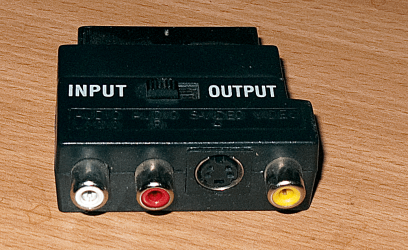
If your VHS recorder has SCART output then a SCART to composite converter (very cheap) will do the job.

BTW the SCART to Composite adapter looks like pic shown below.
(If your old VHS machine as an S-Video connector then you'll get better quality. The HVR 900H has S-Video input as well, and the scart adpater I've shown has it as well -- it's the Circular connection in the middle of the device between the Red and Yellow connectors).


BTW if you don't want to lug your VHS machine up to where your computer is you can use a Video Sender - simply plug the composite output from the Video Sender receiver into the HVR 900H card (or other TV card). - The problem however when using a Video sender near the computer is that you'll get interference from a Wireless router so you'll have to switch off or disable wireless on your router while doing the recording.

The Video sender method will also strip out any stupid macrovision copy protection as well.

I've done this from a DVD recorder to copy "Protected DVD's" to HDD -- I always like to take a small USB external HDD with me when I travel --I can fit a LOT of DVD's on one of these --much better than carrying around a load of physical DVD's.

Note of course these methods copy in "Real Time".

Cheers
jimbo
 

Attachments

  • scart.png
    scart.png
    483.8 KB · Views: 65

My Computer My Computer

Computer type
PC/Desktop
Computer Manufacturer/Model Number
Custom built, several laptops HP/ASUS
OS
Linux CENTOS 7 / various Windows OS'es and servers
CPU
Intel i7 Intel i5
Memory
8GB, 16GB
Graphics Card(s)
On Motherboard
Sound Card
Realtek HD audio
Monitor(s) Displays
Apple Cinema display, Samsung LCD
Screen Resolution
1920 X 1080
Hard Drives
4 X 1TB SATA
Mouse
Toshiba wireless laser
Internet Speed
> 20MB up
Thanks for the good info Jimbo.

And you answered another question I had- about recording in real time. Looks like I'll just have to set my egg timer and run to the PC to hit stop when it ends.

I think I'm going to go with this thingy from Newegg for $19.99 and give it a shot-


VHScapture.jpg
 

My Computer My Computer

Computer Manufacturer/Model Number
Home Built
OS
Win7 x64
CPU
Core 2 Quad Q9400 2.66GHz [email protected]
Motherboard
EVGA 790i Ultra SLI
Memory
6GB OCZ 1800 DDR3
Graphics Card(s)
2 X GeForce GTX 275 SLI enabled
Sound Card
Creative Sound Blaster X-Fi
Monitor(s) Displays
Samsung 30" Wide Screen
Screen Resolution
2560 X 1600
Hard Drives
C drive- Western Digital 250GB (mounted inside a HDD cooler)
D drive- Samsung 1TB (mounted inside a HDD cooler)
PSU
Silverstone modular 700W SLI ready PSU
Case
Lian Li Mid Tower
Cooling
1 X 120MM intake, 1 X 140MM, 2 X 120MM and 1 X 80MM exhaust
Keyboard
Logitech MX5500 Bluetooth
Mouse
Logitech MX Revolution Bluetooth
Internet Speed
3.0Mbps
Other Info
Over clocked on stock voltage for CPU, FSB and Nortbridge. Temps on 4 CPU cores idle at 33C and motherboard stays at 36C. Box has been running for over 1 year without one incident of the BSOD.
Hi there

That's identical to the WinTV device (HVR-900H) but without the TV tuner in it -- the recording software is much the same as well.

Use the S-Video connection for the best quality if your VHS recorder has one.

(You can also use a TV sender as well as described in the previous post -- as I said the device is identical to the WINTV HVR-900H but doesn't have the TV tuner in it).


I think the recording software can be set to stop after a certain time -- so for a 95 min movie say set to 2 hrs and then it will stop automatically.

You can then edit out all the stuff AFTER the film has finished.

If you (like me when I had a VHS recorder) set it to LP and got say 2 films on a tape just record the whole tape to disc and use the editing software to "Split" it where you need to.

LP quality on VHS was almost as good as SP -- doesn't really compare to modern DVD's however. If you can use the S-video output then it will be fine.

Cheers
jimbo
 

My Computer My Computer

Computer type
PC/Desktop
Computer Manufacturer/Model Number
Custom built, several laptops HP/ASUS
OS
Linux CENTOS 7 / various Windows OS'es and servers
CPU
Intel i7 Intel i5
Memory
8GB, 16GB
Graphics Card(s)
On Motherboard
Sound Card
Realtek HD audio
Monitor(s) Displays
Apple Cinema display, Samsung LCD
Screen Resolution
1920 X 1080
Hard Drives
4 X 1TB SATA
Mouse
Toshiba wireless laser
Internet Speed
> 20MB up
Back
Top