Transfering files from XP hard drive to Windows 7

DanH

New member
Local time
2:27 PM
Messages
4
My motherboard on my laptop that was running XP went out. I bought a new laptop with Windows 7 and want to transfer some files from my old hard drive onto my new machine. From what I've read, it seems that I would have to install Windows Easy Transfer on the old machine before I can transfer the files to a machine running Windows 7. However, since my old machine won't boot, there doesn't seem to be a way around this. Other than putting my hard drive into another machine and booting off of it, is there a way to transfer my files?
 

My Computer My Computer

At a glance

Windows 7
OS
Windows 7
If your system is completely non-operational, then you will probably have to remove the drive and slave it into another computer. If there is space on the drive, you could create a new partition and copy the data you want to save to the new partition. Or, you could copy what you want to save to a USB flash drive, SD card, etc.
 

My Computer My Computer

At a glance

Windows 7 Ultimate x64 SP1Core i7-2670QM8GB DDR3 PC3-10600Intel HD Graphics 3000 + GeForce GT 540M
Computer Manufacturer/Model Number
Dell XPS 15 L502x
OS
Windows 7 Ultimate x64 SP1
CPU
Core i7-2670QM
Memory
8GB DDR3 PC3-10600
Graphics Card(s)
Intel HD Graphics 3000 + GeForce GT 540M
Screen Resolution
1920x1080
Hard Drives
1TB 5400RPM Seagate
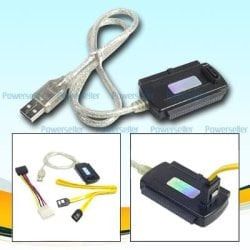
Thank you for your response. I'm sort of a novice about these kind of things, so I apologize if I'm not understanding you right or if I wasn't clear in my original post. I've read that I can buy a USB to IDE adapter and plug the old hard drive into my new computer and transfer the files. Before purchasing this, I wanted to make sure that it would work and that's when I read that Windows Easy Transfer would have to be utilized when transferring files from an XP machine to Windows 7. However, are you saying that this isn't necessary if I use this adapter and plug it into the new laptop as a slave device?
 

My Computer My Computer

At a glance

Windows 7
OS
Windows 7
Tri-head USB Adapter
 

Attachments

  • Tri_Head_tb24611.jpg
    Tri_Head_tb24611.jpg
    19.7 KB · Views: 112

My Computer My Computer

At a glance

Win7 Enterprise, Win7 x86 (Ult 7600), Win7 x6...AMD fx8350 4ghz, AMD-32 2400mhz, AMD-64 3200m...2gb, 4gb on the Ult 7600, 4gb on Technet RTM,...Draw my own Graphics, several nVidia cards
Computer type
PC/Desktop
Computer Manufacturer/Model Number
Built them myself, Science Experiments !
OS
Win7 Enterprise, Win7 x86 (Ult 7600), Win7 x64 Ult 7600, TechNet RTM on AMD x64 (2.8Ghz)
CPU
AMD fx8350 4ghz, AMD-32 2400mhz, AMD-64 3200mhz, AMDx64 2.8G
Motherboard
SIS 755, ECS-K8M890M-M (Ult 7600), GigaByte & others
Memory
2gb, 4gb on the Ult 7600, 4gb on Technet RTM, 32gb on FX8350
Graphics Card(s)
Draw my own Graphics, several nVidia cards
Sound Card
on motherboard
Monitor(s) Displays
19" flat scr, 28" I-Inc widescr,22" Emprex Widescr, 23" Acer
Screen Resolution
1280 x 1024, 1440 x 900, 1920 x 1080
Hard Drives
6 pata Ide HD's & 2 Sata HD's
added 80gb external on Ult 7600 computer,
numerous extra 1tb, 2TB, 3Tb SATA HD's
A collection of ext HD Docks w/ HDs
PSU
430w, 550w, 600w, 700, 800, etc
Case
All Generic Full Towers
Cooling
Open Air & a few fans, some w/ colored LEDs
Keyboard
Compaq & Dell recycled from GoodWill
Mouse
Made in China Optical Wired Mouse
Internet Speed
Fast Cable InterNet
Antivirus
AVG Free on 24 different Desktops, NO Problems!
Browser
IE 8 is preferred, but use FireFox sometimes
Other Info
Linksys Routers, switches, & Hubs
Too Many USB Flash Drives to count, Biggest is 64GB !
Eight computers in my home network.
Sixteen computers at my business network.
Linked via TeamViewer !
Lots of old used spare computer parts everywhere!
External USB Enclosure

I would pull the drive from the machine and put it in an external USB enclosure, then plug it into the laptop and transfer all the files over.
 

My Computer My Computer

At a glance

Windows XP Pro, Windows 7
OS
Windows XP Pro, Windows 7
Coppertrail,

Thank you, but what I'm asking is if this will work if the original drive is from a Windows XP machine and my new laptop is Windows 7. Will the files transfer over if I just plug the old hard drive into my new machine? Nothing else would need to be done to the old hard drive beforehand, ie install Windows Easy Transfer?
 

My Computer My Computer

At a glance

Windows 7
OS
Windows 7
No, you wouldn't have to do anything to the old hard drive--but you shouldn't try to copy over installed programs. Just go after your personal data---bookmarks, email, pictures, video, mp3, Word files, etc.
 

My Computer My Computer

At a glance

Windows 7 Home Premium SP1, 64-bitIntel Skylake i5-6600K, not overclocked8 GB HyperX DDR4-2666 (2 x 4 GB)none; graphics are integrated on CPU
Computer type
PC/Desktop
Computer Manufacturer/Model Number
Ignatz Special; 4 speed manual gearbox; factory air conditioning; one of one
OS
Windows 7 Home Premium SP1, 64-bit
CPU
Intel Skylake i5-6600K, not overclocked
Motherboard
AsRock Z170M Extreme 4, micro ATX
Memory
8 GB HyperX DDR4-2666 (2 x 4 GB)
Graphics Card(s)
none; graphics are integrated on CPU
Sound Card
onboard: Realtek ALC1150; external: USB Behringer UF0-202
Monitor(s) Displays
Dell S2340M 23 inch IPS
Screen Resolution
1600 x 900
Hard Drives
System: Crucial MX100 series SSD, 128 GB;
Data: Samsung Spinpoint 103SJ, 1 TB;
Backup: WD Caviar Green WD30EZRX-00D8PB0, 3 TB
PSU
Rosewill SilentNight 500 watt fanless, semi-modular
Case
Antec Solo II
Cooling
Noctua NH-U12S; Noctua F12 intake, Noctua S12A exhaust
Keyboard
Microsoft 200 6JH-00001 USB
Mouse
Dell or Microsoft optical wired; USB
Antivirus
Microsoft Security Essentials and Malwarebytes Premium
Browser
Pale Moon
Other Info
All fans PWM; speeds at idle: CPU circa 500 rpm; intake circa 600 rpm; exhaust circa 600 rpm; CPU temps 27 idle and 47 C load in a warm room (27 C/81 F) when running Intel Extreme Tuning Utility stress test.
Coppertrail,

Thank you, but what I'm asking is if this will work if the original drive is from a Windows XP machine and my new laptop is Windows 7. Will the files transfer over if I just plug the old hard drive into my new machine? Nothing else would need to be done to the old hard drive beforehand, ie install Windows Easy Transfer?


If you use the adapter or an enclosure for the old laptop HD & it is not damaged in any way, you should be able to copy files, docs, pics, music, etc. But programs will have to be installed new. If you want settings from old HD you should look at the WET tutorial :orb:

http://www.sevenforums.com/tutorials/11470-windows-easy-transfer-transfer-computers.html?ltr=W
 

My Computer My Computer

At a glance

Win7 Enterprise, Win7 x86 (Ult 7600), Win7 x6...AMD fx8350 4ghz, AMD-32 2400mhz, AMD-64 3200m...2gb, 4gb on the Ult 7600, 4gb on Technet RTM,...Draw my own Graphics, several nVidia cards
Computer type
PC/Desktop
Computer Manufacturer/Model Number
Built them myself, Science Experiments !
OS
Win7 Enterprise, Win7 x86 (Ult 7600), Win7 x64 Ult 7600, TechNet RTM on AMD x64 (2.8Ghz)
CPU
AMD fx8350 4ghz, AMD-32 2400mhz, AMD-64 3200mhz, AMDx64 2.8G
Motherboard
SIS 755, ECS-K8M890M-M (Ult 7600), GigaByte & others
Memory
2gb, 4gb on the Ult 7600, 4gb on Technet RTM, 32gb on FX8350
Graphics Card(s)
Draw my own Graphics, several nVidia cards
Sound Card
on motherboard
Monitor(s) Displays
19" flat scr, 28" I-Inc widescr,22" Emprex Widescr, 23" Acer
Screen Resolution
1280 x 1024, 1440 x 900, 1920 x 1080
Hard Drives
6 pata Ide HD's & 2 Sata HD's
added 80gb external on Ult 7600 computer,
numerous extra 1tb, 2TB, 3Tb SATA HD's
A collection of ext HD Docks w/ HDs
PSU
430w, 550w, 600w, 700, 800, etc
Case
All Generic Full Towers
Cooling
Open Air & a few fans, some w/ colored LEDs
Keyboard
Compaq & Dell recycled from GoodWill
Mouse
Made in China Optical Wired Mouse
Internet Speed
Fast Cable InterNet
Antivirus
AVG Free on 24 different Desktops, NO Problems!
Browser
IE 8 is preferred, but use FireFox sometimes
Other Info
Linksys Routers, switches, & Hubs
Too Many USB Flash Drives to count, Biggest is 64GB !
Eight computers in my home network.
Sixteen computers at my business network.
Linked via TeamViewer !
Lots of old used spare computer parts everywhere!
I did this with my Mom's computer. She had an XP Laptop and we got her a Win 7 desktop. I pulled the drive from her laptop and put it in a USB enclosure. A word of advice though: Before you plug in your old hard drive, completely disable UAC on the Win7 machine. I ran into permissions issues on the old hard drive, I had to take ownership of several of her folders on her old drive. But once I disabled UAC, it worked fine. And it will not modify your old drive as long as you copy rather than move the files. You'll need to re-install any programs because of registry entries, etc.
 

My Computer My Computer

At a glance

Windows XP Pro, Windows 7
OS
Windows XP Pro, Windows 7
Thank you everyone. I will try that.
 

My Computer My Computer

At a glance

Windows 7
OS
Windows 7
No need to disable UAC. Just connect the second drive and access the files. You may run into "permission denied" issues (depending on where the files are on the disk). No problem, just right-click on the parent folder and take ownership. I have done the same for multiple disks without issue.

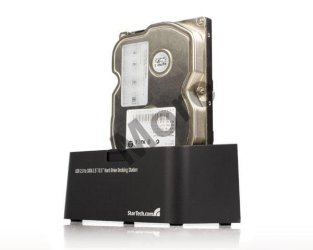
BTW, DocBrown's cable is a great solution. There are many such cables available for IDE and SATA drives...and you can get them extremely inexpensively. Much easier than cracking open the case for such a transfer. I went a little higher end since I connect such drives rather frequently...so I have something like what is pictured below...but the concept is the same. It's just a little faster to drop one into a dock....and it takes up less desk real estate for me. :)

cheers,
Steve
 

Attachments

  • media.jpg
    media.jpg
    16.5 KB · Views: 12

My Computer My Computer

At a glance

Win 7 Pro 64 BitQ66004GB8800GT
Computer Manufacturer/Model Number
Shuttle (SFF) / SP35P2 Pro
OS
Win 7 Pro 64 Bit
CPU
Q6600
Motherboard
Shuttle
Memory
4GB
Graphics Card(s)
8800GT
Sound Card
On Board
Monitor(s) Displays
Samsung 22"
Screen Resolution
1680x1050
Hard Drives
WD 640 Boot
WD 640 Data
WD 500 external backup
PSU
Shuttle 450 Watt
Case
Shuttle
Cooling
Fans...lots of them
Keyboard
Creative Fatal1ty
Mouse
Logitech MX518
Internet Speed
Wicked Fast
Other Info
Capricorn
I am trying to do this now with the tri head adapter. The drive shows up as drive F but I cannot access it with out formatting it. The warning say's all data will be lost. Any suggestions?
 

My Computer My Computer

At a glance

windows 7 home premiumceleron2 gig
Computer Manufacturer/Model Number
hp cq60-615dx
OS
windows 7 home premium
CPU
celeron
Memory
2 gig
If you're getting a message that the drive needs to be formatted before you can use it, that means the file system on it is already corrupted and unreadable. You might be able to use some recovery software to get some of the files back, but I think you're pretty much done with that old drive.
 

My Computer My Computer

At a glance

Windows 7 Ultimate RTM (Technet)3.00 gigahertz Intel Core2 Duo E84004GBATI Radeon X1950 Pro
Computer Manufacturer/Model Number
Custom
OS
Windows 7 Ultimate RTM (Technet)
CPU
3.00 gigahertz Intel Core2 Duo E8400
Motherboard
ASUSTeK Computer INC. P5K/EPU Rev 1.xx
Memory
4GB
Graphics Card(s)
ATI Radeon X1950 Pro
Sound Card
Built in HD Audio
Monitor(s) Displays
22" Gateway LCD
Screen Resolution
1920 x 1200
Hard Drives
ST3160023A [Hard drive] (160.04 GB) -- drive 0, rev 8.01, ST3500630AS [Hard drive] (500.11 GB) -- drive 2, rev 3.AAK
ST3500630AS [Hard drive] (500.11 GB) -- drive 1, rev 3.AAK
Keyboard
Logitech G11
Mouse
Microsoft Wireless Laser Mouse 5000
Internet Speed
13.44 Mbps
One possible other alternative, not too likely, I had an older USB/IDE enclosure, probably 5 years old and it would not handle my new drive because it was larger than 120GB. Using the new 500GB drive in this older adapter the new computer reported that the drive needed to be formatted. When I attached the same drive with a mew adapter, it worked fine and the data was accessible.
 

My Computer My Computer

At a glance

Windows 7 Pro 64i7 2760QM 2.4GHz8GBIntel HD/Nvidia GeForce 555M
Computer Manufacturer/Model Number
Dell XPS17 laptop
OS
Windows 7 Pro 64
CPU
i7 2760QM 2.4GHz
Memory
8GB
Graphics Card(s)
Intel HD/Nvidia GeForce 555M
Sound Card
RealTek
Monitor(s) Displays
Ntrig DuoSense digitzer, touchscreen
Hard Drives
750GB
Mouse
Synaptics touchpad
I'd look into periboob's idea first. :thumbsup:

Failing that, try to find the partition on the old drive using something like this:

TestDisk - CGSecurity
 

My Computer My Computer

At a glance

Main - Windows 7 Pro SP1 64-Bit; 2nd - Window...Main - Core i7 2600K; 2nd - Core i7 920Main - 16GB Corsair Vengeance; 2nd - 12GB Cor...Main - XFX Radeon 6870 1GB; 2nd - XFX Radeon ...
Computer Manufacturer/Model Number
Self
OS
Main - Windows 7 Pro SP1 64-Bit; 2nd - Windows Server 2008 R2
CPU
Main - Core i7 2600K; 2nd - Core i7 920
Motherboard
Main - Asus P8Z68-V Pro/Gen3; 2nd - Gigabyte GA-EX58-UDR3
Memory
Main - 16GB Corsair Vengeance; 2nd - 12GB Corsair Vengeance
Graphics Card(s)
Main - XFX Radeon 6870 1GB; 2nd - XFX Radeon 4870 1GB
Sound Card
Both: Onboard Realtek Azalia
Monitor(s) Displays
Main - Hann 25" + I-INC 25" + Acer 23"; 2nd - Upgrading Soon
Screen Resolution
Main - 1920x1080 (All Three Monitors); 2nd - Upgrading Soon
Hard Drives
Main - (1) Crucial M4 128GB (Boot)
Main - (1) Seagate 2TB 64MB Cache (Data)
Main - (1) Seagate 2TB 64MB Cache (Data Backup)
2nd - (1) Intel X25-M SSD 80GB (Boot)
2nd - (3) Seagate 1TB 32MB Cache (Data Backup)
2nd - (1) Seagate 320GB (Because)
PSU
Main - OCZ 600W Modular; 2nd - OCZ 600W
Case
Main - Thermaltake Element G; 2nd - NZXT something or other
Cooling
Main - Corsair H80; 2nd - Prolimatech Megahalems
Keyboard
Main - Razer Reclusa; 2nd - Old MS Keyboard
Mouse
Main - Logitech MX Revolution; 2nd - Old MS Mouse
Internet Speed
20Mbps Time-Warner Cable
Back
Top