
Translucent Selection Rectangle

AGlobalThreatsK

Computer Technician
Power User
Local time
4:16 PM
Messages
137
I posted this before, although searching didn't yield any results.

In the visual effects settings in the system properties, there is the option for translucent selection rectangle (By default this is checked). This displays the translucent blue square when you click and drag the mouse. However, this option appears to be broken, since it ONLY affects the desktop. Even when the option is unchecked (I much prefer dotted line borders) it will display the blue translucent rectangle in folders and anywhere else you can see it except for the desktop. I figured they would have had this fixed far before RC1, but my RC1 64 bit still has this problem...

Does that mean this isn't going to be fixed?

Is there any workaround for this? I hate the ugly dark blue box, and I haven't been any to find any way to get rid of it.
 

My Computer

Computer Manufacturer/Model Number
Gateway P7801
OS
7 x64 + XP Pro x86
CPU
Undervolted T9900 3.06 GHz Core2Duo
Memory
4GB DDR3 1066MHz
Graphics Card(s)
NVIDIA 9800M GTS 1GB DDR3 1066 MHz
Monitor(s) Displays
17" WUXGA
Screen Resolution
1920x1200
Hard Drives
32GB Patriot V2 SSD w/ Hyperfast
PSU
9-cell Lithium Ion
Keyboard
Logitech Classic
Mouse
Logitech MX310
Internet Speed
slow AT&T
Other Info
Nlited XP x86 (540MB C:) locked with EWF
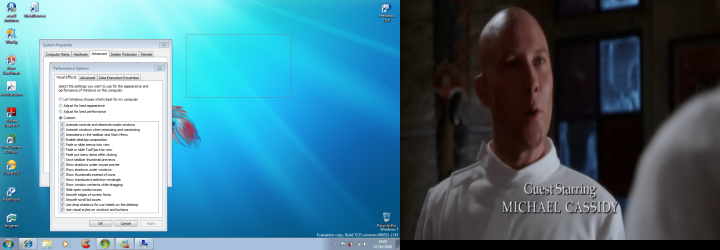
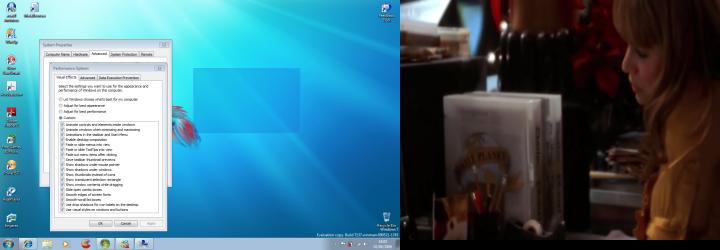
I'm running 7137 x86 & just tested it & it works as it should.
Untitled.png
Untitled1.png

Excuse the large pics i'm twin screening at the minute LOL
 

My Computer

Computer Manufacturer/Model Number
Compaq Desktop
OS
Windows 7 Ultimate x64
CPU
AMD Sempron Dual Core
Memory
3GB
Graphics Card(s)
NVIDIA GeForce 6150SE nForce 430
Screen Resolution
1024x768
Hard Drives
150GB Sata
Yes if you try it in a folder it doesn't matter how you have the option set, you will see the thick blue translucent selection rectangle. I'm not sure if ALL builds are like this, but I have build 7000 and RC1 and they both act this way.

ten nice avatar, my name is Craig :)
 

My Computer

Computer Manufacturer/Model Number
Gateway P7801
OS
7 x64 + XP Pro x86
CPU
Undervolted T9900 3.06 GHz Core2Duo
Memory
4GB DDR3 1066MHz
Graphics Card(s)
NVIDIA 9800M GTS 1GB DDR3 1066 MHz
Monitor(s) Displays
17" WUXGA
Screen Resolution
1920x1200
Hard Drives
32GB Patriot V2 SSD w/ Hyperfast
PSU
9-cell Lithium Ion
Keyboard
Logitech Classic
Mouse
Logitech MX310
Internet Speed
slow AT&T
Other Info
Nlited XP x86 (540MB C:) locked with EWF
Hello AGlobalThreatsK,

It only appears to change on the desktop for me as well with the RC (7137) build. It makes no difference in Windows Explorer. :(
 
Last edited:

My Computer

Computer type
PC/Desktop
Computer Manufacturer/Model Number
Self built custom
OS
64-bit Windows 11 Pro for Workstations
CPU
Intel i7-8700K OC'd to 5 GHz
Motherboard
ASUS ROG Maximus XI Formula Z390
Memory
64 GB (4x16GB) G.SKILL TridentZ RGB DDR4 3600 MHz
Graphics Card(s)
ASUS ROG-STRIX-GTX1080TI-O11G-GAMING
Sound Card
Integrated
Monitor(s) Displays
2 x Samsung Odyssey G7 27"
Screen Resolution
2560x1440
Hard Drives
1TB Samsung 990 PRO M.2,
4TB Samsung 990 PRO PRO M.2,
TerraMaster F8 SSD Plus NAS
PSU
Seasonic Prime Titanium 850W
Case
Thermaltake Core P3
Cooling
Corsair Hydro H115i
Keyboard
Logitech wireless K800
Mouse
Logitech MX Master 4
Internet Speed
2 Gb/s Download and 100 Mb/s Upload
Antivirus
Malwarebyte Anti-Malware Premium
Browser
Google Chrome
Other Info
Logitech Z625 speaker system,
Logitech BRIO 4K Pro webcam,
HP Color LaserJet Pro MFP M477fdn,
APC SMART-UPS RT 1000 XL - SURT1000XLI,
Galaxy S23 Plus phone
Yes if you try it in a folder it doesn't matter how you have the option set, you will see the thick blue translucent selection rectangle. I'm not sure if ALL builds are like this, but I have build 7000 and RC1 and they both act this way.

ten nice avatar, my name is Craig :)

I have the x86 and x64 of RC1 and both have the blue translucent selection everywhere not just the desktop.
 

My Computer

OS
Win 7
Hi YupYup,

We do as well, it's just that when you turn it off in the visual effects settings, it only turns it off for the desktop instead of everywhere like it does in Vista. Do you see this as well?
 

My Computer

Computer type
PC/Desktop
Computer Manufacturer/Model Number
Self built custom
OS
64-bit Windows 11 Pro for Workstations
CPU
Intel i7-8700K OC'd to 5 GHz
Motherboard
ASUS ROG Maximus XI Formula Z390
Memory
64 GB (4x16GB) G.SKILL TridentZ RGB DDR4 3600 MHz
Graphics Card(s)
ASUS ROG-STRIX-GTX1080TI-O11G-GAMING
Sound Card
Integrated
Monitor(s) Displays
2 x Samsung Odyssey G7 27"
Screen Resolution
2560x1440
Hard Drives
1TB Samsung 990 PRO M.2,
4TB Samsung 990 PRO PRO M.2,
TerraMaster F8 SSD Plus NAS
PSU
Seasonic Prime Titanium 850W
Case
Thermaltake Core P3
Cooling
Corsair Hydro H115i
Keyboard
Logitech wireless K800
Mouse
Logitech MX Master 4
Internet Speed
2 Gb/s Download and 100 Mb/s Upload
Antivirus
Malwarebyte Anti-Malware Premium
Browser
Google Chrome
Other Info
Logitech Z625 speaker system,
Logitech BRIO 4K Pro webcam,
HP Color LaserJet Pro MFP M477fdn,
APC SMART-UPS RT 1000 XL - SURT1000XLI,
Galaxy S23 Plus phone
Hi YupYup,

We do as well, it's just that when you turn it off in the visual effects settings, it only turns it off for the desktop instead of everywhere like it does in Vista. Do you see this as well?

Sorry i thought you ment when it is turned on, yes i see the same behavior as you (off setting only effects desktop).
 

My Computer

OS
Win 7
No problem. Well, it's officially a bug then.
 

My Computer

Computer type
PC/Desktop
Computer Manufacturer/Model Number
Self built custom
OS
64-bit Windows 11 Pro for Workstations
CPU
Intel i7-8700K OC'd to 5 GHz
Motherboard
ASUS ROG Maximus XI Formula Z390
Memory
64 GB (4x16GB) G.SKILL TridentZ RGB DDR4 3600 MHz
Graphics Card(s)
ASUS ROG-STRIX-GTX1080TI-O11G-GAMING
Sound Card
Integrated
Monitor(s) Displays
2 x Samsung Odyssey G7 27"
Screen Resolution
2560x1440
Hard Drives
1TB Samsung 990 PRO M.2,
4TB Samsung 990 PRO PRO M.2,
TerraMaster F8 SSD Plus NAS
PSU
Seasonic Prime Titanium 850W
Case
Thermaltake Core P3
Cooling
Corsair Hydro H115i
Keyboard
Logitech wireless K800
Mouse
Logitech MX Master 4
Internet Speed
2 Gb/s Download and 100 Mb/s Upload
Antivirus
Malwarebyte Anti-Malware Premium
Browser
Google Chrome
Other Info
Logitech Z625 speaker system,
Logitech BRIO 4K Pro webcam,
HP Color LaserJet Pro MFP M477fdn,
APC SMART-UPS RT 1000 XL - SURT1000XLI,
Galaxy S23 Plus phone
ones more for explorer... what are crosoft's engineer doing?
 

My Computer

OS
windows seven pro 64bits
CPU
quad 2.8 G
Motherboard
asusp2qd turbo
Memory
corsair 1066Mhz 1G x 4
Graphics Card(s)
nvidia 9600gt
Hard Drives
caviar black
I guess this was never fixed, as I have the same problem on Windows 7 Professional x64.
 

My Computer

OS
Windows 7 Pro x64
Last edited:

My Computer

Computer Manufacturer/Model Number
HP M9077c
OS
Windows 7 Home Premium 64bit
CPU
Intel(R)Core(TM)2 quad [email protected] 2.39GHz
Motherboard
ASUSeK
Memory
6GB DDR2 6400
Graphics Card(s)
GeForce 8500/512MB
Sound Card
Realtek High Def Audio
Monitor(s) Displays
HP w2408 LCD 24" widescreen
Screen Resolution
1920x1200
Cooling
6 pack of Bud
Keyboard
MS wireless Inteli
Mouse
MS wireless Inteli

My Computer

Computer type
PC/Desktop
Computer Manufacturer/Model Number
Self built custom
OS
64-bit Windows 11 Pro for Workstations
CPU
Intel i7-8700K OC'd to 5 GHz
Motherboard
ASUS ROG Maximus XI Formula Z390
Memory
64 GB (4x16GB) G.SKILL TridentZ RGB DDR4 3600 MHz
Graphics Card(s)
ASUS ROG-STRIX-GTX1080TI-O11G-GAMING
Sound Card
Integrated
Monitor(s) Displays
2 x Samsung Odyssey G7 27"
Screen Resolution
2560x1440
Hard Drives
1TB Samsung 990 PRO M.2,
4TB Samsung 990 PRO PRO M.2,
TerraMaster F8 SSD Plus NAS
PSU
Seasonic Prime Titanium 850W
Case
Thermaltake Core P3
Cooling
Corsair Hydro H115i
Keyboard
Logitech wireless K800
Mouse
Logitech MX Master 4
Internet Speed
2 Gb/s Download and 100 Mb/s Upload
Antivirus
Malwarebyte Anti-Malware Premium
Browser
Google Chrome
Other Info
Logitech Z625 speaker system,
Logitech BRIO 4K Pro webcam,
HP Color LaserJet Pro MFP M477fdn,
APC SMART-UPS RT 1000 XL - SURT1000XLI,
Galaxy S23 Plus phone
Back
Top