Transparent

Ashraf768

New member
Local time
7:28 AM
Messages
5
Hey all, its me Ashraf768. I have registered my today, because i have a question. The question is:

My Windows isn't transparent. I see this:

Screen 1:
uwdftkheq.png


screen 2:
ogfzinrmf.png


Please help me.
 

My Computer

Computer type
PC/Desktop
Computer Manufacturer/Model Number
HP
OS
32 bit
Browser
Google Chrome
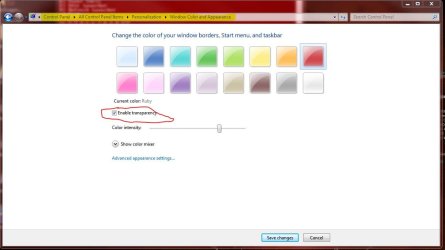
Right click desktop > personalize > windows color > check the 'enable transparency' check box

Save and your explorer should be transparent.

Hope this helps.

Welcome to the forums.
 

My Computer

Computer type
PC/Desktop
Computer Manufacturer/Model Number
Custom Build (multiple machines)
OS
Windows 7 Ultimate x86, Windows 7 Professional x64, Windows 8 Pro x64
CPU
AMD Athlon 7750 Dual-Core 2.70 GHz
Motherboard
ECS GF8200A
Memory
3GB
Graphics Card(s)
Nvidia
Monitor(s) Displays
Asus 24''
Screen Resolution
1680x1050
Antivirus
Microsoft Security Esentials
Browser
IE, Chrome, Firefox (Primary)
Other Info
Will update a full list soon...am planning on upgrading my system later this summer anyways.
Go to
Code:
control panel -> All control panel Items -> Personalization -> Window color and appearance
there should be a check box in that screen labeled enable transparency
 

Attachments

  • Capture.JPG
    Capture.JPG
    53.5 KB · Views: 2

My Computer

Computer Manufacturer/Model Number
Lenovo ThinkCenter, Custom Built PC, Acer Aspire V3-771G-9809
OS
Windows 7 enterprise 64 bit, Windows 7 Pro 64 bit ,Windows 8 64bit
CPU
Core i5-2400, Athlon 64 X2 6400+ ,Core i7-3632QM
Motherboard
ASUS M4A79 Deluxe
Memory
4GB, 4gb g.skill ddr2, 8gb
Graphics Card(s)
Radeon HD 4550 sgb, Radeon HD 4870, NVIDIA Geforce GT 650m
Monitor(s) Displays
dual samsung 22" monitors
Hard Drives
500GB, Western Digital WD Blue WD6400AAKS 640GB 7200 RPM 16MB Cache SATA 3.0Gb/s, 1TB
Case
Antec Twelve Hundred V3 Black Steel ATX Full Tower
Cooling
ASUS Silent Square Pro
Mouse
Razar Death adder
Internet Speed
20 mbps
I don't have that
 

My Computer

Computer type
PC/Desktop
Computer Manufacturer/Model Number
HP
OS
32 bit
Browser
Google Chrome

My Computer

Computer Manufacturer/Model Number
Lenovo ThinkCenter, Custom Built PC, Acer Aspire V3-771G-9809
OS
Windows 7 enterprise 64 bit, Windows 7 Pro 64 bit ,Windows 8 64bit
CPU
Core i5-2400, Athlon 64 X2 6400+ ,Core i7-3632QM
Motherboard
ASUS M4A79 Deluxe
Memory
4GB, 4gb g.skill ddr2, 8gb
Graphics Card(s)
Radeon HD 4550 sgb, Radeon HD 4870, NVIDIA Geforce GT 650m
Monitor(s) Displays
dual samsung 22" monitors
Hard Drives
500GB, Western Digital WD Blue WD6400AAKS 640GB 7200 RPM 16MB Cache SATA 3.0Gb/s, 1TB
Case
Antec Twelve Hundred V3 Black Steel ATX Full Tower
Cooling
ASUS Silent Square Pro
Mouse
Razar Death adder
Internet Speed
20 mbps
Tested, but is don't working.
 

My Computer

Computer type
PC/Desktop
Computer Manufacturer/Model Number
HP
OS
32 bit
Browser
Google Chrome
Update your System Specifications with Speccy, and then copy this information into your System Specifications: Go to your UserCP, and then select Edit System Spec in the left pane. Copy the information from Speccy into the required fields. These System Specifications will then follow your every post.
 

My Computer

Computer type
Laptop
Update your System Specifications with Speccy, and then copy this information into your System Specifications: Go to your UserCP, and then select Edit System Spec in the left pane. Copy the information from Speccy into the required fields. These System Specifications will then follow your every post.
have you skype? than i can give you my teamviewer, i didn't understand this good.
 

My Computer

Computer type
PC/Desktop
Computer Manufacturer/Model Number
HP
OS
32 bit
Browser
Google Chrome
Update uw systeem specificaties met Speccy en kopieer deze informatie in uw systeem Specificaties: Ga naar je UserCP, en selecteer vervolgens Bewerken System Spec in het linkervenster. Kopieer de informatie van Speccy in de vereiste velden. Deze System Specificaties zullen dan volg je elke post.

I've used Google Translate to help you understand my post better, I'm not sure on how accurate it is, but it may be easier for you to understand.
 

My Computer

Computer type
Laptop
To better help us to help you would you please add your systems specs? Here's the correct way to do it. :SystemInfo See Your System Specs Under System Manufacturer/Model Number add whether it is a desktop or laptop and whether self built. Very important

Log in to Seven Forums and you will be able to transfer the info directly to the specs page in your profile from within the System Info app.

After doing this your specs will be available in each of your posts.
Click on My system Specs in the lower left of this post to see how it should look.:)
Full instructions are in the tutorial.
 

My Computer

Computer type
PC/Desktop
Computer Manufacturer/Model Number
Home Built Desktop By DataTech
OS
Windows 7 Ultimate X64 SP1
CPU
Intel i5-2550K, Differing ~4.4-4.8GHz No built in GPU
Motherboard
ASUS P8Z68-V PRO/GEN3
Memory
16GB G.Skill Sniper 1866MHz @ 2133MHz 2x8GB
Graphics Card(s)
ASUS GTX650TIB-DC2OC-2GD5, (650TI Boost)
Sound Card
Onboard Realtek 5-1
Monitor(s) Displays
Samsung P2570HD
Screen Resolution
1920x1080
Hard Drives
Samsung 840 Pro 256GB SSD for OS, 500GB Seagate Constellation (Enterprise drive) for Data
PSU
Corsair HX650W
Case
Inwin Dragon Rider
Cooling
Hyper 212 EVO w/two Noctua fans, push-pull, @1300 RPM
Keyboard
E-Z Eyes, bright yellow keys with large characters
Mouse
steelseries SENSEI Laser Pro Gaming
Internet Speed
48-51Mbs Mbs down, 11 Mbs up Xfinity Cable
Antivirus
Norton Internet Security 2013
Browser
IE 10, Opera, Pale Moon if needed
Other Info
4 case fans, LG BluRay-RE, ASUS DVD-RW, Mr. Fusion power supply, 1.21 gigawatts.
How's it coming along OP?
 

My Computer

Computer type
PC/Desktop
Computer Manufacturer/Model Number
Custom Build (multiple machines)
OS
Windows 7 Ultimate x86, Windows 7 Professional x64, Windows 8 Pro x64
CPU
AMD Athlon 7750 Dual-Core 2.70 GHz
Motherboard
ECS GF8200A
Memory
3GB
Graphics Card(s)
Nvidia
Monitor(s) Displays
Asus 24''
Screen Resolution
1680x1050
Antivirus
Microsoft Security Esentials
Browser
IE, Chrome, Firefox (Primary)
Other Info
Will update a full list soon...am planning on upgrading my system later this summer anyways.
Well, he says that at least is an HP, taking into account that OEMs don't disable visual effects, I can deduce he is using 7 Starter... And sadly enough, he will never be able to enable full Aero (transparent windows) unless he upgrades to a more complete version of W7... By the other hand, upgrading to another version can cause slowdowns (starter is normaly used for low end machnes)... unless the OEM installed starter just to give a better price for the whole PC...

Hope he can fullfull his system specs, but by now the best bet is that this is W7 starter and Aero is not available, even the butchered version...
 

My Computer

Computer type
PC/Desktop
Computer Manufacturer/Model Number
Assembled Desktop PC
OS
Microsoft Windows 7 Home Premium SP1 64-bit Build 7600
CPU
AMD Athlon 64 X2 5200+ Dual Core CPU @ 2.7 Ghz (Brisbane)
Motherboard
PCChips A13G+ v3.0
Memory
2x2 GB DDR2 PC-5300 (667 Mhz) Kingston ValueRAM
Graphics Card(s)
XFX ATI Radeon HD 4350 GPU (512 MB + 512 MB HM)
Sound Card
Realtek High Definition Audio Driver ALC660 @ MCP61S
Monitor(s) Displays
HP S2031 20" LED HD Widescreen Display Monitor
Screen Resolution
1600 x 900 px
Hard Drives
Maxtor Diamond Max 10 (160 GB, 7200 RPM, SATA-II Hard Disk)
Western Digital Scorpion Blue (250 GB, 5400 RPM, SATA-II External Hard Disk - Personal Data)
Toshiba MQ01ABD050 (500 GB, 5400 RPM, SATA-II External Hard Disk - Software & ISOs)
PSU
Pixxo Transformer 850W 80+ Certification PSU
Case
Compaq 5BW353 Case
Cooling
Many solutions, see other info...
Keyboard
Green Leaf (Mitzu) Standard Keyboard
Mouse
Microsoft USB Lasser Pointing Device
Internet Speed
10 MB
Antivirus
Avast Antivirus Free
Browser
Firefox, Chrome, Internet Explorer
Other Info
Windows Experience Index Result: 3.8 of 7.9.

Cooling solutions:
- AVC @ 2000/5000 RPM Copper Heatpipes (For Athlon 64 X2 6000+ CPU used in an Athlon 64 X2 5200+)
- Rear Fan 80 mm @ 2700 RPM for heat extraction
- Manhatan Chipset Cooler @ 4700/7200 RPM (For nVidia Chipset in MoBo)
- Foxconn @ 2500 RPM (Old Pentium III heatsink fan) in XFX ATI Radeon HD 4350
Back
Top