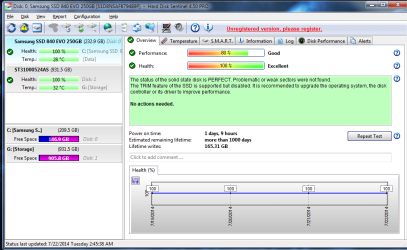
Just installed a Samsung 840 EVO 250GB SSD. Two programs that I use, Hard Disk Sentinel and TrimCheck, both report that trim in not working. The fsutil command returns "0" indicating trim is active. Two other utilities indicate that the SSD supports trim and the feature is active.
PC is Win7 Home Premium 64Bit. SSD is on Sata II Intel controller, PC has a Marvell Sata III controller as well but performance benchmarks are poor. All components have current drivers or firmware. AHCI is active on all Sata ports. Window does recognize the Samsung drive as an SSD.
Have tried all the fixes I know about with no success. I have an identical Samsung drive in another PC and trim is working fine. Any comments or assistance will be much appreciated.
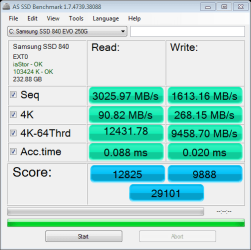
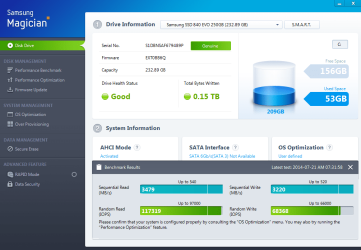
Also, the drive is producing fairly unusual numbers in benchmark tests as you can see from the attachments.
Looking forward to suggestions.
PC is Win7 Home Premium 64Bit. SSD is on Sata II Intel controller, PC has a Marvell Sata III controller as well but performance benchmarks are poor. All components have current drivers or firmware. AHCI is active on all Sata ports. Window does recognize the Samsung drive as an SSD.
Have tried all the fixes I know about with no success. I have an identical Samsung drive in another PC and trim is working fine. Any comments or assistance will be much appreciated.
Also, the drive is producing fairly unusual numbers in benchmark tests as you can see from the attachments.
Looking forward to suggestions.
Attachments
My Computer
- Computer type
- PC/Desktop
- Computer Manufacturer/Model Number
- Cyberpower 5229LQ
- OS
- Windows 7 Home Premium 64bit
- CPU
- Intel Core i7 960 3.20GHz
- Motherboard
- Asus Sabertooth Intel x58
- Memory
- 12GB DDR3
- Graphics Card(s)
- Nvidia Geforce GTX 660 2GB PCI-e
- Hard Drives
- Samsung 840 EVO SSD 250GB
Seagate 1TB 7200RPM
- Antivirus
- Norton Internet Security
- Browser
- Firefox


 .
.