Trim Not Enabled According to HDS?

WinningWith7

New member
Local time
9:31 PM
Messages
25
I have a Samsung SSD 850 PRO 256G which i reccently connected to a Syba SATA III 4 Port PCI-e x2 Controller Card and I installed the latest drivers and re-installs Intel RST because it crashed after adding the PCI card. I noticed in the PCI card boot sequence it said "PassThru AHCI"

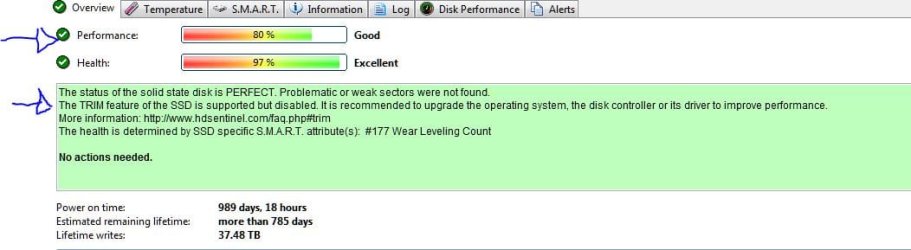
According to Hard Disk Sentinal my TRIM is not enabled, perhaps because of the Marvel controller, but i was under the impression that TRIM/GC etc was done on the controller/SSD level and the drives performance is only at 80%

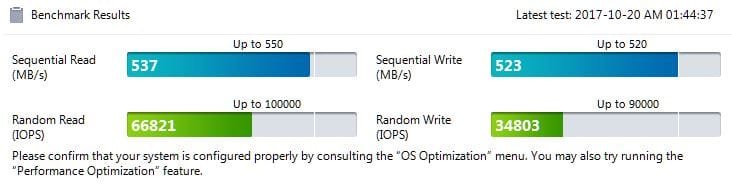
According to Samsung Magician I am getting close to double the speed when connected to the card vs my native sate 2 ports and it says

Is it dangerous to use the SSD on this PCI card like by causing crashes or wearing out the driver far sooner? Should i just connect normal hard drives to it?

Thanks
 

Attachments
  • 1.JPG
    1.JPG
    42.1 KB · Views: 2
  • 2.JPG
    2.JPG
    25.7 KB · Views: 15
Last edited:

My Computer My Computer

Computer type
PC/Desktop
Computer Manufacturer/Model Number
Custom Build
OS
Windows 7 Ultimate x64
CPU
Intel Quad Core Q6600
Motherboard
Asus P5Q pro turbo
Memory
OCZ Reaper 1066
Graphics Card(s)
Asus GTX 460

My Computer My Computer

Computer type
PC/Desktop
Computer Manufacturer/Model Number
medionl/Aspire 6930G/acer x55a
OS
W7 home premium 32bit/W7HP 64bit/w10 tp insider ring
CPU
E5300 dual core
Motherboard
medion MS7366
Memory
3gb
Graphics Card(s)
Nvidia Geforce 7100 Nforce 630i
Monitor(s) Displays
avixc
Internet Speed
n (isp resticted to 72)
Antivirus
mse/pands
Browser
palemoon
Other Info
Belkin Fd7050 n USB using Railink RT2870 drivers, more upto date
- TRIM
Type this cmd
fsutil behavior query DisableDeleteNotify

It will give you one of two results, either a 0 or a 1. A zero indicates that TRIM is enabled correctly, a one means that it is not. If you have a TRIM-compatible SSD, but find that Windows 7 hasn't enabled the command, you can easily do so by running this command:

fsutil behavior set DisableDeleteNotify 0
 

My Computers My Computers

System One System Two

  • Computer type
    PC/Desktop
    Computer Manufacturer/Model Number
    custom build
    OS
    Windows 7 HP 64
    CPU
    i5 6600K - 800MHz to 4200MHz
    Motherboard
    GA-Z170-HD3P
    Memory
    4+4G GSkill DDR4 3000
    Graphics Card(s)
    IG - Intel 530
    Monitor(s) Displays
    Samsung 226BW
    Screen Resolution
    1680x1050
    Hard Drives
    (1) -1 SM951 – 128GB M.2 AHCI PCIe SSD drive for Windows 7 and Lubuntu
    (2) -1 WD SATA 3 - 1T for Data
    (3) -1 WD SATA 3 - 1T for backup
    PSU
    Thermaltake 450W TR2 gold
    Keyboard
    Old and good Chicony mechanical keyboard
    Mouse
    Logitech mX performance - 9 buttons (had to disable some)
    Internet Speed
    500Mb/s
    Browser
    Firefox 64
    Other Info
    TinyWall firewall
  • Computer type
    Laptop
    System Manufacturer/Model Number
    Asus Q550LF
    OS
    Windows 7 Pro
    CPU
    i7-4500U 800MHz to 3.0GHz
    Motherboard
    Asus Q550LF
    Memory
    (4+4)G DDR3 1600
    Graphics Card(s)
    IG intel 4400 + NVIDIA GeForce GT 745M
    Sound Card
    Realtek
    Monitor(s) Displays
    LG Display LP156WF4-SPH1
    Screen Resolution
    1920 x 1080
    Hard Drives
    BX500 120G SSD for Windows and programs +
    1T HDD for data
    Internet Speed
    500 Mb/s
    Browser
    Firefox
    Other Info
    TinyWall firewall
Back
Top