Solved triple booting windows 7, windows 8 and ubuntu

m0nk3n

New member
Member
VIP
Local time
8:52 PM
Messages
125
i have windows 7 installed and i want to get windows 8 and ubuntu which are already on a separate hdd.

i had the hdd with windows 8 and ubuntu already dual boot on a separate desktop so i mounted it in the desktop with windows 7 and booted the computer, even though i force the ssd with windows 7 to boot i get to the ubuntu boot manager which i can choose to boot ubuntu or win 8 but not win 7. i disabled that hdd and could boot into win 7.

can i install or rearrange this boot system in bootmanager or a separate boot manager software?

i have a Silicon image SiI 3132 SATAlink controller that boots the 8 and 9th hdd.
its a extra pciex card in the computer on the motherboard.
 
Last edited:

My Computer My Computer

At a glance

Windows 7 Ultimate 64 Bit SP1i7-4930kcorsair platinum 4x4gb\ddr3 1866mhz + dominat...asus radeon 7970 directcu II top 3gb gddr5
Computer type
PC/Desktop
Computer Manufacturer/Model Number
custom build
OS
Windows 7 Ultimate 64 Bit SP1
CPU
i7-4930k
Motherboard
Asus rampage IV extreme
Memory
corsair platinum 4x4gb\ddr3 1866mhz + dominator gt 2x4gb
Graphics Card(s)
asus radeon 7970 directcu II top 3gb gddr5
Sound Card
Sound Blaster Z
Monitor(s) Displays
3
Screen Resolution
1920 X 1080 \ 5760 X 1600
Hard Drives
3 x samsung 840 evo \ series 250gb, western digital 2tb, western digital 2tb, western digital 2tb, western digital 1.5tb, western digital 1tb
PSU
1050WATT XFX
Case
Xigmatek Elysium
Cooling
Corsair H100
Keyboard
Razer BlackWidow
Mouse
Steelseries Diablo 3 Mouse
Internet Speed
50 \ 50 Mbit
Antivirus
Microsoft Security Essentials
Browser
Google Chrome
the pc i want triple boot on has a asus RIVE while the other one has a P5Q Pro Turbo, its really old.

i can boot into ubuntu or win 8. but not into win 7 when that hdd is enabled. so i disabled that hdd in bios and i could boot into win 7.

i'll try easybcd.
 

My Computer My Computer

At a glance

Windows 7 Ultimate 64 Bit SP1i7-4930kcorsair platinum 4x4gb\ddr3 1866mhz + dominat...asus radeon 7970 directcu II top 3gb gddr5
Computer type
PC/Desktop
Computer Manufacturer/Model Number
custom build
OS
Windows 7 Ultimate 64 Bit SP1
CPU
i7-4930k
Motherboard
Asus rampage IV extreme
Memory
corsair platinum 4x4gb\ddr3 1866mhz + dominator gt 2x4gb
Graphics Card(s)
asus radeon 7970 directcu II top 3gb gddr5
Sound Card
Sound Blaster Z
Monitor(s) Displays
3
Screen Resolution
1920 X 1080 \ 5760 X 1600
Hard Drives
3 x samsung 840 evo \ series 250gb, western digital 2tb, western digital 2tb, western digital 2tb, western digital 1.5tb, western digital 1tb
PSU
1050WATT XFX
Case
Xigmatek Elysium
Cooling
Corsair H100
Keyboard
Razer BlackWidow
Mouse
Steelseries Diablo 3 Mouse
Internet Speed
50 \ 50 Mbit
Antivirus
Microsoft Security Essentials
Browser
Google Chrome
im booted in windows 7. and i know what hdd the windows 8 in, and the ubuntu installation. do i just add the hdd in easybcd ?
 

My Computer My Computer

At a glance

Windows 7 Ultimate 64 Bit SP1i7-4930kcorsair platinum 4x4gb\ddr3 1866mhz + dominat...asus radeon 7970 directcu II top 3gb gddr5
Computer type
PC/Desktop
Computer Manufacturer/Model Number
custom build
OS
Windows 7 Ultimate 64 Bit SP1
CPU
i7-4930k
Motherboard
Asus rampage IV extreme
Memory
corsair platinum 4x4gb\ddr3 1866mhz + dominator gt 2x4gb
Graphics Card(s)
asus radeon 7970 directcu II top 3gb gddr5
Sound Card
Sound Blaster Z
Monitor(s) Displays
3
Screen Resolution
1920 X 1080 \ 5760 X 1600
Hard Drives
3 x samsung 840 evo \ series 250gb, western digital 2tb, western digital 2tb, western digital 2tb, western digital 1.5tb, western digital 1tb
PSU
1050WATT XFX
Case
Xigmatek Elysium
Cooling
Corsair H100
Keyboard
Razer BlackWidow
Mouse
Steelseries Diablo 3 Mouse
Internet Speed
50 \ 50 Mbit
Antivirus
Microsoft Security Essentials
Browser
Google Chrome
You should be able to boot your choice of hard drives via the BIOS. Set the preferred hard drive first to boot, then if you want the other one use the one-time BIOS Boot menu key to trigger it. On Asus that key is normally F8, but you must tap it before it moves to Windows or it then becomes the Advanced Boot Tools key.
 
i can't. i had to disable the hdd that had windows 8 and ubuntu on to get into windows 7.

even with boot override it goes straight to wubi ( ? ) boot menu.

what do i do with easybcd?
 

My Computer My Computer

At a glance

Windows 7 Ultimate 64 Bit SP1i7-4930kcorsair platinum 4x4gb\ddr3 1866mhz + dominat...asus radeon 7970 directcu II top 3gb gddr5
Computer type
PC/Desktop
Computer Manufacturer/Model Number
custom build
OS
Windows 7 Ultimate 64 Bit SP1
CPU
i7-4930k
Motherboard
Asus rampage IV extreme
Memory
corsair platinum 4x4gb\ddr3 1866mhz + dominator gt 2x4gb
Graphics Card(s)
asus radeon 7970 directcu II top 3gb gddr5
Sound Card
Sound Blaster Z
Monitor(s) Displays
3
Screen Resolution
1920 X 1080 \ 5760 X 1600
Hard Drives
3 x samsung 840 evo \ series 250gb, western digital 2tb, western digital 2tb, western digital 2tb, western digital 1.5tb, western digital 1tb
PSU
1050WATT XFX
Case
Xigmatek Elysium
Cooling
Corsair H100
Keyboard
Razer BlackWidow
Mouse
Steelseries Diablo 3 Mouse
Internet Speed
50 \ 50 Mbit
Antivirus
Microsoft Security Essentials
Browser
Google Chrome
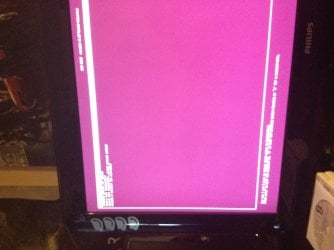
ok when i boot up the computer now i get to this screen.
684riq.jpg


and then i press enter on either windows 8 or ubuntu i get this.

for windows 8
2wc16z9.jpg


and for ubuntu i get this.
2ih1jlf.jpg
 

My Computer My Computer

At a glance

Windows 7 Ultimate 64 Bit SP1i7-4930kcorsair platinum 4x4gb\ddr3 1866mhz + dominat...asus radeon 7970 directcu II top 3gb gddr5
Computer type
PC/Desktop
Computer Manufacturer/Model Number
custom build
OS
Windows 7 Ultimate 64 Bit SP1
CPU
i7-4930k
Motherboard
Asus rampage IV extreme
Memory
corsair platinum 4x4gb\ddr3 1866mhz + dominator gt 2x4gb
Graphics Card(s)
asus radeon 7970 directcu II top 3gb gddr5
Sound Card
Sound Blaster Z
Monitor(s) Displays
3
Screen Resolution
1920 X 1080 \ 5760 X 1600
Hard Drives
3 x samsung 840 evo \ series 250gb, western digital 2tb, western digital 2tb, western digital 2tb, western digital 1.5tb, western digital 1tb
PSU
1050WATT XFX
Case
Xigmatek Elysium
Cooling
Corsair H100
Keyboard
Razer BlackWidow
Mouse
Steelseries Diablo 3 Mouse
Internet Speed
50 \ 50 Mbit
Antivirus
Microsoft Security Essentials
Browser
Google Chrome
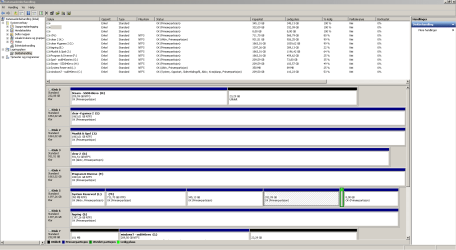
disk management in paperclip icon attachment.

disk M is the one with ubuntu and windows 8 on. i use windows 7 as my standard OS, gaming, movies, pictures, internet.

and windows 8 for games that wont work on win 7, like populous the beginning, somehow the colors get all messed up. and ubuntu, well, to learn about different things.
 

Attachments

  • Skjermbilde.PNG
    Skjermbilde.PNG
    34.4 KB · Views: 6
Last edited:

My Computer My Computer

At a glance

Windows 7 Ultimate 64 Bit SP1i7-4930kcorsair platinum 4x4gb\ddr3 1866mhz + dominat...asus radeon 7970 directcu II top 3gb gddr5
Computer type
PC/Desktop
Computer Manufacturer/Model Number
custom build
OS
Windows 7 Ultimate 64 Bit SP1
CPU
i7-4930k
Motherboard
Asus rampage IV extreme
Memory
corsair platinum 4x4gb\ddr3 1866mhz + dominator gt 2x4gb
Graphics Card(s)
asus radeon 7970 directcu II top 3gb gddr5
Sound Card
Sound Blaster Z
Monitor(s) Displays
3
Screen Resolution
1920 X 1080 \ 5760 X 1600
Hard Drives
3 x samsung 840 evo \ series 250gb, western digital 2tb, western digital 2tb, western digital 2tb, western digital 1.5tb, western digital 1tb
PSU
1050WATT XFX
Case
Xigmatek Elysium
Cooling
Corsair H100
Keyboard
Razer BlackWidow
Mouse
Steelseries Diablo 3 Mouse
Internet Speed
50 \ 50 Mbit
Antivirus
Microsoft Security Essentials
Browser
Google Chrome
For some reason a random data drive "Clear 2" is marked Active which is risky. Mark it Inactive now: Partition - Mark as Inactive - Windows 7 Forums. Only the partition intended to boot an OS should be marked Active.

With separate hard drives what works best is to install with all other drives unplugged, then boot them independently via the BIOS by setting preferred as first to boot and then triggering the other using the one-time BIOS Boot menu key which every PC has.

Presently Win7 drive is marked System so we know it is booting itself.

What I would do is use the BIOS Boot menu to trigger the Windows 8 drive, see if it will boot on its own. We cannot know this until it is booted since the System flag will not show on it's System Reserved partition until it is booted. If it will boot on its own and has its own System flag then install EasyBCD to add Ubuntu as discussed in Dual boot Ubuntu-Win7.

If Windows 8 will not boot on its own, unplug all other hard drives to run Windows 8 Automatic Repair until it does.

I would then boot back into Win7 and use EasyBCD to delete the other OS's so that it is only bootable via the BIOS. If this is not to your liking, add Win7 using EasyBCD from WIndows 8 with Windows 8 drive set first to boot in BIOS setup.

Are you aware that you're using ugly Win2000 Classic graphics in Win7 which has the most elegant Aero graphics of any OS ever that uses no additional resources to render these? May I suggest that you enable an Aero theme in Control Panel>Personalize, then pick a Backgrounds slideshow. The entire collection of Win7 national edition backgrounds slideshows are 120 of the most lavish scenic pictures ever taken and available for download in my tutorial Clean Reinstall Windows 7.
 
it didnt boot cause i had the win 8 and ubuntu on the pciex sata card. switched it over and both win 8 and ubuntu is booting. i had to reboot a couple of times to repair windows 8, all i have to do now is reinstall \ uninstall chipset and other drivers. dont want it to run off the p5q pro turbo.

i will try setting windows 8 hdd first. and enabling win 7 and win 8 hdd making it recognize the win 7 in the boot menu(?)

how do i make the ubuntu show up in the boot menu? since its already recognized when i boot with only the win 8 \ ubuntu hdd.

i get the wubi menu, that red orangy boot window.
 

My Computer My Computer

At a glance

Windows 7 Ultimate 64 Bit SP1i7-4930kcorsair platinum 4x4gb\ddr3 1866mhz + dominat...asus radeon 7970 directcu II top 3gb gddr5
Computer type
PC/Desktop
Computer Manufacturer/Model Number
custom build
OS
Windows 7 Ultimate 64 Bit SP1
CPU
i7-4930k
Motherboard
Asus rampage IV extreme
Memory
corsair platinum 4x4gb\ddr3 1866mhz + dominator gt 2x4gb
Graphics Card(s)
asus radeon 7970 directcu II top 3gb gddr5
Sound Card
Sound Blaster Z
Monitor(s) Displays
3
Screen Resolution
1920 X 1080 \ 5760 X 1600
Hard Drives
3 x samsung 840 evo \ series 250gb, western digital 2tb, western digital 2tb, western digital 2tb, western digital 1.5tb, western digital 1tb
PSU
1050WATT XFX
Case
Xigmatek Elysium
Cooling
Corsair H100
Keyboard
Razer BlackWidow
Mouse
Steelseries Diablo 3 Mouse
Internet Speed
50 \ 50 Mbit
Antivirus
Microsoft Security Essentials
Browser
Google Chrome
Keep the 8/Ubuntu Dual Boot on the one hard drive then boot the Win7 drive separately via the BIOS Boot Priority or Boot Menu key at boot.

If this isn't to your liking add Windows 7 using EasyBCD from Win8.

I spelled all of this out above. If you have questions about any specific step then ask back.
 
when i am in win 8, i can't add win 7 to the easybcd cause now after repairing the win 8 when i boot with the current config i get to choose from win 8 and win 7 but not ubuntu on the same bootloader which is windows's bootloader i guess.

EDIT: hang on. i added win 7 as a c: when windows 8 is c: , i checked it and changed it. hopefully its working now, since i got all 3 in the same loader at boot but windows 7 loaded windows 8 :P
 
Last edited:

My Computer My Computer

At a glance

Windows 7 Ultimate 64 Bit SP1i7-4930kcorsair platinum 4x4gb\ddr3 1866mhz + dominat...asus radeon 7970 directcu II top 3gb gddr5
Computer type
PC/Desktop
Computer Manufacturer/Model Number
custom build
OS
Windows 7 Ultimate 64 Bit SP1
CPU
i7-4930k
Motherboard
Asus rampage IV extreme
Memory
corsair platinum 4x4gb\ddr3 1866mhz + dominator gt 2x4gb
Graphics Card(s)
asus radeon 7970 directcu II top 3gb gddr5
Sound Card
Sound Blaster Z
Monitor(s) Displays
3
Screen Resolution
1920 X 1080 \ 5760 X 1600
Hard Drives
3 x samsung 840 evo \ series 250gb, western digital 2tb, western digital 2tb, western digital 2tb, western digital 1.5tb, western digital 1tb
PSU
1050WATT XFX
Case
Xigmatek Elysium
Cooling
Corsair H100
Keyboard
Razer BlackWidow
Mouse
Steelseries Diablo 3 Mouse
Internet Speed
50 \ 50 Mbit
Antivirus
Microsoft Security Essentials
Browser
Google Chrome
after some thought and some fiddling i made it work. thank you heaps mr rocker :)
 

My Computer My Computer

At a glance

Windows 7 Ultimate 64 Bit SP1i7-4930kcorsair platinum 4x4gb\ddr3 1866mhz + dominat...asus radeon 7970 directcu II top 3gb gddr5
Computer type
PC/Desktop
Computer Manufacturer/Model Number
custom build
OS
Windows 7 Ultimate 64 Bit SP1
CPU
i7-4930k
Motherboard
Asus rampage IV extreme
Memory
corsair platinum 4x4gb\ddr3 1866mhz + dominator gt 2x4gb
Graphics Card(s)
asus radeon 7970 directcu II top 3gb gddr5
Sound Card
Sound Blaster Z
Monitor(s) Displays
3
Screen Resolution
1920 X 1080 \ 5760 X 1600
Hard Drives
3 x samsung 840 evo \ series 250gb, western digital 2tb, western digital 2tb, western digital 2tb, western digital 1.5tb, western digital 1tb
PSU
1050WATT XFX
Case
Xigmatek Elysium
Cooling
Corsair H100
Keyboard
Razer BlackWidow
Mouse
Steelseries Diablo 3 Mouse
Internet Speed
50 \ 50 Mbit
Antivirus
Microsoft Security Essentials
Browser
Google Chrome
Great to hear it. Can we see one last screenshot of Disk Mgmt to be sure nothing went awry as it often does?
 
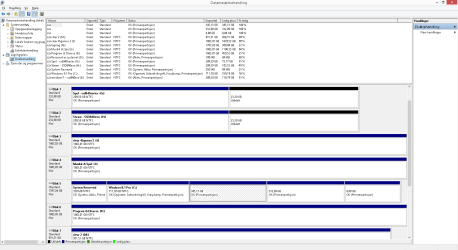
here goes. alot of active. but those are the drives which have win8 \ win 7 \ ubuntu. i guess thats ok?

everything boots normal, no stutters or anything. spent all night configuring win 8 to new system.. phew.
 

Attachments

  • Uten navn.png
    Uten navn.png
    32.9 KB · Views: 4

My Computer My Computer

At a glance

Windows 7 Ultimate 64 Bit SP1i7-4930kcorsair platinum 4x4gb\ddr3 1866mhz + dominat...asus radeon 7970 directcu II top 3gb gddr5
Computer type
PC/Desktop
Computer Manufacturer/Model Number
custom build
OS
Windows 7 Ultimate 64 Bit SP1
CPU
i7-4930k
Motherboard
Asus rampage IV extreme
Memory
corsair platinum 4x4gb\ddr3 1866mhz + dominator gt 2x4gb
Graphics Card(s)
asus radeon 7970 directcu II top 3gb gddr5
Sound Card
Sound Blaster Z
Monitor(s) Displays
3
Screen Resolution
1920 X 1080 \ 5760 X 1600
Hard Drives
3 x samsung 840 evo \ series 250gb, western digital 2tb, western digital 2tb, western digital 2tb, western digital 1.5tb, western digital 1tb
PSU
1050WATT XFX
Case
Xigmatek Elysium
Cooling
Corsair H100
Keyboard
Razer BlackWidow
Mouse
Steelseries Diablo 3 Mouse
Internet Speed
50 \ 50 Mbit
Antivirus
Microsoft Security Essentials
Browser
Google Chrome
Yes, there are too many Active partitions. The Active flag should only point to the System partition actually booting an OS or multi-boot.

I see from the listings at the top that there's a new D System Reserved which I'm assuming is on the Win7 drive although I cannot see it on the drive map below which needs scrolling. Can you boot into Win7 and post back a screenshot showing all drives on the map?

Are you actually booting all OS's from a Windows 8 style blue Boot Menu, or are you booting Win8 and Ubuntu from that Boot Menu, and booting Win7 drive from the BIOS Boot menu key at boot?

Answers to these questions and the WIn7 Disk Mgmt screenshot will determine which partitions should remain marked Active to avoid future problems.
 
Last edited:
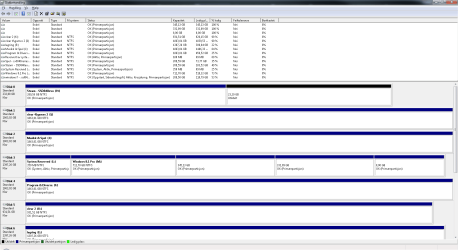
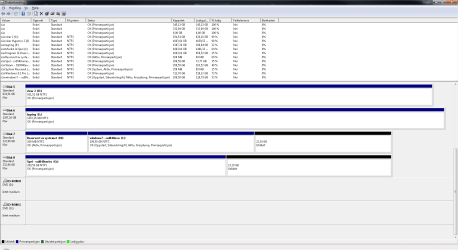
when i boot i get first the purplish grub loader then when i choose windows 8 i get to choose from all 3.
as shown in the bottom 2 pictures.

and there is pictures of the diskmgmt.
 

Attachments

  • top.png
    top.png
    32.7 KB · Views: 2
  • bottom.png
    bottom.png
    29.9 KB · Views: 2
  • IMG_0313.jpg
    IMG_0313.jpg
    824.4 KB · Views: 1
  • IMG_0314.jpg
    IMG_0314.jpg
    523.2 KB · Views: 1

My Computer My Computer

At a glance

Windows 7 Ultimate 64 Bit SP1i7-4930kcorsair platinum 4x4gb\ddr3 1866mhz + dominat...asus radeon 7970 directcu II top 3gb gddr5
Computer type
PC/Desktop
Computer Manufacturer/Model Number
custom build
OS
Windows 7 Ultimate 64 Bit SP1
CPU
i7-4930k
Motherboard
Asus rampage IV extreme
Memory
corsair platinum 4x4gb\ddr3 1866mhz + dominator gt 2x4gb
Graphics Card(s)
asus radeon 7970 directcu II top 3gb gddr5
Sound Card
Sound Blaster Z
Monitor(s) Displays
3
Screen Resolution
1920 X 1080 \ 5760 X 1600
Hard Drives
3 x samsung 840 evo \ series 250gb, western digital 2tb, western digital 2tb, western digital 2tb, western digital 1.5tb, western digital 1tb
PSU
1050WATT XFX
Case
Xigmatek Elysium
Cooling
Corsair H100
Keyboard
Razer BlackWidow
Mouse
Steelseries Diablo 3 Mouse
Internet Speed
50 \ 50 Mbit
Antivirus
Microsoft Security Essentials
Browser
Google Chrome
I dont' know why Linux bootloader is involved since you have a full Windows boot Menu for all three OS's. Did you follow the Barman's proven procedure in Dual boot Ubuntu-Win7?

If you are booted into Win7 in the screenshots above as it seems by the presence of "Oppstart" (Startup) on its partition showing it is the booted partition, then it is being booted by Windows 8 System Reserved partition as signified by the System flag on it and none other. Because of this there's no need for any other partition to be marked Active so I would mark everything except Win8 System Reserved Inactive: Partition - Mark as Inactive - Windows 7 Forums

I'm not sure why you recreated the Win7 System Reserved partition because it is not doing anything as proven by it not having the System label when Win7 is booted. You can mark it Inactive and even delete it, unless you want to make that drive independently bootable via the BIOS, in which case you'd unplug all other drives and run Startup Repair - Run 3 Separate Times until it boots on its own and Win7 System Reserved is marked System Active. You can even then add it to a Multi-Boot with EasyBCD so that you have the convenient Windows Boot menu, yet it will still boot itself when it's hard drive is triggered fro the BIOS. Presently it seems it can't boot itself without the System flag, although you can test that by choosing that Hard drive from the BIOS Boot Menu key.

Unfortunately I am a Windows guy so cannot explain why Linux Bootloader starts and then hands things over to the Windows Boot Manager. But I would not want it that way myself, since the method Barman describes above doesn't involve the Linux Bootloader but boots everything via Windows Boot menu.

I'll ask Barman to look at the thread to see if he has anything to add, and also the author of our standalone tutorial to Dual Boot - Windows 7 and Linux Golden can probably help you more than I can here.
 
Back
Top