Solved triple booting windows 7, windows 8 and ubuntu

i didnt recreate it. i ran win 8 automatic repair like you said then i booted into win 7 and you asked me to take pictures of the bootmgmt and it was there.

i told you in my very first post i had the linux bootloader with win 8 and ubuntu already on a separate hdd.

i dont see why i need to do anything else to this. its perfect just the way it is.
 

My Computer My Computer

At a glance

Windows 7 Ultimate 64 Bit SP1i7-4930kcorsair platinum 4x4gb\ddr3 1866mhz + dominat...asus radeon 7970 directcu II top 3gb gddr5
Computer type
PC/Desktop
Computer Manufacturer/Model Number
custom build
OS
Windows 7 Ultimate 64 Bit SP1
CPU
i7-4930k
Motherboard
Asus rampage IV extreme
Memory
corsair platinum 4x4gb\ddr3 1866mhz + dominator gt 2x4gb
Graphics Card(s)
asus radeon 7970 directcu II top 3gb gddr5
Sound Card
Sound Blaster Z
Monitor(s) Displays
3
Screen Resolution
1920 X 1080 \ 5760 X 1600
Hard Drives
3 x samsung 840 evo \ series 250gb, western digital 2tb, western digital 2tb, western digital 2tb, western digital 1.5tb, western digital 1tb
PSU
1050WATT XFX
Case
Xigmatek Elysium
Cooling
Corsair H100
Keyboard
Razer BlackWidow
Mouse
Steelseries Diablo 3 Mouse
Internet Speed
50 \ 50 Mbit
Antivirus
Microsoft Security Essentials
Browser
Google Chrome
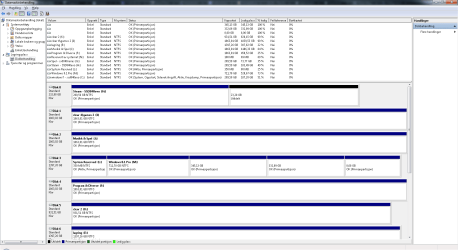
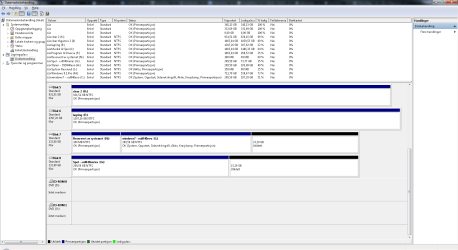
Your first Disk Mgmt screenshot shows in a partial picture of the Win7 drive that the System Reserved partition is unallocated. The next one shows it has been recreated and is marked Active, though it is not booting Win7 or it would be marked System.

It is hardly perfect when you have a bunch of partitions marked Active that shouldn't be, a Linux bootloader starting up and then handing off to a proper Windows Triple Boot menu. It is just a matter of time until it crashes.

But wait until a Linux expert can look at it.
 
how do i uninstall grub for the dual boot on the separate hdd?

windows loader should "take over"?

edit: marked unsolved.
 

My Computer My Computer

At a glance

Windows 7 Ultimate 64 Bit SP1i7-4930kcorsair platinum 4x4gb\ddr3 1866mhz + dominat...asus radeon 7970 directcu II top 3gb gddr5
Computer type
PC/Desktop
Computer Manufacturer/Model Number
custom build
OS
Windows 7 Ultimate 64 Bit SP1
CPU
i7-4930k
Motherboard
Asus rampage IV extreme
Memory
corsair platinum 4x4gb\ddr3 1866mhz + dominator gt 2x4gb
Graphics Card(s)
asus radeon 7970 directcu II top 3gb gddr5
Sound Card
Sound Blaster Z
Monitor(s) Displays
3
Screen Resolution
1920 X 1080 \ 5760 X 1600
Hard Drives
3 x samsung 840 evo \ series 250gb, western digital 2tb, western digital 2tb, western digital 2tb, western digital 1.5tb, western digital 1tb
PSU
1050WATT XFX
Case
Xigmatek Elysium
Cooling
Corsair H100
Keyboard
Razer BlackWidow
Mouse
Steelseries Diablo 3 Mouse
Internet Speed
50 \ 50 Mbit
Antivirus
Microsoft Security Essentials
Browser
Google Chrome

My Computer My Computer

At a glance

Windows 10 Pro x64 ; Xubuntu x64Intel i7 860 @ 2.80 GHz O/C'ed to 4.0GHz16GB Corsair Vengance DDR3 @ 661 MHz Dual Cha...EVGA NVidia GTX 560 1024MB
Computer type
PC/Desktop
Computer Manufacturer/Model Number
Golden Mk. I.4
OS
Windows 10 Pro x64 ; Xubuntu x64
CPU
Intel i7 860 @ 2.80 GHz O/C'ed to 4.0GHz
Motherboard
Gigabyte P55A-UD3R Rev.1. Award BIOS F13
Memory
16GB Corsair Vengance DDR3 @ 661 MHz Dual Channel (9-9-9-24)
Graphics Card(s)
EVGA NVidia GTX 560 1024MB
Sound Card
Realtek Integrated
Monitor(s) Displays
Dual Samsung SyncMaster 2494HS
Screen Resolution
1920*1080 and 1920*1080
Hard Drives
1*Samsung 840 EVO 120GB SSD;
1*OCZ Vertex 2 60GB SSD;
2*Samsung F3 SpinPoint 1TB in RAID0;
1*Samsung F1 SpinPoint 1TB;
2*Western Digital 1TB External USB 3.0
1*Western Digital 500GB External USB 3.0
1*Seagate 500GB External USB 2.0
PSU
Thermaltake ToughPower QFan 750W
Case
Thermaltake Element S VK60001W2Z
Cooling
Corsair H60 Water Cooling, 2*230mm and 2*80mm case fans
Keyboard
Logitech G110
Mouse
Logitech MX518
now i can't boot into windows 8 from the ssd that windows 7 is on even though i have done it correctly in easyBCD since i can boot into linux from it. and i think if i set the dual boot hdd first in BIOS i get the grub menu, but not from the ssd with win 7.

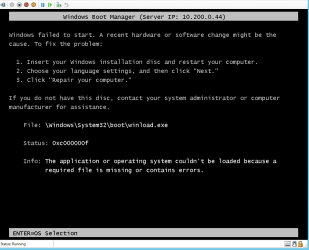
if i boot from the ssd and try to boot windows 8 from the loader i get that unsigned driver \ winload error.
and if i press f8 i get to the same screen.
i need to check this later. hard night of gaming. kinda drowsy yet. but its cirka what i described.

i remember now.. windows 8 had (restored) on easybcd, and i re-added win 8 into the windows 7 easybcd and now it wont boot or change to grub loader if i select windows 8 from windows loader, it just goes to the winload page.

basically this. (see picture) happened after i re-added win 8. otherwise i get the winloader -> grub -> winloader = choose ubuntu from winloader when boot -> grub -> then i choose win 8 -> winloader. help!

can i trigger the repair in windows 8 so that it gets added into the easybcd through the grub as (restored)?

i'm sorry for being so numb during this. no job. 1 computer. heaps of games. little sleep.
 

Attachments

  • 446311.png
    446311.png
    14.3 KB · Views: 1
Last edited:

My Computer My Computer

At a glance

Windows 7 Ultimate 64 Bit SP1i7-4930kcorsair platinum 4x4gb\ddr3 1866mhz + dominat...asus radeon 7970 directcu II top 3gb gddr5
Computer type
PC/Desktop
Computer Manufacturer/Model Number
custom build
OS
Windows 7 Ultimate 64 Bit SP1
CPU
i7-4930k
Motherboard
Asus rampage IV extreme
Memory
corsair platinum 4x4gb\ddr3 1866mhz + dominator gt 2x4gb
Graphics Card(s)
asus radeon 7970 directcu II top 3gb gddr5
Sound Card
Sound Blaster Z
Monitor(s) Displays
3
Screen Resolution
1920 X 1080 \ 5760 X 1600
Hard Drives
3 x samsung 840 evo \ series 250gb, western digital 2tb, western digital 2tb, western digital 2tb, western digital 1.5tb, western digital 1tb
PSU
1050WATT XFX
Case
Xigmatek Elysium
Cooling
Corsair H100
Keyboard
Razer BlackWidow
Mouse
Steelseries Diablo 3 Mouse
Internet Speed
50 \ 50 Mbit
Antivirus
Microsoft Security Essentials
Browser
Google Chrome
Let's get back to basics and get Windows 7 booting on its own via the BIOS instead of being booted by Windows 8 as it is now. You want that anyway in case the Win8 hard drive ever is removed or stops working. Then if you don't like booting 7 via the BIOS you can add it to the Win8/Linux Dual Boot from Windows 8.

D/l this .zip, rt click it Properties>Unblock> Apply>OK .

bootsect.zip

Extract the .zip and copy bootsect.exe into your C:\windows\System32 folder.

Open an elevated command ( type cmd in start search box - when the black box pops up - rt click it and run as admin.)

Type the following , and press enter after each line:

bcdboot c:\windows /s c:

bootsect /nt60 c: /mbr

diskpart

sel vol c

act

sel vol n

inact

exit

Close Command Window, restart, now trigger Win7 to boot by using the BIOS Boot Menu interrupt key at boot.

If you like this and you still have a non-working Win7 listing on your Boot Menu, install EasyBCD to Windows 8 to delete it under Edit Boot menu.

If you don't like that arrangement install EasyBCD to Windows 8 to add Windows 7 to a Windows Boot Menu. Then delete and add Ubuntu following Dual boot Ubuntu-Win7. This is the way it should have been done in the first place and what I had suggested.

I'm not sure what you mean by having used EasyBCD from Win7. Who suggested that? Win7 is not even booting itself, it is being booted by Windows 8 System Reserved partition until these changes are made.
 
i downloaded the zip, check > allow, copied the file in it to system 32, opened cmd and did the code thingy you posted, exit, close cmd. rebooted and pressed f8 and chose the ssd that has windows 7 installed and got the bootloader, selected windows 7 and booted into windows 7.

diskmgmt after i did what you said.
 

Attachments

  • aba.png
    aba.png
    40.3 KB · Views: 3
  • aba 2.png
    aba 2.png
    38.4 KB · Views: 2

My Computer My Computer

At a glance

Windows 7 Ultimate 64 Bit SP1i7-4930kcorsair platinum 4x4gb\ddr3 1866mhz + dominat...asus radeon 7970 directcu II top 3gb gddr5
Computer type
PC/Desktop
Computer Manufacturer/Model Number
custom build
OS
Windows 7 Ultimate 64 Bit SP1
CPU
i7-4930k
Motherboard
Asus rampage IV extreme
Memory
corsair platinum 4x4gb\ddr3 1866mhz + dominator gt 2x4gb
Graphics Card(s)
asus radeon 7970 directcu II top 3gb gddr5
Sound Card
Sound Blaster Z
Monitor(s) Displays
3
Screen Resolution
1920 X 1080 \ 5760 X 1600
Hard Drives
3 x samsung 840 evo \ series 250gb, western digital 2tb, western digital 2tb, western digital 2tb, western digital 1.5tb, western digital 1tb
PSU
1050WATT XFX
Case
Xigmatek Elysium
Cooling
Corsair H100
Keyboard
Razer BlackWidow
Mouse
Steelseries Diablo 3 Mouse
Internet Speed
50 \ 50 Mbit
Antivirus
Microsoft Security Essentials
Browser
Google Chrome
Good work. You see that C is now the System partition meaning it is booting itself independently.

Now set the preferred OS hard drive to boot first in BIOS setup, trigger the other one using the one-time BIOS Boot menu key.

What do you get now when you boot into Windows 8? Is there a Boot menu? If not run Windows 8 Automatic Repair
and then install EasyBCD to add your Linux according to Dual boot Ubuntu-Win7.

If after awhile of trying booting Win7 via the BIOS you decide you'd prefer to boot it on the Windows Boot Menu, add Win from EasyBCD on Windows 8 partition.
 
i set the preferred OS hard drive which is windows 7, then clicked f8, chose the hdd with windows 8 and ubuntu on it and got the windows loader with win 7, win 8 and ubuntu as options.

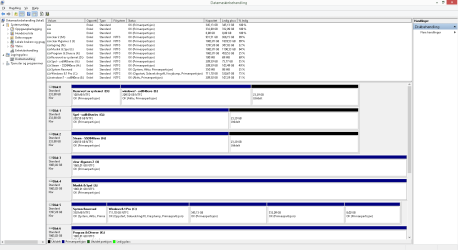
what i get when i boot into win 8 is a login screen, i type the pass and login. writing this from win 8.

diskmgmt from win 8.
 

Attachments

  • Uten navn.png
    Uten navn.png
    32.2 KB · Views: 2
  • Uten navn 2.png
    Uten navn 2.png
    29.6 KB · Views: 2

My Computer My Computer

At a glance

Windows 7 Ultimate 64 Bit SP1i7-4930kcorsair platinum 4x4gb\ddr3 1866mhz + dominat...asus radeon 7970 directcu II top 3gb gddr5
Computer type
PC/Desktop
Computer Manufacturer/Model Number
custom build
OS
Windows 7 Ultimate 64 Bit SP1
CPU
i7-4930k
Motherboard
Asus rampage IV extreme
Memory
corsair platinum 4x4gb\ddr3 1866mhz + dominator gt 2x4gb
Graphics Card(s)
asus radeon 7970 directcu II top 3gb gddr5
Sound Card
Sound Blaster Z
Monitor(s) Displays
3
Screen Resolution
1920 X 1080 \ 5760 X 1600
Hard Drives
3 x samsung 840 evo \ series 250gb, western digital 2tb, western digital 2tb, western digital 2tb, western digital 1.5tb, western digital 1tb
PSU
1050WATT XFX
Case
Xigmatek Elysium
Cooling
Corsair H100
Keyboard
Razer BlackWidow
Mouse
Steelseries Diablo 3 Mouse
Internet Speed
50 \ 50 Mbit
Antivirus
Microsoft Security Essentials
Browser
Google Chrome
How about Ubuntu? Does it still boot from the Windows Boot menu? If not add it from EasyBCD installed in WIndows 8 following Barman's or Colin's suggestions.

Delete Windows 7 from EasyBCD in Windows 8, unless you want it on the Windows Boot menu and it boots correctly now. If not delete it and add it again.
 
i must have done a mistake somewhere. cause now i can't see windows 8 or ubuntu on the windows loader or the grub loader.

i have the preferred OS hard drive as the only boot option in BIOS, and i boot and i get windows loader with only win 7. if i press f8 and select the hard drive with win 8 and ubuntu i get the windows loader with only windows 7. and i can boot both version into win 7. i know i did not delete windows 8 from easybcd in win 8.

im sorry if this is a mess. i might have rushed or overlooked something i should do.

i have a slight hint that if i add ubuntu to the easybcd it will give me option for linux in windows loader and then i get the grub and win 8 if i choose to.
 

My Computer My Computer

At a glance

Windows 7 Ultimate 64 Bit SP1i7-4930kcorsair platinum 4x4gb\ddr3 1866mhz + dominat...asus radeon 7970 directcu II top 3gb gddr5
Computer type
PC/Desktop
Computer Manufacturer/Model Number
custom build
OS
Windows 7 Ultimate 64 Bit SP1
CPU
i7-4930k
Motherboard
Asus rampage IV extreme
Memory
corsair platinum 4x4gb\ddr3 1866mhz + dominator gt 2x4gb
Graphics Card(s)
asus radeon 7970 directcu II top 3gb gddr5
Sound Card
Sound Blaster Z
Monitor(s) Displays
3
Screen Resolution
1920 X 1080 \ 5760 X 1600
Hard Drives
3 x samsung 840 evo \ series 250gb, western digital 2tb, western digital 2tb, western digital 2tb, western digital 1.5tb, western digital 1tb
PSU
1050WATT XFX
Case
Xigmatek Elysium
Cooling
Corsair H100
Keyboard
Razer BlackWidow
Mouse
Steelseries Diablo 3 Mouse
Internet Speed
50 \ 50 Mbit
Antivirus
Microsoft Security Essentials
Browser
Google Chrome
You said you had installed EasyBCD to Windows 7 to add the others, when Windows 7 wasn't even the primary hard drive. Who told you to do that? Not me.

I had suggested you make Win7 independently bootable which was only done just now. I had suggested to install EasyBCD to Windows 8 to add Linux, so that you booted into your choice of Windows from the BIOS, then Windows 8 offered you a Dual Boot menu for Linux.

Now correct Windows 8 by running Automatic Repair - Run in Windows 8.

Power down to pull the data cable plug on Windows 7 hard drive first so it doesn't have its boot files affected by the Win8 repair.

After Windows 8 is repaired and boots, if necessary install EasyBCD to WIndows 8 to add Ubuntu following Dual boot Ubuntu-Win7 . This is the seventh time I've posted that link so maybe you'll actually do it this time?
 
i get this with the win 7 ssd disconnected.
 

Attachments

  • IMG_0317.jpg
    IMG_0317.jpg
    637.6 KB · Views: 5

My Computer My Computer

At a glance

Windows 7 Ultimate 64 Bit SP1i7-4930kcorsair platinum 4x4gb\ddr3 1866mhz + dominat...asus radeon 7970 directcu II top 3gb gddr5
Computer type
PC/Desktop
Computer Manufacturer/Model Number
custom build
OS
Windows 7 Ultimate 64 Bit SP1
CPU
i7-4930k
Motherboard
Asus rampage IV extreme
Memory
corsair platinum 4x4gb\ddr3 1866mhz + dominator gt 2x4gb
Graphics Card(s)
asus radeon 7970 directcu II top 3gb gddr5
Sound Card
Sound Blaster Z
Monitor(s) Displays
3
Screen Resolution
1920 X 1080 \ 5760 X 1600
Hard Drives
3 x samsung 840 evo \ series 250gb, western digital 2tb, western digital 2tb, western digital 2tb, western digital 1.5tb, western digital 1tb
PSU
1050WATT XFX
Case
Xigmatek Elysium
Cooling
Corsair H100
Keyboard
Razer BlackWidow
Mouse
Steelseries Diablo 3 Mouse
Internet Speed
50 \ 50 Mbit
Antivirus
Microsoft Security Essentials
Browser
Google Chrome
i only have a key for win 8 that i did a favour for a friend and he gave me the key for it. is there somewhere i can download and make a bootable dvd?
 

My Computer My Computer

At a glance

Windows 7 Ultimate 64 Bit SP1i7-4930kcorsair platinum 4x4gb\ddr3 1866mhz + dominat...asus radeon 7970 directcu II top 3gb gddr5
Computer type
PC/Desktop
Computer Manufacturer/Model Number
custom build
OS
Windows 7 Ultimate 64 Bit SP1
CPU
i7-4930k
Motherboard
Asus rampage IV extreme
Memory
corsair platinum 4x4gb\ddr3 1866mhz + dominator gt 2x4gb
Graphics Card(s)
asus radeon 7970 directcu II top 3gb gddr5
Sound Card
Sound Blaster Z
Monitor(s) Displays
3
Screen Resolution
1920 X 1080 \ 5760 X 1600
Hard Drives
3 x samsung 840 evo \ series 250gb, western digital 2tb, western digital 2tb, western digital 2tb, western digital 1.5tb, western digital 1tb
PSU
1050WATT XFX
Case
Xigmatek Elysium
Cooling
Corsair H100
Keyboard
Razer BlackWidow
Mouse
Steelseries Diablo 3 Mouse
Internet Speed
50 \ 50 Mbit
Antivirus
Microsoft Security Essentials
Browser
Google Chrome
How did you originally install Windows 8?

Can you borrow the disk if you don't have one now?

Did you try to run Windows 8 Automatic Repair without the disk first?

As a last resort you can try adding Windows 8 to a Dual Boot menu using EasyBCD from Win7, to get it started to trigger Automatic Repair from within Windows 8.
 
when i boot with the windows 8 hdd all i get is the windows loader with 1 option and that is windows 7 if i remember correctly and when i select it i get the screen 4 posts above this one.
 

My Computer My Computer

At a glance

Windows 7 Ultimate 64 Bit SP1i7-4930kcorsair platinum 4x4gb\ddr3 1866mhz + dominat...asus radeon 7970 directcu II top 3gb gddr5
Computer type
PC/Desktop
Computer Manufacturer/Model Number
custom build
OS
Windows 7 Ultimate 64 Bit SP1
CPU
i7-4930k
Motherboard
Asus rampage IV extreme
Memory
corsair platinum 4x4gb\ddr3 1866mhz + dominator gt 2x4gb
Graphics Card(s)
asus radeon 7970 directcu II top 3gb gddr5
Sound Card
Sound Blaster Z
Monitor(s) Displays
3
Screen Resolution
1920 X 1080 \ 5760 X 1600
Hard Drives
3 x samsung 840 evo \ series 250gb, western digital 2tb, western digital 2tb, western digital 2tb, western digital 1.5tb, western digital 1tb
PSU
1050WATT XFX
Case
Xigmatek Elysium
Cooling
Corsair H100
Keyboard
Razer BlackWidow
Mouse
Steelseries Diablo 3 Mouse
Internet Speed
50 \ 50 Mbit
Antivirus
Microsoft Security Essentials
Browser
Google Chrome
That means that the disk is not booting and it's trying to start the hard drive listed first to boot.

Try again booting the WIndows 8 hard drive with Win7 drive unplugged.

Now try booting the disk via the BIOS Boot menu key. Are you seeing a prompt to "Press any key to boot disk?" If not then the disk is not being read by the optical drive reader. See if it is badly scratched or needs washing.
 
i tried it again with the windows 7 drive unplugged and i booted and pressed f8 then chose the disk which has windows 8 \ ubuntu on and it gave me the picture 6 posts above this one.

i think i may have removed ubuntu from the easybcd in win8 or i must have done something wrong to f this up. i think if i restore it to a state so that it can boot into windows 8 by either adding the ubuntu in easybcd to get the grub so that it shows win 8 as a boot option?

i thought "Press any key to boot disk?" was when you dont have a boot medium?
or you must mean "no boot device "located" insert boot device"
didnt see any press key to boot since all i get is the windows boot loader menu thingy.
 

My Computer My Computer

At a glance

Windows 7 Ultimate 64 Bit SP1i7-4930kcorsair platinum 4x4gb\ddr3 1866mhz + dominat...asus radeon 7970 directcu II top 3gb gddr5
Computer type
PC/Desktop
Computer Manufacturer/Model Number
custom build
OS
Windows 7 Ultimate 64 Bit SP1
CPU
i7-4930k
Motherboard
Asus rampage IV extreme
Memory
corsair platinum 4x4gb\ddr3 1866mhz + dominator gt 2x4gb
Graphics Card(s)
asus radeon 7970 directcu II top 3gb gddr5
Sound Card
Sound Blaster Z
Monitor(s) Displays
3
Screen Resolution
1920 X 1080 \ 5760 X 1600
Hard Drives
3 x samsung 840 evo \ series 250gb, western digital 2tb, western digital 2tb, western digital 2tb, western digital 1.5tb, western digital 1tb
PSU
1050WATT XFX
Case
Xigmatek Elysium
Cooling
Corsair H100
Keyboard
Razer BlackWidow
Mouse
Steelseries Diablo 3 Mouse
Internet Speed
50 \ 50 Mbit
Antivirus
Microsoft Security Essentials
Browser
Google Chrome
Back
Top