
Hi all,
last week i purchased a sony vaio e series sve14116gn/b laptop with genuine windows 7 x64bit professional os. I got only one drive C: with around 450 GB harddisk.
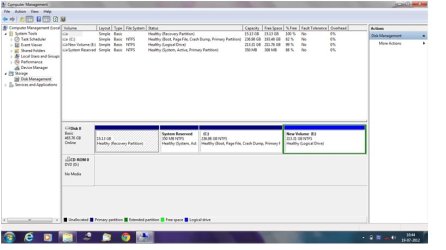
So i decided to create new partitions using Disk management, only a 100 GB space i want to allowcate for C: drive and remaing space for other 2or3 new drives. but i can able to create only one new drive by shrinking C: drive (only 213 GB space). And in C: drive 236GB remained that i can not shrink. i have another two like system reserved space 350MB AND RECOVERY PARTITION 15 GB. So plz help how to shrink C: drive to 100 GB and/or to create new partition or extend space in new partition.
Thanks in Advance.
last week i purchased a sony vaio e series sve14116gn/b laptop with genuine windows 7 x64bit professional os. I got only one drive C: with around 450 GB harddisk.
So i decided to create new partitions using Disk management, only a 100 GB space i want to allowcate for C: drive and remaing space for other 2or3 new drives. but i can able to create only one new drive by shrinking C: drive (only 213 GB space). And in C: drive 236GB remained that i can not shrink. i have another two like system reserved space 350MB AND RECOVERY PARTITION 15 GB. So plz help how to shrink C: drive to 100 GB and/or to create new partition or extend space in new partition.
Thanks in Advance.
Attachments

Last edited:
My Computer
At a glance
windows7 professional x64
- OS
- windows7 professional x64

