Trouble installing ATI drivers

The card AGP or PCI-E?
 

My Computer

Computer type
PC/Desktop
Computer Manufacturer/Model Number
Me
OS
Win 7 Ultimate x64
CPU
FX-8350 @ 4.6 GHz so far
Motherboard
Asus M5A97 EVO
Memory
ADATA XPG V1 Series Black 8GB DDR3 1600
Graphics Card(s)
Sapphire R9 270x Dual-X
Sound Card
Xonar DGX w/ Corsair Vengence 1300
Monitor(s) Displays
Acer S232HL Abid
Screen Resolution
1920x1080
Hard Drives
120 GB OCZ Vertex 3
500 GB Seagate 7200.12
PSU
Antec Earthwatts 650W Green
Case
Antec Three Hundred
Cooling
Cooler Master 212 EVO
Keyboard
Logitech G510
Mouse
Logitech G500s
Internet Speed
35000/3000
3 pages and nobody pointed you towards Driver Sweeper!?

ATI graphics drivers are notoriously buggy... they always have been and everyone here knows it. Installing one driver over another is never a good idea with ATI drivers... you're just asking for trouble.

It's a hassle, but if you follow this method you will be a happy camper.

First: download and install Driver Sweeper. Guru3D - Driver Sweeper

Second: Uninstall through Add/Remove, select express uninstall of everything. After the drivers have uninstalled answer yes to uninstalling CCC. Reboot when prompted and tap the F8 key to boot up in Safe Mode.

In safe mode run driver sweeper. Check ATI and let it clean all traces of previous drivers. Reboot when done and install the latest.
 

My Computer

OS
7 Ultimate x64
CPU
i5-2500k
Motherboard
Asus P8P67 Pro
Memory
8GB G.Skill Ripjaws X F3-12800CL7D-8GBXH 1866MHz 8-9-8-24
Graphics Card(s)
EVGA GTX 570 SC
Sound Card
X-Fi Titanium Fatality
Monitor(s) Displays
Samsung S27A550H 27" LED
Screen Resolution
1920x1080
Hard Drives
OCZ Vertex 3 120GB.
1TB Samsung F3.
2TB Samsung F4.
PSU
PC Power & Cooling Silencer 760
Case
Lian Li Lancool K62
Cooling
Thermalright Venomous X Black/Scythe S-Flex/Shin-Etsu X23
Keyboard
MS Natural Elite 4000 Ergonomic
Mouse
Logitech G500
Internet Speed
6MB/768
Other Info
Logitech Z-5500 505 watts.
D-Link DGL-4500.
Tripp-Lite Smart Pro 1500.
Well Driver Sweeper seems to have removed the ATI drivers, but when I try to install 10.11 I still have the problem with Program Compatibility Assistant.
 

My Computer

OS
Windows 7
I finally got to 10.11 installed. What I did was I went through Windows' driver update and it installed 10.11.

Thanks for all the help everyone! :grouphug:
 

My Computer

OS
Windows 7
You got lucky, really.

Windows update can only give you drivers given to them... it doesn't seek out the latest drivers. Sometimes the drivers they have are dated, which is why it's always recommended to seek out the drivers on your own.

I'm curious about the Program Comparability Assistant though... it's for older programs, so it should not have popped up installing drivers that came out a few days ago. :confused:
 

My Computer

OS
7 Ultimate x64
CPU
i5-2500k
Motherboard
Asus P8P67 Pro
Memory
8GB G.Skill Ripjaws X F3-12800CL7D-8GBXH 1866MHz 8-9-8-24
Graphics Card(s)
EVGA GTX 570 SC
Sound Card
X-Fi Titanium Fatality
Monitor(s) Displays
Samsung S27A550H 27" LED
Screen Resolution
1920x1080
Hard Drives
OCZ Vertex 3 120GB.
1TB Samsung F3.
2TB Samsung F4.
PSU
PC Power & Cooling Silencer 760
Case
Lian Li Lancool K62
Cooling
Thermalright Venomous X Black/Scythe S-Flex/Shin-Etsu X23
Keyboard
MS Natural Elite 4000 Ergonomic
Mouse
Logitech G500
Internet Speed
6MB/768
Other Info
Logitech Z-5500 505 watts.
D-Link DGL-4500.
Tripp-Lite Smart Pro 1500.
Yes I'm curious as well.

As for the Windows update, can't you simply download the latest and point Windows update to it as opposed to it going online looking for the latest drivers? I tried doing that but in this case the one online was the same as the one I pointed it to.
 

My Computer

OS
Windows 7
Yes I'm curious as well.

As for the Windows update, can't you simply download the latest and point Windows update to it as opposed to it going online looking for the latest drivers? I tried doing that but in this case the one online was the same as the one I pointed it to.

Windows Update doesn't work that way. You can do that with the device manager, but not WU.
 

My Computer

OS
7 Ultimate x64
CPU
i5-2500k
Motherboard
Asus P8P67 Pro
Memory
8GB G.Skill Ripjaws X F3-12800CL7D-8GBXH 1866MHz 8-9-8-24
Graphics Card(s)
EVGA GTX 570 SC
Sound Card
X-Fi Titanium Fatality
Monitor(s) Displays
Samsung S27A550H 27" LED
Screen Resolution
1920x1080
Hard Drives
OCZ Vertex 3 120GB.
1TB Samsung F3.
2TB Samsung F4.
PSU
PC Power & Cooling Silencer 760
Case
Lian Li Lancool K62
Cooling
Thermalright Venomous X Black/Scythe S-Flex/Shin-Etsu X23
Keyboard
MS Natural Elite 4000 Ergonomic
Mouse
Logitech G500
Internet Speed
6MB/768
Other Info
Logitech Z-5500 505 watts.
D-Link DGL-4500.
Tripp-Lite Smart Pro 1500.
I finally got to 10.11 installed. What I did was I went through Windows' driver update and it installed 10.11.

Thanks for all the help everyone! :grouphug:

well done:D
 

My Computer

Computer Manufacturer/Model Number
packard bell IXTREME M5722
OS
Operating System : Windows 7 Home Premium Edition 6.01.7600 SP1 (x64)
CPU
Processor : Intel Core 2 Quad Q8300 @ 2500 MHz
Motherboard
Mainboard : Packard Bell (Acer EG43M )
Memory
Physical Memory :8GB Corsair4x 2GB 800MHz C5 DDR2
Graphics Card(s)
Video Card : XFX 6700 AMD
Monitor(s) Displays
Maestro 234DL - BenQ V2220 - BenQ VW2420H
Screen Resolution
Current Display :1920x1080p pixels at 60 Hz in HD LED
Hard Drives
Hard Disks : WDC (1000 GB)
Drive C: (Hard Disk) : 428 GB available on 491 GB
Drive D: (Hard Disk) : 426 GB available on 492 GB
SAMSUNG spinpoint HD103SJ 1000.2 GB
(X 2) KINGSTON SSD NOW V 30GB
PSU
XFX ProSeries 550W PSU
Case
PACKARD BELL IXTREME
Cooling
System Blower Current: 150mA Air Flow16CFM ;Akasa 90mm rear
Keyboard
Gigabyte Aivia K8100
Mouse
TRUST-Wireless Laser Mouse - Carbon edition MI-7770C
Internet Speed
TP-LINK > TL-WN951N / AV500 Gigabit Powerline Adapters
Browser
chrome dev
Other Info
EXTRA COOLING>(FAN CONTROLLER) PC Bay Cooler 3 x 40mm fans; Akasa AK-HD-BL Blue hard drive cooler 2 x 40 mm fan 4500 rpm 29.7 dBA
Bios> American Megatrends Inc.
Version : P01-A1
Date : 08/31/2009
Yes I'm curious as well.

As for the Windows update, can't you simply download the latest and point Windows update to it as opposed to it going online looking for the latest drivers? I tried doing that but in this case the one online was the same as the one I pointed it to.

Windows Update doesn't work that way. You can do that with the device manager, but not WU.

My apologies, I wrote Windows Update when in fact I used the device manager to install the new driver.
 

My Computer

OS
Windows 7
Ok I'm having similar problems and having used windows update it claims to have installed the latest version fo teh driver for my HD5700 but device manager says it's like version 8.791.0.0 when it should be 10 shouldn't it? I know the versions often don't correlate but it's still concerning.
Anyway even trying to revert to the previous v10.10 failed. Something is different...

Anyone know of an update which was applied within the last week which would cause this?

Oh and I've tried the whole compatibility route. It suggested running as XP SP2 and that failed too. I'm wondering if AMD has screwed with their installer and have retroactively changed their driver history to use the new installer. Far fetched but matches the problem.
 

My Computer

Computer Manufacturer/Model Number
DIY Build Number Infinity+1
OS
Windows 7 64Bit
CPU
AMD 965BE @ 3.9Ghz
Motherboard
Asus Crosshair III Formula
Memory
2x2Gb Corsair 1600 BEMP DDRIII
Graphics Card(s)
Sapphire ATi 5770 Vapor-X
Sound Card
SoundMAX
Monitor(s) Displays
HP w2408h
Screen Resolution
1920x1200
Hard Drives
2x Patriot Torqx 64Gb SSD (RAID 0) [Windows Drive]
1x Western Digital Velociraptor 300Gb [Apps Drive]
1x Samsung Spinpoint T166 500Gb [Storage Drive]
PSU
Corsair 850W
Case
Fractal Design Define R2 Black Pearl
Cooling
Prolimatech Megashadow in push pull w/ 2x Apache Black Fans
Keyboard
Rocat Arvo
Mouse
Rocat Kone
Internet Speed
10Mbs
device manager says it's like version 8.791.0.0 when it should be 10 shouldn't it?

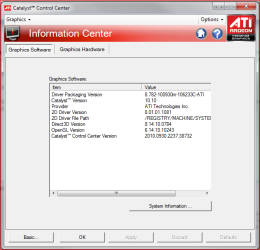
Catalyst version and driver or packager version are always different. This is for the 10.10,

cat1010.PNG

which if you go by the package version (which is what you posted) I believe you have the 10.11. If you didn't download it directly from AMD then you got the one that came out through Windows Update a week or two ago. If you did get the WU one then to uninstall it check the installed updates in windows Update instead of Programs and Features. If you can't find it or it won't uninstall then do a system restore to before it was updated (that driver showed up on or around the 12th).

Once you get back to the 10.10 or whatever it was you had previously, only ever get driver updates for your video card from AMD and never through WU. Check this thread every once in a while,

http://www.sevenforums.com/graphic-cards/1810-latest-ati-catalyst-driver-windows-7-a.html

if you want to keep the driver up to date as someone always posts when the new one comes out .
 

My Computer

Computer type
PC/Desktop
Computer Manufacturer/Model Number
Me
OS
Win 7 Ultimate x64
CPU
FX-8350 @ 4.6 GHz so far
Motherboard
Asus M5A97 EVO
Memory
ADATA XPG V1 Series Black 8GB DDR3 1600
Graphics Card(s)
Sapphire R9 270x Dual-X
Sound Card
Xonar DGX w/ Corsair Vengence 1300
Monitor(s) Displays
Acer S232HL Abid
Screen Resolution
1920x1080
Hard Drives
120 GB OCZ Vertex 3
500 GB Seagate 7200.12
PSU
Antec Earthwatts 650W Green
Case
Antec Three Hundred
Cooling
Cooler Master 212 EVO
Keyboard
Logitech G510
Mouse
Logitech G500s
Internet Speed
35000/3000
Once you get back to the 10.10 or whatever it was you had previously, only ever get driver updates for your video card from AMD and never through WU.
Thanks for the driver version info, nice to know it's not reverted to an ancient driver, but you've hit the problem right there. The damn thing won't install the AMD drivers. It keeps stopping just after you select install driver. Even the old driver which previously successfully installed does it now.

I'dmlove to only install drivers from AMD but it's just not playing ball right now.
 

My Computer

Computer Manufacturer/Model Number
DIY Build Number Infinity+1
OS
Windows 7 64Bit
CPU
AMD 965BE @ 3.9Ghz
Motherboard
Asus Crosshair III Formula
Memory
2x2Gb Corsair 1600 BEMP DDRIII
Graphics Card(s)
Sapphire ATi 5770 Vapor-X
Sound Card
SoundMAX
Monitor(s) Displays
HP w2408h
Screen Resolution
1920x1200
Hard Drives
2x Patriot Torqx 64Gb SSD (RAID 0) [Windows Drive]
1x Western Digital Velociraptor 300Gb [Apps Drive]
1x Samsung Spinpoint T166 500Gb [Storage Drive]
PSU
Corsair 850W
Case
Fractal Design Define R2 Black Pearl
Cooling
Prolimatech Megashadow in push pull w/ 2x Apache Black Fans
Keyboard
Rocat Arvo
Mouse
Rocat Kone
Internet Speed
10Mbs
Hai,
I've the same problem when i tried to install the new driver -11.8- for my HD 6850, and i tried to install the previous -11.7- which i had install One week ago and it doesn't work with me too, WU gave me version 8.850.0.0 ,
There any solutions?
 

My Computer

Computer Manufacturer/Model Number
Gigabyte
OS
Windows 7 Ultimate x64
CPU
AMD Phenom II x2 555 ,3200 Mhz
Motherboard
AMD 880GM-USB3
Memory
4.00 Gigabyte DDR3
Graphics Card(s)
AMD Radeon HD 6850
Monitor(s) Displays
Samsung Syncmaster 2494 HS
Back
Top
