Trouble using ICS to connect to Xbox Live

cryptictrip

New member
Local time
1:08 PM
Messages
9
Hello,

I am *extremely* frustrated right now, for the past few hours I've been trying everything I could to access Xbox Live using ICS.

I have Windows 7 Starter on my Netbook, my internet is broadband Verizon Wireless USB760, meaning it plugs into my usb port..and I have the ethernet cable connected to both my Xbox and my netbook.

I have a Local Area Connection set up for the Ethernet, when I go to Network And Sharing Center --> Change adapter settings, it shows both my Verizon broadband connection and the Ethernet one. I know I'm supposed to right click them and click the Sharing tab, but...There is none one either one of them. It just has the Networking tab. I also tried bridging the connection, but there's no option for Bridge Connections when I have them both highlighted and right click on one...

I really don't know what to do from here, any suggestions would be greatly appreciated.
 

My Computer My Computer

At a glance

Windows 7 Starter
OS
Windows 7 Starter
Type services.msc in the start menu search box. Hit enter. Enable Internet Connection Sharing service and set to automatic start.
 

My Computer My Computer

At a glance

Win7
OS
Win7
Thank you for replying, and I did so. I clicked Start and it said "The ICS service on Local Computer started and then stopped. Some services stop automatically if they are not being used by another service or program."

Still no Sharing tab.
Also, under my LAN connection, it says Network Cable unplugged, although I have the Ethernet cable plugged in to the Xbox, which is on, and this netbook...

Do I need to like, reinstall Windows 7? What is the problem here?
 

My Computer My Computer

At a glance

Windows 7 Starter
OS
Windows 7 Starter

Attachments

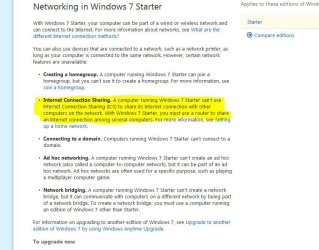
  • ICS.jpg
    ICS.jpg
    84.6 KB · Views: 1,156

My Computer My Computer

At a glance

Windows 7 Ultimate x64AMD Phenom x6 1045t8 GBATI Radeon HD 5570
Computer Manufacturer/Model Number
HP Pavilion Elite HPE-410f
OS
Windows 7 Ultimate x64
CPU
AMD Phenom x6 1045t
Motherboard
N/A
Memory
8 GB
Graphics Card(s)
ATI Radeon HD 5570
Sound Card
Realtek Highdefinition Audio / 5.1 Dolby Setup
Monitor(s) Displays
HP w2207h Widescreen
Screen Resolution
1680*1050
Hard Drives
1 TB (fixed), 320 Portable maxtor, Server Hard drives
PSU
350 Watt
Case
HP CASE
Cooling
Bass
Keyboard
Logitech MX 5500
Mouse
Logitech MX 5500
Internet Speed
ROAD RUNNER 16MB D/512 U
I've heard that you can, though, using ad hoc? Not completely sure what it is, I've just heard it works with Windows 7 and you can share internet with it...

I can't afford a router, and do they even work with USB modem internet?
 

My Computer My Computer

At a glance

Windows 7 Starter
OS
Windows 7 Starter
Ad hoc: is when you use wireless and connect one computer wireless to another computer wireless

You can get a router for 15 dollars. You can find one cheap man...

So you are telling me that the modem that you are using does not have a RJ 45 connection coming out of the back at all??? If that is the case... a modem won't do you any good. You are going to have to upgrade your windows. You have to use ICS to convert the USB to the CAT5 or Wireless
 

My Computer My Computer

At a glance

Windows 7 Ultimate x64AMD Phenom x6 1045t8 GBATI Radeon HD 5570
Computer Manufacturer/Model Number
HP Pavilion Elite HPE-410f
OS
Windows 7 Ultimate x64
CPU
AMD Phenom x6 1045t
Motherboard
N/A
Memory
8 GB
Graphics Card(s)
ATI Radeon HD 5570
Sound Card
Realtek Highdefinition Audio / 5.1 Dolby Setup
Monitor(s) Displays
HP w2207h Widescreen
Screen Resolution
1680*1050
Hard Drives
1 TB (fixed), 320 Portable maxtor, Server Hard drives
PSU
350 Watt
Case
HP CASE
Cooling
Bass
Keyboard
Logitech MX 5500
Mouse
Logitech MX 5500
Internet Speed
ROAD RUNNER 16MB D/512 U
All my internet is, is a simple USB drive. So...I guess it won't help.

I've seen people on forums with the same internet and Windows 7 Starter be able to access Live this way. I'm also wondering if it's a hardware compatibility problem, the Ethernet cable is 2 years old...But, I could have no idea what I'm talking about, I don't know much.

So there is *no* way to get the Sharing tab to appear without upgrading? That's the main problem, that it's not there, but for anyone else with the same internet & OS as me, it appears for them.

Also-- I have a friend coming this weekend with Windows Vista, if I plugged the Ethernet into there and got my internet on there...Would Xbox Live work with that?
 

My Computer My Computer

At a glance

Windows 7 Starter
OS
Windows 7 Starter
Yeah actually when your friend comes over. You can do it.....

This is how you do it:

When you activate Sharing:

It will make the NIC: 192.168.0.1

for you to share your internet... two ways... either you are going to have to set up a Ad Hoc or you are going to have to ask your friend to bring a router.

It really depends on how your hooking up your system and what hardware you have already
 

My Computer My Computer

At a glance

Windows 7 Ultimate x64AMD Phenom x6 1045t8 GBATI Radeon HD 5570
Computer Manufacturer/Model Number
HP Pavilion Elite HPE-410f
OS
Windows 7 Ultimate x64
CPU
AMD Phenom x6 1045t
Motherboard
N/A
Memory
8 GB
Graphics Card(s)
ATI Radeon HD 5570
Sound Card
Realtek Highdefinition Audio / 5.1 Dolby Setup
Monitor(s) Displays
HP w2207h Widescreen
Screen Resolution
1680*1050
Hard Drives
1 TB (fixed), 320 Portable maxtor, Server Hard drives
PSU
350 Watt
Case
HP CASE
Cooling
Bass
Keyboard
Logitech MX 5500
Mouse
Logitech MX 5500
Internet Speed
ROAD RUNNER 16MB D/512 U
Can you inform me on what you have in the house already and what your friend has and i can help you set it up.
 

My Computer My Computer

At a glance

Windows 7 Ultimate x64AMD Phenom x6 1045t8 GBATI Radeon HD 5570
Computer Manufacturer/Model Number
HP Pavilion Elite HPE-410f
OS
Windows 7 Ultimate x64
CPU
AMD Phenom x6 1045t
Motherboard
N/A
Memory
8 GB
Graphics Card(s)
ATI Radeon HD 5570
Sound Card
Realtek Highdefinition Audio / 5.1 Dolby Setup
Monitor(s) Displays
HP w2207h Widescreen
Screen Resolution
1680*1050
Hard Drives
1 TB (fixed), 320 Portable maxtor, Server Hard drives
PSU
350 Watt
Case
HP CASE
Cooling
Bass
Keyboard
Logitech MX 5500
Mouse
Logitech MX 5500
Internet Speed
ROAD RUNNER 16MB D/512 U
Right now I have: Hp Mini Netbook w/ Windows 7 Starter, Verizon USB 760 internet, the Xbox, and the Ethernet cable.

My friend is just bringing their HP Laptop which has Vista on it.

I was thinking I'd just plug my USB internet and the Ethernet cable into his laptop and plug it into the Xbox, and share the internet there...If that'd work.
 

My Computer My Computer

At a glance

Windows 7 Starter
OS
Windows 7 Starter
What you can do is:

Plug the internet into the vista computer.....


if you guys had a router it would work good...

but is it really necessary to put your computer online ... you should be good enough with the vista computer online.

1. Plug USB internet into the vista
2. Activate the NIC Card on the Vista computer, make sure its enable
3. Enable the ICS, point it to the NIC card, make sure the ip is: 192.168.0.1
4. plug the patch cable from the NIC card to your Xbox.
5. Force the Xbox to have the IP address as:
IP: 192.168.0.2
Subnet: 255.255.255.0
Gateway: 192.168.0.1

Your DNS should be manually inputed into the xbox... you can obtain your DNS
by open up CMD.. on your vista when you got the internet crackin' and type in:

ipconfig /all

and under your verizon connection you will see the DNS servers you will need to put into the Xbox, they must all match.

I am sorry, without a switch/hub/router .. only the vista and xbox will be online
 

My Computer My Computer

At a glance

Windows 7 Ultimate x64AMD Phenom x6 1045t8 GBATI Radeon HD 5570
Computer Manufacturer/Model Number
HP Pavilion Elite HPE-410f
OS
Windows 7 Ultimate x64
CPU
AMD Phenom x6 1045t
Motherboard
N/A
Memory
8 GB
Graphics Card(s)
ATI Radeon HD 5570
Sound Card
Realtek Highdefinition Audio / 5.1 Dolby Setup
Monitor(s) Displays
HP w2207h Widescreen
Screen Resolution
1680*1050
Hard Drives
1 TB (fixed), 320 Portable maxtor, Server Hard drives
PSU
350 Watt
Case
HP CASE
Cooling
Bass
Keyboard
Logitech MX 5500
Mouse
Logitech MX 5500
Internet Speed
ROAD RUNNER 16MB D/512 U
Thank you, I'm sure this would work...if I had the right Ethernet cable. I've come to the conclusion that I don't, due to the fact when I plug in either one of my cables, underneath my LAN it says "Network cable unplugged". I've looked things up and it said that I need a crossover cable...I'm going to buy one tomorrow, any idea what kind I'd need?
 

My Computer My Computer

At a glance

Windows 7 Starter
OS
Windows 7 Starter
Just one that saids Cross over cable... Pref Cat 5e


then the lenght is your preference.


Or you can build one yourself or go to a computer store... brin ghte cable there and have them build it there for them, you just have to switch two wires on one end...thats it.
 

My Computer My Computer

At a glance

Windows 7 Ultimate x64AMD Phenom x6 1045t8 GBATI Radeon HD 5570
Computer Manufacturer/Model Number
HP Pavilion Elite HPE-410f
OS
Windows 7 Ultimate x64
CPU
AMD Phenom x6 1045t
Motherboard
N/A
Memory
8 GB
Graphics Card(s)
ATI Radeon HD 5570
Sound Card
Realtek Highdefinition Audio / 5.1 Dolby Setup
Monitor(s) Displays
HP w2207h Widescreen
Screen Resolution
1680*1050
Hard Drives
1 TB (fixed), 320 Portable maxtor, Server Hard drives
PSU
350 Watt
Case
HP CASE
Cooling
Bass
Keyboard
Logitech MX 5500
Mouse
Logitech MX 5500
Internet Speed
ROAD RUNNER 16MB D/512 U
I got a Cat5e cable today. It shows up as Unidentified Network on my computer now, and I entered all of the IP settings as you said on my Xbox, as well as DNS. But when I try to connect to Live, it says "Can't connect to your network hardware using a static IP address"

What am I doing wrong now??
 

My Computer My Computer

At a glance

Windows 7 Starter
OS
Windows 7 Starter
cryptictrip, once you plug the ethernet cable, and showed connected, now you should right click your "internet" connection, and share it.

zzz2496
 

My Computer My Computer

At a glance

Windows7 Ultimate 64bitIntel Core 2 Quad Q6600DDR2 Adata 4GBNvidia GeForce GTX 285 1024 and Nvidia GeForc...
Computer Manufacturer/Model Number
Self Built
OS
Windows7 Ultimate 64bit
CPU
Intel Core 2 Quad Q6600
Motherboard
Abit IN9-32X-MMAX
Memory
DDR2 Adata 4GB
Graphics Card(s)
Nvidia GeForce GTX 285 1024 and Nvidia GeForce 8800GT 512
Sound Card
Asus Xonar HDAV 1.3
Monitor(s) Displays
Dell 2407WFP and BenQ 2400v and Philips 150v3
Screen Resolution
3840x1200 and 1024x768
Hard Drives
2 WDC 1TB
1 WDC 1.5TB
1 WDC 640GB
1 WDC 320GB
1 Seagate 200GB
PSU
Corsair TX 850W
Case
Cooler Master HAF932
Cooling
Arctic Cooling Freezer Extreme and plenty of fans...
Keyboard
MicrosoftNaturalKeyboard 4000/Apple Alu keyboard/Dinovo mini
Mouse
Logitech G5/MarbleMouseTrackball/PerformanceMX/SpacePilotPRO
Internet Speed
1.5Mbps down/384Kbps up
Other Info
APC SURT 1000XL
Logitech Z-560
Wiimote
Mikrotik Router
Linksys (now Cisco) SD2008 8 port Gigabit switch
Linksys WRT54G (acting as AP)
Apple wireless Aluminium keyboard
Apple Magic Mouse
Xbox360 wired controller
I already have done that, it was one of the first steps I did...It still doesn't work, the xbox keeps giving me the same error "csn't connect to your network hardware using a static IP address"
 

My Computer My Computer

At a glance

Windows 7 Starter
OS
Windows 7 Starter
Sorry then, I don't own XBOX 360, so I don't know it's quirks... Playstation 3 works though, static IP nor DHCP enabled, both works... (-_-)a. BTW, can you ping your XBOX from the netbook? Just to make sure that network connection is indeed established...

zzz2496
 

My Computer My Computer

At a glance

Windows7 Ultimate 64bitIntel Core 2 Quad Q6600DDR2 Adata 4GBNvidia GeForce GTX 285 1024 and Nvidia GeForc...
Computer Manufacturer/Model Number
Self Built
OS
Windows7 Ultimate 64bit
CPU
Intel Core 2 Quad Q6600
Motherboard
Abit IN9-32X-MMAX
Memory
DDR2 Adata 4GB
Graphics Card(s)
Nvidia GeForce GTX 285 1024 and Nvidia GeForce 8800GT 512
Sound Card
Asus Xonar HDAV 1.3
Monitor(s) Displays
Dell 2407WFP and BenQ 2400v and Philips 150v3
Screen Resolution
3840x1200 and 1024x768
Hard Drives
2 WDC 1TB
1 WDC 1.5TB
1 WDC 640GB
1 WDC 320GB
1 Seagate 200GB
PSU
Corsair TX 850W
Case
Cooler Master HAF932
Cooling
Arctic Cooling Freezer Extreme and plenty of fans...
Keyboard
MicrosoftNaturalKeyboard 4000/Apple Alu keyboard/Dinovo mini
Mouse
Logitech G5/MarbleMouseTrackball/PerformanceMX/SpacePilotPRO
Internet Speed
1.5Mbps down/384Kbps up
Other Info
APC SURT 1000XL
Logitech Z-560
Wiimote
Mikrotik Router
Linksys (now Cisco) SD2008 8 port Gigabit switch
Linksys WRT54G (acting as AP)
Apple wireless Aluminium keyboard
Apple Magic Mouse
Xbox360 wired controller
I have no idea what that is lol

But something wierd I noted...I changed a few settings and noticed my Verizon connection said "Shared" underneath it..So on my xbox I said get IP automatically for the heck of it...Tested connection, it said "could not obtain an ip address from your network hardware" But when I looked at the Configure Network screen, under IP settings it had a new IP Address and Subnet mask that I suppose the laptop assigned it...But the default gateway was 0.0.0.0, and I'm pretty sure if the gateway is that, then Live won't work...And when I went to CMD and then ipconfig /all, my Verizon connection had its default gateway to be 0.0.0.0 too...
 

My Computer My Computer

At a glance

Windows 7 Starter
OS
Windows 7 Starter
Hmm... what's the current IP address of your LAN interface on the netbook? I'd like to try something that probably will fix your problem (if XBOX behaves as predicted). Can you make a screenshot of "ipconfig /all" ?

zzz2496
 

My Computer My Computer

At a glance

Windows7 Ultimate 64bitIntel Core 2 Quad Q6600DDR2 Adata 4GBNvidia GeForce GTX 285 1024 and Nvidia GeForc...
Computer Manufacturer/Model Number
Self Built
OS
Windows7 Ultimate 64bit
CPU
Intel Core 2 Quad Q6600
Motherboard
Abit IN9-32X-MMAX
Memory
DDR2 Adata 4GB
Graphics Card(s)
Nvidia GeForce GTX 285 1024 and Nvidia GeForce 8800GT 512
Sound Card
Asus Xonar HDAV 1.3
Monitor(s) Displays
Dell 2407WFP and BenQ 2400v and Philips 150v3
Screen Resolution
3840x1200 and 1024x768
Hard Drives
2 WDC 1TB
1 WDC 1.5TB
1 WDC 640GB
1 WDC 320GB
1 Seagate 200GB
PSU
Corsair TX 850W
Case
Cooler Master HAF932
Cooling
Arctic Cooling Freezer Extreme and plenty of fans...
Keyboard
MicrosoftNaturalKeyboard 4000/Apple Alu keyboard/Dinovo mini
Mouse
Logitech G5/MarbleMouseTrackball/PerformanceMX/SpacePilotPRO
Internet Speed
1.5Mbps down/384Kbps up
Other Info
APC SURT 1000XL
Logitech Z-560
Wiimote
Mikrotik Router
Linksys (now Cisco) SD2008 8 port Gigabit switch
Linksys WRT54G (acting as AP)
Apple wireless Aluminium keyboard
Apple Magic Mouse
Xbox360 wired controller
well, i dont know if you're still around on here, cryptic.
but, ive had the same problems - i just got my netbook today. i was running around the internet looking for information on this, and i found something that said the computer might not have enough of the internet cards. like, it has a wireless one, but it doesn't have the actual wired one.. which is why you don't see the Sharing tab.
 

My Computer My Computer

At a glance

windows 7 starter
OS
windows 7 starter
Back
Top