Solved Trouble with IE

ElctrcRngr

New member
Local time
12:28 PM
Messages
19
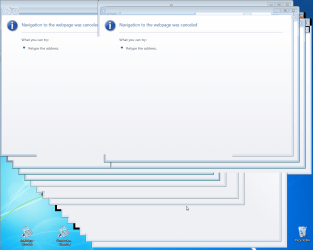
Wasn't quite sure where to put this, or even how to describe it. After doing a clean install of Win 7 Pro 64 bit, I occasionally close Chrome to find a dialog box that reads, at the top, Windows Internet Explorer. In the box proper, it says, "Could not perform this operation because the default mail client is not properly installed." It has the normal red X in the upper right corner to close, and the normal OK button in the lower right corner. When I click on either of them, at least fifty instances of a window pop up that has a big white lower case i in a blue circle in the upper left corner, and at the top, next to the i, it reads, "Navigation to the webpage was cancelled." Below this, it reads, "What you can try:" Just below this it says, "Retype the address". This doesn't happen every time I close Chrome, and every thing else seems to work fine. I have Important updates set to install automatically, but Recommended ones I install manually, depending on whether I think they are needed on my particular setup. Could there be an update I'm missing that will take care of this? I know I'm probably not providing all the info needed to answer this, but without help I don't even know where to start. I'm going to try to provide screenshots, but the ones I have I took with Greenshot, and are in PNG format.
 

Attachments

  • 2014-11-30 21_37_13-Greenshot.png
    2014-11-30 21_37_13-Greenshot.png
    319.9 KB · Views: 2
  • 2014-11-30 21_38_16-Greenshot.png
    2014-11-30 21_38_16-Greenshot.png
    57.5 KB · Views: 1

My Computer

Computer type
PC/Desktop
Computer Manufacturer/Model Number
Dell Optiplex 760
OS
Windows 7 Pro 64bit
CPU
3.0GHz Intel Core II Duo
Motherboard
Unknown Chipset is Intel Q43 Express
Memory
4GB
Graphics Card(s)
Integrated
Hard Drives
160 GBWestern Digital SATA w/ a Seagate 2TB External USB
Antivirus
Avast Free
Browser
Mozilla FireFox 29.0
Hi and welcome to SevenForums,
I doubt any update is pin pointed at some thing like that but then again post a screen shot of the update you have yet to download and install :/

Pretty strange reaction from a pretty basic task of closing Chrome,
Does it happen closing Firefox which you show you also so have installed in your system spec's ?

First thought would be to state what is your default email program :confused:
If webmail just state gmail/.....

Second thought would be to re-install Chrome,
But then again this screen capture utility shows allot of entries for Internet explorer and none for any other browser please explain why ?
Use Clean boot,
http://www.sevenforums.com/tutorials/179159-troubleshoot-application-conflicts-performing-clean-startup.html
Click Start and type in the search box,
msconfig
Click on the suggestion on top or hit the Enter key,
Go to the Startup section and take some screen shots for a complete list,
Go to the Services section and on the bottom left Check the box to Hide All Microsoft services,
Repeat the screen shots,
See the links above my signature on how to take and upload screen shots here,
Cheers.
 

My Computer

Computer type
PC/Desktop
Computer Manufacturer/Model Number
Custom assembled by me :}
OS
Win-7-Pro64bit 7-H-Prem-64bit
CPU
i7-5930K 2nd i9-9940x both water blocked VRM's too
Motherboard
ASUS SABERTOOTH X99 2nd ASUS x299 Apex
Memory
Trident-z 3200C14 2nd Trident-z 3600C16
Graphics Card(s)
EVGA 1080ti ftw3 2nd Titan Xp both water blocked
Sound Card
Built-in Realtek
Monitor(s) Displays
1-AOC G2460PG 24"G-Sync 144Hz/ 2nd 1-ASUS VG248QE 24" 144Hz
Screen Resolution
1920 x 1080 144Hz
Hard Drives
2-Samsung M.2 Evo & Evo Plus
2-Samsung 850 EVO 500GB SSD's/ 3-2.5 W.D. Black 1tb-&3-1tb/3-3.5 WD Black 1tb hdd's
PSU
EVGA SuperNOVA 1000-P2 2nd 1200-P2
Case
2-Corsair Obsidian Series 450D Black ATX Mid Tower
Cooling
Custom water loops
Keyboard
Logitech G710+/ 2nd Logitech G910
Mouse
2-RedDragon M901 Perdition 16400 dpi Gaming mouse = wired
Internet Speed
Comcast Ping 19ms 89.31mbps download speed 6.12mbps upload
Antivirus
Malwarebytes Pro/ Superantispyware Pro
Browser
FireFox & Pale moon
Other Info
2nd ASUS X299 Apex/Intel i9-9940x with Custom water loop/7H-Prem-x64/Corsair 450D case/Ram Trident-z 3600C16 4x8gb / Samsung970Evo plus 500gb SSD/Dual ssd EZ swap evo/PSU EVGA SuperNova 1200w-P2 80+Platinum/GPU Titan Xp /8-ML-140 on push-pull on 2-280GTX rads
Well, I never did find out exactly what was causing this problem, but I did another clean install of Windows a few days ago, and it seems to be resolved. Now I have another question, but I don't think it goes in this area, so I'm going to try to find the right place to post it. Thanks for all your help, it is much appreciated!
 

My Computer

Computer type
PC/Desktop
Computer Manufacturer/Model Number
Dell Optiplex 760
OS
Windows 7 Pro 64bit
CPU
3.0GHz Intel Core II Duo
Motherboard
Unknown Chipset is Intel Q43 Express
Memory
4GB
Graphics Card(s)
Integrated
Hard Drives
160 GBWestern Digital SATA w/ a Seagate 2TB External USB
Antivirus
Avast Free
Browser
Mozilla FireFox 29.0
Back
Top