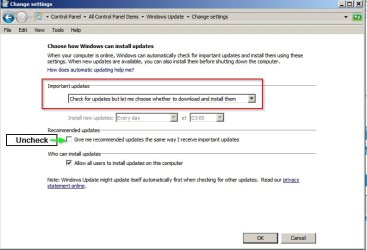
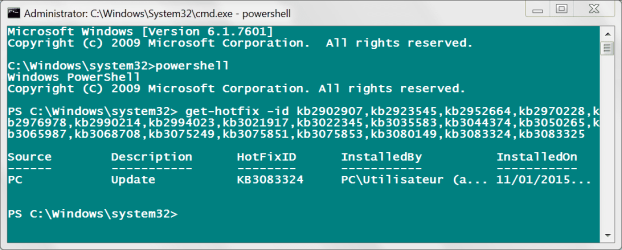
Reinstalling from scratch. Having just started updates, done SP1. Windows Update Agent updates itself to 7.6.7600.256, then to 7.6.7600.320 and trouble starts.
Checking for updates brings nothing, no Internet traffic (I know this is supposed to be "normal", but bear with me).
System Tray icon tells me I've got pending updates, but clicking on the icon does not display them, only Checking for Updates.
I de-activate Avira anti-virus, and suddenly ~ 200 udpates are proposed. Including updates to .NET, but .NET is not on my machine.
I decide to select and install IE 11 only, to see if this works. Downloading stays at 0% for a very long time, so I stop downloading and shut down.
I start again, now downloading is at ~ 60% right away out of the blue. IE11 is installed, however a dozen other updates have installed alongside, which I did not ask for.
Also, they appear in Installed Updates but not in Update History.
I have been installing, wiping and re-installing Windows for dozens of times now over the last few weeks, without ever managing a properly finalized, working system. So before I examine each of those hundred updates again to see if they really have to be installed, then wait again a full day or more to see if Microsoft servers react online, I'd be glad to have your opinion.
I see a lot of people with similar complaints about 7.6.7600.320.
Thanks.
View attachment 374842
Checking for updates brings nothing, no Internet traffic (I know this is supposed to be "normal", but bear with me).
System Tray icon tells me I've got pending updates, but clicking on the icon does not display them, only Checking for Updates.
I de-activate Avira anti-virus, and suddenly ~ 200 udpates are proposed. Including updates to .NET, but .NET is not on my machine.
I decide to select and install IE 11 only, to see if this works. Downloading stays at 0% for a very long time, so I stop downloading and shut down.
I start again, now downloading is at ~ 60% right away out of the blue. IE11 is installed, however a dozen other updates have installed alongside, which I did not ask for.
Also, they appear in Installed Updates but not in Update History.
I have been installing, wiping and re-installing Windows for dozens of times now over the last few weeks, without ever managing a properly finalized, working system. So before I examine each of those hundred updates again to see if they really have to be installed, then wait again a full day or more to see if Microsoft servers react online, I'd be glad to have your opinion.
I see a lot of people with similar complaints about 7.6.7600.320.
Thanks.
View attachment 374842
Last edited:
My Computer
At a glance
Windows 7 Home Premium 64-bit (OEM)AMD Athlon II X4 640 (3 GHz, 4 cores)Patriot 16Gb DDR3 1600 (2 kits of 2)ATI Radeon HD 4290 (integrated)
- Computer type
- PC/Desktop
- Computer Manufacturer/Model Number
- Custom build
- OS
- Windows 7 Home Premium 64-bit (OEM)
- CPU
- AMD Athlon II X4 640 (3 GHz, 4 cores)
- Motherboard
- Asus M4A 89 GTD Pro/USB3
- Memory
- Patriot 16Gb DDR3 1600 (2 kits of 2)
- Graphics Card(s)
- ATI Radeon HD 4290 (integrated)
- Sound Card
- AMD + Realtek HD Audio (integrated)
- Monitor(s) Displays
- Hewlett-Packard ZR2440w (24")
- Screen Resolution
- 1920 x 1200
- Hard Drives
- Internal : Samsung SSD 860 EVO 250 Gb (system), Seagate Barrcuda 1 Tb (data), Western Digital Caviar Blue 500 Gb (archives).
External (USB) : 2 x 1 Tb 2,5" Seagate Barracuda (backups).
- PSU
- Corsair VX 450 W
- Case
- Antec Solo
- Cooling
- Cooler Master Hyper 212 Plus, 2 Nexus Real Silent Case fans
- Keyboard
- Cherry KC 1000
- Mouse
- Logitech M 90
- Internet Speed
- Fiber, 300 Mbit/s down, 200 Mbit/s up
- Antivirus
- Microsoft Security Essentials
- Browser
- Vivaldi, Tor
- Other Info
- BIOS Date: 07/18/11 Ver: 08.00.15.
Modem-router : provided by ISP