
You are using an out of date browser. It may not display this or other websites correctly.
You should upgrade or use an alternative browser.
You should upgrade or use an alternative browser.
Solved Troubleshoot Icon on Laptop in Devices & Printers after new W7 install
- Thread starter chobbs
- Start date

Not a problem Chobbs that is what the forum is about mate.Will do. I'm willing to try anything even if its tedious. thanks for bearing with me

My Computer
At a glance
Desk1 7 Home Prem / Desk2 10 Pro / Main lap A...Desk1 i5 3750K / Laptop i7 GTX 860M / Desk2 i...Desk1 8GB (1866) / Desk2 16GB (1333) / Laptop...Desk 1& 2NVidia GTX 650 & Laptops on board Intel
- Computer type
- PC/Desktop
- Computer Manufacturer/Model Number
- Own build (new) Desk1 / Asus ROG Win 7 / Desk2 1st build
- OS
- Desk1 7 Home Prem / Desk2 10 Pro / Main lap Asus ROG 10 Pro 2 laptop Toshiba 7 Pro Asus P2520 7 & 10
- CPU
- Desk1 i5 3750K / Laptop i7 GTX 860M / Desk2 i5 2500
- Motherboard
- Desk1 Asus P877-V / Desk2 Gigabyte H67 UD3H / Laptop ?
- Memory
- Desk1 8GB (1866) / Desk2 16GB (1333) / Laptop 8Gb DDR3
- Graphics Card(s)
- Desk 1& 2NVidia GTX 650 & Laptops on board Intel
- Sound Card
- Desk 1 & 2 -XONAR DG Realtek High Def audio Laptop
- Monitor(s) Displays
- Desk 1 Benq HD 2450 / Desk2 Philips 24" / Laptop 17.5"
- Screen Resolution
- 1920x1080 D1 & D2 & Laptop 1
- Hard Drives
- Desk1 Samsung 120GB 830 SSD
Asus ROG 256GB 850 Pro SSD
Desk2 Samsung 840 256 SSD
Toshiba 120GB EVO
- PSU
- Desk 1 Corsair HX 1050/ Laptop ? / Desk 2 Corsair HX 650
- Case
- Desk 1 Cooler HAF XM ? Toshiba laptop / Desk2 Coolermaster
- Cooling
- Fans on all Desk1 -2 Desk2 - all Coolermasters 5 Laptop ?
- Keyboard
- Desk 1 MS Sidewinder X6 Desk 2 MS Sidewinder X 4
- Mouse
- Desk 1&2 - Gigabyte MS 900 gamer - laptop - Logitec wireless
- Internet Speed
- ADSL2+
- Other Info
- One other Desktop (tester) and spare Toshba laptop both with SSD's
Running Kaspersky 2016 ISS on all machines config'd identically
Logitec audio stereo systems on each machine (x3)
Canon MG5250MFC
Router/modem TP-Link running WPA2SK
how do i test each stick one at a time ? I went into the configuration menu and i couldn't find an option to do so.
My Computer
At a glance
Windows 7 Ultimate 32bit
- Computer type
- Laptop
- Computer Manufacturer/Model Number
- HP
- OS
- Windows 7 Ultimate 32bit

Hi there ... You need to remove the Ram physically .. The Link below will help you achieve this .. PLease do not take offence at the Title ...
How to Remove RAM from Your Laptop - For Dummies
How to Remove RAM from Your Laptop - For Dummies
My Computer
At a glance
windows 7 home 64bitINTEL-CORE I716GB
- Computer Manufacturer/Model Number
- W530-3630QM1
- OS
- windows 7 home 64bit
- CPU
- INTEL-CORE I7
- Memory
- 16GB
- Hard Drives
- 750GB
- Browser
- Chrome
Sorry for late reply and thanks Maxie for the tip I di try to look for the HP model but - HP Pavilion dv4-1114nrre no specific details on where the RAM sticks were.
My Computer
At a glance
Desk1 7 Home Prem / Desk2 10 Pro / Main lap A...Desk1 i5 3750K / Laptop i7 GTX 860M / Desk2 i...Desk1 8GB (1866) / Desk2 16GB (1333) / Laptop...Desk 1& 2NVidia GTX 650 & Laptops on board Intel
- Computer type
- PC/Desktop
- Computer Manufacturer/Model Number
- Own build (new) Desk1 / Asus ROG Win 7 / Desk2 1st build
- OS
- Desk1 7 Home Prem / Desk2 10 Pro / Main lap Asus ROG 10 Pro 2 laptop Toshiba 7 Pro Asus P2520 7 & 10
- CPU
- Desk1 i5 3750K / Laptop i7 GTX 860M / Desk2 i5 2500
- Motherboard
- Desk1 Asus P877-V / Desk2 Gigabyte H67 UD3H / Laptop ?
- Memory
- Desk1 8GB (1866) / Desk2 16GB (1333) / Laptop 8Gb DDR3
- Graphics Card(s)
- Desk 1& 2NVidia GTX 650 & Laptops on board Intel
- Sound Card
- Desk 1 & 2 -XONAR DG Realtek High Def audio Laptop
- Monitor(s) Displays
- Desk 1 Benq HD 2450 / Desk2 Philips 24" / Laptop 17.5"
- Screen Resolution
- 1920x1080 D1 & D2 & Laptop 1
- Hard Drives
- Desk1 Samsung 120GB 830 SSD
Asus ROG 256GB 850 Pro SSD
Desk2 Samsung 840 256 SSD
Toshiba 120GB EVO
- PSU
- Desk 1 Corsair HX 1050/ Laptop ? / Desk 2 Corsair HX 650
- Case
- Desk 1 Cooler HAF XM ? Toshiba laptop / Desk2 Coolermaster
- Cooling
- Fans on all Desk1 -2 Desk2 - all Coolermasters 5 Laptop ?
- Keyboard
- Desk 1 MS Sidewinder X6 Desk 2 MS Sidewinder X 4
- Mouse
- Desk 1&2 - Gigabyte MS 900 gamer - laptop - Logitec wireless
- Internet Speed
- ADSL2+
- Other Info
- One other Desktop (tester) and spare Toshba laptop both with SSD's
Running Kaspersky 2016 ISS on all machines config'd identically
Logitec audio stereo systems on each machine (x3)
Canon MG5250MFC
Router/modem TP-Link running WPA2SK
No Worries. I found the mem slots. I pulled out one and am running the test on just one stick.
I figured out my issues with the restarts. As with most HP laptops i think there is an overheat issue. Previously if i do not have a vent for air to flow out from underneath, my laptop just shuts down. To resolve this is usually hang the side of my laptop over a table to let in airflow when i'm doing heavy processing tasks (dangerous, i know)
I tried that technique while doing the previous mem test but i guess that is not enough, it was still shutting down. I kind of jerry rigged a diy cooling system for my laptop (see picture) and it seems to be doing well so far. I'm about to get to pass number two and plan on leaving it this way until it reaches pass 8 and repeat with the other mem chip.
PicPaste - Clthy1av.jpg
I figured out my issues with the restarts. As with most HP laptops i think there is an overheat issue. Previously if i do not have a vent for air to flow out from underneath, my laptop just shuts down. To resolve this is usually hang the side of my laptop over a table to let in airflow when i'm doing heavy processing tasks (dangerous, i know)
I tried that technique while doing the previous mem test but i guess that is not enough, it was still shutting down. I kind of jerry rigged a diy cooling system for my laptop (see picture) and it seems to be doing well so far. I'm about to get to pass number two and plan on leaving it this way until it reaches pass 8 and repeat with the other mem chip.
PicPaste - Clthy1av.jpg
My Computer
At a glance
Windows 7 Ultimate 32bit
- Computer type
- Laptop
- Computer Manufacturer/Model Number
- HP
- OS
- Windows 7 Ultimate 32bit
At least you will stay cool 
My Computer
At a glance
windows 7 home 64bitINTEL-CORE I716GB
- Computer Manufacturer/Model Number
- W530-3630QM1
- OS
- windows 7 home 64bit
- CPU
- INTEL-CORE I7
- Memory
- 16GB
- Hard Drives
- 750GB
- Browser
- Chrome
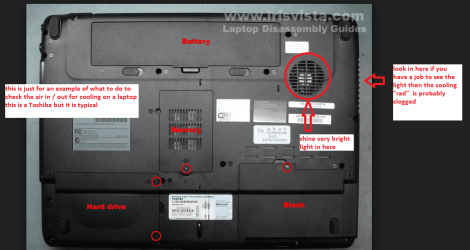
Chobbs mate to see if the machine needs cleaning out from a air flow perspective do this
CLEANING A LAPTOP FAN & COOLER RAD
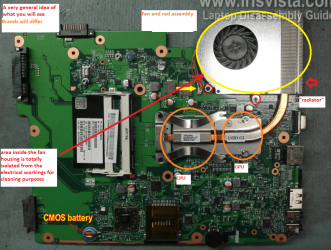
The thing you do is to turn over thelaptop and shine a very bright light into the air intake aperture (you will seethe fan there) and then while doing that look at the outlet vent on the end ofthe laptop you should see the light quite clearly shining through the cooling" radiator" if not it is clogged and will need cleaning as willprobably the fan opening.
You can do this by blowing it outusing a compressed air can in short bursts.
BUT ONE WORD OF WARNING DO NOT blow the air into the fan opening withoutinserting say a plastic rod or large cable tie to stop the fan from spinning asthe air blast will spin the fan at a very high speed that it is not designed totake and may wreck the bearing!!
To clean the "rad" I use those pipe cleaners to GENTLY loosen the crud and then blow it out of course disassembly makes life so much easier
In my pics you will get the general idea and one is to show you what is inside.
CLEANING A LAPTOP FAN & COOLER RAD
The thing you do is to turn over thelaptop and shine a very bright light into the air intake aperture (you will seethe fan there) and then while doing that look at the outlet vent on the end ofthe laptop you should see the light quite clearly shining through the cooling" radiator" if not it is clogged and will need cleaning as willprobably the fan opening.
You can do this by blowing it outusing a compressed air can in short bursts.
BUT ONE WORD OF WARNING DO NOT blow the air into the fan opening withoutinserting say a plastic rod or large cable tie to stop the fan from spinning asthe air blast will spin the fan at a very high speed that it is not designed totake and may wreck the bearing!!
To clean the "rad" I use those pipe cleaners to GENTLY loosen the crud and then blow it out of course disassembly makes life so much easier
In my pics you will get the general idea and one is to show you what is inside.
Attachments
My Computer
At a glance
Desk1 7 Home Prem / Desk2 10 Pro / Main lap A...Desk1 i5 3750K / Laptop i7 GTX 860M / Desk2 i...Desk1 8GB (1866) / Desk2 16GB (1333) / Laptop...Desk 1& 2NVidia GTX 650 & Laptops on board Intel
- Computer type
- PC/Desktop
- Computer Manufacturer/Model Number
- Own build (new) Desk1 / Asus ROG Win 7 / Desk2 1st build
- OS
- Desk1 7 Home Prem / Desk2 10 Pro / Main lap Asus ROG 10 Pro 2 laptop Toshiba 7 Pro Asus P2520 7 & 10
- CPU
- Desk1 i5 3750K / Laptop i7 GTX 860M / Desk2 i5 2500
- Motherboard
- Desk1 Asus P877-V / Desk2 Gigabyte H67 UD3H / Laptop ?
- Memory
- Desk1 8GB (1866) / Desk2 16GB (1333) / Laptop 8Gb DDR3
- Graphics Card(s)
- Desk 1& 2NVidia GTX 650 & Laptops on board Intel
- Sound Card
- Desk 1 & 2 -XONAR DG Realtek High Def audio Laptop
- Monitor(s) Displays
- Desk 1 Benq HD 2450 / Desk2 Philips 24" / Laptop 17.5"
- Screen Resolution
- 1920x1080 D1 & D2 & Laptop 1
- Hard Drives
- Desk1 Samsung 120GB 830 SSD
Asus ROG 256GB 850 Pro SSD
Desk2 Samsung 840 256 SSD
Toshiba 120GB EVO
- PSU
- Desk 1 Corsair HX 1050/ Laptop ? / Desk 2 Corsair HX 650
- Case
- Desk 1 Cooler HAF XM ? Toshiba laptop / Desk2 Coolermaster
- Cooling
- Fans on all Desk1 -2 Desk2 - all Coolermasters 5 Laptop ?
- Keyboard
- Desk 1 MS Sidewinder X6 Desk 2 MS Sidewinder X 4
- Mouse
- Desk 1&2 - Gigabyte MS 900 gamer - laptop - Logitec wireless
- Internet Speed
- ADSL2+
- Other Info
- One other Desktop (tester) and spare Toshba laptop both with SSD's
Running Kaspersky 2016 ISS on all machines config'd identically
Logitec audio stereo systems on each machine (x3)
Canon MG5250MFC
Router/modem TP-Link running WPA2SK
i'll check about the overheat issue but i doubt it is because it is dirty. I think most HP laptops have generally had this issue.
So i did the mem test. Everything checked out fine. There were no errors.
So i did the mem test. Everything checked out fine. There were no errors.
My Computer
At a glance
Windows 7 Ultimate 32bit
- Computer type
- Laptop
- Computer Manufacturer/Model Number
- HP
- OS
- Windows 7 Ultimate 32bit
Good news so you have no problems then !
My Computer
At a glance
windows 7 home 64bitINTEL-CORE I716GB
- Computer Manufacturer/Model Number
- W530-3630QM1
- OS
- windows 7 home 64bit
- CPU
- INTEL-CORE I7
- Memory
- 16GB
- Hard Drives
- 750GB
- Browser
- Chrome
I do not see that as a problem .. Your Computer works perfectly
My Computer
At a glance
windows 7 home 64bitINTEL-CORE I716GB
- Computer Manufacturer/Model Number
- W530-3630QM1
- OS
- windows 7 home 64bit
- CPU
- INTEL-CORE I7
- Memory
- 16GB
- Hard Drives
- 750GB
- Browser
- Chrome
Did you do that very simple check for the cooling? It takes all of a minute Chobbs and at least eliminates that avenue of the problem.
My Computer
At a glance
Desk1 7 Home Prem / Desk2 10 Pro / Main lap A...Desk1 i5 3750K / Laptop i7 GTX 860M / Desk2 i...Desk1 8GB (1866) / Desk2 16GB (1333) / Laptop...Desk 1& 2NVidia GTX 650 & Laptops on board Intel
- Computer type
- PC/Desktop
- Computer Manufacturer/Model Number
- Own build (new) Desk1 / Asus ROG Win 7 / Desk2 1st build
- OS
- Desk1 7 Home Prem / Desk2 10 Pro / Main lap Asus ROG 10 Pro 2 laptop Toshiba 7 Pro Asus P2520 7 & 10
- CPU
- Desk1 i5 3750K / Laptop i7 GTX 860M / Desk2 i5 2500
- Motherboard
- Desk1 Asus P877-V / Desk2 Gigabyte H67 UD3H / Laptop ?
- Memory
- Desk1 8GB (1866) / Desk2 16GB (1333) / Laptop 8Gb DDR3
- Graphics Card(s)
- Desk 1& 2NVidia GTX 650 & Laptops on board Intel
- Sound Card
- Desk 1 & 2 -XONAR DG Realtek High Def audio Laptop
- Monitor(s) Displays
- Desk 1 Benq HD 2450 / Desk2 Philips 24" / Laptop 17.5"
- Screen Resolution
- 1920x1080 D1 & D2 & Laptop 1
- Hard Drives
- Desk1 Samsung 120GB 830 SSD
Asus ROG 256GB 850 Pro SSD
Desk2 Samsung 840 256 SSD
Toshiba 120GB EVO
- PSU
- Desk 1 Corsair HX 1050/ Laptop ? / Desk 2 Corsair HX 650
- Case
- Desk 1 Cooler HAF XM ? Toshiba laptop / Desk2 Coolermaster
- Cooling
- Fans on all Desk1 -2 Desk2 - all Coolermasters 5 Laptop ?
- Keyboard
- Desk 1 MS Sidewinder X6 Desk 2 MS Sidewinder X 4
- Mouse
- Desk 1&2 - Gigabyte MS 900 gamer - laptop - Logitec wireless
- Internet Speed
- ADSL2+
- Other Info
- One other Desktop (tester) and spare Toshba laptop both with SSD's
Running Kaspersky 2016 ISS on all machines config'd identically
Logitec audio stereo systems on each machine (x3)
Canon MG5250MFC
Router/modem TP-Link running WPA2SK
Hi ICit2lol,
Got busy the past few days with my quadcopter project. I did check the fan issue, i shined the light but i don't see anything coming out the radiator vent. My light is strong but i don't know how strong a light i need. I'm just going to open it up in the next few days and inspect it.
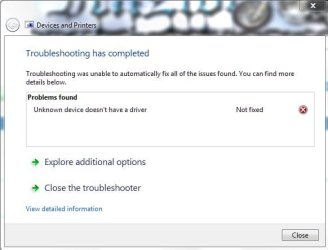
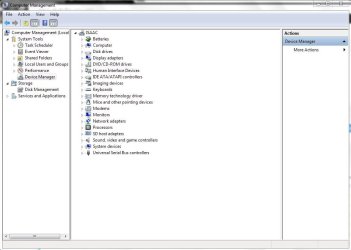
Back to the original issue (the trouble shoot icon on my laptop icon), it now says it's a driver issue (see picture). I can't seem to figure out which driver exactly. Everything in the device manager is working properlly.
Any thoughts ?
Got busy the past few days with my quadcopter project. I did check the fan issue, i shined the light but i don't see anything coming out the radiator vent. My light is strong but i don't know how strong a light i need. I'm just going to open it up in the next few days and inspect it.
Back to the original issue (the trouble shoot icon on my laptop icon), it now says it's a driver issue (see picture). I can't seem to figure out which driver exactly. Everything in the device manager is working properlly.
Any thoughts ?
Attachments
My Computer
At a glance
Windows 7 Ultimate 32bit
- Computer type
- Laptop
- Computer Manufacturer/Model Number
- HP
- OS
- Windows 7 Ultimate 32bit
We are back to square one that was in your first Post ...
My Computer
At a glance
windows 7 home 64bitINTEL-CORE I716GB
- Computer Manufacturer/Model Number
- W530-3630QM1
- OS
- windows 7 home 64bit
- CPU
- INTEL-CORE I7
- Memory
- 16GB
- Hard Drives
- 750GB
- Browser
- Chrome
i didnt check...
I have an idea though, i'll try and get the current hp drivers for my laptop model and see if that fixes it.
Let me know if you think of anything else
I have an idea though, i'll try and get the current hp drivers for my laptop model and see if that fixes it.
Let me know if you think of anything else
My Computer
At a glance
Windows 7 Ultimate 32bit
- Computer type
- Laptop
- Computer Manufacturer/Model Number
- HP
- OS
- Windows 7 Ultimate 32bit
The Link below contains your Drivers .. They are rather old though .. I think you would be best sticking with the ones you have ...
Software & driver downloads HP Pavilion dv4-1114nr Entertainment Notebook PC | HP® Support
Software & driver downloads HP Pavilion dv4-1114nr Entertainment Notebook PC | HP® Support
My Computer
At a glance
windows 7 home 64bitINTEL-CORE I716GB
- Computer Manufacturer/Model Number
- W530-3630QM1
- OS
- windows 7 home 64bit
- CPU
- INTEL-CORE I7
- Memory
- 16GB
- Hard Drives
- 750GB
- Browser
- Chrome
Hmm sory late reply mate the light just one of those small bright LED torches or a strong desktop lamp held real close (don't forget any heat generated) and you should see light very clearly otherwise that "rad" is blocked.
Have attached pic if I didn't attach before and anyway if the "rad" is really dirty the fan should show signs of crud too.
Have attached pic if I didn't attach before and anyway if the "rad" is really dirty the fan should show signs of crud too.
Attachments

My Computer
At a glance
Desk1 7 Home Prem / Desk2 10 Pro / Main lap A...Desk1 i5 3750K / Laptop i7 GTX 860M / Desk2 i...Desk1 8GB (1866) / Desk2 16GB (1333) / Laptop...Desk 1& 2NVidia GTX 650 & Laptops on board Intel
- Computer type
- PC/Desktop
- Computer Manufacturer/Model Number
- Own build (new) Desk1 / Asus ROG Win 7 / Desk2 1st build
- OS
- Desk1 7 Home Prem / Desk2 10 Pro / Main lap Asus ROG 10 Pro 2 laptop Toshiba 7 Pro Asus P2520 7 & 10
- CPU
- Desk1 i5 3750K / Laptop i7 GTX 860M / Desk2 i5 2500
- Motherboard
- Desk1 Asus P877-V / Desk2 Gigabyte H67 UD3H / Laptop ?
- Memory
- Desk1 8GB (1866) / Desk2 16GB (1333) / Laptop 8Gb DDR3
- Graphics Card(s)
- Desk 1& 2NVidia GTX 650 & Laptops on board Intel
- Sound Card
- Desk 1 & 2 -XONAR DG Realtek High Def audio Laptop
- Monitor(s) Displays
- Desk 1 Benq HD 2450 / Desk2 Philips 24" / Laptop 17.5"
- Screen Resolution
- 1920x1080 D1 & D2 & Laptop 1
- Hard Drives
- Desk1 Samsung 120GB 830 SSD
Asus ROG 256GB 850 Pro SSD
Desk2 Samsung 840 256 SSD
Toshiba 120GB EVO
- PSU
- Desk 1 Corsair HX 1050/ Laptop ? / Desk 2 Corsair HX 650
- Case
- Desk 1 Cooler HAF XM ? Toshiba laptop / Desk2 Coolermaster
- Cooling
- Fans on all Desk1 -2 Desk2 - all Coolermasters 5 Laptop ?
- Keyboard
- Desk 1 MS Sidewinder X6 Desk 2 MS Sidewinder X 4
- Mouse
- Desk 1&2 - Gigabyte MS 900 gamer - laptop - Logitec wireless
- Internet Speed
- ADSL2+
- Other Info
- One other Desktop (tester) and spare Toshba laptop both with SSD's
Running Kaspersky 2016 ISS on all machines config'd identically
Logitec audio stereo systems on each machine (x3)
Canon MG5250MFC
Router/modem TP-Link running WPA2SK
ok, so i opened up the laptop and cleaned everything out. There was some crud but nothing significant. There problem with the troubleshoot icon is still there.
My Computer
At a glance
Windows 7 Ultimate 32bit
- Computer type
- Laptop
- Computer Manufacturer/Model Number
- HP
- OS
- Windows 7 Ultimate 32bit
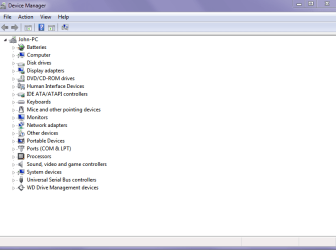
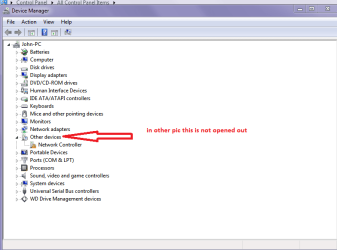
Chobbs if you have that yellow triangle as in post #1 against the machine you need to go into Device Manager and open out each segment because leaving it as in your shots of the Device Manage r there looks to be nothing wrong.
In my pics I have my Device Manager completely shut and then a pic with network opened out. So you need to go through each of those entries and open them out to see if there are any yellow triangles.
In my pics I have my Device Manager completely shut and then a pic with network opened out. So you need to go through each of those entries and open them out to see if there are any yellow triangles.
Attachments
My Computer
At a glance
Desk1 7 Home Prem / Desk2 10 Pro / Main lap A...Desk1 i5 3750K / Laptop i7 GTX 860M / Desk2 i...Desk1 8GB (1866) / Desk2 16GB (1333) / Laptop...Desk 1& 2NVidia GTX 650 & Laptops on board Intel
- Computer type
- PC/Desktop
- Computer Manufacturer/Model Number
- Own build (new) Desk1 / Asus ROG Win 7 / Desk2 1st build
- OS
- Desk1 7 Home Prem / Desk2 10 Pro / Main lap Asus ROG 10 Pro 2 laptop Toshiba 7 Pro Asus P2520 7 & 10
- CPU
- Desk1 i5 3750K / Laptop i7 GTX 860M / Desk2 i5 2500
- Motherboard
- Desk1 Asus P877-V / Desk2 Gigabyte H67 UD3H / Laptop ?
- Memory
- Desk1 8GB (1866) / Desk2 16GB (1333) / Laptop 8Gb DDR3
- Graphics Card(s)
- Desk 1& 2NVidia GTX 650 & Laptops on board Intel
- Sound Card
- Desk 1 & 2 -XONAR DG Realtek High Def audio Laptop
- Monitor(s) Displays
- Desk 1 Benq HD 2450 / Desk2 Philips 24" / Laptop 17.5"
- Screen Resolution
- 1920x1080 D1 & D2 & Laptop 1
- Hard Drives
- Desk1 Samsung 120GB 830 SSD
Asus ROG 256GB 850 Pro SSD
Desk2 Samsung 840 256 SSD
Toshiba 120GB EVO
- PSU
- Desk 1 Corsair HX 1050/ Laptop ? / Desk 2 Corsair HX 650
- Case
- Desk 1 Cooler HAF XM ? Toshiba laptop / Desk2 Coolermaster
- Cooling
- Fans on all Desk1 -2 Desk2 - all Coolermasters 5 Laptop ?
- Keyboard
- Desk 1 MS Sidewinder X6 Desk 2 MS Sidewinder X 4
- Mouse
- Desk 1&2 - Gigabyte MS 900 gamer - laptop - Logitec wireless
- Internet Speed
- ADSL2+
- Other Info
- One other Desktop (tester) and spare Toshba laptop both with SSD's
Running Kaspersky 2016 ISS on all machines config'd identically
Logitec audio stereo systems on each machine (x3)
Canon MG5250MFC
Router/modem TP-Link running WPA2SK
