

seventrad
New member
- Local time
- 5:48 PM
- Messages
- 50
[SOLVED] TrueCrypt password error!!!
Hi,
I created a "Encrypted File Container" with AES, NTFS and 4.3GB. When I click "Mount" button and type password the volume is mounted. But, if I click "Auto-mount Devices" button and type password the error message appears. The password is the same (and is the right password). I guess it is a bug!
See:
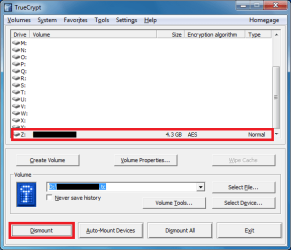
"Mount" button: volume is mounted!
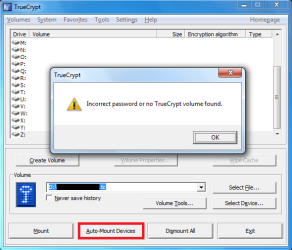
"Auto-mount Devices" button: error: "Incorrect password or no TrueCrypt volume found".
I did the backup of header of my volume and I restored it, but didn't work!
If I configure TrueCrypt to initialize at logon and auto-mount my volumes thesame error appears. This function is very important to me. I need this function.
I can't access the TrueCrypt Forum because he don't allow e-mails of free providers (Yahoo, Hotmail, Gmail, AOL, because of spam).
Hi,
I created a "Encrypted File Container" with AES, NTFS and 4.3GB. When I click "Mount" button and type password the volume is mounted. But, if I click "Auto-mount Devices" button and type password the error message appears. The password is the same (and is the right password). I guess it is a bug!
See:
"Mount" button: volume is mounted!
"Auto-mount Devices" button: error: "Incorrect password or no TrueCrypt volume found".
I did the backup of header of my volume and I restored it, but didn't work!
If I configure TrueCrypt to initialize at logon and auto-mount my volumes thesame error appears. This function is very important to me. I need this function.
I can't access the TrueCrypt Forum because he don't allow e-mails of free providers (Yahoo, Hotmail, Gmail, AOL, because of spam).
Last edited:
My Computer
- OS
- Windows 7 Ultimate x64 SP1


