
cerpintaxt
New member
- Local time
- 10:27 AM
- Messages
- 2
Hi,
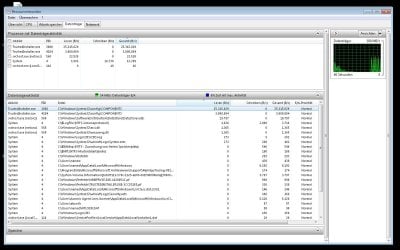
I have a problem with a computer running Windows 7 Pro 64bit. A couple of seconds after windows has booted the process "TrustedInstaller.exe" is started and accessing the file "c:/Windows/system32/config/COMPONENTES" continously. While the task manager shows no cpu usage of said process the resource monitor does show disk activity (screenshot attached). The disk activity comes along with a regular "klack" noise of the harddisk (every 2-3 seconds). This behaviour goes on and on with only short breaks of disk activity and the "klack" noise. The system does work but responds pretty laggy.
I noticed the issue yesterday after I inserted an additional harddisk into the pc. I had to remove all harddrives for space reasons and put them back in (1 system drive, 4 additional drives). I have disconnected all additional drives from the power supply for now but the problem remains. It is possible that the system installed updates while shutting down before I removed all the drives. Maybe something got corrupted during the first boot up with the additional drive?
Any help or ideas are appreciated, thanks in advance.
Jan
I have a problem with a computer running Windows 7 Pro 64bit. A couple of seconds after windows has booted the process "TrustedInstaller.exe" is started and accessing the file "c:/Windows/system32/config/COMPONENTES" continously. While the task manager shows no cpu usage of said process the resource monitor does show disk activity (screenshot attached). The disk activity comes along with a regular "klack" noise of the harddisk (every 2-3 seconds). This behaviour goes on and on with only short breaks of disk activity and the "klack" noise. The system does work but responds pretty laggy.
I noticed the issue yesterday after I inserted an additional harddisk into the pc. I had to remove all harddrives for space reasons and put them back in (1 system drive, 4 additional drives). I have disconnected all additional drives from the power supply for now but the problem remains. It is possible that the system installed updates while shutting down before I removed all the drives. Maybe something got corrupted during the first boot up with the additional drive?
Any help or ideas are appreciated, thanks in advance.
Jan
Attachments
My Computer
At a glance
Windows 7 Professional 64bit
- Computer type
- PC/Desktop
- OS
- Windows 7 Professional 64bit


