try to backup and it puts 656Gb on backup drive

martygene

New member
Local time
10:20 AM
Messages
23
i just installed win7 64 home premium on a new 320gb hard drive and there is 49gb of info on that drive. i start a backup to another drive on my system and it takes hours to complete the backup and when it's finished there are 656gb of info on the 1TB drive. as soon as i delete the backup file the 1 TB goes down to nothing...
i have tried to do this backup several times to the same result. trying to backup C to New Volume E witch is the 1 TB drive...
any ideas?
thanks
 

My Computer My Computer

At a glance

Windows 7 64 bit
OS
Windows 7 64 bit
I'm confused by a few things. Perhaps you can explain.

1: I wouldn't expect a new installation of Windows 7 to amount to 49 GB.

2: You say you backed something up and it amounted to 656 GB. What drive or partition did you think you were backing up and how much space is occupied on that source drive or partition?

3: What application are you using for this backup?

4: Obviously, if you are trying to backup only a 49 GB partition, the result should not be 656 GB. But it's not clear exactly what you are trying to do.

5: Are you trying to make an "image" file of an operating system? Or trying to "back up" individual files?

More detail needed.
 

My Computer My Computer

At a glance

Windows 7 Home Premium SP1, 64-bitIntel Skylake i5-6600K, not overclocked8 GB HyperX DDR4-2666 (2 x 4 GB)none; graphics are integrated on CPU
Computer type
PC/Desktop
Computer Manufacturer/Model Number
Ignatz Special; 4 speed manual gearbox; factory air conditioning; one of one
OS
Windows 7 Home Premium SP1, 64-bit
CPU
Intel Skylake i5-6600K, not overclocked
Motherboard
AsRock Z170M Extreme 4, micro ATX
Memory
8 GB HyperX DDR4-2666 (2 x 4 GB)
Graphics Card(s)
none; graphics are integrated on CPU
Sound Card
onboard: Realtek ALC1150; external: USB Behringer UF0-202
Monitor(s) Displays
Dell S2340M 23 inch IPS
Screen Resolution
1600 x 900
Hard Drives
System: Crucial MX100 series SSD, 128 GB;
Data: Samsung Spinpoint 103SJ, 1 TB;
Backup: WD Caviar Green WD30EZRX-00D8PB0, 3 TB
PSU
Rosewill SilentNight 500 watt fanless, semi-modular
Case
Antec Solo II
Cooling
Noctua NH-U12S; Noctua F12 intake, Noctua S12A exhaust
Keyboard
Microsoft 200 6JH-00001 USB
Mouse
Dell or Microsoft optical wired; USB
Antivirus
Microsoft Security Essentials and Malwarebytes Premium
Browser
Pale Moon
Other Info
All fans PWM; speeds at idle: CPU circa 500 rpm; intake circa 600 rpm; exhaust circa 600 rpm; CPU temps 27 idle and 47 C load in a warm room (27 C/81 F) when running Intel Extreme Tuning Utility stress test.
Post a full picture of Disk Management. Then we can probably clarify the matter. I suspect it dragged other partitions along because those had some system files.

I assume you used Windows7 imaging - which is the worst choice anyhow. But we will discuss sensible options later.
 

My Computer My Computer

At a glance

Vista, Windows7, Mint Mate, Zorin, Windows 8from 1.6GHz Duo to i7
Computer Manufacturer/Model Number
HP, Dell, Gateway, Toshiba - 4 laptops and 2 desktops
OS
Vista, Windows7, Mint Mate, Zorin, Windows 8
CPU
from 1.6GHz Duo to i7
Monitor(s) Displays
2x HP w2207
Hard Drives
5x HDD, 7x SSD, 12x Externals
Keyboard
with trackball - no mices
Mouse
Trackball mice
Internet Speed
DSL 6000
Thanks. i am using the windows backup that comes with wondows 7. i didn't partition the 320 hard drive the the OS is on. then reason there is 49 gb on C is that i now have installed some programs. when i open the backup page it doesn't give me any options other than to backup. while it's backing upit says backing up drive c to drive e..
 

My Computer My Computer

At a glance

Windows 7 64 bit
OS
Windows 7 64 bit
disk management.jpg
i think i have what you want but i can't tell yet
 

My Computer My Computer

At a glance

Windows 7 64 bit
OS
Windows 7 64 bit
I'll let WHS try to steer you to Macrium.

But post a picture of your Disk Management.
 

My Computer My Computer

At a glance

Windows 7 Home Premium SP1, 64-bitIntel Skylake i5-6600K, not overclocked8 GB HyperX DDR4-2666 (2 x 4 GB)none; graphics are integrated on CPU
Computer type
PC/Desktop
Computer Manufacturer/Model Number
Ignatz Special; 4 speed manual gearbox; factory air conditioning; one of one
OS
Windows 7 Home Premium SP1, 64-bit
CPU
Intel Skylake i5-6600K, not overclocked
Motherboard
AsRock Z170M Extreme 4, micro ATX
Memory
8 GB HyperX DDR4-2666 (2 x 4 GB)
Graphics Card(s)
none; graphics are integrated on CPU
Sound Card
onboard: Realtek ALC1150; external: USB Behringer UF0-202
Monitor(s) Displays
Dell S2340M 23 inch IPS
Screen Resolution
1600 x 900
Hard Drives
System: Crucial MX100 series SSD, 128 GB;
Data: Samsung Spinpoint 103SJ, 1 TB;
Backup: WD Caviar Green WD30EZRX-00D8PB0, 3 TB
PSU
Rosewill SilentNight 500 watt fanless, semi-modular
Case
Antec Solo II
Cooling
Noctua NH-U12S; Noctua F12 intake, Noctua S12A exhaust
Keyboard
Microsoft 200 6JH-00001 USB
Mouse
Dell or Microsoft optical wired; USB
Antivirus
Microsoft Security Essentials and Malwarebytes Premium
Browser
Pale Moon
Other Info
All fans PWM; speeds at idle: CPU circa 500 rpm; intake circa 600 rpm; exhaust circa 600 rpm; CPU temps 27 idle and 47 C load in a warm room (27 C/81 F) when running Intel Extreme Tuning Utility stress test.
is that the picture want?
 

My Computer My Computer

At a glance

Windows 7 64 bit
OS
Windows 7 64 bit
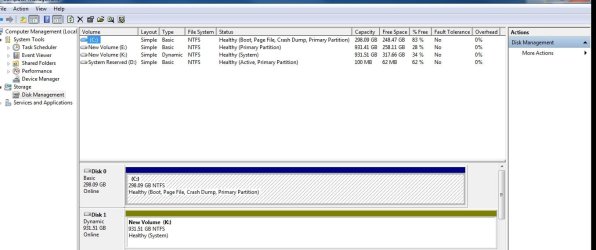
Several problems with that picture.

Drive D is not shown at all.

Drive K is shown as both Dynamic and as a system disk. Dynamic disks are generally a no-no.

What is your intended purpose for drive K?? What do you want to do with it??

Normally, you would want to have NO dynamic disks and to have C showing as system and active.

And your tiny "system reserved" partition has a D drive letter. It should normally have NO drive letter.
 

My Computer My Computer

At a glance

Windows 7 Home Premium SP1, 64-bitIntel Skylake i5-6600K, not overclocked8 GB HyperX DDR4-2666 (2 x 4 GB)none; graphics are integrated on CPU
Computer type
PC/Desktop
Computer Manufacturer/Model Number
Ignatz Special; 4 speed manual gearbox; factory air conditioning; one of one
OS
Windows 7 Home Premium SP1, 64-bit
CPU
Intel Skylake i5-6600K, not overclocked
Motherboard
AsRock Z170M Extreme 4, micro ATX
Memory
8 GB HyperX DDR4-2666 (2 x 4 GB)
Graphics Card(s)
none; graphics are integrated on CPU
Sound Card
onboard: Realtek ALC1150; external: USB Behringer UF0-202
Monitor(s) Displays
Dell S2340M 23 inch IPS
Screen Resolution
1600 x 900
Hard Drives
System: Crucial MX100 series SSD, 128 GB;
Data: Samsung Spinpoint 103SJ, 1 TB;
Backup: WD Caviar Green WD30EZRX-00D8PB0, 3 TB
PSU
Rosewill SilentNight 500 watt fanless, semi-modular
Case
Antec Solo II
Cooling
Noctua NH-U12S; Noctua F12 intake, Noctua S12A exhaust
Keyboard
Microsoft 200 6JH-00001 USB
Mouse
Dell or Microsoft optical wired; USB
Antivirus
Microsoft Security Essentials and Malwarebytes Premium
Browser
Pale Moon
Other Info
All fans PWM; speeds at idle: CPU circa 500 rpm; intake circa 600 rpm; exhaust circa 600 rpm; CPU temps 27 idle and 47 C load in a warm room (27 C/81 F) when running Intel Extreme Tuning Utility stress test.
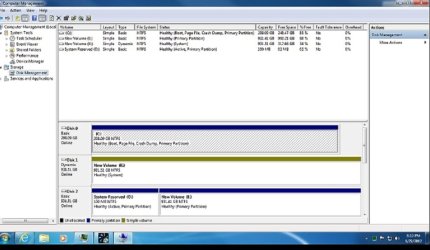
how about these?
 

Attachments

  • disk management 2.jpg
    disk management 2.jpg
    33.8 KB · Views: 13
  • disk management 3.jpg
    disk management 3.jpg
    58 KB · Views: 9

My Computer My Computer

At a glance

Windows 7 64 bit
OS
Windows 7 64 bit
i don't know hown any of that happened. can i change the K to something other than dynamic? how and to what? would it change the OS so that i can't boot or run?
 

My Computer My Computer

At a glance

Windows 7 64 bit
OS
Windows 7 64 bit
k just is fir file storage
 

My Computer My Computer

At a glance

Windows 7 64 bit
OS
Windows 7 64 bit
That's pretty much a mess.

You say it is a fresh install.

If it were me, I would start over.

Disconnect ALL drives except the one you want Windows to be on.

Install Windows and update it.

Then reconnect one more drive and make a single basic NTFS partition on it.

Then reconnect the third drive and make a single basic NTFS partition on it.

As it is now, you have "system reserved" on the wrong hard drive. You have a dynamic disk, which is bad.

It may be repairable, but in your shoes, I'd cut my losses and start over.

Where you probably went wrong is having more than 1 drive connected when you began.

If K is just for file storage, it definitely should NOT be dynamic.

Look at my setup, 3 drives, each with one partition. D and E are strictly for data:
 

Attachments

  • Untitled-1.jpg
    Untitled-1.jpg
    83.9 KB · Views: 9

My Computer My Computer

At a glance

Windows 7 Home Premium SP1, 64-bitIntel Skylake i5-6600K, not overclocked8 GB HyperX DDR4-2666 (2 x 4 GB)none; graphics are integrated on CPU
Computer type
PC/Desktop
Computer Manufacturer/Model Number
Ignatz Special; 4 speed manual gearbox; factory air conditioning; one of one
OS
Windows 7 Home Premium SP1, 64-bit
CPU
Intel Skylake i5-6600K, not overclocked
Motherboard
AsRock Z170M Extreme 4, micro ATX
Memory
8 GB HyperX DDR4-2666 (2 x 4 GB)
Graphics Card(s)
none; graphics are integrated on CPU
Sound Card
onboard: Realtek ALC1150; external: USB Behringer UF0-202
Monitor(s) Displays
Dell S2340M 23 inch IPS
Screen Resolution
1600 x 900
Hard Drives
System: Crucial MX100 series SSD, 128 GB;
Data: Samsung Spinpoint 103SJ, 1 TB;
Backup: WD Caviar Green WD30EZRX-00D8PB0, 3 TB
PSU
Rosewill SilentNight 500 watt fanless, semi-modular
Case
Antec Solo II
Cooling
Noctua NH-U12S; Noctua F12 intake, Noctua S12A exhaust
Keyboard
Microsoft 200 6JH-00001 USB
Mouse
Dell or Microsoft optical wired; USB
Antivirus
Microsoft Security Essentials and Malwarebytes Premium
Browser
Pale Moon
Other Info
All fans PWM; speeds at idle: CPU circa 500 rpm; intake circa 600 rpm; exhaust circa 600 rpm; CPU temps 27 idle and 47 C load in a warm room (27 C/81 F) when running Intel Extreme Tuning Utility stress test.
i had a lot of troubele getting win7 installed so maybe somehow that is how all that got messed up. is there any fixing it to make it "normal" again?
 

My Computer My Computer

At a glance

Windows 7 64 bit
OS
Windows 7 64 bit
one of the things that happened was that the first install went ok but while doing updates i got the BSOD and after that i had a lot of trouble getting everythng to work. probably should just start over. the K drive has lots of files on it. if i re-install and then plug that drive in will it still show up as a dynamic disk?
 

My Computer My Computer

At a glance

Windows 7 64 bit
OS
Windows 7 64 bit
if i re-install and then plug that drive in will it still show up as a dynamic disk?


I doubt it will show up as dynamic.

But if it does, it can be corrected---but it takes some work.

It's simpler to begin again and worry about K then.

Get a single C going, with Windows.

Then add a drive, partition it, format it, and give it a drive letter.

Then add the last drive.

Begin with ONLY 1 drive connected.

Choose to delete all partitions on that drive when given the choice.
 

My Computer My Computer

At a glance

Windows 7 Home Premium SP1, 64-bitIntel Skylake i5-6600K, not overclocked8 GB HyperX DDR4-2666 (2 x 4 GB)none; graphics are integrated on CPU
Computer type
PC/Desktop
Computer Manufacturer/Model Number
Ignatz Special; 4 speed manual gearbox; factory air conditioning; one of one
OS
Windows 7 Home Premium SP1, 64-bit
CPU
Intel Skylake i5-6600K, not overclocked
Motherboard
AsRock Z170M Extreme 4, micro ATX
Memory
8 GB HyperX DDR4-2666 (2 x 4 GB)
Graphics Card(s)
none; graphics are integrated on CPU
Sound Card
onboard: Realtek ALC1150; external: USB Behringer UF0-202
Monitor(s) Displays
Dell S2340M 23 inch IPS
Screen Resolution
1600 x 900
Hard Drives
System: Crucial MX100 series SSD, 128 GB;
Data: Samsung Spinpoint 103SJ, 1 TB;
Backup: WD Caviar Green WD30EZRX-00D8PB0, 3 TB
PSU
Rosewill SilentNight 500 watt fanless, semi-modular
Case
Antec Solo II
Cooling
Noctua NH-U12S; Noctua F12 intake, Noctua S12A exhaust
Keyboard
Microsoft 200 6JH-00001 USB
Mouse
Dell or Microsoft optical wired; USB
Antivirus
Microsoft Security Essentials and Malwarebytes Premium
Browser
Pale Moon
Other Info
All fans PWM; speeds at idle: CPU circa 500 rpm; intake circa 600 rpm; exhaust circa 600 rpm; CPU temps 27 idle and 47 C load in a warm room (27 C/81 F) when running Intel Extreme Tuning Utility stress test.
...If it were me, I would start over...
I would second the motion.

If I have a computer I've spent several weeks or months in tweaking and getting everything "just right", I might be tempted to go to extra lengths to straighten it out. With a brand new installation it makes far more sense to backup your stuff, then wipe-and-reload. It will never be easier than it is right now. If you don't do it and run into even more trouble down the road you will have wasted all the time you spend between now and the point when it becomes unavoidable. :)
 

My Computer My Computer

At a glance

Main - Windows 7 Pro SP1 64-Bit; 2nd - Window...Main - Core i7 2600K; 2nd - Core i7 920Main - 16GB Corsair Vengeance; 2nd - 12GB Cor...Main - XFX Radeon 6870 1GB; 2nd - XFX Radeon ...
Computer Manufacturer/Model Number
Self
OS
Main - Windows 7 Pro SP1 64-Bit; 2nd - Windows Server 2008 R2
CPU
Main - Core i7 2600K; 2nd - Core i7 920
Motherboard
Main - Asus P8Z68-V Pro/Gen3; 2nd - Gigabyte GA-EX58-UDR3
Memory
Main - 16GB Corsair Vengeance; 2nd - 12GB Corsair Vengeance
Graphics Card(s)
Main - XFX Radeon 6870 1GB; 2nd - XFX Radeon 4870 1GB
Sound Card
Both: Onboard Realtek Azalia
Monitor(s) Displays
Main - Hann 25" + I-INC 25" + Acer 23"; 2nd - Upgrading Soon
Screen Resolution
Main - 1920x1080 (All Three Monitors); 2nd - Upgrading Soon
Hard Drives
Main - (1) Crucial M4 128GB (Boot)
Main - (1) Seagate 2TB 64MB Cache (Data)
Main - (1) Seagate 2TB 64MB Cache (Data Backup)
2nd - (1) Intel X25-M SSD 80GB (Boot)
2nd - (3) Seagate 1TB 32MB Cache (Data Backup)
2nd - (1) Seagate 320GB (Because)
PSU
Main - OCZ 600W Modular; 2nd - OCZ 600W
Case
Main - Thermaltake Element G; 2nd - NZXT something or other
Cooling
Main - Corsair H80; 2nd - Prolimatech Megahalems
Keyboard
Main - Razer Reclusa; 2nd - Old MS Keyboard
Mouse
Main - Logitech MX Revolution; 2nd - Old MS Mouse
Internet Speed
20Mbps Time-Warner Cable
ok. thank you VERY MUCH for all your help. i guess i know what i'm doing tomorrow :(
 

My Computer My Computer

At a glance

Windows 7 64 bit
OS
Windows 7 64 bit
you are correct...i will let you know tomorrow how it all went.. with disk management pictures to boot...
 

My Computer My Computer

At a glance

Windows 7 64 bit
OS
Windows 7 64 bit
so you don't think then that i have to try to copy all the files on K to another drive before hooking it up after the install tomorrow?
 

My Computer My Computer

At a glance

Windows 7 64 bit
OS
Windows 7 64 bit
Get those files off from K to an external disk because you have to correct that Dynamic situation. Easiest is to reformat it. All your other user data files from the other disks should also first go to an external before you start revamping everything. I have hardly ever seen such a mess.
 

My Computer My Computer

At a glance

Vista, Windows7, Mint Mate, Zorin, Windows 8from 1.6GHz Duo to i7
Computer Manufacturer/Model Number
HP, Dell, Gateway, Toshiba - 4 laptops and 2 desktops
OS
Vista, Windows7, Mint Mate, Zorin, Windows 8
CPU
from 1.6GHz Duo to i7
Monitor(s) Displays
2x HP w2207
Hard Drives
5x HDD, 7x SSD, 12x Externals
Keyboard
with trackball - no mices
Mouse
Trackball mice
Internet Speed
DSL 6000
Back
Top