

- Local time
- 10:15 AM
- Messages
- 152
Trying removal & preventing installation of duplicate keyboard driver
Apologize for this long post but I am trying to be as thorough as possible to provide the necessary info.
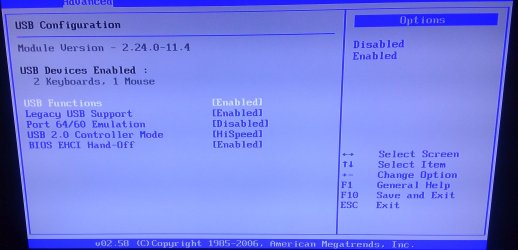
Attached is the BIOS USB page & setup listing two keyboards. When checked, there really are two identical versions of the same driver (Microsoft 6.1.7601.17514) in the Device manager.
The problem is that the keyboard goes crazy after a couple of minutes. Keys don't generate the correct character, the Windows key is not working, and the left or right arrow keys bring forth windows open in the background.
The source of the duplicate is Logitech, passed through the Microsoft update and is installed by the Logitech Download Assistant, (software update released in August, 2012).
C:\Windows\System32\DriverStore\FileRepository\lvpro5v.inf_x86_neutral_793a06f60f3fecc2\LogiDPP.dll
C:\Windows\System32\DriverStore\FileRepository\lvpro5v.inf_x86_neutral_793a06f60f3fecc2\LogiDPPApp.exe
C:\Windows\System32\LogiDPPApp.exe
C:\Windows\System32\LogiDPP.dll
Having four USB keyboards (two Logitech and two Microsoft), one of each is a wired, and one of each is wireless, to test the problem. Currently, I am using a wired Microsoft 600 keyboard and the problem is the same with all.
The mouse is always the same. It's a Logitech M510 wireless and all batteries are fully charged.
While in Windows, I managed to force the removal of LogiDPP.dll, and the 2nd keyboard driver disappeared and everything worked fine, until a reboot.
LogiDPPApp.exe could not be removed in Windows, so I booted into Xubuntu Live CD and deleted the files from System32 and \System32\DriverStore\FileRepository.
When rebooted, the BIOS again displayed two keyboards and one mouse, (I don't know it knew), and when Windows loaded, the above mentioned files were back in their folders.
Also uninstalled Logitech Download Assistant and hid the new replacement update
How can I get rid of them permanently?
Apologize for this long post but I am trying to be as thorough as possible to provide the necessary info.
Attached is the BIOS USB page & setup listing two keyboards. When checked, there really are two identical versions of the same driver (Microsoft 6.1.7601.17514) in the Device manager.
The problem is that the keyboard goes crazy after a couple of minutes. Keys don't generate the correct character, the Windows key is not working, and the left or right arrow keys bring forth windows open in the background.
The source of the duplicate is Logitech, passed through the Microsoft update and is installed by the Logitech Download Assistant, (software update released in August, 2012).
C:\Windows\System32\DriverStore\FileRepository\lvpro5v.inf_x86_neutral_793a06f60f3fecc2\LogiDPP.dll
C:\Windows\System32\DriverStore\FileRepository\lvpro5v.inf_x86_neutral_793a06f60f3fecc2\LogiDPPApp.exe
C:\Windows\System32\LogiDPPApp.exe
C:\Windows\System32\LogiDPP.dll
Having four USB keyboards (two Logitech and two Microsoft), one of each is a wired, and one of each is wireless, to test the problem. Currently, I am using a wired Microsoft 600 keyboard and the problem is the same with all.
The mouse is always the same. It's a Logitech M510 wireless and all batteries are fully charged.
While in Windows, I managed to force the removal of LogiDPP.dll, and the 2nd keyboard driver disappeared and everything worked fine, until a reboot.
LogiDPPApp.exe could not be removed in Windows, so I booted into Xubuntu Live CD and deleted the files from System32 and \System32\DriverStore\FileRepository.
When rebooted, the BIOS again displayed two keyboards and one mouse, (I don't know it knew), and when Windows loaded, the above mentioned files were back in their folders.
Also uninstalled Logitech Download Assistant and hid the new replacement update
How can I get rid of them permanently?
Attachments
My Computer
At a glance
Microsoft Windows 10 Pro 64-bit8th generation Intel(R) Pentium G5600 3.9GHz16 GB DDR4 Kingston HyperXOn board Intel UHD Graphics 1GB shared
- Computer type
- PC/Desktop
- Computer Manufacturer/Model Number
- Custom built
- OS
- Microsoft Windows 10 Pro 64-bit
- CPU
- 8th generation Intel(R) Pentium G5600 3.9GHz
- Motherboard
- ASRock B360 Pro 4 8th Generation
- Memory
- 16 GB DDR4 Kingston HyperX
- Graphics Card(s)
- On board Intel UHD Graphics 1GB shared
- Sound Card
- On board Realtek HD ALC892
- Monitor(s) Displays
- LG 22 in LCD
- Screen Resolution
- 1536 x 864 x 32 bits (4294967296 colors) @ 59 Hz
- Hard Drives
- (1) SanDisk SDSSDHII120G ATA Device
(2) ST1000DM003-1SB10C ATA Device
(3) ST500DM002-1BD142 ATA Device
- PSU
- Antec 650 Watt PSU
- Case
- Antec mid size tower
- Cooling
- 120mm fan
- Keyboard
- Generic 105 keys
- Mouse
- Generic JeTech
- Internet Speed
- 50 megabits
- Antivirus
- Avast and daily Malwarebytes scan
- Browser
- Cyberfox 52.9.1

