Solved Trying to clone displays

Reading this through I have difficulties to understand what I just typed :). Hopefully you get it.
WOW! This is quite a post! :rolleyes: I think I understand it based on plain English explanation ;) BUT (don't kill me for that question) How is that possible to still have 1600X1200 resolution on the monitor in Windows XP with the same exact setup? I mean everything is the same except the Windows version. Same monitor, same TV, same video card, same cables, same mouse pad :)... Just everything. If we go by the rules you just described, it wouldn't be possible at all (doesn't matter what OS we are talking about). Right? Yet it's possible in XP and I have to compromise 1200 for 900 in 7 so my desktop will look like.. you know..:mad: Somehow those rules could be overwritten in previous versions of Windows. I want to know how and I want to overwrite them again. This is why I'm here asking for help. As a matter of fact before I posted here I've done a lot of research on the web and people like me (looking for the same solution) were saying that it was also possible in Vista. I've never used that OS so I can't vouch for that. Went to XP from 98 and would run it for another ?? years if Microsoft would support it.
 

My Computer My Computer

At a glance

Windows 7 Ultimate x64Intel Core I5 750 @ 2.67 GHzDDR3 10GBATI Radeon HD 4350
Computer type
PC/Desktop
Computer Manufacturer/Model Number
Dell Vostro 430
OS
Windows 7 Ultimate x64
CPU
Intel Core I5 750 @ 2.67 GHz
Motherboard
Dell Inc. 054KM3
Memory
DDR3 10GB
Graphics Card(s)
ATI Radeon HD 4350
Monitor(s) Displays
Dell S2740L, Vizio SV470XVT1A
Screen Resolution
1920X1080, 1920X1080
Hard Drives
Western Digital Caviar Black WD5003AZEX, Seagate Barracuda ST31500341AS
Internet Speed
50 Mbps
Antivirus
Microsoft Security Essentials
Browser
Firefox
As I requested above, can you please make a second YouTube video showing what this looks like under Win7?

Your mention of "compromise 1200 for 900" is unclear to me. What are you referring to??

Anyway, what is needed is a Windows 7 video version of the same thing you produced previously with WinXP. That will make absolutely clear what you're complaining about under Win7.
 

My Computer My Computer

At a glance

Windows 7 Pro x64 (1), Win7 Pro X64 (2)i5-3350p 3.1Ghz/6MB-cache (1); E8400 3.0Ghz/6...8GB PC3-12800 DDR3 (1); 4GB PC3-10600 DDR3 (2)ATI HD7750 (1), (see TV cards); ATI R7 250 (2)
Computer type
PC/Desktop
Computer Manufacturer/Model Number
Home-built, two systems (1) and (2)
OS
Windows 7 Pro x64 (1), Win7 Pro X64 (2)
CPU
i5-3350p 3.1Ghz/6MB-cache (1); E8400 3.0Ghz/6MB-cache (2)
Motherboard
ASUS P8Z77-V Pro (1); ASUS P5Q3 (2)
Memory
8GB PC3-12800 DDR3 (1); 4GB PC3-10600 DDR3 (2)
Graphics Card(s)
ATI HD7750 (1), (see TV cards); ATI R7 250 (2)
Sound Card
Realtek ALC892 HD Audio (1); Realtek ALC1200 HD Audio (2)
Monitor(s) Displays
Eizo HD2441W LCD, Eizo S2433W (1); Eizo 24" S2433W (2)
Screen Resolution
1920x1200, 1920x1200 (1); 1920x1200 (2)
Hard Drives
(1) 1TB SATA-II (7200RPM), 2x2TB SATA-III (7200RPM), 250GB SATA-III (10000RPM) for OS; 2x2TB external USB 3.0

(2) 320GB SATA-II (7200RPM), 750GB SATA-II (7200RPM), 150GB SATA-II (10000RPM) for OS; 2TB external USB 3.0
PSU
Nesteq ECS-6001 600W (1); Nesteq ECS-5001 500W (2)
Case
Acousti-Case 360 (1) and (2)
Cooling
Noctua NH-U12P SE2 for CPU, 2x120mm case fans (1) and (2)
Keyboard
IBM PS/2 (1) and (2)
Mouse
Logitech MX Revolution wireless (1); Microsoft wired (2)
Internet Speed
100mbps down / 10mbps up
Antivirus
Microsoft Security Essentials; Malwarebyte Anti-Malware Pro
Browser
Firefox
Other Info
Ceton InfiniTV 4-tuner cablecard-enabled TV card as well as Hauppauge HVR-2250 OTA/ATSC 2-tuner TV card in (1), running under Win7 WMC
I'm curious to see what, if anything is different. Again, picture = 1000 words, so this demonstration approach is perfect.
I don’t know if the video will look any different but the screen resolution will. In your specs I see that the screen resolution that you’re using is 1920x1200. Try to step down a little, click apply and see how “beautiful” everything will look on your monitor. Same thing is when Win7 forces me from 1600X1200 to 1440X900

As I requested above, can you please make a second YouTube video showing what this looks like under Win7?
I will do it tomorrow.

Your mention of "compromise 1200 for 900" is unclear to me. What are you referring to??
Sorry to make it unclear. I was replying to Kari’s post:
In this case the best possible compromize would be to use 1600 * 900 resolution
I was referring to my monitor's resolution. Now it's 1600X1200 and when I click on “duplicate”, Windows changes it to 1440X900. I should have put the whole thing there.


However this doesn't mean you're not watching both display devices at 1600x1200.
If I understood this correctly – it does. Because once again: I can’t keep 1600x1200 resolution. If I could this thread would not exist.
 

My Computer My Computer

At a glance

Windows 7 Ultimate x64Intel Core I5 750 @ 2.67 GHzDDR3 10GBATI Radeon HD 4350
Computer type
PC/Desktop
Computer Manufacturer/Model Number
Dell Vostro 430
OS
Windows 7 Ultimate x64
CPU
Intel Core I5 750 @ 2.67 GHz
Motherboard
Dell Inc. 054KM3
Memory
DDR3 10GB
Graphics Card(s)
ATI Radeon HD 4350
Monitor(s) Displays
Dell S2740L, Vizio SV470XVT1A
Screen Resolution
1920X1080, 1920X1080
Hard Drives
Western Digital Caviar Black WD5003AZEX, Seagate Barracuda ST31500341AS
Internet Speed
50 Mbps
Antivirus
Microsoft Security Essentials
Browser
Firefox
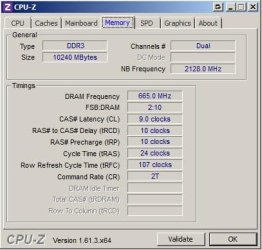
Download and install CPU-z then open the memory tab to check.
Thank you. I have CPU-z. Will run it and check tomorrow on 7. I have dual on XP
 

My Computer My Computer

At a glance

Windows 7 Ultimate x64Intel Core I5 750 @ 2.67 GHzDDR3 10GBATI Radeon HD 4350
Computer type
PC/Desktop
Computer Manufacturer/Model Number
Dell Vostro 430
OS
Windows 7 Ultimate x64
CPU
Intel Core I5 750 @ 2.67 GHz
Motherboard
Dell Inc. 054KM3
Memory
DDR3 10GB
Graphics Card(s)
ATI Radeon HD 4350
Monitor(s) Displays
Dell S2740L, Vizio SV470XVT1A
Screen Resolution
1920X1080, 1920X1080
Hard Drives
Western Digital Caviar Black WD5003AZEX, Seagate Barracuda ST31500341AS
Internet Speed
50 Mbps
Antivirus
Microsoft Security Essentials
Browser
Firefox
In your specs I see that the screen resolution that you’re using is 1920x1200. Try to step down a little, click apply and see how “beautiful” everything will look on your monitor. Same thing is when Win7 forces me from 1600X1200 to 1440X900
1920x1200 (i.e. 16x10) is the native resolution of my monitor. It is certainly rectangular shaped, but it is a bit taller than your standard HDTV or lesser monitor which has a 16x9 aspect ratio (i.e. 1920x1080, or 1280x720, or 1680x1050.)

All this means is that when viewing a 16x9 image (e.g. standard HDTV picture) on my 16x10 screen, I have small black bars on top and bottom of the 16x9 image which is centered vertically (but extends horizontally across the complete width of my 16x10 screen).

If I change the resolution of my screen (i.e. the Windows desktop) from 1920x1200 to 1920x1080, the amount of "desktop real estate" shrinks in the vertical direction, since I now only have 1080 pixels vertically. But those 1080 pixels are stretched in the vertical direction in order to fill the entire 16x10 sreeen shape. So actually my desktop appears slightly distorted, as I'm looking at a 16x9 image (i.e. the 1920x1080 Windows desktop) spread completely (horizontally and vertically) across my 16x10 screen. So the image no longer has its OAR (original aspect ratio) of 16x9, but rather has been stretched to fit completely onto a 16x10 (background) screen raster.

That's what is meant by "native resolution", i.e. the actual shape of the screen and the presentation configuration which will give you the BEST LOOKING IMAGE... i.e. no horizontal or vertical stretching at all, but all OAR images.


As I requested above, can you please make a second YouTube video showing what this looks like under Win7?
I will do it tomorrow.


I was referring to my monitor's resolution. Now it's 1600X1200 and when I click on “duplicate”, Windows changes it to 1440X900. I should have put the whole thing there.
Why is this the first time I've seen this information? Did I just miss it before? Or is this the first time you're mentioning that THIS is what happens??

What if you UNCHECK the "scale image to full panel size" in CCC? What difference does that make?

Note that 1600x1200 is the 4:3 shape of your desktop monitor. And 1440x900 is 16:10. Can't imagine right off the bat why this should happen, or why 16:10 would be what it changes to?

So now I understand that it is THIS resolution change from 1600x1200 to 1440x900 which defines the problem. That was completely unknown to me before now.

What happens if you uncheck the "scale" box?
 

My Computer My Computer

At a glance

Windows 7 Pro x64 (1), Win7 Pro X64 (2)i5-3350p 3.1Ghz/6MB-cache (1); E8400 3.0Ghz/6...8GB PC3-12800 DDR3 (1); 4GB PC3-10600 DDR3 (2)ATI HD7750 (1), (see TV cards); ATI R7 250 (2)
Computer type
PC/Desktop
Computer Manufacturer/Model Number
Home-built, two systems (1) and (2)
OS
Windows 7 Pro x64 (1), Win7 Pro X64 (2)
CPU
i5-3350p 3.1Ghz/6MB-cache (1); E8400 3.0Ghz/6MB-cache (2)
Motherboard
ASUS P8Z77-V Pro (1); ASUS P5Q3 (2)
Memory
8GB PC3-12800 DDR3 (1); 4GB PC3-10600 DDR3 (2)
Graphics Card(s)
ATI HD7750 (1), (see TV cards); ATI R7 250 (2)
Sound Card
Realtek ALC892 HD Audio (1); Realtek ALC1200 HD Audio (2)
Monitor(s) Displays
Eizo HD2441W LCD, Eizo S2433W (1); Eizo 24" S2433W (2)
Screen Resolution
1920x1200, 1920x1200 (1); 1920x1200 (2)
Hard Drives
(1) 1TB SATA-II (7200RPM), 2x2TB SATA-III (7200RPM), 250GB SATA-III (10000RPM) for OS; 2x2TB external USB 3.0

(2) 320GB SATA-II (7200RPM), 750GB SATA-II (7200RPM), 150GB SATA-II (10000RPM) for OS; 2TB external USB 3.0
PSU
Nesteq ECS-6001 600W (1); Nesteq ECS-5001 500W (2)
Case
Acousti-Case 360 (1) and (2)
Cooling
Noctua NH-U12P SE2 for CPU, 2x120mm case fans (1) and (2)
Keyboard
IBM PS/2 (1) and (2)
Mouse
Logitech MX Revolution wireless (1); Microsoft wired (2)
Internet Speed
100mbps down / 10mbps up
Antivirus
Microsoft Security Essentials; Malwarebyte Anti-Malware Pro
Browser
Firefox
Other Info
Ceton InfiniTV 4-tuner cablecard-enabled TV card as well as Hauppauge HVR-2250 OTA/ATSC 2-tuner TV card in (1), running under Win7 WMC
Again, picture = 1000 words, so this demonstration approach is perfect.

Exactly! I agree with you 200% :)

Why is this the first time I've seen this information? Did I just miss it before? Or is this the first time you're mentioning that THIS is what happens??

No, it’s not the first time. I guess you did miss it:

So how do I keep my monitor’s resolution while doing that? As soon as I click on “duplicate”, Windows changes it to 1440X900 and I can’t change it.

What if you UNCHECK the "scale image to full panel size" in CCC?

It is unchecked in Windows 7. If I check it there things get ugly.

I made couple of videos/presentations today to make myself clear of what I want to accomplish. Watch them in HD.

The 1st one is about duplicating screens in Windows 7
https://www.youtube.com/watch?v=CWLC8yVALDA

The 2nd video is about what happens when the resolution is changed in Windows 7
https://www.youtube.com/watch?v=V_S59QO20HI

The 3rd one is the requested video ;)
https://www.youtube.com/watch?v=XWHbaF63J8s

The last two videos will show exactly what I want to do in Windows 7. Those are XP videos.
In this one I forgot to open the properties on the desktop to show that it’s running 1600X1200 but since it was already uploaded to youtube …
https://www.youtube.com/watch?v=EUkIqjrCVOo

Finally the last one. This is the way it should work...
https://www.youtube.com/watch?v=erm5pOrwVs8

Thanks for not giving up on me! I think Kari already did :)
 

My Computer My Computer

At a glance

Windows 7 Ultimate x64Intel Core I5 750 @ 2.67 GHzDDR3 10GBATI Radeon HD 4350
Computer type
PC/Desktop
Computer Manufacturer/Model Number
Dell Vostro 430
OS
Windows 7 Ultimate x64
CPU
Intel Core I5 750 @ 2.67 GHz
Motherboard
Dell Inc. 054KM3
Memory
DDR3 10GB
Graphics Card(s)
ATI Radeon HD 4350
Monitor(s) Displays
Dell S2740L, Vizio SV470XVT1A
Screen Resolution
1920X1080, 1920X1080
Hard Drives
Western Digital Caviar Black WD5003AZEX, Seagate Barracuda ST31500341AS
Internet Speed
50 Mbps
Antivirus
Microsoft Security Essentials
Browser
Firefox

My Computer My Computer

At a glance

Windows 7 Ultimate x64Intel Core I5 750 @ 2.67 GHzDDR3 10GBATI Radeon HD 4350
Computer type
PC/Desktop
Computer Manufacturer/Model Number
Dell Vostro 430
OS
Windows 7 Ultimate x64
CPU
Intel Core I5 750 @ 2.67 GHz
Motherboard
Dell Inc. 054KM3
Memory
DDR3 10GB
Graphics Card(s)
ATI Radeon HD 4350
Monitor(s) Displays
Dell S2740L, Vizio SV470XVT1A
Screen Resolution
1920X1080, 1920X1080
Hard Drives
Western Digital Caviar Black WD5003AZEX, Seagate Barracuda ST31500341AS
Internet Speed
50 Mbps
Antivirus
Microsoft Security Essentials
Browser
Firefox
What is it you don't understand? This thread is becoming ridiculous.

Try to understand this: Your TV has a maximum resolution of 1920X1080. It can show maximum 1920 pixels horizontally, and 1080 pixels vertically It cannot show 1200 pixels vertically.When you clone displays, the lesser resolution and aspect ratio of the displays you have is used. Read this post again: http://www.sevenforums.com/graphic-cards/326192-trying-clone-displays-2.html#post2733856

What you want is not possible. It was not possible in Windows XP, it is not possible in Windows 7. Please confirm you have understood this, somehow you seem to be confused and I am not sure you understand written English. You tell you understand, then you go further demanding something absolutely, totally, utterly impossible.

If you want both displays to use an individual resolution, you have to use extended desktop settings. Please try to understand the meaning of the terms cloning or duplicating: a pixel by pixel copy. How can a 1600*1200 display be cloned to 1920*1080? Do you really not understand this simple thing?

What you want is not possible, as we have told you several times. Please stop now!

I am becoming frustrated. You have been told that what you want is absolutely impossible. You insist it is possible and provide videos to prove your point, not understanding that the videos prove the opposite, the thing we have been trying to tell you: It is not possible!.


Kari
 
Last edited:

My Computer My Computer

At a glance

Windows 10 Pro x64 EN-GB1.6 GHz Intel Core i7-720QM Processor6 GBATI Mobility Radeon HD 5850 Graphics
Computer type
Laptop
Computer Manufacturer/Model Number
HP ENVY 17-1150eg
OS
Windows 10 Pro x64 EN-GB
CPU
1.6 GHz Intel Core i7-720QM Processor
Memory
6 GB
Graphics Card(s)
ATI Mobility Radeon HD 5850 Graphics
Sound Card
Beats sound system with integrated subwoofer
Monitor(s) Displays
17" laptop display, 22" LED and 32" Full HD TV through HDMI
Screen Resolution
1600*900 (1), 1920*1080 (2&3)
Hard Drives
Internal: 2 x 500 GB SATA Hard Disk Drive 7200 rpm
External: 2TB for backups, 3TB USB3 network drive for media
Cooling
As Envy runs a bit warm, I have it on a Cooler Master pad
Keyboard
Logitech diNovo Media Desktop Laser (bluetooth)
Mouse
Logitech Performance Mouse MX
Internet Speed
50/10 Mbps VDSL
Antivirus
Windows Defender 4.3.9431.0
Browser
Maxthon 3.5.2., IE11
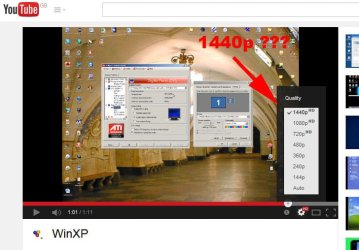
Just to confuse things - anyone else notice that the OP's YouTube was in 1440p HD ? See attachment screenshot

1920 * 1440 is 4:3 but . . . I thought his 4:3 was 1600 . . .

1440p.jpg
 

My Computer My Computer

At a glance

Windows 7 pro x64 SP1Intel i7-2600k o/c to 4.6GHz8GB Mushkin 1866MHzNvidia GTX 750 Ti 2GB
Computer type
PC/Desktop
Computer Manufacturer/Model Number
self build
OS
Windows 7 pro x64 SP1
CPU
Intel i7-2600k o/c to 4.6GHz
Motherboard
MSI Z68-GD80
Memory
8GB Mushkin 1866MHz
Graphics Card(s)
Nvidia GTX 750 Ti 2GB
Sound Card
integrated
Monitor(s) Displays
Liyama ProLite 27"
Screen Resolution
1920*1080 px
Hard Drives
Seagate 2TB
PSU
Coolermaster GX 750W
Case
Antec 300 case + 5 fans
Cooling
Dark Rock Pro
Internet Speed
62Mbit down 18Mbit up
Antivirus
MSE
Browser
Firefox
Other Info
Blackgold BGT3650 Quad HD TV card. Also have various 3770 + 4770K render boxes.
Now it's 1600X1200 and when I click on “duplicate”, Windows changes it to 1440X900.
Actually, your Win7 video shows that this is NOT what happens when you click on "duplicate". It was YOU who changed it to 1440x900, not Windows.

What actually happened when you clicked "duplicate" was that for some reason Windows changed the resolutions to 1280x960... from the original 1600x1200 which was originally in effect on the CRT monitor. Note that 1280x960 is also a 4:3 aspect ratio resolution, similar to 1600x1200 which is also 4:3.

Windows made that resolution change when you initiated "clone" mode because 1600x1200 cannot be displayed on the 1920x1080 Vizio screen. Maximum vertical size is 1080, so 1200 is too large. Remember it's a 16x9 HDTV, not an actual computer monitor which might support additional VESA resolutions. 1200 vertical is unacceptable, since the Vizio only has 1080 vertical maximum (remember, it's a 1920x1080 screen).

So Windows reduced the "clone" resolution down from 1600x1200 (4x3) to 1280x960, which is also a 4:3 resolution and is acceptable to the Vizio's vertical screen size. In fact it is apparently the largest possible 4:3 resolution the Vizio can accept (in its maximum 1080 vertical screen dimension).

And judging from other the values shown in the slider when you decided to dropdown the list, in addition to 1280x960 the Vizio can also accept 1280x1024, 1360x768, 1360x1024, and 1440x900... all of which do not exceed the Vizio's maximum of 1080 vertical screen size dimension, while at the same time also being acceptable to the Lenovo 4:3 monitor.

Note that as shown in your Win7 Res Change video, when you did manually (yourself) change to 1440x900, this image was presented inside the Vizio's 1920x1080 screen size as a 1440x900 centered image. So it looks "postage stamp", i.e. horizontally and vertically centered at 1440x900 size within 1920x1080 real estate, and technically speaking there are black bars on left and right, as well as on top and bottom... hence "postage stamp".

Similarly, if you'd left things the way they were originally changed to when you pushed the "duplicate" button (i.e. when Windows changed it to 1280x960), you would have again seen "postage stamp" on the Vizio, displaying a 1280x960 window within 1920x1080 real estate. Of course the 1280x960 (4x3) postage stamp would have been shaped differently than the 1440x900 (16x10) postage stamp, but both would have been "postage stamp" within the 1920x1080 screen size of the Vizio.

Again, the Vizio is an HDTV (not a true monitor) and has a set of acceptable display resolutions it can handle, up to a maximum of its "native" recommended resolution of 1920x1080 which would therefore fill 100% of its screen real estate with a 1920x1080 Windows desktop image.


It is unchecked in Windows 7. If I check it there things get ugly.
I didn't see a visual proof of this statement in Win7, in any video. You showed clone mode details and that check box for XP in your WinXP video where the box IS CHECKED for both monitor and HDTV.

But you didn't show the equivalent in Win7, which you now say IS UN-CHECKED!! This is the opposite of how you have things in XP as clearly proven by your WinXP video, so now I'm not entirely surprised that things don't work exactly the same way in XP and 7.

So... how about CHECKING the boxes in Win7, to match how you have it in WinXP?? You say "if I check it there things get ugly", but I'd like to see what you mean... in another video please??


Anyway, I really do want you to upgrade your Catalyst driver to the latest 13.9 LEGACY driver, along with the matching current Catalyst Control Center. You don't need the optional HydraVision package at the bottom of the page. When you get the 13.9 components successfully installed, be sure to go into Catalyst Control Center and switch to "advanced mode" from the default "basic mode", so that you can see all options for everything.

And one more thing. If you look at your XP Desk TV video, you'll notice that on the left edge of your WinXP desktop on the Lenovo monitor there are 15 rows of shortcut icons, with the top row having 5 and the bottom row having 1. Now look at the Vizio screen later in the same video. Note that there are only 12 rows of shortcut icons, with the top row having 3 and the bottom row having 2. So the Vizio presentation in "clone" mode on XP has chopped off the top and bottom of what is simultaneously visible on the lenovo monitor. I don't know if this is being caused by some ZOOM MODE you might have active at this moment on the Vizio HDTV (which seems likely to me as the only plausible explanation), or some other additional oddity anomaly in the XP Catalyst driver and "clone" mode with different screen sizes.

 

My Computer My Computer

At a glance

Windows 7 Pro x64 (1), Win7 Pro X64 (2)i5-3350p 3.1Ghz/6MB-cache (1); E8400 3.0Ghz/6...8GB PC3-12800 DDR3 (1); 4GB PC3-10600 DDR3 (2)ATI HD7750 (1), (see TV cards); ATI R7 250 (2)
Computer type
PC/Desktop
Computer Manufacturer/Model Number
Home-built, two systems (1) and (2)
OS
Windows 7 Pro x64 (1), Win7 Pro X64 (2)
CPU
i5-3350p 3.1Ghz/6MB-cache (1); E8400 3.0Ghz/6MB-cache (2)
Motherboard
ASUS P8Z77-V Pro (1); ASUS P5Q3 (2)
Memory
8GB PC3-12800 DDR3 (1); 4GB PC3-10600 DDR3 (2)
Graphics Card(s)
ATI HD7750 (1), (see TV cards); ATI R7 250 (2)
Sound Card
Realtek ALC892 HD Audio (1); Realtek ALC1200 HD Audio (2)
Monitor(s) Displays
Eizo HD2441W LCD, Eizo S2433W (1); Eizo 24" S2433W (2)
Screen Resolution
1920x1200, 1920x1200 (1); 1920x1200 (2)
Hard Drives
(1) 1TB SATA-II (7200RPM), 2x2TB SATA-III (7200RPM), 250GB SATA-III (10000RPM) for OS; 2x2TB external USB 3.0

(2) 320GB SATA-II (7200RPM), 750GB SATA-II (7200RPM), 150GB SATA-II (10000RPM) for OS; 2TB external USB 3.0
PSU
Nesteq ECS-6001 600W (1); Nesteq ECS-5001 500W (2)
Case
Acousti-Case 360 (1) and (2)
Cooling
Noctua NH-U12P SE2 for CPU, 2x120mm case fans (1) and (2)
Keyboard
IBM PS/2 (1) and (2)
Mouse
Logitech MX Revolution wireless (1); Microsoft wired (2)
Internet Speed
100mbps down / 10mbps up
Antivirus
Microsoft Security Essentials; Malwarebyte Anti-Malware Pro
Browser
Firefox
Other Info
Ceton InfiniTV 4-tuner cablecard-enabled TV card as well as Hauppauge HVR-2250 OTA/ATSC 2-tuner TV card in (1), running under Win7 WMC
Just to confuse things - anyone else notice that the OP's YouTube was in 1440p HD ? See attachment screenshot

1920 * 1440 is 4:3 but . . . I thought his 4:3 was 1600 . . .
My guess is a bug in Catalyst Control Center, uncovered by the two different screen resolutions.

What's shown in the upper part ("panel information") of the "attributes" presentation is the MAXIMUM reported by the display, not the actual resolution currently in effect. In fact the actual resolution currently in effect is [theoretically] shown in the "display area" of "Displays manager" -> "Displays properties".

So the "display area" claims 1600x1200 in XP clone mode, whereas you've observed the YouTube video was 1440. In my mind, 1440 matches what was shown as the maximum possible clone mode resolution (i.e. 1440x900) in Win7. And this makes sense because 1200 is unacceptable as a vertical resolution value on the Vizio where max resolution is 1920x1080.

So, Win7 and Catalyst Control Center resolved the conflict by limiting max "clone" mode resolution to 1440x900. I suspect WinXP did the same, but there is simply a flaw in Catalyst Control Center showing the current "clone" mode resolution as 1600x1200 which clearly is impossible and incorrect (in my mind, anyway). The YouTube video confirms.


Also note the other oddity I observed, that the WinXP desktop left edge shows 15 rows of shortcut icons, whereas the Vizio desktop only shows 12. ZOOM mode on the Vizio? Some other problem with "clone" mode in XP when using two different shaped screens??
 

My Computer My Computer

At a glance

Windows 7 Pro x64 (1), Win7 Pro X64 (2)i5-3350p 3.1Ghz/6MB-cache (1); E8400 3.0Ghz/6...8GB PC3-12800 DDR3 (1); 4GB PC3-10600 DDR3 (2)ATI HD7750 (1), (see TV cards); ATI R7 250 (2)
Computer type
PC/Desktop
Computer Manufacturer/Model Number
Home-built, two systems (1) and (2)
OS
Windows 7 Pro x64 (1), Win7 Pro X64 (2)
CPU
i5-3350p 3.1Ghz/6MB-cache (1); E8400 3.0Ghz/6MB-cache (2)
Motherboard
ASUS P8Z77-V Pro (1); ASUS P5Q3 (2)
Memory
8GB PC3-12800 DDR3 (1); 4GB PC3-10600 DDR3 (2)
Graphics Card(s)
ATI HD7750 (1), (see TV cards); ATI R7 250 (2)
Sound Card
Realtek ALC892 HD Audio (1); Realtek ALC1200 HD Audio (2)
Monitor(s) Displays
Eizo HD2441W LCD, Eizo S2433W (1); Eizo 24" S2433W (2)
Screen Resolution
1920x1200, 1920x1200 (1); 1920x1200 (2)
Hard Drives
(1) 1TB SATA-II (7200RPM), 2x2TB SATA-III (7200RPM), 250GB SATA-III (10000RPM) for OS; 2x2TB external USB 3.0

(2) 320GB SATA-II (7200RPM), 750GB SATA-II (7200RPM), 150GB SATA-II (10000RPM) for OS; 2TB external USB 3.0
PSU
Nesteq ECS-6001 600W (1); Nesteq ECS-5001 500W (2)
Case
Acousti-Case 360 (1) and (2)
Cooling
Noctua NH-U12P SE2 for CPU, 2x120mm case fans (1) and (2)
Keyboard
IBM PS/2 (1) and (2)
Mouse
Logitech MX Revolution wireless (1); Microsoft wired (2)
Internet Speed
100mbps down / 10mbps up
Antivirus
Microsoft Security Essentials; Malwarebyte Anti-Malware Pro
Browser
Firefox
Other Info
Ceton InfiniTV 4-tuner cablecard-enabled TV card as well as Hauppauge HVR-2250 OTA/ATSC 2-tuner TV card in (1), running under Win7 WMC
Why is it so important you must have the movie showing on both displays
Because when I edit movies/videos I like my mouse to be on the computer desktop in front of my eyes where the editing program is and not on TV even though it's in the same room. I can always turn my head or even come closer to the TV to see how the borders etc look like on 16:9 but not going there with the mouse :)

Another inconsistency is that the OP likes the mouse to be just on 1 display not both. In clone mode the mouse appears on both monitors, in extend mode the mouse is only on 1 monitor at a time. Maybe the OP actually needs extend mode.
 

My Computer My Computer

At a glance

Windows 7 pro x64 SP1Intel i7-2600k o/c to 4.6GHz8GB Mushkin 1866MHzNvidia GTX 750 Ti 2GB
Computer type
PC/Desktop
Computer Manufacturer/Model Number
self build
OS
Windows 7 pro x64 SP1
CPU
Intel i7-2600k o/c to 4.6GHz
Motherboard
MSI Z68-GD80
Memory
8GB Mushkin 1866MHz
Graphics Card(s)
Nvidia GTX 750 Ti 2GB
Sound Card
integrated
Monitor(s) Displays
Liyama ProLite 27"
Screen Resolution
1920*1080 px
Hard Drives
Seagate 2TB
PSU
Coolermaster GX 750W
Case
Antec 300 case + 5 fans
Cooling
Dark Rock Pro
Internet Speed
62Mbit down 18Mbit up
Antivirus
MSE
Browser
Firefox
Other Info
Blackgold BGT3650 Quad HD TV card. Also have various 3770 + 4770K render boxes.
Another inconsistency is that the OP likes the mouse to be just on 1 display not both. In clone mode the mouse appears on both monitors, in extend mode the mouse is only on 1 monitor at a time. Maybe the OP actually needs extend mode.

Only intelligent solution, judging by everything OP has told, would be to use extended mode: Edit the video on PC monitor (display 1), run the edited movie on TV (display 2).
 

My Computer My Computer

At a glance

Windows 10 Pro x64 EN-GB1.6 GHz Intel Core i7-720QM Processor6 GBATI Mobility Radeon HD 5850 Graphics
Computer type
Laptop
Computer Manufacturer/Model Number
HP ENVY 17-1150eg
OS
Windows 10 Pro x64 EN-GB
CPU
1.6 GHz Intel Core i7-720QM Processor
Memory
6 GB
Graphics Card(s)
ATI Mobility Radeon HD 5850 Graphics
Sound Card
Beats sound system with integrated subwoofer
Monitor(s) Displays
17" laptop display, 22" LED and 32" Full HD TV through HDMI
Screen Resolution
1600*900 (1), 1920*1080 (2&3)
Hard Drives
Internal: 2 x 500 GB SATA Hard Disk Drive 7200 rpm
External: 2TB for backups, 3TB USB3 network drive for media
Cooling
As Envy runs a bit warm, I have it on a Cooler Master pad
Keyboard
Logitech diNovo Media Desktop Laser (bluetooth)
Mouse
Logitech Performance Mouse MX
Internet Speed
50/10 Mbps VDSL
Antivirus
Windows Defender 4.3.9431.0
Browser
Maxthon 3.5.2., IE11
Only intelligent solution, judging by everything OP has told, would be to use extended mode: Edit the video on PC monitor (display 1), run the edited movie on TV (display 2).

When editing video, preserving aspect ratio is the #1 priority. Forcing cloned monitors' pixels to adopt wrong values could easily result in the final output being distorted.

The next post will be 'why are my movies stretched ? looked fine in the editor'. YouTube is full of people with wide faces (and plenty of very tall thin dudes).

When editing video, preserving aspect ratio is the #1 priority
 

My Computer My Computer

At a glance

Windows 7 pro x64 SP1Intel i7-2600k o/c to 4.6GHz8GB Mushkin 1866MHzNvidia GTX 750 Ti 2GB
Computer type
PC/Desktop
Computer Manufacturer/Model Number
self build
OS
Windows 7 pro x64 SP1
CPU
Intel i7-2600k o/c to 4.6GHz
Motherboard
MSI Z68-GD80
Memory
8GB Mushkin 1866MHz
Graphics Card(s)
Nvidia GTX 750 Ti 2GB
Sound Card
integrated
Monitor(s) Displays
Liyama ProLite 27"
Screen Resolution
1920*1080 px
Hard Drives
Seagate 2TB
PSU
Coolermaster GX 750W
Case
Antec 300 case + 5 fans
Cooling
Dark Rock Pro
Internet Speed
62Mbit down 18Mbit up
Antivirus
MSE
Browser
Firefox
Other Info
Blackgold BGT3650 Quad HD TV card. Also have various 3770 + 4770K render boxes.
Only intelligent solution, judging by everything OP has told, would be to use extended mode: Edit the video on PC monitor (display 1), run the edited movie on TV (display 2).

When editing video, preserving aspect ratio is the #1 priority. Forcing cloned monitors' pixels to adopt wrong values could easily result in the final output being distorted.

The next post will be 'why are my movies stretched ? looked fine in the editor'. YouTube is full of people with wide faces (and plenty of very tall thin dudes).

When editing video, preserving aspect ratio is the #1 priority
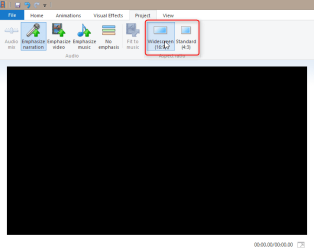
It is a very bad video editor if it does not allow working on a 16:9 video on a 4:3 display. Not valid point, if you ask me. Simple Windows Live Movie Maker allows you to select the aspect ratio for your video, regardless of the aspect ratio of your display.
 

My Computer My Computer

At a glance

Windows 10 Pro x64 EN-GB1.6 GHz Intel Core i7-720QM Processor6 GBATI Mobility Radeon HD 5850 Graphics
Computer type
Laptop
Computer Manufacturer/Model Number
HP ENVY 17-1150eg
OS
Windows 10 Pro x64 EN-GB
CPU
1.6 GHz Intel Core i7-720QM Processor
Memory
6 GB
Graphics Card(s)
ATI Mobility Radeon HD 5850 Graphics
Sound Card
Beats sound system with integrated subwoofer
Monitor(s) Displays
17" laptop display, 22" LED and 32" Full HD TV through HDMI
Screen Resolution
1600*900 (1), 1920*1080 (2&3)
Hard Drives
Internal: 2 x 500 GB SATA Hard Disk Drive 7200 rpm
External: 2TB for backups, 3TB USB3 network drive for media
Cooling
As Envy runs a bit warm, I have it on a Cooler Master pad
Keyboard
Logitech diNovo Media Desktop Laser (bluetooth)
Mouse
Logitech Performance Mouse MX
Internet Speed
50/10 Mbps VDSL
Antivirus
Windows Defender 4.3.9431.0
Browser
Maxthon 3.5.2., IE11
It is a very bad video editor if it does not allow working on a 16:9 video on a 4:3 display. Not valid point, if you ask me. Simple Windows Live Movie Maker allows you to select the aspect ratio for your video, regardless of the aspect ratio of your display.

What I meant was - often people 'eyeball' stuff when editing video to get the dimensions right. If I have several clips from different sources (eg anamorphic + square pixel) in one composition I look for circular objects (clocks etc) to check things are in shape. If the OP edits video on a distorted monitor, things that appear circular might turn out oval when watched on a regular (non distorted) TV. Sorry for the thread hijack - AR is one of my obsessions eg 4:3 vids stretched to 16:9. YouTube has millions of examples.
 

My Computer My Computer

At a glance

Windows 7 pro x64 SP1Intel i7-2600k o/c to 4.6GHz8GB Mushkin 1866MHzNvidia GTX 750 Ti 2GB
Computer type
PC/Desktop
Computer Manufacturer/Model Number
self build
OS
Windows 7 pro x64 SP1
CPU
Intel i7-2600k o/c to 4.6GHz
Motherboard
MSI Z68-GD80
Memory
8GB Mushkin 1866MHz
Graphics Card(s)
Nvidia GTX 750 Ti 2GB
Sound Card
integrated
Monitor(s) Displays
Liyama ProLite 27"
Screen Resolution
1920*1080 px
Hard Drives
Seagate 2TB
PSU
Coolermaster GX 750W
Case
Antec 300 case + 5 fans
Cooling
Dark Rock Pro
Internet Speed
62Mbit down 18Mbit up
Antivirus
MSE
Browser
Firefox
Other Info
Blackgold BGT3650 Quad HD TV card. Also have various 3770 + 4770K render boxes.
I still disagree with you. Even the simplest video editor, Windows Live Movie Maker can really do it as I mentioned in my previous post. If you edit a 16:9 video on it on a 4:3 display, you still get a real 16:9 and images appear on yhe editor and a real 16:9 display exactly the same.

2014-03-31_00h38_41.png
 

My Computer My Computer

At a glance

Windows 10 Pro x64 EN-GB1.6 GHz Intel Core i7-720QM Processor6 GBATI Mobility Radeon HD 5850 Graphics
Computer type
Laptop
Computer Manufacturer/Model Number
HP ENVY 17-1150eg
OS
Windows 10 Pro x64 EN-GB
CPU
1.6 GHz Intel Core i7-720QM Processor
Memory
6 GB
Graphics Card(s)
ATI Mobility Radeon HD 5850 Graphics
Sound Card
Beats sound system with integrated subwoofer
Monitor(s) Displays
17" laptop display, 22" LED and 32" Full HD TV through HDMI
Screen Resolution
1600*900 (1), 1920*1080 (2&3)
Hard Drives
Internal: 2 x 500 GB SATA Hard Disk Drive 7200 rpm
External: 2TB for backups, 3TB USB3 network drive for media
Cooling
As Envy runs a bit warm, I have it on a Cooler Master pad
Keyboard
Logitech diNovo Media Desktop Laser (bluetooth)
Mouse
Logitech Performance Mouse MX
Internet Speed
50/10 Mbps VDSL
Antivirus
Windows Defender 4.3.9431.0
Browser
Maxthon 3.5.2., IE11
If you look at your XP Desk TV video, you'll notice that on the left edge of your WinXP desktop on the Lenovo monitor there are 15 rows of shortcut icons, with the top row having 5 and the bottom row having 1. Now look at the Vizio screen later in the same video. Note that there are only 12 rows of shortcut icons, with the top row having 3 and the bottom row having 2. So the Vizio presentation in "clone" mode on XP has chopped off the top and bottom of what is simultaneously visible on the lenovo monitor. I don't know if this is being caused by some ZOOM MODE you might have active at this moment on the Vizio HDTV (which seems likely to me as the only plausible explanation), or some other additional oddity anomaly in the XP Catalyst driver and "clone" mode with different screen sizes.

You are absolutely right. It was a ZOOM MODE. Now I made a video (XP OS) where you can see different modes (Zoom-Panoramic-Normal-Wide) on TV and how the desktop looks on it. Please look closely at the Normal mode. I know it’s not possible, but you’ll see the complete desktop (1600X1200) on TV (1920X1080). The reason I keep my TV in the Zoom mode is because any other mode would not show the correct picture. As for the desktop itself – I don’t care if it’s not showing in full on TV screen because I only use “clone” for the movies. And as long as I have the normal (1600X1200) resolution on my desktop and the movie is scaled to full screen on TV – I’m fine.

https://www.youtube.com/watch?v=HKr7mTzRPnE

So... how about CHECKING the boxes in Win7, to match how you have it in WinXP?? You say "if I check it there things get ugly", but I'd like to see what you mean... in another video please??

Here it is. What I meant by “ugly” is that the resolution on the monitor is different from 1600X1200 and everything is stretched vertically. You’ll see that in the video. I have no problem with the way it looks on TV. My problem is that I can’t keep 1600X1200 resolution on the monitor. If I could only do that, everything would be PERFECT.

https://www.youtube.com/watch?v=uZliCAles_8
 

My Computer My Computer

At a glance

Windows 7 Ultimate x64Intel Core I5 750 @ 2.67 GHzDDR3 10GBATI Radeon HD 4350
Computer type
PC/Desktop
Computer Manufacturer/Model Number
Dell Vostro 430
OS
Windows 7 Ultimate x64
CPU
Intel Core I5 750 @ 2.67 GHz
Motherboard
Dell Inc. 054KM3
Memory
DDR3 10GB
Graphics Card(s)
ATI Radeon HD 4350
Monitor(s) Displays
Dell S2740L, Vizio SV470XVT1A
Screen Resolution
1920X1080, 1920X1080
Hard Drives
Western Digital Caviar Black WD5003AZEX, Seagate Barracuda ST31500341AS
Internet Speed
50 Mbps
Antivirus
Microsoft Security Essentials
Browser
Firefox
Your latest video (taken in XP) that shows "NORMAL" mode (producing the black bars on left and right of the 4:3 image in the center) demonstrates as I would expect that without any TV-added ZOOM to alter what is being sent to the TV, the actual image presented on the TV is the same 4:3 aspect ratio as we see on the CRT.

What we don't really know is whether this image is 1600x1200 (which I would have thought to be IMPOSSIBLE to display on the 1920x1080 TV, unless the TV does its own "vertical compression" which I don't know without looking at the manual) or 1440x900 (as Windows 7 seems to force as the max possible) or maybe 1440x1080 (which is truly 4x3) or what.

Does your TV have a "display" button on the remote which presents an onscreen info bar showing the input resolution it's being sent? That would be very helpful, to actually see what the PC is sending to the TV in both WinXP and Win7.

Now I am very bothered by the fact that you have two very different setups in CCC for WinXP and Win7. You have your WinXP setup with the "scale image to full panel size" CHECKED on both CRT and TV. And for Win7 you say you have this option UN-CHECKED! That is a very significant difference, and you confirm very different results in Win7 when you do CHECK that option. You say that forces a switch to 1440x900 from what you believe to be 1600x1200, which is why I'm puzzled that in WinXP having the options CHECKED puts out what claims to be 1600x1200, which is not what gets put out in Win7 with the same options CHECKED.

I can't explain the seemingly opposite (or at least different) behavior under WinXP vs. Win7 with the same options checked, and I don't really know which one is "right". I also don't know how your TV works, but can't imagine that there is an acceptable 1600x1200 resolution it will accept when in Win7 it reports max of 1440x900 (which is why that is the largest value selectable in "clone mode" on Win7). It's vertical height is 1080, so 1200 cannot be displayed.

I still would sure like you to be using CURRENT DRIVERS and CURRENT CATALYST CONTROL CENTER in Win7, instead of software from 3-4 years ago.

And I'd sure like to know what the "display" button on the TV's remote shows onscreen as the input resolution being received from the TV.
 

My Computer My Computer

At a glance

Windows 7 Pro x64 (1), Win7 Pro X64 (2)i5-3350p 3.1Ghz/6MB-cache (1); E8400 3.0Ghz/6...8GB PC3-12800 DDR3 (1); 4GB PC3-10600 DDR3 (2)ATI HD7750 (1), (see TV cards); ATI R7 250 (2)
Computer type
PC/Desktop
Computer Manufacturer/Model Number
Home-built, two systems (1) and (2)
OS
Windows 7 Pro x64 (1), Win7 Pro X64 (2)
CPU
i5-3350p 3.1Ghz/6MB-cache (1); E8400 3.0Ghz/6MB-cache (2)
Motherboard
ASUS P8Z77-V Pro (1); ASUS P5Q3 (2)
Memory
8GB PC3-12800 DDR3 (1); 4GB PC3-10600 DDR3 (2)
Graphics Card(s)
ATI HD7750 (1), (see TV cards); ATI R7 250 (2)
Sound Card
Realtek ALC892 HD Audio (1); Realtek ALC1200 HD Audio (2)
Monitor(s) Displays
Eizo HD2441W LCD, Eizo S2433W (1); Eizo 24" S2433W (2)
Screen Resolution
1920x1200, 1920x1200 (1); 1920x1200 (2)
Hard Drives
(1) 1TB SATA-II (7200RPM), 2x2TB SATA-III (7200RPM), 250GB SATA-III (10000RPM) for OS; 2x2TB external USB 3.0

(2) 320GB SATA-II (7200RPM), 750GB SATA-II (7200RPM), 150GB SATA-II (10000RPM) for OS; 2TB external USB 3.0
PSU
Nesteq ECS-6001 600W (1); Nesteq ECS-5001 500W (2)
Case
Acousti-Case 360 (1) and (2)
Cooling
Noctua NH-U12P SE2 for CPU, 2x120mm case fans (1) and (2)
Keyboard
IBM PS/2 (1) and (2)
Mouse
Logitech MX Revolution wireless (1); Microsoft wired (2)
Internet Speed
100mbps down / 10mbps up
Antivirus
Microsoft Security Essentials; Malwarebyte Anti-Malware Pro
Browser
Firefox
Other Info
Ceton InfiniTV 4-tuner cablecard-enabled TV card as well as Hauppauge HVR-2250 OTA/ATSC 2-tuner TV card in (1), running under Win7 WMC
Your latest video (taken in XP) that shows "NORMAL" mode (producing the black bars on left and right of the 4:3 image in the center) demonstrates as I would expect that without any TV-added ZOOM to alter what is being sent to the TV, the actual image presented on the TV is the same 4:3 aspect ratio as we see on the CRT.
Correct.

What we don't really know is whether this image is 1600x1200 (which I would have thought to be IMPOSSIBLE to display on the 1920x1080 TV
My guess is that “Scale image to full panel size” checked resizes that 1200 to fit into 1080. Obviously it fits.

Does your TV have a "display" button on the remote which presents an onscreen info bar showing the input resolution it's being sent? That would be very helpful, to actually see what the PC is sending to the TV in both WinXP and Win7.


You say that forces a switch to 1440x900 from what you believe to be 1600x1200
No. This is not what I say. I say that Windows 7 forces a switch to 1440x900 from 1600x1200 on my monitor and keeps it that way in the clone/duplicate mode (I loose 1600X1200 on my monitor). And this is the only problem that I have.

It's vertical height is 1080, so 1200 cannot be displayed.
Let’s try this. You have a king size pillow and you want to put it in the Vons’s plastic bag. Of course your pillow is larger than your bag. But you can squeeze it in. Right? In my mind this is exactly what the software does. Depending on the resolution (with “Scale image to full panel size” checked) it will either shrink or expend it to the size of the other screen. And my video (taken in XP) proves it.

I still would sure like you to be using CURRENT DRIVERS and CURRENT CATALYST CONTROL CENTER in Win7, instead of software from 3-4 years ago.
Installed the latest and greatest driver 13-9-legacy_vista_win7_64_dd_ccc_whql. ;) The only thing added is a maximum resolution of 1600X900 (maximum was 1440X900). So couple more versions of drivers and they will hopefully add 1600X200 and it’s going to be as good as XP driver in 2009 :). Also in Win7 I have different options on TV: connected to XP-> Zoom-Panoramic-Normal-Wide; connected to 7-> Zoom-Stretch-Wide.
Here are 2 videos with old and new drivers/CCC on Win7
https://www.youtube.com/watch?v=_2FUok0U8V4
https://www.youtube.com/watch?v=IJi9pHUzzAg
 

My Computer My Computer

At a glance

Windows 7 Ultimate x64Intel Core I5 750 @ 2.67 GHzDDR3 10GBATI Radeon HD 4350
Computer type
PC/Desktop
Computer Manufacturer/Model Number
Dell Vostro 430
OS
Windows 7 Ultimate x64
CPU
Intel Core I5 750 @ 2.67 GHz
Motherboard
Dell Inc. 054KM3
Memory
DDR3 10GB
Graphics Card(s)
ATI Radeon HD 4350
Monitor(s) Displays
Dell S2740L, Vizio SV470XVT1A
Screen Resolution
1920X1080, 1920X1080
Hard Drives
Western Digital Caviar Black WD5003AZEX, Seagate Barracuda ST31500341AS
Internet Speed
50 Mbps
Antivirus
Microsoft Security Essentials
Browser
Firefox
Back
Top