Trying To Create System Image, Getting Error Message

roma1625

New member
Member
Local time
6:19 PM
Messages
46
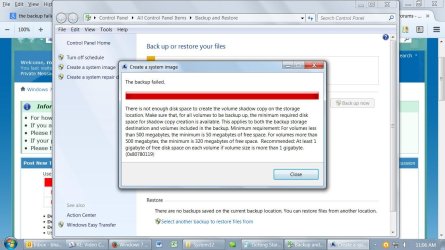
I just re-installed Windows 7 Ultimate 64-bit onto my PC. I've also added a bunch of programs, files, etc. Also, there's a file called Windows.old on my C drive. Total size of my C drive is 115GB. I'm now trying to create a System Image to a brand new 2TB external hard drive. I keep getting this error message (see screenshot). Can anybody help me with this?

Thanks!
 

Attachments

  • Screen Shot.jpg
    Screen Shot.jpg
    158.3 KB · Views: 1

My Computer

Computer type
PC/Desktop
Computer Manufacturer/Model Number
Custom Build
OS
Windows 7 Ultimate N 64-bit
Memory
4.00 GB
Antivirus
Avast
Browser
Firefox

My Computer

Computer Manufacturer/Model Number
HP, Dell, Gateway, Toshiba - 4 laptops and 2 desktops
OS
Vista, Windows7, Mint Mate, Zorin, Windows 8
CPU
from 1.6GHz Duo to i7
Monitor(s) Displays
2x HP w2207
Hard Drives
5x HDD, 7x SSD, 12x Externals
Keyboard
with trackball - no mices
Mouse
Trackball mice
Internet Speed
DSL 6000
I don't want to delete Windows.old yet as I'm afraid that there may be something in there that I'll need later. I'll probably delete it in a couple of weeks. Anyway, I used Macrium per your suggestion. On the external hard drive, there is now a "Disk Partition Image" file, size of 77.7 GB. I'm assuming this is what I need, but please tell me if this is not correct. I can restore my entire system including files if I need to?

Also, I know you are advising against using the Windows backup utility, but just for my own knowledge, could someone please tell me why I get that error message and how can I correct it?

Thanks
 

My Computer

Computer type
PC/Desktop
Computer Manufacturer/Model Number
Custom Build
OS
Windows 7 Ultimate N 64-bit
Memory
4.00 GB
Antivirus
Avast
Browser
Firefox
.....I used Macrium per your suggestion. On the external hard drive, there is now a "Disk Partition Image" file, size of 77.7 GB. I'm assuming this is what I need, but please tell me if this is not correct. I can restore my entire system including files if I need to?

Macrium will make a file with an mrimg extension.

Is that what you see?

In my experience, they are not named "Disk Partition Image".

Instead, it should be named something like WQ66JO33054-00-00.mrg. A bunch of letters and numbers, ending in mrimg.

You CANNOT restore unless you made a recovery disk aka rescue disk within Macrium. Did you?

You'd need to boot from that disk in order to restore.
 

My Computer

Computer type
PC/Desktop
Computer Manufacturer/Model Number
Ignatz Special; 4 speed manual gearbox; factory air conditioning; one of one
OS
Windows 7 Home Premium SP1, 64-bit
CPU
Intel Skylake i5-6600K, not overclocked
Motherboard
AsRock Z170M Extreme 4, micro ATX
Memory
8 GB HyperX DDR4-2666 (2 x 4 GB)
Graphics Card(s)
none; graphics are integrated on CPU
Sound Card
onboard: Realtek ALC1150; external: USB Behringer UF0-202
Monitor(s) Displays
Dell S2340M 23 inch IPS
Screen Resolution
1600 x 900
Hard Drives
System: Crucial MX100 series SSD, 128 GB;
Data: Samsung Spinpoint 103SJ, 1 TB;
Backup: WD Caviar Green WD30EZRX-00D8PB0, 3 TB
PSU
Rosewill SilentNight 500 watt fanless, semi-modular
Case
Antec Solo II
Cooling
Noctua NH-U12S; Noctua F12 intake, Noctua S12A exhaust
Keyboard
Microsoft 200 6JH-00001 USB
Mouse
Dell or Microsoft optical wired; USB
Antivirus
Microsoft Security Essentials and Malwarebytes Premium
Browser
Pale Moon
Other Info
All fans PWM; speeds at idle: CPU circa 500 rpm; intake circa 600 rpm; exhaust circa 600 rpm; CPU temps 27 idle and 47 C load in a warm room (27 C/81 F) when running Intel Extreme Tuning Utility stress test.
77.7GB is a big image. That corresponds to appr. 130GB of data. If you have checked all partitions for your image, then you should have it all. For checking, double click on the image file and see whether all partitions are there - then Cancel. Btw - that's how you can mount an image file and look at it or retrieve data from it. It will appear in Computer.

And here is an iso for a recovery disk that you can download. Saves you a lot of time. Just burn this iso to CD.
 

My Computer

Computer Manufacturer/Model Number
HP, Dell, Gateway, Toshiba - 4 laptops and 2 desktops
OS
Vista, Windows7, Mint Mate, Zorin, Windows 8
CPU
from 1.6GHz Duo to i7
Monitor(s) Displays
2x HP w2207
Hard Drives
5x HDD, 7x SSD, 12x Externals
Keyboard
with trackball - no mices
Mouse
Trackball mice
Internet Speed
DSL 6000
ignatzatsonic,

Yes, the disc name is similar to what you're saying with .mrimg extension. The file type is "Disk Partition Image." The file contains System Reserved and C. I have no other partitions on this computer.

Thanks for telling me about the Rescue Disc. I went ahead and made one using Macrium even though I had already made one from Windows. I'm not sure if they're the same thing, but two is better than one, right?


whs,

How big would be "normal?" I think mine is inflated first of all by the windows.old file, which is 47GB by itself plus I already loaded a bunch of programs + my documents, videos, pics, music, etc.


Still would like to know what happened when I tried creating the image using Windows. Just bothers me when stuff like that happens.
 

My Computer

Computer type
PC/Desktop
Computer Manufacturer/Model Number
Custom Build
OS
Windows 7 Ultimate N 64-bit
Memory
4.00 GB
Antivirus
Avast
Browser
Firefox
Normally a Macrium OS image is about 60% of the data that is on the C partition. To that you have to add the appr. 60% of the other partition's data if you imaged more than just C and the system partition (which is minute).
 

My Computer

Computer Manufacturer/Model Number
HP, Dell, Gateway, Toshiba - 4 laptops and 2 desktops
OS
Vista, Windows7, Mint Mate, Zorin, Windows 8
CPU
from 1.6GHz Duo to i7
Monitor(s) Displays
2x HP w2207
Hard Drives
5x HDD, 7x SSD, 12x Externals
Keyboard
with trackball - no mices
Mouse
Trackball mice
Internet Speed
DSL 6000
ignatzatsonic,
Thanks for telling me about the Rescue Disc. I went ahead and made one using Macrium even though I had already made one from Windows. I'm not sure if they're the same thing, but two is better than one, right?

They are categorically NOT the same.

You need to confirm that disk you made in Macrium will in fact boot your PC. If it won't, it's useless.

Did you choose the "WinPE" rescue disk or the "Linux" method? The former is far better. If you boot from the a WinPE rescue disk, you should land at the Macrium interface, just as if you had opened Macrium from your C drive. If you boot from a Linux rescue disk, you will end up in a slow and cryptic Linux interface that you may find confusing.
 

My Computer

Computer type
PC/Desktop
Computer Manufacturer/Model Number
Ignatz Special; 4 speed manual gearbox; factory air conditioning; one of one
OS
Windows 7 Home Premium SP1, 64-bit
CPU
Intel Skylake i5-6600K, not overclocked
Motherboard
AsRock Z170M Extreme 4, micro ATX
Memory
8 GB HyperX DDR4-2666 (2 x 4 GB)
Graphics Card(s)
none; graphics are integrated on CPU
Sound Card
onboard: Realtek ALC1150; external: USB Behringer UF0-202
Monitor(s) Displays
Dell S2340M 23 inch IPS
Screen Resolution
1600 x 900
Hard Drives
System: Crucial MX100 series SSD, 128 GB;
Data: Samsung Spinpoint 103SJ, 1 TB;
Backup: WD Caviar Green WD30EZRX-00D8PB0, 3 TB
PSU
Rosewill SilentNight 500 watt fanless, semi-modular
Case
Antec Solo II
Cooling
Noctua NH-U12S; Noctua F12 intake, Noctua S12A exhaust
Keyboard
Microsoft 200 6JH-00001 USB
Mouse
Dell or Microsoft optical wired; USB
Antivirus
Microsoft Security Essentials and Malwarebytes Premium
Browser
Pale Moon
Other Info
All fans PWM; speeds at idle: CPU circa 500 rpm; intake circa 600 rpm; exhaust circa 600 rpm; CPU temps 27 idle and 47 C load in a warm room (27 C/81 F) when running Intel Extreme Tuning Utility stress test.
Ignatz is right. Testing the recovery disc is a good idea. But you don't want to do that with your whole system.

Create a little 2GB test partition. Populate that with some copied data and image/restore that partition. That will show you how it works and if it works you know the recovery CD is OK.
 

My Computer

Computer Manufacturer/Model Number
HP, Dell, Gateway, Toshiba - 4 laptops and 2 desktops
OS
Vista, Windows7, Mint Mate, Zorin, Windows 8
CPU
from 1.6GHz Duo to i7
Monitor(s) Displays
2x HP w2207
Hard Drives
5x HDD, 7x SSD, 12x Externals
Keyboard
with trackball - no mices
Mouse
Trackball mice
Internet Speed
DSL 6000
I rebooted using the Rescue Disk and it goes to the Macrium interface exactly as you describe. Yes, I used Windows PE.

Thanks for all of your help!
 

My Computer

Computer type
PC/Desktop
Computer Manufacturer/Model Number
Custom Build
OS
Windows 7 Ultimate N 64-bit
Memory
4.00 GB
Antivirus
Avast
Browser
Firefox

My Computer

Computer Manufacturer/Model Number
HP, Dell, Gateway, Toshiba - 4 laptops and 2 desktops
OS
Vista, Windows7, Mint Mate, Zorin, Windows 8
CPU
from 1.6GHz Duo to i7
Monitor(s) Displays
2x HP w2207
Hard Drives
5x HDD, 7x SSD, 12x Externals
Keyboard
with trackball - no mices
Mouse
Trackball mice
Internet Speed
DSL 6000
Back
Top