Solved Trying to do a clean install of OS on new SSD, but having problems

Lonelylunar

New member
Local time
2:52 PM
Messages
34
HI, I'm trying to do a clean install of windows 7 Pro x64 on a new SSD I bought but I'm having a persistent problem no matter what I try or what steps I use to try and fix the problem. I'm using a disk copy for the install (if it matters) and I get to the screen where it asks where I want to install the OS, I pick my SSD, then I click ADVANCED, then NEW, I select the partition size and format. But I get the same error message every time which is "Setup was unable to create a new system partition or locate and existing system partition. See the Setup log files for more information".

If anyone can help me I would greatly appreciate it, I've been stuck on this problem for about a week now and it's drastically increasing my stress levels.
 

My Computer My Computer

At a glance

Windows 7 Professional x64Intel i5Crucial 4GB x2 DDR3EVGA GeForce GTX 550 Ti
Computer type
PC/Desktop
Computer Manufacturer/Model Number
Custom Build
OS
Windows 7 Professional x64
CPU
Intel i5
Motherboard
ASRock Z77 Pro4 - M
Memory
Crucial 4GB x2 DDR3
Graphics Card(s)
EVGA GeForce GTX 550 Ti
Hard Drives
240GB - PNY SSD

2TB - Seagate Barracuda HDD
Antivirus
AVG + Advanced System Care
Browser
Mozilla Firefox
Sounds like the ssd was setup up as gpt, convert it to mbr.

http://www.sevenforums.com/tutorials/26203-convert-gpt-disk-mbr-disk.html

If you have a UEFI bios and want to install using the GPT partition style, you`ll have to setup the installer that way.

I don`t use that, I always set the bios to legacy boot and disable UEFI if it has it, and install to a MBR partition.
 

My Computer My Computer

At a glance

Windows 10 Pro x64Intel Core i7 6700KGSkill TridentZ RGB 16GB 3600 16-16-16-36EVGA GTX 980 Ti SC x2
Computer type
PC/Desktop
Computer Manufacturer/Model Number
Skylake Special #666
OS
Windows 10 Pro x64
CPU
Intel Core i7 6700K
Motherboard
Asus Sabertooth Z170 Mark 1
Memory
GSkill TridentZ RGB 16GB 3600 16-16-16-36
Graphics Card(s)
EVGA GTX 980 Ti SC x2
Sound Card
Realtek High Definition
Monitor(s) Displays
AOC G2460PG
Screen Resolution
1920 x 1080 144Hz
Hard Drives
Samsung 860 Pro 256GB, Seagate Barracuda 4TB x2
PSU
EVGA 1000 P2, EVGA White Custom Braided Cables
Case
Corsair Vengeance C70 Gunmetal Black
Cooling
Corsair H100i v2, Corsair ML120 x2, Thermal Grizzly Kryonaut
Keyboard
Logitech G910 Orion Spectrum
Mouse
Logitech G700s
Internet Speed
Verizon Fios Quantum Gateway 75/75
Antivirus
Windows Defender, Malwarebytes Free 3.8.3
Browser
Chrome
Other Info
Corsair SP120 x4, LG Blu-ray Drive, Durabrand HT-395 100 Watt Dolby Digital Amp, Corsair H2100 Wireless 7.1 Headset
AddRAM, I followed the steps in the link and converted to mbr through the the command prompt, when I got to the "where do you want the OS" page of the installer I clicked ADVANCED, then NEW to partition the drive, I then formatted. But I still get the same error as before "Setup was unable to create a new system partition or locate and existing system partition. See the Setup log files for more information".

What should I do now?
 

My Computer My Computer

At a glance

Windows 7 Professional x64Intel i5Crucial 4GB x2 DDR3EVGA GeForce GTX 550 Ti
Computer type
PC/Desktop
Computer Manufacturer/Model Number
Custom Build
OS
Windows 7 Professional x64
CPU
Intel i5
Motherboard
ASRock Z77 Pro4 - M
Memory
Crucial 4GB x2 DDR3
Graphics Card(s)
EVGA GeForce GTX 550 Ti
Hard Drives
240GB - PNY SSD

2TB - Seagate Barracuda HDD
Antivirus
AVG + Advanced System Care
Browser
Mozilla Firefox
Okay, after going through the steps you gave me at least 5 times and fiddling around with bios options I finally got windows to install on to the SSD (woot), but I now have another problem (it never ends).

I now have windows installed onto my SSD and so far everything works just fine, but now my SSD is the only drive that shows up. other than the SSD I also have a 2 tb HDD, bios says its there and boot says its there but when on the desktop and go into "my computer" it doesn't show up.

How do I fix it?
 

My Computer My Computer

At a glance

Windows 7 Professional x64Intel i5Crucial 4GB x2 DDR3EVGA GeForce GTX 550 Ti
Computer type
PC/Desktop
Computer Manufacturer/Model Number
Custom Build
OS
Windows 7 Professional x64
CPU
Intel i5
Motherboard
ASRock Z77 Pro4 - M
Memory
Crucial 4GB x2 DDR3
Graphics Card(s)
EVGA GeForce GTX 550 Ti
Hard Drives
240GB - PNY SSD

2TB - Seagate Barracuda HDD
Antivirus
AVG + Advanced System Care
Browser
Mozilla Firefox
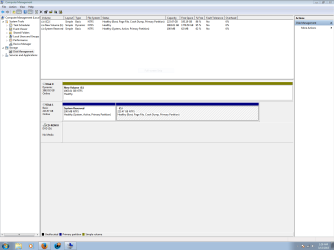
Can you post a picture of your disk management please.
 

My Computer My Computer

At a glance

Vista, Windows7, Mint Mate, Zorin, Windows 8from 1.6GHz Duo to i7
Computer Manufacturer/Model Number
HP, Dell, Gateway, Toshiba - 4 laptops and 2 desktops
OS
Vista, Windows7, Mint Mate, Zorin, Windows 8
CPU
from 1.6GHz Duo to i7
Monitor(s) Displays
2x HP w2207
Hard Drives
5x HDD, 7x SSD, 12x Externals
Keyboard
with trackball - no mices
Mouse
Trackball mice
Internet Speed
DSL 6000
I've had that disk missing issue before, as gregrocker said, you probably need to assign drive letters to them, and they should appear, did for me anyway, lol.
 

My Computer My Computer

At a glance

Windows 10 Home x64AMD FX-8320 @ 3.5 GHz4 x 2 GB G Skill Ripjaws DDR3-1600EVGA Nvidia GTX 550 Ti 1 GB
Computer type
PC/Desktop
Computer Manufacturer/Model Number
Custom Build
OS
Windows 10 Home x64
CPU
AMD FX-8320 @ 3.5 GHz
Motherboard
Gigabyte GA-990FXA-UD3 (rev. 4.0)
Memory
4 x 2 GB G Skill Ripjaws DDR3-1600
Graphics Card(s)
EVGA Nvidia GTX 550 Ti 1 GB
Sound Card
Realtek
Monitor(s) Displays
Acer S201HL
Screen Resolution
1600x900
Hard Drives
1 x 240 GB OCZ SSD
1 x 60 GB Intel SSD
1 x 1 TB Samsung HDD
PSU
Silverstone Strider 750w Modular
Case
Antec 300 Illusion
Cooling
Air
Keyboard
Microsoft
Mouse
HP
Antivirus
Microsoft Security Essentials
Browser
Google Chrome
okay the issue was a little different than just assigning the drive a letter, but I figured it out and fixed the problem and everything runs great so far. The problem was that the disk showed up as foreign so I couldn't access it, what fixed it was right clicking the disk and clicking the option to "import foreign disks".

I really appreciate all of the help you guys have given me with this, thanks you.
 

My Computer My Computer

At a glance

Windows 7 Professional x64Intel i5Crucial 4GB x2 DDR3EVGA GeForce GTX 550 Ti
Computer type
PC/Desktop
Computer Manufacturer/Model Number
Custom Build
OS
Windows 7 Professional x64
CPU
Intel i5
Motherboard
ASRock Z77 Pro4 - M
Memory
Crucial 4GB x2 DDR3
Graphics Card(s)
EVGA GeForce GTX 550 Ti
Hard Drives
240GB - PNY SSD

2TB - Seagate Barracuda HDD
Antivirus
AVG + Advanced System Care
Browser
Mozilla Firefox
Hmm, has anybody ever heard of a "foreign disk" ?
 

My Computer My Computer

At a glance

Vista, Windows7, Mint Mate, Zorin, Windows 8from 1.6GHz Duo to i7
Computer Manufacturer/Model Number
HP, Dell, Gateway, Toshiba - 4 laptops and 2 desktops
OS
Vista, Windows7, Mint Mate, Zorin, Windows 8
CPU
from 1.6GHz Duo to i7
Monitor(s) Displays
2x HP w2207
Hard Drives
5x HDD, 7x SSD, 12x Externals
Keyboard
with trackball - no mices
Mouse
Trackball mice
Internet Speed
DSL 6000

My Computer My Computer

At a glance

Windows 10 Home x64AMD FX-8320 @ 3.5 GHz4 x 2 GB G Skill Ripjaws DDR3-1600EVGA Nvidia GTX 550 Ti 1 GB
Computer type
PC/Desktop
Computer Manufacturer/Model Number
Custom Build
OS
Windows 10 Home x64
CPU
AMD FX-8320 @ 3.5 GHz
Motherboard
Gigabyte GA-990FXA-UD3 (rev. 4.0)
Memory
4 x 2 GB G Skill Ripjaws DDR3-1600
Graphics Card(s)
EVGA Nvidia GTX 550 Ti 1 GB
Sound Card
Realtek
Monitor(s) Displays
Acer S201HL
Screen Resolution
1600x900
Hard Drives
1 x 240 GB OCZ SSD
1 x 60 GB Intel SSD
1 x 1 TB Samsung HDD
PSU
Silverstone Strider 750w Modular
Case
Antec 300 Illusion
Cooling
Air
Keyboard
Microsoft
Mouse
HP
Antivirus
Microsoft Security Essentials
Browser
Google Chrome
A Dynamic disk should only be used to span a partition across multiple hard drives.


What does that mean?


If this is not the case then it can cause problems.


What kind of problems can it cause?
 

Attachments

  • Capture.PNG
    Capture.PNG
    34.6 KB · Views: 8

My Computer My Computer

At a glance

Windows 7 Professional x64Intel i5Crucial 4GB x2 DDR3EVGA GeForce GTX 550 Ti
Computer type
PC/Desktop
Computer Manufacturer/Model Number
Custom Build
OS
Windows 7 Professional x64
CPU
Intel i5
Motherboard
ASRock Z77 Pro4 - M
Memory
Crucial 4GB x2 DDR3
Graphics Card(s)
EVGA GeForce GTX 550 Ti
Hard Drives
240GB - PNY SSD

2TB - Seagate Barracuda HDD
Antivirus
AVG + Advanced System Care
Browser
Mozilla Firefox
Why do you want a Dynamic Disk?

A Dynamic disk is only meant to be used to span a single partition across multiple hard drives, or for certain RAID arrays. A single partition like you appear to have should be on a Basic Disk.

Basic and Dynamic Disks (Windows)

I would use Option One in Convert a Dynamic Disk to a Basic Disk - Windows 7 Help Forums to non-destructively convert to Basic. It has worked just fine when used in cases like this we see here regularly. That tutorial has never been reported to fail and has been used to date by 974,751.


It's not that i want to use a dynamic disk, I just didn't know the difference and didn't know it mattered, I'd been using the disk as dynamic for 3 years now. But either way I changed it to basic as you said.
 

My Computer My Computer

At a glance

Windows 7 Professional x64Intel i5Crucial 4GB x2 DDR3EVGA GeForce GTX 550 Ti
Computer type
PC/Desktop
Computer Manufacturer/Model Number
Custom Build
OS
Windows 7 Professional x64
CPU
Intel i5
Motherboard
ASRock Z77 Pro4 - M
Memory
Crucial 4GB x2 DDR3
Graphics Card(s)
EVGA GeForce GTX 550 Ti
Hard Drives
240GB - PNY SSD

2TB - Seagate Barracuda HDD
Antivirus
AVG + Advanced System Care
Browser
Mozilla Firefox
Sort of, Right before I changed the disk to basic from dynamic, my computer crashed, it blue screened talking about a memory problem. I struggled with this problem for a little over a year before taking it to someone and getting it looked at, while they had it the problem would never reproduce itself but ran a bunch of test and found that one of my SATA cables was bad so he replaced it. Ever since then the computer has worked just fine without any problems, that is until I accidentally ****ed myself by formatting the wrong drive in the process of upgrading my SSD. Now that I have upgraged the problem resurfaced only that one time, which was moments before converting the disk to basic. Now that I have converted the disk to basic I haven't had the problem show up again, but if/when I does I'll take a picture of it and post it here to see if you guys can figure it out.
 

My Computer My Computer

At a glance

Windows 7 Professional x64Intel i5Crucial 4GB x2 DDR3EVGA GeForce GTX 550 Ti
Computer type
PC/Desktop
Computer Manufacturer/Model Number
Custom Build
OS
Windows 7 Professional x64
CPU
Intel i5
Motherboard
ASRock Z77 Pro4 - M
Memory
Crucial 4GB x2 DDR3
Graphics Card(s)
EVGA GeForce GTX 550 Ti
Hard Drives
240GB - PNY SSD

2TB - Seagate Barracuda HDD
Antivirus
AVG + Advanced System Care
Browser
Mozilla Firefox
Do you have the Win7 drive plugged into SATA1 port?

It's best to have the OS drive in DISK0 in Disk Mgmt, so that during repairs or reinstall the System boot files can't be derailed to a preceding primary partition on another drive.

Have you tested your RAM - Test with Memtest86+?
 
Do you have the Win7 drive plugged into SATA1 port?

It's best to have the OS drive in DISK0 in Disk Mgmt, so that during repairs or reinstall the System boot files can't be derailed to a preceding primary partition on another drive.

Have you tested your RAM - Test with Memtest86+?

That's what odd about my system is my Windows drive is listed as DISK1, not DISK0, even though it's plugged into the same SATA port as my old SSD was which was also my main Windows drive... according to KB937251, the order in which SATA disks are enumerated and displayed on Windows is not guaranteed to correspond to which SATA ports the disks are connected to, and can even vary between operating system start-ups.
 

My Computer My Computer

At a glance

Windows 10 Home x64AMD FX-8320 @ 3.5 GHz4 x 2 GB G Skill Ripjaws DDR3-1600EVGA Nvidia GTX 550 Ti 1 GB
Computer type
PC/Desktop
Computer Manufacturer/Model Number
Custom Build
OS
Windows 10 Home x64
CPU
AMD FX-8320 @ 3.5 GHz
Motherboard
Gigabyte GA-990FXA-UD3 (rev. 4.0)
Memory
4 x 2 GB G Skill Ripjaws DDR3-1600
Graphics Card(s)
EVGA Nvidia GTX 550 Ti 1 GB
Sound Card
Realtek
Monitor(s) Displays
Acer S201HL
Screen Resolution
1600x900
Hard Drives
1 x 240 GB OCZ SSD
1 x 60 GB Intel SSD
1 x 1 TB Samsung HDD
PSU
Silverstone Strider 750w Modular
Case
Antec 300 Illusion
Cooling
Air
Keyboard
Microsoft
Mouse
HP
Antivirus
Microsoft Security Essentials
Browser
Google Chrome
Do you have the Win7 drive plugged into SATA1 port?

It's best to have the OS drive in DISK0 in Disk Mgmt, so that during repairs or reinstall the System boot files can't be derailed to a preceding primary partition on another drive.

Have you tested your RAM - Test with Memtest86+?

Yes I've tested my RAM, I did so probably 20 times during the year and a half or so that I had the problem consistently, the verdict being that the RAM being perfectly fine, as the motherboard. But as I said the problem was fixed by replacing a SATA cable, and the crash only happened that one time and hasn't yet happened again.
 

My Computer My Computer

At a glance

Windows 7 Professional x64Intel i5Crucial 4GB x2 DDR3EVGA GeForce GTX 550 Ti
Computer type
PC/Desktop
Computer Manufacturer/Model Number
Custom Build
OS
Windows 7 Professional x64
CPU
Intel i5
Motherboard
ASRock Z77 Pro4 - M
Memory
Crucial 4GB x2 DDR3
Graphics Card(s)
EVGA GeForce GTX 550 Ti
Hard Drives
240GB - PNY SSD

2TB - Seagate Barracuda HDD
Antivirus
AVG + Advanced System Care
Browser
Mozilla Firefox
Back
Top