
Trying to install Windows10 from Win7

sierradane

New member
Local time
8:42 AM
Messages
1
I have had to set my computer back to factory settings for the second time in a year. From it being shut off incorrectly (power outages, etc) too many times... it would end up on the blue "choose your keyboard layout," frozen.

I did the thing where you put windows 10 on a flash drive from my husband's computer to mine. This time, I managed to back up my files so maybe it won't be as bad if I can get this solved.

The only way to get it out of the frozen "choose keyboard" problem was to set it back to factory settings. I bought this HP computer in 2012 so it sets it back to Windows 7. I have the option to upgrade it to 10, but it won't let me because it says my browser needs updating.

I try to update it to the latest internet explorer browser, 11... but it says I need to install 7 sp... which I do that, successfully, and I cannot get it to upgrade to 11.

I found where there is some update for Win10 to solve the "choose keyboard layout" problem, but I can't do that til I can upgrade the browser.

And... at the moment, I can't think of what to type to get my info. I know it's diag somthing. My mind is a blank.
 

Attachments
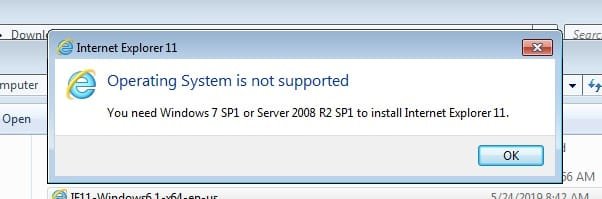
  • Untitled.jpg
    Untitled.jpg
    16.2 KB · Views: 21

My Computer My Computer

Computer type
PC/Desktop
Computer Manufacturer/Model Number
HP
OS
windows 7
Antivirus
PC Matic
Browser
chrome
I would get your windows7 up to date on windows update as your next step. WUMT is much quicker than windows update and does the same thing.
Download Windows Update MiniTool free - latest version
you just download it then run the x64 file if you are on windows7 64-bit, or run the x86 file if you are on 32-bit. You may have to reboot and rerun it a few times, just like you do with normal windows update
 

My Computer My Computer

Computer type
PC/Desktop
Computer Manufacturer/Model Number
diy
OS
Win7 pro x64
CPU
stock i7 7700k
Motherboard
Gigabyte Z270N-WIFI mini-ITX
Memory
Corsair Vengeance LPX 16GB (2x8GB) DDR4 @ 3200MHz
Graphics Card(s)
integrated Intel HD 630
Sound Card
onboard Realtek ALC1220
Monitor(s) Displays
two vertically mounted samsung 55" 4k un55mu8000
Screen Resolution
1920x1280
Hard Drives
256GB Samsung EVO 960 M.2 pci-e NVMe SSD
PSU
SilverStone Nightjar ST45NF 450Watt Fanless
Case
No case. Motherboard is mounted directly onto power supply
Cooling
Evercool low profile 815EP with Panaflow 12L fan at 7v
Keyboard
Ortek MCK-86 mini
Mouse
Belkin 5-button USB
Internet Speed
spectrum 400mbps
If you want 10 why are you needing with 7 down latest ISO for 10 free from ms and install it delete all partitions and do a clean install if you had it on the PC it will activate from their servers
 

My Computer My Computer

Computer type
PC/Desktop
OS
win 8 32 bit
Welcome to the Forum.

What do you want to do, make your Win 7 work as it should or downgrade to win 10?

Fist choose your Keyboard layout. Open Control Panel\All Control Panel Items\Region and Language
- Formats tab. Choose English (US)

If your HP Keyboard is different from the default you will have to install a proper Driver. You probably have the driver on a folder on your disk.

Fist you need to install Windows SP1. Is your Win 7 32 or 64 bits version?

Select windows6.1-KB976932-X64.exe For Win 7 64 bits (903.2 MB)
Select windows6.1-KB976932-X86.exe For Win 7 32 bits (537.8 MB)
 

My Computers My Computers

System One System Two

  • Computer type
    PC/Desktop
    Computer Manufacturer/Model Number
    custom build
    OS
    Windows 7 HP 64
    CPU
    i5 6600K - 800MHz to 4200MHz
    Motherboard
    GA-Z170-HD3P
    Memory
    4+4G GSkill DDR4 3000
    Graphics Card(s)
    IG - Intel 530
    Monitor(s) Displays
    Samsung 226BW
    Screen Resolution
    1680x1050
    Hard Drives
    (1) -1 SM951 – 128GB M.2 AHCI PCIe SSD drive for Windows 7 and Lubuntu
    (2) -1 WD SATA 3 - 1T for Data
    (3) -1 WD SATA 3 - 1T for backup
    PSU
    Thermaltake 450W TR2 gold
    Keyboard
    Old and good Chicony mechanical keyboard
    Mouse
    Logitech mX performance - 9 buttons (had to disable some)
    Internet Speed
    500Mb/s
    Browser
    Firefox 64
    Other Info
    TinyWall firewall
  • Computer type
    Laptop
    System Manufacturer/Model Number
    Asus Q550LF
    OS
    Windows 7 Pro
    CPU
    i7-4500U 800MHz to 3.0GHz
    Motherboard
    Asus Q550LF
    Memory
    (4+4)G DDR3 1600
    Graphics Card(s)
    IG intel 4400 + NVIDIA GeForce GT 745M
    Sound Card
    Realtek
    Monitor(s) Displays
    LG Display LP156WF4-SPH1
    Screen Resolution
    1920 x 1080
    Hard Drives
    BX500 120G SSD for Windows and programs +
    1T HDD for data
    Internet Speed
    500 Mb/s
    Browser
    Firefox
    Other Info
    TinyWall firewall
Back
Top