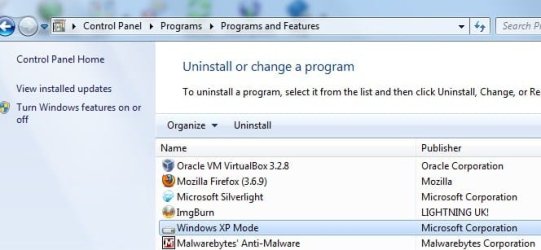
Trying to uninstall XP Mode

CPP

New member
Local time
1:02 PM
Messages
2
Hello,

I'm new to the forum.

I installed XP Mode in my Dell Windows 7 64-bit system this morning, and now I want to uninstall it.

Windows XP Mode (or anything like it) does not appear in the Control Panel | Uninstall or Change a Program list.

I tried restarting my system, and hibernating and closing the virtual machine.

I just want top uninstall it.

Note that a restore point was not created before I installed XP Mode, and I didn't manually create a restore point.

Any help would be greatly appreciated.
 
Last edited by a moderator:

My Computer

Computer Manufacturer/Model Number
Dell
OS
window 7
With the Uninstall or change a program window open, click the link on the left for "View installed updates". It will be there, listed as "Windows Virtual PC".
 

My Computer

Computer type
PC/Desktop
Computer Manufacturer/Model Number
Custom
OS
Windows 10 Pro x64
CPU
Intel Core i7 4790K @ 4.5GHz
Motherboard
Asus Maximus Hero VII
Memory
32GB DDR3
Graphics Card(s)
Nvidia GeForce GTX970
Sound Card
Realtek HD Audio
Screen Resolution
1920x1200
Hard Drives
1x Samsung 250GB SSD
4x WD RE 2TB (RAIDZ)
PSU
Corsair AX760i
Case
Fractal Design Define R4
Cooling
Noctua NH-D15
Thank you so much!
 

My Computer

Computer Manufacturer/Model Number
Dell
OS
window 7
With the Uninstall or change a program window open, click the link on the left for "View installed updates". It will be there, listed as "Windows Virtual PC".

I thought you had to delete both. Under add/remove and Revo uninstaller, XP mode shows up as its own application.


I'm not deleting mine, but curious.
 

Attachments

  • Untitled.jpg
    Untitled.jpg
    36.9 KB · Views: 21

My Computers

System One System Two

  • Computer type
    PC/Desktop
    Computer Manufacturer/Model Number
    PowerSpec G164
    OS
    WIN10
    CPU
    AMD Ryzen 5 3600 6-Core Processor 3.59 GHz
    Memory
    16.0 GB
    Internet Speed
    VERY FAST>>>!!!
  • Antivirus
    ESET Security Premium
I thought you had to delete both. Under add/remove and Revo uninstaller, XP mode shows up as its own application.
If you have XP mode and uninstall it from there, it doesn't remove virtual PC, only the XP Mode VM. Given the OP doesn't have XP mode installed (they have removed the XP mode VM previously, obviously), I figured what the OP asked and what they actually wanted to do were two different things ;).
 

My Computer

Computer type
PC/Desktop
Computer Manufacturer/Model Number
Custom
OS
Windows 10 Pro x64
CPU
Intel Core i7 4790K @ 4.5GHz
Motherboard
Asus Maximus Hero VII
Memory
32GB DDR3
Graphics Card(s)
Nvidia GeForce GTX970
Sound Card
Realtek HD Audio
Screen Resolution
1920x1200
Hard Drives
1x Samsung 250GB SSD
4x WD RE 2TB (RAIDZ)
PSU
Corsair AX760i
Case
Fractal Design Define R4
Cooling
Noctua NH-D15
Back
Top