Solved Turn off and restart the system failure

s00

New member
Member
VIP
Local time
8:57 AM
Messages
220
Location
SISTAN
My system is not shut down or restart.
plz Help me
 

My Computer My Computer

At a glance

windows 7 home preminm x64i7DDR3 4GATI HD 5470 1G
Computer Manufacturer/Model Number
dell 1558
OS
windows 7 home preminm x64
CPU
i7
Motherboard
dell
Memory
DDR3 4G
Graphics Card(s)
ATI HD 5470 1G
Monitor(s) Displays
15.6 LED
Hard Drives
Hitachi 500G
Before you attempt anything either backup or save important documents, etc. to a removable drive/disc.

Could you give some more information, such as how you are trying to restart/shutdown? Have you run Malwarebytes and/or a virus scanner? Have you recently installed updates? How long has this problem been going on (you can try System Restore back to a date before the problem started)? Can you manually shut the system down by holding down the Power button? If you can then I would assume you can restart it. Assuming it will manually shut down then I'd do the following:

Start > Run > chkdsk /F. Command prompt will ask you if you want to check the volume at your next startup. Type Y and then manually shut down your computer > restart. Depending on what you've got on your computer this could take quite a bit of time so only do this when you have the time available.
 

My Computer My Computer

At a glance

Windows 7 Home Premium x64AMD A6-6400K APU8.0GB DDR3-1600Radeon Onboard Graphics
Computer type
PC/Desktop
Computer Manufacturer/Model Number
Custom
OS
Windows 7 Home Premium x64
CPU
AMD A6-6400K APU
Motherboard
Gigabyte F2A88XM-D3H
Memory
8.0GB DDR3-1600
Graphics Card(s)
Radeon Onboard Graphics
Sound Card
Realtek High Def
Monitor(s) Displays
Acer K242HQL
Screen Resolution
1920x1080
Hard Drives
Samsung 850 EVO SSD 250GB
PSU
Corsair 430W
Case
Silverstone PS-08
Cooling
Enermax fans (120mm-intake, 80mm-exhaust)
Keyboard
Logitech K360
Mouse
Logitech M305 Cordless Optical
Internet Speed
Download 60.19Mbps Upload 6.71Mbps
Antivirus
AVG
Browser
Iron Version 51.0.2700.0 (64-bit)
i scanned with Malwarebytes and ESET also i installed updates.
shut the system down by holding down the Power button works.
I used of backup windows to solve my problem And it worked but But after the update and an Internet connection problem Back.
i tested Diagnostic startup in system Configuration
This problem does not exist in Diagnostic startup
The problem occurs in the normal startup
 

My Computer My Computer

At a glance

windows 7 home preminm x64i7DDR3 4GATI HD 5470 1G
Computer Manufacturer/Model Number
dell 1558
OS
windows 7 home preminm x64
CPU
i7
Motherboard
dell
Memory
DDR3 4G
Graphics Card(s)
ATI HD 5470 1G
Monitor(s) Displays
15.6 LED
Hard Drives
Hitachi 500G
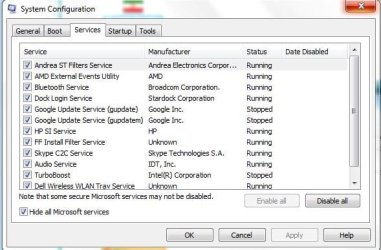
In that case in msconfig>Startup and >Services (after Hide All MS Services box it ticked) enable only the AV to see if the problem persists, and if so uninstall your AV and replace with free lightweight MSE to test that.

You don't need a bunch of freeloaders starting with Win7 anyway - only the AV, any synch, gadgets or stickies, a messenger you always want ready.
 
AV service?
1.JPG
i dont found it
 

My Computer My Computer

At a glance

windows 7 home preminm x64i7DDR3 4GATI HD 5470 1G
Computer Manufacturer/Model Number
dell 1558
OS
windows 7 home preminm x64
CPU
i7
Motherboard
dell
Memory
DDR3 4G
Graphics Card(s)
ATI HD 5470 1G
Monitor(s) Displays
15.6 LED
Hard Drives
Hitachi 500G
What AV do you have? If in doubt uninstall any other and install MSE now.

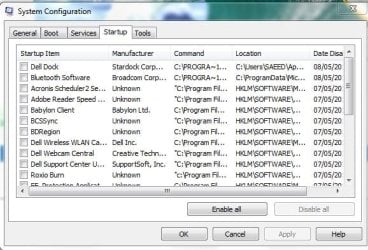
Was the AV in Startup tab?

You don't need any of those starting with Windows, all freeloaders that drag down the system. You may need to disable Dell Wireless first to connect using Win7's superior Wireless service.
 
2.JPG
 

My Computer My Computer

At a glance

windows 7 home preminm x64i7DDR3 4GATI HD 5470 1G
Computer Manufacturer/Model Number
dell 1558
OS
windows 7 home preminm x64
CPU
i7
Motherboard
dell
Memory
DDR3 4G
Graphics Card(s)
ATI HD 5470 1G
Monitor(s) Displays
15.6 LED
Hard Drives
Hitachi 500G
Good. Now observe performance closely and for anything that seems missing, report back.
 
To disable all startup programs, there is still problem
 

My Computer My Computer

At a glance

windows 7 home preminm x64i7DDR3 4GATI HD 5470 1G
Computer Manufacturer/Model Number
dell 1558
OS
windows 7 home preminm x64
CPU
i7
Motherboard
dell
Memory
DDR3 4G
Graphics Card(s)
ATI HD 5470 1G
Monitor(s) Displays
15.6 LED
Hard Drives
Hitachi 500G
That is strange because you said a Diagnostic Startup solve the problem and that would only disable all Startup programs. So did you try disabling everything including your AV?

What AV do you use. Can you uninstall any bloatware AV using the Uninstallers (removal tools) for common antivirus software and try Microsoft Security Essentials to compare?

Work through the Troubleshooting Steps for Windows 7
which uncover most problems.

Report back anything you find which might indicate other steps we'll have.
 

My Computer My Computer

At a glance

windows 7 home preminm x64i7DDR3 4GATI HD 5470 1G
Computer Manufacturer/Model Number
dell 1558
OS
windows 7 home preminm x64
CPU
i7
Motherboard
dell
Memory
DDR3 4G
Graphics Card(s)
ATI HD 5470 1G
Monitor(s) Displays
15.6 LED
Hard Drives
Hitachi 500G
Doe DIagnostic Startup still solve the problem? If so only enable MSE in Startup and Services (after Hiding all MS Services) and leave all others except MS services unchecked. So does running a Diagnostic Startup with only MSE still solve the problem? How about without MSE?
 
What you mean MSE?
Did you mean Microsoft Security Essentials or Not?
 

My Computer My Computer

At a glance

windows 7 home preminm x64i7DDR3 4GATI HD 5470 1G
Computer Manufacturer/Model Number
dell 1558
OS
windows 7 home preminm x64
CPU
i7
Motherboard
dell
Memory
DDR3 4G
Graphics Card(s)
ATI HD 5470 1G
Monitor(s) Displays
15.6 LED
Hard Drives
Hitachi 500G
If you uninstalled ESET then check services to see if Windows Defender is running. If it is you're OK until you get MSE installed and do what gregrocker suggests. Until then you should consider running sfc /scannow from an elevated prompt (with Administrator privileges) just to be sure that a system file isn't causing the problem.
 

My Computer My Computer

At a glance

Windows 7 Home Premium x64AMD A6-6400K APU8.0GB DDR3-1600Radeon Onboard Graphics
Computer type
PC/Desktop
Computer Manufacturer/Model Number
Custom
OS
Windows 7 Home Premium x64
CPU
AMD A6-6400K APU
Motherboard
Gigabyte F2A88XM-D3H
Memory
8.0GB DDR3-1600
Graphics Card(s)
Radeon Onboard Graphics
Sound Card
Realtek High Def
Monitor(s) Displays
Acer K242HQL
Screen Resolution
1920x1080
Hard Drives
Samsung 850 EVO SSD 250GB
PSU
Corsair 430W
Case
Silverstone PS-08
Cooling
Enermax fans (120mm-intake, 80mm-exhaust)
Keyboard
Logitech K360
Mouse
Logitech M305 Cordless Optical
Internet Speed
Download 60.19Mbps Upload 6.71Mbps
Antivirus
AVG
Browser
Iron Version 51.0.2700.0 (64-bit)
Back
Top