Turn off Media Sharing

curryking1

New member
Local time
7:39 AM
Messages
15
Like the title says...

How on earth do you turn off media sharing?

Windows makes it so easy to turn on media sharing but for the life of me I cannot find how to turn it off!!! :cry:

This has to be one of the most frustrating things. It should be so simple yet is so difficult!
 

My Computer

Computer Manufacturer/Model Number
Custom // SAGER
OS
Windows 7 Ultimate x64 // Windows 7 Ultimate x64
CPU
AMD 8320 // i7 4810MQ
Memory
16 GB // 8 GB
Graphics Card(s)
MSI 760 GTX // Nvidia 860M Maxwell
Screen Resolution
1920x1080 // 1920x1080
Mouse
Zowie FK1 // Zowie FK1
You just need to open up the 'Media and sharing centre' (click the network icon on the notification area). Then choose the 'Choose homegroup and sharing options'. You can then select which media (if any) you wish to share.

Hope this helps :)
 

My Computer

Computer Manufacturer/Model Number
Compaq Desktop
OS
Windows 7 Ultimate x64
CPU
AMD Sempron Dual Core
Memory
3GB
Graphics Card(s)
NVIDIA GeForce 6150SE nForce 430
Screen Resolution
1024x768
Hard Drives
150GB Sata
Thanks for such a quick reply.

I don't have a homegroup though. The Network and Sharing Center doesn't appear to have that option for me :S

I believe this is through Windows Media Player sharing.

Edit - It appears I have turned this off somehow...

I made a Homegroup... then I turned off the Homegroup... and I selected no for each type of media to share with Homegroup...

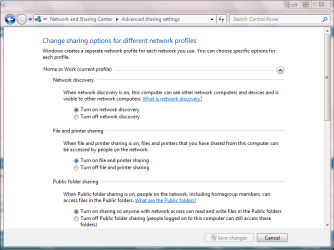
And I have all advanced sharing settings to off now...

That appears to have fixed it???

This is one thing Windows always does poorly... aside from very epicly disgusting management of hard disks.

Thanks for the help though :)
 

My Computer

Computer Manufacturer/Model Number
Custom // SAGER
OS
Windows 7 Ultimate x64 // Windows 7 Ultimate x64
CPU
AMD 8320 // i7 4810MQ
Memory
16 GB // 8 GB
Graphics Card(s)
MSI 760 GTX // Nvidia 860M Maxwell
Screen Resolution
1920x1080 // 1920x1080
Mouse
Zowie FK1 // Zowie FK1
You could try the 'Change advanced sharing options' on the left panel. It has a list of options you can change.

It may be beneficial to upgrade/fresh install to a later build, 7077 is the most stable so far.

EDIT: Glad you sorted it, just seen your post LOL
 

My Computer

Computer Manufacturer/Model Number
Compaq Desktop
OS
Windows 7 Ultimate x64
CPU
AMD Sempron Dual Core
Memory
3GB
Graphics Card(s)
NVIDIA GeForce 6150SE nForce 430
Screen Resolution
1024x768
Hard Drives
150GB Sata
Ya.. change advanced sharing options doesn't help.

All it does is allow you to allow/deny certain hardware from using your share.

And yes... very silly solution lol. I don't even know what happened :/
 

My Computer

Computer Manufacturer/Model Number
Custom // SAGER
OS
Windows 7 Ultimate x64 // Windows 7 Ultimate x64
CPU
AMD 8320 // i7 4810MQ
Memory
16 GB // 8 GB
Graphics Card(s)
MSI 760 GTX // Nvidia 860M Maxwell
Screen Resolution
1920x1080 // 1920x1080
Mouse
Zowie FK1 // Zowie FK1
Hmm, as far as i can see, the second option should solve the issue (see pic) and i too don't have homegroup set up :p
 

Attachments

  • Capture.PNG
    Capture.PNG
    28.5 KB · Views: 15,781

My Computer

Computer Manufacturer/Model Number
Compaq Desktop
OS
Windows 7 Ultimate x64
CPU
AMD Sempron Dual Core
Memory
3GB
Graphics Card(s)
NVIDIA GeForce 6150SE nForce 430
Screen Resolution
1024x768
Hard Drives
150GB Sata
That may well be what did it, but I can't be bothered to test to find out :P
 

My Computer

Computer Manufacturer/Model Number
Custom // SAGER
OS
Windows 7 Ultimate x64 // Windows 7 Ultimate x64
CPU
AMD 8320 // i7 4810MQ
Memory
16 GB // 8 GB
Graphics Card(s)
MSI 760 GTX // Nvidia 860M Maxwell
Screen Resolution
1920x1080 // 1920x1080
Mouse
Zowie FK1 // Zowie FK1
I cant really think of a scenario where this feature is useful? anyone else? seems a waste really.
 

My Computer

Computer Manufacturer/Model Number
CUSTOM
OS
XP/win7 x86 build 7127
CPU
Athlon64 X2 DUAL 4200+ 2.21ghz
Motherboard
ASUS K8 PRO SLI
Memory
2GB Dual Chan DDR2 Corsair
Graphics Card(s)
Nvidia 6800GT
Sound Card
nvidia
Monitor(s) Displays
19' LCD
Screen Resolution
1280x1024
Hard Drives
WD 250, 2x500, 2x1TB IDE/USB
WD 250 SATA (system)
SEAGATE 120 Sata
PSU
coolermaster 450
Case
SUPERFLOWER
Cooling
1 HDD bay fan, 5x80mm Case Fans, AEROGATE II Fan/Temp
Keyboard
MS wireless
Mouse
MS Wireless
Internet Speed
fassssssssst
I have a way to fix that...just turn off homegroups. You don't need that unless you are on an unsecure network anyway.
 

My Computer

Computer type
PC/Desktop
Computer Manufacturer/Model Number
Home built
OS
Windows 7 Ult, Windows 8.1 Pro,
CPU
Q9650-4.275GHz, E8600 4.5GHz, E6750-3.8GHz
Motherboard
Evga 780i FTW
Memory
G.Skill PC2 9600 1200Mhz 5 5 5 15 2T
Graphics Card(s)
GTX480
Sound Card
Asus Xonar D2
Monitor(s) Displays
HannsG
Screen Resolution
1680X1050
Hard Drives
GSkill Phoenix Pro 120GB SSD
PSU
ThermalTake Toughpower 1000Watt modular
Case
ThermalTake XaserV
Cooling
Xigmatek S1283
Keyboard
Logitech G15
Mouse
Logitech G9
Internet Speed
T1
You could also go to services and disables media sharing from there.

Start, type in services click on services when it comes up scroll down to windows media player network sharing service and disable.
 

My Computer

Computer Manufacturer/Model Number
Custom Build.
OS
Windows 7 Ultimate x64.
CPU
i5 760 @ 4.2Ghz. 1.18v
Motherboard
Gigabyte - H55M-USB3
Memory
4g Corsair xms3 ddr3, 1600Mhz.
Graphics Card(s)
Gigabyte GTX-560Ti soc edition
Sound Card
Asus Xonar Dx - Logitech Z5500.
Monitor(s) Displays
Acer 22" LCD Wide screen 1680-1050 -Samsung 42" Plasma....
Screen Resolution
1680/1050 -----1920/1080p.
Hard Drives
2x 2TB Seagate Go Flex,
1x 1TB Seagate,
1x 640WD Black,
x16 Gig sandisc flash drive,
1x8Gig sandisc flash drive.
PSU
XigmaTek 80plus NRP-PC702 - 700w dual 30a.
Case
Venus Gamers Midi Tower Case with LED Display
Cooling
Arctic Freezer 7 Pro Rev 2... x2 Arctic F8 case fans........
Keyboard
Logitech G15-v2 Gaming.
Mouse
Microsoft Sidewinder X8.
Internet Speed
Virgin Media - 50mb down- 8mb up.
Other Info
x2 Xbox 360 wireless controllers...

Dual layer optical disc drive...

Chrome 79million

A.V = MSE
thanks for sharing.. finally i can use my nas drive to access my ps3. everytime i on my laptop, i wasn;t able to see my nas drive
 

My Computer

OS
Windows 7 Enterprise 32bit & Windows 8 Single Language
CPU
Intel E8200 2.66GHz
Motherboard
Gigabyte EP45-DS4P
Memory
OCZ Reaper 2GB Kit (1200MHz)
Graphics Card(s)
Asus 8800 Ultra 768MB
Sound Card
Built-In
Monitor(s) Displays
Compaq MV740
Hard Drives
WD 320GB

Seagate 250GB (3pcs)
PSU
Gigabyte Ordin (800W)
Case
None
Cooling
Stock
Internet Speed
512MBps
Other Info
Laptop - "Asus K46C" i5-3317U - 1.7Ghz, 10GB DDR3, SANDISK Extreme 120GB SSD, Nvidia GT 635M 2GB, WIN 8 Single Language.
turning off media sharing right? i once turned off media sharing thru windows media player. go to stream drop down, uncheck all automatic bla bla stuffs and more at "more streaming options". i got it done on mine. hope this helps
 

My Computer

Computer type
PC/Desktop
OS
windows 7 ultimate 64bit
You could also go to services and disables media sharing from there.

Start, type in services click on services when it comes up scroll down to windows media player network sharing service and disable.

This is by far the best suggestion here IMO. Not only does it work, but having disabled this service, LAN access seems much more responsive (but then again, my router is a BT Home Hub which does not appear to be very good as a LAN router).
 

My Computer

Computer type
Laptop
Computer Manufacturer/Model Number
HP Envy 6
OS
Windows 7 Home Premium x64
CPU
AMD A6
Memory
6Gb
Graphics Card(s)
AMD Radeon 7500G
I was looking for the batch file that disables Media Sharing completely and none of the google search results including those from 7F had it although I know I'd posted it earlier here when it was more widely available on the web about 5 years ago. So I dug it up in 7F archives and am posting it here.

In cases where turning off the HomeGroup, Media Sharing in Advanced Sharing Settings in the Network & Sharing Center, and WMPSharing in Services.msc still does not kill the Media Sharing service from starting at boot, you can run the following batch CMD as Administrator which will finish it off.

I have used it for years to remedy Sleep problems.
 

Attachments

Last edited:
Thanks Greg, good fix!
 

My Computer

Computer type
PC/Desktop
Computer Manufacturer/Model Number
Dude Build
OS
Windows 10 Pro X64
CPU
Intel(R) Core(TM) i5-3570K CPU OC@ 4.5GHZ Turbo
Motherboard
MSI Z77A-G45 Gaming
Memory
8.00 GB DDR3 1600Mhz
Graphics Card(s)
MSI Gaming X GTX 1070
Sound Card
Realtek High Definition
Monitor(s) Displays
Dell S23O9W, HP L1710
Screen Resolution
DELL-1920 x 1080 HP-1280 x1024
Hard Drives
Crucial m4 256 SSD, WD 7200RPM 500GB WD 1TB
PSU
Seasonic X650 GOLD
Case
Zalman Z12
Cooling
Antec Kuhler 920
Keyboard
Logitech
Mouse
MSI DS100 Interceptor
Internet Speed
50 down and 5 up
Antivirus
MSE
Browser
Chrome, IE 11
Other Info
Logitech X-620 Speakers
Back
Top