
You are using an out of date browser. It may not display this or other websites correctly.
You should upgrade or use an alternative browser.
You should upgrade or use an alternative browser.
Turn off system restore
- Thread starter saf79
- Start date
How do i turn off system restore in Windows 7?
Is it advisable to turn off system restore like Windows XP
Personally, I like to keep it on myself, makes fixing things alot easier.
http://www.sevenforums.com/tutorials/81500-system-restore-enable-disable.html
My Computer
- Computer type
- PC/Desktop
- Computer Manufacturer/Model Number
- Self Built
- OS
- Win 10 Pro x64
- CPU
- Intel I5-2500K @3.3GHz
- Motherboard
- Asrock P67 Extreme4
- Memory
- 16GB G.Skill Ripjaws X (4x4GB)
- Graphics Card(s)
- EVGA GeForce 750 Ti SC 2GB
- Sound Card
- ASUS Xonar DG 5.1 Channels 24-bit 96KHz PCI Interface Sound
- Monitor(s) Displays
- auria eq2367
- Screen Resolution
- 1920 x 1080
- Hard Drives
- 250GB Samsung 850 EVO SSD
1TB WD Blue
1TB Hitachi
- PSU
- SeaSonic X 650W 80 Plus Gold
- Case
- Corsair Obsidian 750D
- Cooling
- Corsair H60, Three 140mm case fans
- Keyboard
- Logitech Wireless Keyboard K520
- Mouse
- Logitech Wireless Mouse M310
- Internet Speed
- Wave Broadband ~ 100 dn 5 up
- Antivirus
- Windows Defender, Malwarebytes Premium
- Browser
- Edge, IE11, Chrome
- Other Info
- Laptop specs: HP g7-1365dx /
CPU: AMD A6-3420M APU with Radeon(tm) HD Graphics /
RAM: Crucial 8Gb (2x4Gb) /
SSD: Crucial M4-CT128M4SSD2 ATA Device/ FW 000F /
GFX: AMD Radeon HD 6520G /
OS: Windows 10 Pro x64

- Local time
- 3:50 PM
- Messages
- 7,877
How do i turn off system restore in Windows 7?
Is it advisable to turn off system restore like Windows XP
Why would you want to? Have you honestly never had a situation where you start up your computer one day and all of a sudden something strange has happened...like your cdrom drive doesn't work, or your second monitor isn't working, or the control panel doesn't open properly when you click on the icon. More often than not, going back a day or two with system restore fixes the problem and you are on your way.
I would not shut it off. If you are concerned about the amount of disk space used, lower the percentage of your drive that it is allowed to consume.
My Computer
- Computer Manufacturer/Model Number
- Self-Built in July 2009
- OS
- Windows 7 Ultimate x64
- CPU
- Intel Q9550 2.83Ghz OC'd to 3.40Ghz
- Motherboard
- Gigabyte GA-EP45-UD3R rev. 1.1, F12 BIOS
- Memory
- 8GB G.Skill PI DDR2-800, 4-4-4-12 timings
- Graphics Card(s)
- EVGA 1280MB Nvidia GeForce GTX570
- Sound Card
- Realtek ALC899A 8 channel onboard audio
- Monitor(s) Displays
- 23" Acer x233H
- Screen Resolution
- 1920x1080
- Hard Drives
- Intel X25-M 80GB Gen 2 SSD
Western Digital 1TB Caviar Black, 32MB cache. WD1001FALS
- PSU
- Corsair 620HX modular
- Case
- Antec P182
- Cooling
- stock
- Keyboard
- ABS M1 Mechanical
- Mouse
- Logitech G9 Laser Mouse
- Internet Speed
- 15/2 cable modem
- Other Info
- Windows and Linux enthusiast. Logitech G35 Headset.

E.g. on a small SSD. But then you should do frequent imaging instead.Why would you want to?
My Computer
- Computer Manufacturer/Model Number
- HP, Dell, Gateway, Toshiba - 4 laptops and 2 desktops
- OS
- Vista, Windows7, Mint Mate, Zorin, Windows 8
- CPU
- from 1.6GHz Duo to i7
- Monitor(s) Displays
- 2x HP w2207
- Hard Drives
- 5x HDD, 7x SSD, 12x Externals
- Keyboard
- with trackball - no mices
- Mouse
- Trackball mice
- Internet Speed
- DSL 6000

Hello Saf,
In addition: http://www.sevenforums.com/tutorials/330-system-protection-turn-off.html
Hope this helps,
Shawn
In addition: http://www.sevenforums.com/tutorials/330-system-protection-turn-off.html
Hope this helps,
Shawn
My Computer
- Computer type
- PC/Desktop
- Computer Manufacturer/Model Number
- Self built custom
- OS
- 64-bit Windows 11 Pro for Workstations
- CPU
- Intel i7-8700K OC'd to 5 GHz
- Motherboard
- ASUS ROG Maximus XI Formula Z390
- Memory
- 64 GB (4x16GB) G.SKILL TridentZ RGB DDR4 3600 MHz
- Graphics Card(s)
- ASUS ROG-STRIX-GTX1080TI-O11G-GAMING
- Sound Card
- Integrated
- Monitor(s) Displays
- 2 x Samsung Odyssey G7 27"
- Screen Resolution
- 2560x1440
- Hard Drives
- 1TB Samsung 990 PRO M.2,
4TB Samsung 990 PRO PRO M.2,
TerraMaster F8 SSD Plus NAS
- PSU
- Seasonic Prime Titanium 850W
- Case
- Thermaltake Core P3
- Cooling
- Corsair Hydro H115i
- Keyboard
- Logitech wireless K800
- Mouse
- Logitech MX Master 4
- Internet Speed
- 2 Gb/s Download and 100 Mb/s Upload
- Antivirus
- Malwarebyte Anti-Malware Premium
- Browser
- Google Chrome
- Other Info
- Logitech Z625 speaker system,
Logitech BRIO 4K Pro webcam,
HP Color LaserJet Pro MFP M477fdn,
APC SMART-UPS RT 1000 XL - SURT1000XLI,
Galaxy S23 Plus phone
- Local time
- 3:50 PM
- Messages
- 7,877
Set it to 1% on a small SSD. Manually delete some older restore points to keep it well under 1% actual usage.E.g. on a small SSD. But then you should do frequent imaging instead.Why would you want to?
http://www.sevenforums.com/tutorials/335-system-protection-change-disk-space-usage.html
http://www.sevenforums.com/tutorials/818-disk-cleanup-open-use.html
Last edited by a moderator:
My Computer
- Computer Manufacturer/Model Number
- Self-Built in July 2009
- OS
- Windows 7 Ultimate x64
- CPU
- Intel Q9550 2.83Ghz OC'd to 3.40Ghz
- Motherboard
- Gigabyte GA-EP45-UD3R rev. 1.1, F12 BIOS
- Memory
- 8GB G.Skill PI DDR2-800, 4-4-4-12 timings
- Graphics Card(s)
- EVGA 1280MB Nvidia GeForce GTX570
- Sound Card
- Realtek ALC899A 8 channel onboard audio
- Monitor(s) Displays
- 23" Acer x233H
- Screen Resolution
- 1920x1080
- Hard Drives
- Intel X25-M 80GB Gen 2 SSD
Western Digital 1TB Caviar Black, 32MB cache. WD1001FALS
- PSU
- Corsair 620HX modular
- Case
- Antec P182
- Cooling
- stock
- Keyboard
- ABS M1 Mechanical
- Mouse
- Logitech G9 Laser Mouse
- Internet Speed
- 15/2 cable modem
- Other Info
- Windows and Linux enthusiast. Logitech G35 Headset.

- Local time
- 1:50 PM
- Messages
- 50,634
Absolutely do not turn off System Restore.
I find it to be one of the most valuable features of Win7, providing the ability to go back in time before a problem started.
If anything, with sufficient drive space increase the percentage of HD space allowed to get more restore points.
I find it to be one of the most valuable features of Win7, providing the ability to go back in time before a problem started.
If anything, with sufficient drive space increase the percentage of HD space allowed to get more restore points.

- Local time
- 1:50 PM
- Messages
- 1,251
saf79- If you are concerned about saving drive space by disabling System Restore I would advise against it in Win 7 as the other Members have. I have System Restore turned off on my Vista computer because it consumes massive amounts of drive space which take up 30 GB very quickly, but so far Win 7 only creates a few 100 MB in shadow copies each day on my Win 7 desktop which is so much easier to live with than in Vista that I always keep System Restore on in Win 7.
~Maxx~
.

~Maxx~
.
My Computer
- Computer Manufacturer/Model Number
- HP HPE 270f
- OS
- Windows 7 x64 Home Premium
- CPU
- Intel Core i7 930 @ 2.8 Ghz Socket 1366 LGA
- Motherboard
- Pegatron Truckee v1.04E41
- Memory
- 8 GB 1366 Mhz DDR3 (PC3-10700) RAM
- Graphics Card(s)
- ATI Radeon 5770 1 GB DDR5 RAM
- Sound Card
- Realtech High Definition
- Monitor(s) Displays
- 32" Sony Bravia
- Screen Resolution
- 1366 X 768
- Hard Drives
- Intel 25nm 120 GB Series 320 SSD HD Tune- 265 MBps Read/ 130 MBps Write
LaCie 1TB + 1TB RAID 0 eSATA Drive HD Tune- 160 MBps Read/ 90 MBps Write
- Keyboard
- Logitech Illuminated
- Mouse
- Logitech MX Revolution
- Internet Speed
- 36.4 Mbps Maximum on a 37 Mbps Motorola SB501 Modem

I too would suggest leaving it ON.
Turning it Off, if theres nothing else to fall back on is not a good idea at all.
I disable mine, but I have Acronis making Daily Images.
Turning it Off, if theres nothing else to fall back on is not a good idea at all.
I disable mine, but I have Acronis making Daily Images.
My Computer
- Computer Manufacturer/Model Number
- Custom (Self Build)
- OS
- Windows 7 Home Premium 64bit
- CPU
- Intel Core i7 2700k
- Motherboard
- eVGA P67 SLI
- Memory
- 8GB Mushkin Redline Ridgebacks @1866
- Graphics Card(s)
- EVGA GTX570 SC
- Sound Card
- XiFi Titanium HD
- Monitor(s) Displays
- LG W2453V
- Screen Resolution
- 1920x1080
- Hard Drives
- Intel 320 80GB -- Intel X25-V 40GB --WD Black 1TB x2 -- WD Blue 640GB
- PSU
- Seasonic x750
- Case
- Corsair 600T SE White
- Cooling
- eVGA Superclocked CPU Cooler
- Keyboard
- Saitek Cyborg
- Antivirus
- Kaspersky
- Browser
- IE
- Other Info
- LG BD/DVD
- Local time
- 1:50 PM
- Messages
- 1,251
I have Acronis making Daily Images.
Having a 3rd party Image Backup program is an excellent idea and thanks to Wishmaster's help I am able to re-image my Win 7 x64 computer with the Macrium Reflect Backup Images I have made.
~Maxx~
.
My Computer
- Computer Manufacturer/Model Number
- HP HPE 270f
- OS
- Windows 7 x64 Home Premium
- CPU
- Intel Core i7 930 @ 2.8 Ghz Socket 1366 LGA
- Motherboard
- Pegatron Truckee v1.04E41
- Memory
- 8 GB 1366 Mhz DDR3 (PC3-10700) RAM
- Graphics Card(s)
- ATI Radeon 5770 1 GB DDR5 RAM
- Sound Card
- Realtech High Definition
- Monitor(s) Displays
- 32" Sony Bravia
- Screen Resolution
- 1366 X 768
- Hard Drives
- Intel 25nm 120 GB Series 320 SSD HD Tune- 265 MBps Read/ 130 MBps Write
LaCie 1TB + 1TB RAID 0 eSATA Drive HD Tune- 160 MBps Read/ 90 MBps Write
- Keyboard
- Logitech Illuminated
- Mouse
- Logitech MX Revolution
- Internet Speed
- 36.4 Mbps Maximum on a 37 Mbps Motorola SB501 Modem

Why would you want to? Have you honestly never had a situation where you start up your computer one day and all of a sudden something strange has happened...like your cdrom drive doesn't work, or your second monitor isn't working, or the control panel doesn't open properly when you click on the icon.
1. If I just used system restore to fix those or similar behavior I never would've investigated and/or learned how it happened in the first place.
2. I've had system restore off since it's inception, makes for a cleaner running system, the less Windows interferes with how I work the better. I make a disk image once or twice a week, takes less than 5 minutes. Currently using Macrium by "Reflect".
p.s. In "Task Manager" with "Show Processes From All Users" enabled I'm showing 27 background processes/services running. The joys of running a stripped/clean system are many.
Ap
My Computer
- Computer Manufacturer/Model Number
- Assembled in my workshop
- OS
- Windows 7 Home Premium
- CPU
- Intel Core 2 Duo @ 3.00gHz
- Motherboard
- Gigabyte GA-P35-S3G
- Memory
- 4 GB
- Graphics Card(s)
- ATI Radeon HD 2600 XT
- Sound Card
- RME 24/96 Card, Realtek Internal Audio PreSonus FireStudio
- Monitor(s) Displays
- Acer 1917 (x2)
- Screen Resolution
- 1280 x 1024 on both monitors
- Hard Drives
- Three 250GB Seagate SATA Barracuda 7200rpm
- PSU
- Rosewill 500-watt
- Case
- Rosewill mid-tower
- Cooling
- Noctua NH-U9B (CPU), PwrSupply fan + single large case Fan
- Keyboard
- Macally w/2/USB ports.
- Mouse
- Trackman Wheel
- Other Info
- Event 20/20 bas studio monitors, Yamaha sub.
Rackmount Korg/Roland/Yamaha synthesizers,
Cubase MIDI/audio recording. Sony Soundforge audio/mastering software. CD Architect Mastering. RME & Presonus audio interfaces.
- Local time
- 3:50 PM
- Messages
- 7,877
Maybe....and sometimes it's just a strange thing that is much faster to repair by just reverting back.1. If I just used system restore to fix those or similar behavior I never would've investigated and/or learned how it happened in the first place.
Those images kinda defeat the troubleshooting phase and learning phase by loading from scratch. I own Acronis True Image and make an image about once per month. I've used Macrium and EaseUs at work.2. I've had system restore off since it's inception, makes for a cleaner running system, the less Windows interferes with how I work the better. I make a disk image once or twice a week, takes less than 5 minutes. Currently using Macrium by "Reflect".
And my box is running about 60 and it runs great, is fast and battery life lasts 5+ hours. Less is not always better.p.s. In "Task Manager" with "Show Processes From All Users" enabled I'm showing 27 background processes/services running. The joys of running a stripped/clean system are many.
My Computer
- Computer Manufacturer/Model Number
- Self-Built in July 2009
- OS
- Windows 7 Ultimate x64
- CPU
- Intel Q9550 2.83Ghz OC'd to 3.40Ghz
- Motherboard
- Gigabyte GA-EP45-UD3R rev. 1.1, F12 BIOS
- Memory
- 8GB G.Skill PI DDR2-800, 4-4-4-12 timings
- Graphics Card(s)
- EVGA 1280MB Nvidia GeForce GTX570
- Sound Card
- Realtek ALC899A 8 channel onboard audio
- Monitor(s) Displays
- 23" Acer x233H
- Screen Resolution
- 1920x1080
- Hard Drives
- Intel X25-M 80GB Gen 2 SSD
Western Digital 1TB Caviar Black, 32MB cache. WD1001FALS
- PSU
- Corsair 620HX modular
- Case
- Antec P182
- Cooling
- stock
- Keyboard
- ABS M1 Mechanical
- Mouse
- Logitech G9 Laser Mouse
- Internet Speed
- 15/2 cable modem
- Other Info
- Windows and Linux enthusiast. Logitech G35 Headset.

I would keep system restore on. Does it tell you what caused the problem (NO). If you and others need your computer working now system restore is great. If you are one that wants to figure out what caused the problem, like many of us well you can still use restore when your done looking. Please update your security after using restore.
My Computer
- Computer type
- PC/Desktop
- Computer Manufacturer/Model Number
- Home made Desktop
- OS
- Windows 10 Pro. 64/ version 1709 Windows 7 Pro/64
- CPU
- Intel i7-6800K @ 4.3
- Motherboard
- ASUS X-99 Deluxe II
- Memory
- Corsair Platinum 16 gig @2400
- Graphics Card(s)
- EVGA GTX 1070 OC
- Monitor(s) Displays
- Asus 27" LED LCD/VE278Q
- Screen Resolution
- 1920-1080 or 1280-720 HDMI
- Hard Drives
- INTEL SSD 730-240 Gb Sata 3.0/
- PSU
- EVGA Platium 1200W
- Case
- Phanteks Luxe Tempered Glass 8 fans/ one radiator
- Cooling
- XSPC/ Water Cooled CPU
- Keyboard
- Das 4 Professional
- Mouse
- Logitech M705/MX Anywhere 2-S
- Internet Speed
- 100 mbits
- Antivirus
- Microsoft Security Essentials/ Malwarebytes Premium 3.0/ SAS
- Browser
- I.E. 11 default/Firefox/ ISP Time Warner Cable/Spectrum
- Other Info
- LG BluRay Burner/
Sound system-KLipsch-THX/
Icy Dock ssd Hot Swap bays.
- Local time
- 1:50 PM
- Messages
- 1,251
As for myself the decision 'To Restore or not To Restore' is purely situational. If I have the time to investigate and learn what is wrong with my computer I will.
The other day something went wrong early on and I had a full schedule of things to do at the computer. Since I wasn't 100% sure that the problem was not also in the recent restore points also I shut the computer down and restored it from a 100% trusted Macrium Reflect Backup Image I had made several days earlier which was unquestionably without any problems. Reflect restored the backup in 4:40 minutes and I haven't had a single problem with it since.
~Maxx~
.
The other day something went wrong early on and I had a full schedule of things to do at the computer. Since I wasn't 100% sure that the problem was not also in the recent restore points also I shut the computer down and restored it from a 100% trusted Macrium Reflect Backup Image I had made several days earlier which was unquestionably without any problems. Reflect restored the backup in 4:40 minutes and I haven't had a single problem with it since.
~Maxx~
.
My Computer
- Computer Manufacturer/Model Number
- HP HPE 270f
- OS
- Windows 7 x64 Home Premium
- CPU
- Intel Core i7 930 @ 2.8 Ghz Socket 1366 LGA
- Motherboard
- Pegatron Truckee v1.04E41
- Memory
- 8 GB 1366 Mhz DDR3 (PC3-10700) RAM
- Graphics Card(s)
- ATI Radeon 5770 1 GB DDR5 RAM
- Sound Card
- Realtech High Definition
- Monitor(s) Displays
- 32" Sony Bravia
- Screen Resolution
- 1366 X 768
- Hard Drives
- Intel 25nm 120 GB Series 320 SSD HD Tune- 265 MBps Read/ 130 MBps Write
LaCie 1TB + 1TB RAID 0 eSATA Drive HD Tune- 160 MBps Read/ 90 MBps Write
- Keyboard
- Logitech Illuminated
- Mouse
- Logitech MX Revolution
- Internet Speed
- 36.4 Mbps Maximum on a 37 Mbps Motorola SB501 Modem
I'm glad restore worked for you Maxxwire. That is a very good example of using some kind of restore system. One can use a restore what ever method chosen when needed or wanted. I use Windows built in restore and it works well. I used it yesterday because of lack of time and I didn't need the headache.
My Computer
- Computer type
- PC/Desktop
- Computer Manufacturer/Model Number
- Home made Desktop
- OS
- Windows 10 Pro. 64/ version 1709 Windows 7 Pro/64
- CPU
- Intel i7-6800K @ 4.3
- Motherboard
- ASUS X-99 Deluxe II
- Memory
- Corsair Platinum 16 gig @2400
- Graphics Card(s)
- EVGA GTX 1070 OC
- Monitor(s) Displays
- Asus 27" LED LCD/VE278Q
- Screen Resolution
- 1920-1080 or 1280-720 HDMI
- Hard Drives
- INTEL SSD 730-240 Gb Sata 3.0/
- PSU
- EVGA Platium 1200W
- Case
- Phanteks Luxe Tempered Glass 8 fans/ one radiator
- Cooling
- XSPC/ Water Cooled CPU
- Keyboard
- Das 4 Professional
- Mouse
- Logitech M705/MX Anywhere 2-S
- Internet Speed
- 100 mbits
- Antivirus
- Microsoft Security Essentials/ Malwarebytes Premium 3.0/ SAS
- Browser
- I.E. 11 default/Firefox/ ISP Time Warner Cable/Spectrum
- Other Info
- LG BluRay Burner/
Sound system-KLipsch-THX/
Icy Dock ssd Hot Swap bays.
- Local time
- 1:50 PM
- Messages
- 1,251
I use Windows built in restore and it works well. I used it yesterday because of lack of time and I didn't need the headache.
I have used Win 7 System Restore many times as well and the Win 7 System Image Restore is amazingly fast considering it restores a full 24 GB backup image to my computer in 5 1/2 minutes instead of the compressed 7.9 GB image that Reflect restores.
~Maxx~
My Computer
- Computer Manufacturer/Model Number
- HP HPE 270f
- OS
- Windows 7 x64 Home Premium
- CPU
- Intel Core i7 930 @ 2.8 Ghz Socket 1366 LGA
- Motherboard
- Pegatron Truckee v1.04E41
- Memory
- 8 GB 1366 Mhz DDR3 (PC3-10700) RAM
- Graphics Card(s)
- ATI Radeon 5770 1 GB DDR5 RAM
- Sound Card
- Realtech High Definition
- Monitor(s) Displays
- 32" Sony Bravia
- Screen Resolution
- 1366 X 768
- Hard Drives
- Intel 25nm 120 GB Series 320 SSD HD Tune- 265 MBps Read/ 130 MBps Write
LaCie 1TB + 1TB RAID 0 eSATA Drive HD Tune- 160 MBps Read/ 90 MBps Write
- Keyboard
- Logitech Illuminated
- Mouse
- Logitech MX Revolution
- Internet Speed
- 36.4 Mbps Maximum on a 37 Mbps Motorola SB501 Modem

I concur. I image; but sometimes System Restore is quicker and easier.
My Computer
- Computer Manufacturer/Model Number
- Home built
- OS
- Windows 7 Ultimate 32 bit
- CPU
- Intel(R) Pentium(R) 4 CPU 3.00GHz
- Motherboard
- ASUS P4P800-VM Motherboard Chipset: Intel 865G + ICH5
- Memory
- 2.50 GB RAM
- Graphics Card(s)
- NVIDIA GeForce 7600 GS
- Sound Card
- SoundMax Integrated Digital Audio (Chip)
- Monitor(s) Displays
- ViewSonic VX 1962 wm
- Screen Resolution
- 1680 X 1050
- Hard Drives
- Seagate Barracuda 7200.10 80 GB
ST380215A ATA Device 18.6 GB
Western Digital "My Book" external hard drive 750 GB
- Cooling
- Fan based
- Keyboard
- Microsoft Comfort Curve Keyboard 2000 v10 USB
- Mouse
- Logitec optic USB
- Internet Speed
- 3.01 Mb/s download 0.64 Mb/s upload
- Local time
- 1:50 PM
- Messages
- 1,251
I concur. I image; but sometimes System Restore is quicker and easier.
Yes, whatever Restore method is quicker and doesn't contain what your trying to get rid of.
~Maxx~
.
My Computer
- Computer Manufacturer/Model Number
- HP HPE 270f
- OS
- Windows 7 x64 Home Premium
- CPU
- Intel Core i7 930 @ 2.8 Ghz Socket 1366 LGA
- Motherboard
- Pegatron Truckee v1.04E41
- Memory
- 8 GB 1366 Mhz DDR3 (PC3-10700) RAM
- Graphics Card(s)
- ATI Radeon 5770 1 GB DDR5 RAM
- Sound Card
- Realtech High Definition
- Monitor(s) Displays
- 32" Sony Bravia
- Screen Resolution
- 1366 X 768
- Hard Drives
- Intel 25nm 120 GB Series 320 SSD HD Tune- 265 MBps Read/ 130 MBps Write
LaCie 1TB + 1TB RAID 0 eSATA Drive HD Tune- 160 MBps Read/ 90 MBps Write
- Keyboard
- Logitech Illuminated
- Mouse
- Logitech MX Revolution
- Internet Speed
- 36.4 Mbps Maximum on a 37 Mbps Motorola SB501 Modem
I concur. I image; but sometimes System Restore is quicker and easier.
Just different needs... My system drive changes very little so i can get by with a weekly image. Files & data are stored on non-system drives.
I need my audio programs to have as little interference from the system as possible so I tend to be fanatical about eliminating all unnecessary background processes.
A side benefit is that everything runs fast and smoothly, even on a fairly slow (by today's standards) computer with modest graphics. I just tried a test playing a multitrack recording in Cubase using a hefty amount of real-time DSP (Reverb, EQ & Compression on almost every track) while playing a Youtube video.
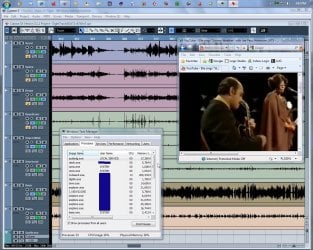
Not sure what the limit would be but I imagine it's possible to run several more application without audio or video dropouts.
Like I said... different needs.
Ap
My Computer
- Computer Manufacturer/Model Number
- Assembled in my workshop
- OS
- Windows 7 Home Premium
- CPU
- Intel Core 2 Duo @ 3.00gHz
- Motherboard
- Gigabyte GA-P35-S3G
- Memory
- 4 GB
- Graphics Card(s)
- ATI Radeon HD 2600 XT
- Sound Card
- RME 24/96 Card, Realtek Internal Audio PreSonus FireStudio
- Monitor(s) Displays
- Acer 1917 (x2)
- Screen Resolution
- 1280 x 1024 on both monitors
- Hard Drives
- Three 250GB Seagate SATA Barracuda 7200rpm
- PSU
- Rosewill 500-watt
- Case
- Rosewill mid-tower
- Cooling
- Noctua NH-U9B (CPU), PwrSupply fan + single large case Fan
- Keyboard
- Macally w/2/USB ports.
- Mouse
- Trackman Wheel
- Other Info
- Event 20/20 bas studio monitors, Yamaha sub.
Rackmount Korg/Roland/Yamaha synthesizers,
Cubase MIDI/audio recording. Sony Soundforge audio/mastering software. CD Architect Mastering. RME & Presonus audio interfaces.
- Local time
- 1:50 PM
- Messages
- 1,251
I see from your screenshot that Cubase uses about 10X as much RAM as explorer, that's some well featured program! The screenshot also shows 33 processes running including Task Manager which would make it only 32. Coming from a guy who has only been able to get Win 7 down to 35 running processes you've done an excellent job of cutting back on unnecessary processes running.
~Maxx~
.
~Maxx~
.
My Computer
- Computer Manufacturer/Model Number
- HP HPE 270f
- OS
- Windows 7 x64 Home Premium
- CPU
- Intel Core i7 930 @ 2.8 Ghz Socket 1366 LGA
- Motherboard
- Pegatron Truckee v1.04E41
- Memory
- 8 GB 1366 Mhz DDR3 (PC3-10700) RAM
- Graphics Card(s)
- ATI Radeon 5770 1 GB DDR5 RAM
- Sound Card
- Realtech High Definition
- Monitor(s) Displays
- 32" Sony Bravia
- Screen Resolution
- 1366 X 768
- Hard Drives
- Intel 25nm 120 GB Series 320 SSD HD Tune- 265 MBps Read/ 130 MBps Write
LaCie 1TB + 1TB RAID 0 eSATA Drive HD Tune- 160 MBps Read/ 90 MBps Write
- Keyboard
- Logitech Illuminated
- Mouse
- Logitech MX Revolution
- Internet Speed
- 36.4 Mbps Maximum on a 37 Mbps Motorola SB501 Modem
Similar threads
- Replies
- 4
- Views
- 1K


- Replies
- 3
- Views
- 6K

- Replies
- 15
- Views
- 3K
- Replies
- 10
- Views
- 2K