Turning off second HDD

LovelyFlipper

New member
Local time
8:34 AM
Messages
25
I have a second hard drive installed that I clone to about once a month.
It seems to me that having it run all the time is unnecessary.
I also think that having it turned off will keep it safe from becoming infected.
Is there a way to turn it off without unplugging it?
 

My Computer My Computer

Computer type
PC/Desktop
Computer Manufacturer/Model Number
Dell XPS 8300
OS
Windows 7 Home Premium 64 bit
CPU
Intel(R) Core i7 [email protected] GHz
Motherboard
Dell
Memory
6GB
Graphics Card(s)
NVIDIA GeForce GTX 750 Ti sc
Monitor(s) Displays
Dell U2412
Hard Drives
(2) HDD 1T
Antivirus
Microsoft security essentials
Browser
FireFox
Unfortunately there is no way to turn an individual hard drive off.

I installed a SATA hard drive tray in the front of my case that allows me to hot plug drives and safely remove them for backup purposes.
 

My Computer My Computer

Computer type
PC/Desktop
Computer Manufacturer/Model Number
Custom Built
OS
Windows 10 Pro x64, Windows 8.1 Pro x64, Windows 7 Ultimate x64 SP1,
CPU
INTEL i9-7920X LGA 2066
Motherboard
Gigabyte X299-WU8 F3
Memory
64 GB (4 X 16 GB) G-Skill V Series DDR4 3200 Quad Channel
Graphics Card(s)
EVGA GTX 1060 SC 3 GB
Sound Card
Realtek Onboard ALC1220
Monitor(s) Displays
2 x Samsung S27E310
Screen Resolution
1920x1080
Hard Drives
Samsung 2 x 970 EVO Plus 500 GB NVMe
1 x 6TB WD 6003FZBX SATA
1 x 6TB WD 60EFRX SATA
12 x 3TB WD 30EFRX SATA
PSU
Seasonic X-1050
Case
Thermaltake Armor+
Cooling
Corsair H80i V2 Liquid AOI Cooler
Keyboard
Logitech G510s
Mouse
Logitech MX Master 2S
Internet Speed
200 Mb/s
Antivirus
ESET NOD32 13.1
Browser
EDGE (Dev, Canary, Beta), Chrome
Other Info
ASUS RT-AC68U router
Malwarebytes 4.0.4
Pbcopter, thanks for the reply.
It's not such a big deal for me to open the case and unplug it.
I was just wondering if there was some cool little trick that I didn't know about.:)
 

My Computer My Computer

Computer type
PC/Desktop
Computer Manufacturer/Model Number
Dell XPS 8300
OS
Windows 7 Home Premium 64 bit
CPU
Intel(R) Core i7 [email protected] GHz
Motherboard
Dell
Memory
6GB
Graphics Card(s)
NVIDIA GeForce GTX 750 Ti sc
Monitor(s) Displays
Dell U2412
Hard Drives
(2) HDD 1T
Antivirus
Microsoft security essentials
Browser
FireFox
I like this tray. It has a fan and a power button to shutdown the drive. Just for your info.

IcyDock Tray
 

My Computer My Computer

Computer type
PC/Desktop
Computer Manufacturer/Model Number
Custom Built
OS
Windows 10 Pro x64, Windows 8.1 Pro x64, Windows 7 Ultimate x64 SP1,
CPU
INTEL i9-7920X LGA 2066
Motherboard
Gigabyte X299-WU8 F3
Memory
64 GB (4 X 16 GB) G-Skill V Series DDR4 3200 Quad Channel
Graphics Card(s)
EVGA GTX 1060 SC 3 GB
Sound Card
Realtek Onboard ALC1220
Monitor(s) Displays
2 x Samsung S27E310
Screen Resolution
1920x1080
Hard Drives
Samsung 2 x 970 EVO Plus 500 GB NVMe
1 x 6TB WD 6003FZBX SATA
1 x 6TB WD 60EFRX SATA
12 x 3TB WD 30EFRX SATA
PSU
Seasonic X-1050
Case
Thermaltake Armor+
Cooling
Corsair H80i V2 Liquid AOI Cooler
Keyboard
Logitech G510s
Mouse
Logitech MX Master 2S
Internet Speed
200 Mb/s
Antivirus
ESET NOD32 13.1
Browser
EDGE (Dev, Canary, Beta), Chrome
Other Info
ASUS RT-AC68U router
Malwarebytes 4.0.4
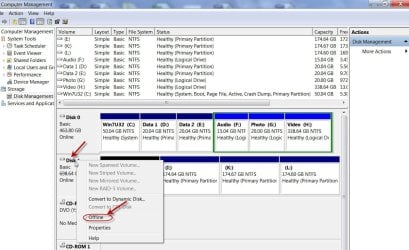
You may right click on the Disk in Windows Disk Management and click on Offline to take it Offline.

You may toggle it Online again when you want to.

05-03-2016 10-04-40.jpg

(You may need to reboot for the change to become effective in both cases.)
 

My Computer My Computer

OS
Windows 7 Home Premium 32 bit
jumanji idea will work to the best of my knowledge.

I personally use HotSwap bays. You will have a sata connection. Plug a ssd or hard drive in and then just use it as need be. When done just remove it and put it some place safe.
 

My Computer My Computer

Computer type
PC/Desktop
Computer Manufacturer/Model Number
Home made Desktop
OS
Windows 10 Pro. 64/ version 1709 Windows 7 Pro/64
CPU
Intel i7-6800K @ 4.3
Motherboard
ASUS X-99 Deluxe II
Memory
Corsair Platinum 16 gig @2400
Graphics Card(s)
EVGA GTX 1070 OC
Monitor(s) Displays
Asus 27" LED LCD/VE278Q
Screen Resolution
1920-1080 or 1280-720 HDMI
Hard Drives
INTEL SSD 730-240 Gb Sata 3.0/
PSU
EVGA Platium 1200W
Case
Phanteks Luxe Tempered Glass 8 fans/ one radiator
Cooling
XSPC/ Water Cooled CPU
Keyboard
Das 4 Professional
Mouse
Logitech M705/MX Anywhere 2-S
Internet Speed
100 mbits
Antivirus
Microsoft Security Essentials/ Malwarebytes Premium 3.0/ SAS
Browser
I.E. 11 default/Firefox/ ISP Time Warner Cable/Spectrum
Other Info
LG BluRay Burner/
Sound system-KLipsch-THX/
Icy Dock ssd Hot Swap bays.
First, you are to be commended for having the good sense to have a backup! So many people do not, then show up here or on another forum distraught because their HDD with all the family photos, doctorate's dissertation, whatever, died and they didn't have a backup.

Storing backup drives outside the computer is the safest way to store them. I have a 2.5" hot swap bay built into my case and I added a 3.5" hot swap bay in a 5.25" bay. I just plug in an internal type 3.5" HDD into the hot swap bay to update my backup, then remove it and return it to the drawer I keep it in. Easy peasey, quick and slick.

An alternative to adding a hot swap bay to your computer would be to get an external dock, set it on top or alongside the computer, and leave it connected to the computer all the time. Just remove the backup HDD when not updating the backup.

There are switches available for shutting down HDDs (Orico and Lian Li are two manufacturers I've seen make them) that fit in a 5.25" bay. However, even if you use a switch or go inside the computer to disconnect the backup drive, you run the risk of losing the backup if good ol' Light Fingered Louie exercises his five finger discount and your computer and backup will both go south. Having the backup in a separate place from your computer dramatically reduces the chance of losing both.

Also, even if you keep your backups in another room, a fire, storm, meteor strike, etc. could still cause you to lose all your data, including the backup. Keeping a second backup offsite, such as in a locked drawer or locker at work, a trusted friend's or relative's house, or a bank safe deposit box will dramatically reduce the amount of data you would loose in a dramatic disaster, the amount depending on how often you update the offsite backup. Another way to have an offsite backup that is easier to keep up to date is to use a good, paid, backup service, such as Carbonite.com, Crashplan, or Backblaze. These have software on your computer that will encrypt your data before it ever leaves the computer. Just stay away from cloud storage sites, especially the free ones. They rarely are secure and the free ones are notorious for disappearing with little or no notice.
 

My Computer My Computer

Computer type
PC/Desktop
Computer Manufacturer/Model Number
Custom Build
OS
Win 7 Ultimate 64 bit
CPU
Intel i7-3930K
Motherboard
ASUS P9X79 WS
Memory
Kingston HyperX Genesis 32GB Kit (8x4GB Modules) 1600MHz DDR
Graphics Card(s)
MSI R7850 Twin Frozr 2GD5/OC Radeon HD 7850 2GB 256-bit GDDR
Sound Card
Asus Xonar Essence STX
Monitor(s) Displays
3x Asus VG248QE 24", Vizio 32" TV
Screen Resolution
1920 x 1080, ?
Hard Drives
Samsung 128GB 840 Pro SSD (1),
Samsung 4TB 850 EVO SSDs (4)
Samsung 4TB 850 EVO SSDs (16) external backup drives used in 2.5" hot swap bays in the computer.
PSU
Corsair HX750w
Case
Antec Two Hundred v2 (modified)
Cooling
Cooler Master GeminII S524 120mm (fan replaced with a 140mm)
Keyboard
Logitech G510s
Mouse
Logitech M525 (two in use)
Internet Speed
=< 32Mbps down, 8Mbps up
Antivirus
AVAST!, MBAM, SAS, Spybot S&D (all but MBAM free) Glary Util
Browser
IE11
Other Info
LSI 9211-8i HBA card (8 SATA III ports), 2.5" & 3.5" Hot Swap Bays, HooToo HT-CR001 PCI-E to USB 3.0 Internal Hub + 6 Slot Card Reader, and LG Model CH12LS28 BD-ROM Optical Drive. Also, ScanSnap S1500 ADF duplexing scanner, Canon 9000F flat bed scanner, Corsair SP2500 2.1 speakers, Samsung CLP 415nw laser color printer, Cyberpower PP2200SW UPS
Pbcopter.
I love that IcyDock Tray.
Sure wish I had room for something like that.
 

My Computer My Computer

Computer type
PC/Desktop
Computer Manufacturer/Model Number
Dell XPS 8300
OS
Windows 7 Home Premium 64 bit
CPU
Intel(R) Core i7 [email protected] GHz
Motherboard
Dell
Memory
6GB
Graphics Card(s)
NVIDIA GeForce GTX 750 Ti sc
Monitor(s) Displays
Dell U2412
Hard Drives
(2) HDD 1T
Antivirus
Microsoft security essentials
Browser
FireFox
You may right click on the Disk in Windows Disk Management and click on Offline to take it Offline.

You may toggle it Online again when you want to.

View attachment 382914

(You may need to reboot for the change to become effective in both cases.)

By golly, that's the kind of trick I was hoping for! Thank you!
 

My Computer My Computer

Computer type
PC/Desktop
Computer Manufacturer/Model Number
Dell XPS 8300
OS
Windows 7 Home Premium 64 bit
CPU
Intel(R) Core i7 [email protected] GHz
Motherboard
Dell
Memory
6GB
Graphics Card(s)
NVIDIA GeForce GTX 750 Ti sc
Monitor(s) Displays
Dell U2412
Hard Drives
(2) HDD 1T
Antivirus
Microsoft security essentials
Browser
FireFox
Lady Fitzgerald,
Don't worry about me, I'm totally neurotic about backing up files and having multiple clones of my hard drives in various locations.
I'm not giving up my elegant Windows 7 without a fight.
 

My Computer My Computer

Computer type
PC/Desktop
Computer Manufacturer/Model Number
Dell XPS 8300
OS
Windows 7 Home Premium 64 bit
CPU
Intel(R) Core i7 [email protected] GHz
Motherboard
Dell
Memory
6GB
Graphics Card(s)
NVIDIA GeForce GTX 750 Ti sc
Monitor(s) Displays
Dell U2412
Hard Drives
(2) HDD 1T
Antivirus
Microsoft security essentials
Browser
FireFox
Guys, Control Panel --> Device Manager --> Disk Drives --> Disable [not Uninstall] the 2nd HD works for me; I'm using Windows 7 Pro, I'm not sure if that will work for all Windows 7s out there.
 

My Computer My Computer

Computer type
PC/Desktop
Computer Manufacturer/Model Number
Antec desktop; Acer Aspire laptops
OS
Windows 7 Professional 64-bit
CPU
Desktop i5; Acers i5 & i7
Memory
desktop 16GB; 1 Acer 8GB & 1 Acer 16GB
Hard Drives
1TB split into 2 equal partitions [OS and data] usable by RJS
Internet Speed
AT&T DSL
Browser
FF, GChrome, msIE
Other Info
Windows 7 Firewall, Emsisoft AM/AV, MSE [scan-only], SpywareBlaster, Ruiware/BillP combine
RolandJS, ANOTHER fine trick!

Am I the only person that ever wanted to turn off a backup Hard Drive?
Do most people just let them run? Just curious.
 

My Computer My Computer

Computer type
PC/Desktop
Computer Manufacturer/Model Number
Dell XPS 8300
OS
Windows 7 Home Premium 64 bit
CPU
Intel(R) Core i7 [email protected] GHz
Motherboard
Dell
Memory
6GB
Graphics Card(s)
NVIDIA GeForce GTX 750 Ti sc
Monitor(s) Displays
Dell U2412
Hard Drives
(2) HDD 1T
Antivirus
Microsoft security essentials
Browser
FireFox
Nah, most people use an external drive for backup that they just disconnect. I myself use an external enclosure. That lets me reuse all those HDDs that I have recovered from the laptops when they were upgraded with SSDs.
 

My Computer My Computer

Computer Manufacturer/Model Number
HP, Dell, Gateway, Toshiba - 4 laptops and 2 desktops
OS
Vista, Windows7, Mint Mate, Zorin, Windows 8
CPU
from 1.6GHz Duo to i7
Monitor(s) Displays
2x HP w2207
Hard Drives
5x HDD, 7x SSD, 12x Externals
Keyboard
with trackball - no mices
Mouse
Trackball mice
Internet Speed
DSL 6000
I always disconnect them if not going to use them
Any connected device is just as corruptible as the os drive.
 

My Computer My Computer

Computer type
PC/Desktop
Computer Manufacturer/Model Number
Custom assembled by me :}
OS
Win-7-Pro64bit 7-H-Prem-64bit
CPU
i7-5930K 2nd i9-9940x both water blocked VRM's too
Motherboard
ASUS SABERTOOTH X99 2nd ASUS x299 Apex
Memory
Trident-z 3200C14 2nd Trident-z 3600C16
Graphics Card(s)
EVGA 1080ti ftw3 2nd Titan Xp both water blocked
Sound Card
Built-in Realtek
Monitor(s) Displays
1-AOC G2460PG 24"G-Sync 144Hz/ 2nd 1-ASUS VG248QE 24" 144Hz
Screen Resolution
1920 x 1080 144Hz
Hard Drives
2-Samsung M.2 Evo & Evo Plus
2-Samsung 850 EVO 500GB SSD's/ 3-2.5 W.D. Black 1tb-&3-1tb/3-3.5 WD Black 1tb hdd's
PSU
EVGA SuperNOVA 1000-P2 2nd 1200-P2
Case
2-Corsair Obsidian Series 450D Black ATX Mid Tower
Cooling
Custom water loops
Keyboard
Logitech G710+/ 2nd Logitech G910
Mouse
2-RedDragon M901 Perdition 16400 dpi Gaming mouse = wired
Internet Speed
Comcast Ping 19ms 89.31mbps download speed 6.12mbps upload
Antivirus
Malwarebytes Pro/ Superantispyware Pro
Browser
FireFox & Pale moon
Other Info
2nd ASUS X299 Apex/Intel i9-9940x with Custom water loop/7H-Prem-x64/Corsair 450D case/Ram Trident-z 3600C16 4x8gb / Samsung970Evo plus 500gb SSD/Dual ssd EZ swap evo/PSU EVGA SuperNova 1200w-P2 80+Platinum/GPU Titan Xp /8-ML-140 on push-pull on 2-280GTX rads
Nah, most people use an external drive for backup that they just disconnect. I myself use an external enclosure. That lets me reuse all those HDDs that I have recovered from the laptops when they were upgraded with SSDs.

I have a bunch of those recovered 2.5" HDDs. Pity they don't have more capacity. I use one occasionally for experiments but, for the most part, they are just taking up space in a drawer because I can't bring myself to get rid of perfectly good hardware.
 

My Computer My Computer

Computer type
PC/Desktop
Computer Manufacturer/Model Number
Custom Build
OS
Win 7 Ultimate 64 bit
CPU
Intel i7-3930K
Motherboard
ASUS P9X79 WS
Memory
Kingston HyperX Genesis 32GB Kit (8x4GB Modules) 1600MHz DDR
Graphics Card(s)
MSI R7850 Twin Frozr 2GD5/OC Radeon HD 7850 2GB 256-bit GDDR
Sound Card
Asus Xonar Essence STX
Monitor(s) Displays
3x Asus VG248QE 24", Vizio 32" TV
Screen Resolution
1920 x 1080, ?
Hard Drives
Samsung 128GB 840 Pro SSD (1),
Samsung 4TB 850 EVO SSDs (4)
Samsung 4TB 850 EVO SSDs (16) external backup drives used in 2.5" hot swap bays in the computer.
PSU
Corsair HX750w
Case
Antec Two Hundred v2 (modified)
Cooling
Cooler Master GeminII S524 120mm (fan replaced with a 140mm)
Keyboard
Logitech G510s
Mouse
Logitech M525 (two in use)
Internet Speed
=< 32Mbps down, 8Mbps up
Antivirus
AVAST!, MBAM, SAS, Spybot S&D (all but MBAM free) Glary Util
Browser
IE11
Other Info
LSI 9211-8i HBA card (8 SATA III ports), 2.5" & 3.5" Hot Swap Bays, HooToo HT-CR001 PCI-E to USB 3.0 Internal Hub + 6 Slot Card Reader, and LG Model CH12LS28 BD-ROM Optical Drive. Also, ScanSnap S1500 ADF duplexing scanner, Canon 9000F flat bed scanner, Corsair SP2500 2.1 speakers, Samsung CLP 415nw laser color printer, Cyberpower PP2200SW UPS
Guys, Control Panel --> Device Manager --> Disk Drives --> Disable [not Uninstall] the 2nd HD works for me; I'm using Windows 7 Pro, I'm not sure if that will work for all Windows 7s out there.

That's a nice trick to know. I just tried it with a spare HDD I had knocking about (one of those 2.5" ones I mentioned earlier) and I was able to disable and reenable it. I didn't bother to see if a disabled drive would show up again after a reboot, though. Would it?

Also, all that the list displays is the part number of the drive. How would one determine which drive to disable if one has multiple drives with the same part number?
 

My Computer My Computer

Computer type
PC/Desktop
Computer Manufacturer/Model Number
Custom Build
OS
Win 7 Ultimate 64 bit
CPU
Intel i7-3930K
Motherboard
ASUS P9X79 WS
Memory
Kingston HyperX Genesis 32GB Kit (8x4GB Modules) 1600MHz DDR
Graphics Card(s)
MSI R7850 Twin Frozr 2GD5/OC Radeon HD 7850 2GB 256-bit GDDR
Sound Card
Asus Xonar Essence STX
Monitor(s) Displays
3x Asus VG248QE 24", Vizio 32" TV
Screen Resolution
1920 x 1080, ?
Hard Drives
Samsung 128GB 840 Pro SSD (1),
Samsung 4TB 850 EVO SSDs (4)
Samsung 4TB 850 EVO SSDs (16) external backup drives used in 2.5" hot swap bays in the computer.
PSU
Corsair HX750w
Case
Antec Two Hundred v2 (modified)
Cooling
Cooler Master GeminII S524 120mm (fan replaced with a 140mm)
Keyboard
Logitech G510s
Mouse
Logitech M525 (two in use)
Internet Speed
=< 32Mbps down, 8Mbps up
Antivirus
AVAST!, MBAM, SAS, Spybot S&D (all but MBAM free) Glary Util
Browser
IE11
Other Info
LSI 9211-8i HBA card (8 SATA III ports), 2.5" & 3.5" Hot Swap Bays, HooToo HT-CR001 PCI-E to USB 3.0 Internal Hub + 6 Slot Card Reader, and LG Model CH12LS28 BD-ROM Optical Drive. Also, ScanSnap S1500 ADF duplexing scanner, Canon 9000F flat bed scanner, Corsair SP2500 2.1 speakers, Samsung CLP 415nw laser color printer, Cyberpower PP2200SW UPS
I always disconnect them if not going to use them
Any connected device is just as corruptible as the os drive.

Not a bad idea but, unless you physically disconnect them, it still wouldn't protect them from getting fried if the PSU were to ever fail or a massive spike or surge blows through your spike and surge protection and the PSU.
 

My Computer My Computer

Computer type
PC/Desktop
Computer Manufacturer/Model Number
Custom Build
OS
Win 7 Ultimate 64 bit
CPU
Intel i7-3930K
Motherboard
ASUS P9X79 WS
Memory
Kingston HyperX Genesis 32GB Kit (8x4GB Modules) 1600MHz DDR
Graphics Card(s)
MSI R7850 Twin Frozr 2GD5/OC Radeon HD 7850 2GB 256-bit GDDR
Sound Card
Asus Xonar Essence STX
Monitor(s) Displays
3x Asus VG248QE 24", Vizio 32" TV
Screen Resolution
1920 x 1080, ?
Hard Drives
Samsung 128GB 840 Pro SSD (1),
Samsung 4TB 850 EVO SSDs (4)
Samsung 4TB 850 EVO SSDs (16) external backup drives used in 2.5" hot swap bays in the computer.
PSU
Corsair HX750w
Case
Antec Two Hundred v2 (modified)
Cooling
Cooler Master GeminII S524 120mm (fan replaced with a 140mm)
Keyboard
Logitech G510s
Mouse
Logitech M525 (two in use)
Internet Speed
=< 32Mbps down, 8Mbps up
Antivirus
AVAST!, MBAM, SAS, Spybot S&D (all but MBAM free) Glary Util
Browser
IE11
Other Info
LSI 9211-8i HBA card (8 SATA III ports), 2.5" & 3.5" Hot Swap Bays, HooToo HT-CR001 PCI-E to USB 3.0 Internal Hub + 6 Slot Card Reader, and LG Model CH12LS28 BD-ROM Optical Drive. Also, ScanSnap S1500 ADF duplexing scanner, Canon 9000F flat bed scanner, Corsair SP2500 2.1 speakers, Samsung CLP 415nw laser color printer, Cyberpower PP2200SW UPS
Guys, Control Panel --> Device Manager --> Disk Drives --> Disable [not Uninstall] the 2nd HD works for me; I'm using Windows 7 Pro, I'm not sure if that will work for all Windows 7s out there.
That's a nice trick to know. I just tried it with a spare HDD I had knocking about (one of those 2.5" ones I mentioned earlier) and I was able to disable and reenable it. I didn't bother to see if a disabled drive would show up again after a reboot, though. Would it?
Also, all that the list displays is the part number of the drive. How would one determine which drive to disable if one has multiple drives with the same part number?
Correct, before disabling, re-enabling hard-drives, serial numbers have to be "hunted up" with software-based sniffers, I think I used something similar to tweaking.com's hardware ID to learn which serial number went with which HD listed in the explorer.exe's left side panel.
If memory serves me, a disabled drive will not show up in explorer.exe's left side panel after that particular Windows session has been restarted. Now, what I do not know: if any malware can "behind your back" reEnable a disabled hard-drive.
I once tried uninstalling a 2nd hard-drive and/or using Acronis Disk Manager to HIDE such a HD, and I had to jump through a couple of hoops to get the hard-drive back into explorer.exe's good graces.
 

My Computer My Computer

Computer type
PC/Desktop
Computer Manufacturer/Model Number
Antec desktop; Acer Aspire laptops
OS
Windows 7 Professional 64-bit
CPU
Desktop i5; Acers i5 & i7
Memory
desktop 16GB; 1 Acer 8GB & 1 Acer 16GB
Hard Drives
1TB split into 2 equal partitions [OS and data] usable by RJS
Internet Speed
AT&T DSL
Browser
FF, GChrome, msIE
Other Info
Windows 7 Firewall, Emsisoft AM/AV, MSE [scan-only], SpywareBlaster, Ruiware/BillP combine
Guys, Control Panel --> Device Manager --> Disk Drives --> Disable [not Uninstall] the 2nd HD works for me; I'm using Windows 7 Pro, I'm not sure if that will work for all Windows 7s out there.
That's a nice trick to know. I just tried it with a spare HDD I had knocking about (one of those 2.5" ones I mentioned earlier) and I was able to disable and reenable it. I didn't bother to see if a disabled drive would show up again after a reboot, though. Would it?
Also, all that the list displays is the part number of the drive. How would one determine which drive to disable if one has multiple drives with the same part number?
Correct, before disabling, re-enabling hard-drives, serial numbers have to be "hunted up" with software-based sniffers, I think I used something similar to tweaking.com's hardware ID to learn which serial number went with which HD listed in the explorer.exe's left side panel.
If memory serves me, a disabled drive will not show up in explorer.exe's left side panel after that particular Windows session has been restarted. Now, what I do not know: if any malware can "behind your back" reEnable a disabled hard-drive.
I once tried uninstalling a 2nd hard-drive and/or using Acronis Disk Manager to HIDE such a HD, and I had to jump through a couple of hoops to get the hard-drive back into explorer.exe's good graces.

I don't see any serial numbers on the list; only part numbers. Pity that. Btw, I can get serial and part numbers using Speccy.
 

My Computer My Computer

Computer type
PC/Desktop
Computer Manufacturer/Model Number
Custom Build
OS
Win 7 Ultimate 64 bit
CPU
Intel i7-3930K
Motherboard
ASUS P9X79 WS
Memory
Kingston HyperX Genesis 32GB Kit (8x4GB Modules) 1600MHz DDR
Graphics Card(s)
MSI R7850 Twin Frozr 2GD5/OC Radeon HD 7850 2GB 256-bit GDDR
Sound Card
Asus Xonar Essence STX
Monitor(s) Displays
3x Asus VG248QE 24", Vizio 32" TV
Screen Resolution
1920 x 1080, ?
Hard Drives
Samsung 128GB 840 Pro SSD (1),
Samsung 4TB 850 EVO SSDs (4)
Samsung 4TB 850 EVO SSDs (16) external backup drives used in 2.5" hot swap bays in the computer.
PSU
Corsair HX750w
Case
Antec Two Hundred v2 (modified)
Cooling
Cooler Master GeminII S524 120mm (fan replaced with a 140mm)
Keyboard
Logitech G510s
Mouse
Logitech M525 (two in use)
Internet Speed
=< 32Mbps down, 8Mbps up
Antivirus
AVAST!, MBAM, SAS, Spybot S&D (all but MBAM free) Glary Util
Browser
IE11
Other Info
LSI 9211-8i HBA card (8 SATA III ports), 2.5" & 3.5" Hot Swap Bays, HooToo HT-CR001 PCI-E to USB 3.0 Internal Hub + 6 Slot Card Reader, and LG Model CH12LS28 BD-ROM Optical Drive. Also, ScanSnap S1500 ADF duplexing scanner, Canon 9000F flat bed scanner, Corsair SP2500 2.1 speakers, Samsung CLP 415nw laser color printer, Cyberpower PP2200SW UPS
Disabling the drive does not remove the power. I thought that is what the OP wanted.
 

My Computer My Computer

Computer type
PC/Desktop
Computer Manufacturer/Model Number
Custom Built
OS
Windows 10 Pro x64, Windows 8.1 Pro x64, Windows 7 Ultimate x64 SP1,
CPU
INTEL i9-7920X LGA 2066
Motherboard
Gigabyte X299-WU8 F3
Memory
64 GB (4 X 16 GB) G-Skill V Series DDR4 3200 Quad Channel
Graphics Card(s)
EVGA GTX 1060 SC 3 GB
Sound Card
Realtek Onboard ALC1220
Monitor(s) Displays
2 x Samsung S27E310
Screen Resolution
1920x1080
Hard Drives
Samsung 2 x 970 EVO Plus 500 GB NVMe
1 x 6TB WD 6003FZBX SATA
1 x 6TB WD 60EFRX SATA
12 x 3TB WD 30EFRX SATA
PSU
Seasonic X-1050
Case
Thermaltake Armor+
Cooling
Corsair H80i V2 Liquid AOI Cooler
Keyboard
Logitech G510s
Mouse
Logitech MX Master 2S
Internet Speed
200 Mb/s
Antivirus
ESET NOD32 13.1
Browser
EDGE (Dev, Canary, Beta), Chrome
Other Info
ASUS RT-AC68U router
Malwarebytes 4.0.4
Back
Top