Tweeking, bogging down

cowpoke

New member
Local time
9:27 AM
Messages
22
Win 7

I'm wondering if anybody knows what can be done to tune up Windows 7?

Every few weeks or month or so it gets so slow and bogged down, the circle spinning, to the point where it's not working very well at all.

I run CC cleaner on it and after that's done it gets back to normal, so it's cleaning up things, not sure what.

One thing I notice is, a lot of time cleaning up Internet explorer which I do not use, I have Firefox as my default.
I remember looking into this initially and being told that it's impossible to get rid of Internet explorer completely??

Any ideas on what the problem might be, and how to fix?
 

My Computer

Computer type
PC/Desktop
OS
WINDOWS 7
We know nothing about what hardware (processor, RAM, graphics, storage drive, etc.) is in your computer, so that may be one reason why it's being slow and bogging down.
 

My Computer

Computer type
PC/Desktop
Computer Manufacturer/Model Number
Dell OptiPlex 9020
OS
Windows 7 Professional SP1 64-bit
CPU
Intel Core i7-4790 3.60 GHz
Memory
32 GB DDR3-1600 MHz
Graphics Card(s)
Integrated Intel HD Graphics 4600
Monitor(s) Displays
Viewsonic 32" LCD
Hard Drives
Kingston SATA 3 240 GB SSD
Internet Speed
Spectrum Internet 1000 Mbps
Sometime when it's bogged down, run the Task Manager and order Processes to show the memory usage from largest to smallest to see if there's something gulping down memory.
 

My Computer

Computer type
Laptop
Computer Manufacturer/Model Number
Dell M6500 Precision Work Station
OS
Windows 7 Pro SP1 64 bit
Memory
8 GB
Screen Resolution
1920x
Internet Speed
30 Mbps
Antivirus
Norton Security
Browser
IE 11
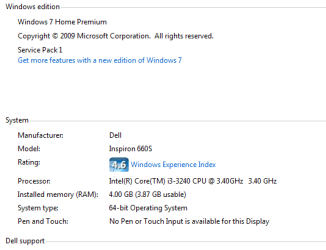
I have attached some of my system information.

I don't think it's so much of a system issue, as I mentioned once I clean things up it works normally.

So there's something going on with you here memory or malware or something that bogs it down until I clean it up.
 

Attachments

  • Win 7.PNG
    Win 7.PNG
    16.4 KB · Views: 10

My Computer

Computer type
PC/Desktop
OS
WINDOWS 7
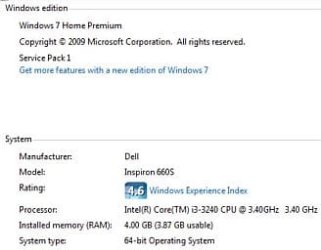
You have a Dell Inspiron 660s Desktop PC.
What's the exact 7-character "service tag" number on yours?

It has an Intel Core i3-3240 3.40 GHz processor and 4 GB of RAM and is running Windows 7 Home Premium SP1 64-bit.

We're not there to see your PC, but I'm guessing it has too many running processes and/or too much clutter and/or an infestation of malware, spyware, etc..
 

Attachments

  • Capture.JPG
    Capture.JPG
    21.1 KB · Views: 7

My Computer

Computer type
PC/Desktop
Computer Manufacturer/Model Number
Dell OptiPlex 9020
OS
Windows 7 Professional SP1 64-bit
CPU
Intel Core i7-4790 3.60 GHz
Memory
32 GB DDR3-1600 MHz
Graphics Card(s)
Integrated Intel HD Graphics 4600
Monitor(s) Displays
Viewsonic 32" LCD
Hard Drives
Kingston SATA 3 240 GB SSD
Internet Speed
Spectrum Internet 1000 Mbps
You should check memory usage as I suggested.

The information you provided doesn't tell us much. Run msinfo32 and save the file as an .nfo. I don't know for sure if you can attach an .nfo file so, if you would, upload it to a webpage such as dropbox, one drive, etc.; share it; get a link and provide the link here.
 

My Computer

Computer type
Laptop
Computer Manufacturer/Model Number
Dell M6500 Precision Work Station
OS
Windows 7 Pro SP1 64 bit
Memory
8 GB
Screen Resolution
1920x
Internet Speed
30 Mbps
Antivirus
Norton Security
Browser
IE 11
Hi Cowpoke.

couple of things to try,

Control panel >> programs & features >> features (top left) small window will open, UNCHECK IE11 or whichever version stated.... its out of date anyway and no longer supported
(IE whatever version is integrated into W7 so you cannot completly uninstall it as such)

turn Windows Updates OFF
 

My Computer

Computer type
PC/Desktop
Computer Manufacturer/Model Number
medionl/Aspire 6930G/acer x55a
OS
W7 home premium 32bit/W7HP 64bit/w10 tp insider ring
CPU
E5300 dual core
Motherboard
medion MS7366
Memory
3gb
Graphics Card(s)
Nvidia Geforce 7100 Nforce 630i
Monitor(s) Displays
avixc
Internet Speed
n (isp resticted to 72)
Antivirus
mse/pands
Browser
palemoon
Other Info
Belkin Fd7050 n USB using Railink RT2870 drivers, more upto date
Back
Top