
aussiecriminals
New member
- Local time
- 8:24 AM
- Messages
- 24
Twitter not displaying correctly, fonts are all garbled like sticks. I have tried in firefox, IE9 and Chrome. It is unreadable in all browsers and I cannot find a fix anywhere.
For Character Encoding I have all browsers set to Unicode (UTF-8) as do not recall ever changing them to anything else or seeing this problem before. All other sites show correctly. So I really am stumped. If you need my twitter page or could go see if it looks normal on your computer the address is Robbo (@aussiecriminals) on Twitter
So I figured this is the place to be as it may be a rendering issue within Windows7 or my computer. Here is a screen of what I am seeing guys. Thanks for any help in advance...Cheers
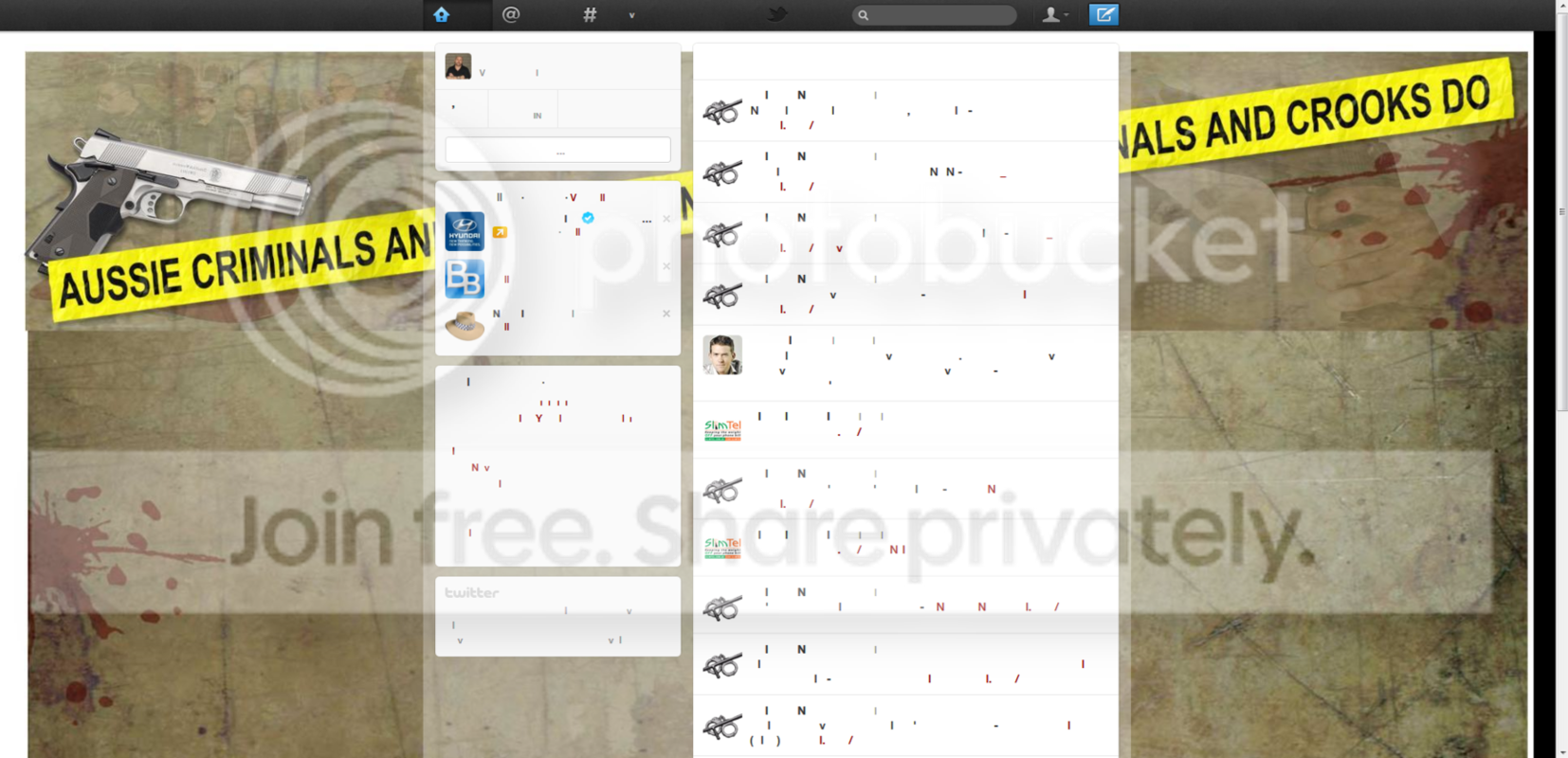
For Character Encoding I have all browsers set to Unicode (UTF-8) as do not recall ever changing them to anything else or seeing this problem before. All other sites show correctly. So I really am stumped.
If you need my twitter page or could go see if it looks normal on your computer the address is Robbo (@aussiecriminals) on TwitterSo I figured this is the place to be as it may be a rendering issue within Windows7 or my computer. Here is a screen of what I am seeing guys. Thanks for any help in advance...Cheers
My Computer
At a glance
Windows 7 Ultimate x64Intel Core2 Duo CPU E8500 @ 3.16GHz4096 MB DDR2-SDRAMNVIDIA GeForce 9500 GT
- OS
- Windows 7 Ultimate x64
- CPU
- Intel Core2 Duo CPU E8500 @ 3.16GHz
- Motherboard
- Asus P5KPL-CM
- Memory
- 4096 MB DDR2-SDRAM
- Graphics Card(s)
- NVIDIA GeForce 9500 GT
- Monitor(s) Displays
- BenQ BenQ T2200HD and LG Electronics L192WS
- Screen Resolution
- 1920x1080 pixels at 60 Hz in True Colors 32-bit
- Hard Drives
- WDC (1000 GB)
ST3500320AS (500 GB)
ST3500320AS (500 GB)
WDC (160 GB)
- Case
- Generic
- Cooling
- Fan cooled
- Keyboard
- Logitech wireless EX100
- Mouse
- Logitech HID-compliant Cordless Mouse
- Internet Speed
- 8000 x 356


