
I have a Toshiba satellite A300 2D4 laptop with RealTek RTL8102E/RTL8103E family PCI-E Ethernet
with Windows 7 ultimate x32
I use it in internet cafes so I always have to change TCP/IP v4.0 internet protocol settings but the problem is that I started getting two active local area networks in all the cafes I go to in spite all of the cafes have only one LAN
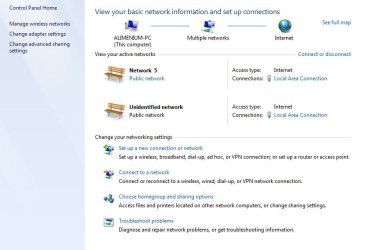
one of the two networks is always Identified as Network 5 or Network 4...etc with the ability to change its location(work, home, public) but the other network is always Unidentified Network with a static location of Public and both have access type of Local Area Connection (check the attachment)
A guy told me to give him additional details about ipconfig
and that was
I'll be thankful for help and I have been informed that this site is for specialists
that's all
what should I do???
with Windows 7 ultimate x32
I use it in internet cafes so I always have to change TCP/IP v4.0 internet protocol settings but the problem is that I started getting two active local area networks in all the cafes I go to in spite all of the cafes have only one LAN
one of the two networks is always Identified as Network 5 or Network 4...etc with the ability to change its location(work, home, public) but the other network is always Unidentified Network with a static location of Public and both have access type of Local Area Connection (check the attachment)
A guy told me to give him additional details about ipconfig
and that was
Code:
Microsoft Windows [Version 6.1.7600]
Copyright (c) 2009 Microsoft Corporation. All rights reserved.


Windows IP Configuration

Host Name . . . . . . . . . . . . : Alimenium-PC
Primary Dns Suffix . . . . . . . :
Node Type . . . . . . . . . . . . : Mixed
IP Routing Enabled. . . . . . . . : No
WINS Proxy Enabled. . . . . . . . : No

Ethernet adapter Local Area Connection* 17:

Media State . . . . . . . . . . . : Media disconnected
Connection-specific DNS Suffix . :
Description . . . . . . . . . . . : Anchorfree HSS Adapter
Physical Address. . . . . . . . . : [B][COLOR=#ff0000]REMOVED[/COLOR][/B]
DHCP Enabled. . . . . . . . . . . : No
Autoconfiguration Enabled . . . . : Yes

Wireless LAN adapter Wireless Network Connection:

Media State . . . . . . . . . . . : Media disconnected
Connection-specific DNS Suffix . :
Description . . . . . . . . . . . : Intel(R) WiFi Link 5100 AGN
Physical Address. . . . . . . . . : [B][COLOR=#ff0000]REMOVED[/COLOR][/B]
DHCP Enabled. . . . . . . . . . . : Yes
Autoconfiguration Enabled . . . . : Yes

Ethernet adapter Local Area Connection:

Connection-specific DNS Suffix . :
Description . . . . . . . . . . . : Realtek RTL8102E/RTL8103E Family PCI-E Fa
st Ethernet NIC (NDIS 6.20)
Physical Address. . . . . . . . . : [B][COLOR=#ff0000]REMOVED[/COLOR][/B]
DHCP Enabled. . . . . . . . . . . : No
Autoconfiguration Enabled . . . . : Yes
Link-local IPv6 Address . . . . . : [B][COLOR=#ff0000]REMOVED[/COLOR][/B]
IPv4 Address. . . . . . . . . . . : [B][COLOR=red]REMOVED[/COLOR][/B]
Subnet Mask . . . . . . . . . . . : 255.255.255.0
Default Gateway . . . . . . . . . : [B][COLOR=#ff0000]REMOVED[/COLOR][/B]
192.168.1.1
DHCPv6 IAID . . . . . . . . . . . : 234888755
DHCPv6 Client DUID. . . . . . . . : [B][COLOR=#ff0000]REMOVED[/COLOR][/B]

DNS Servers . . . . . . . . . . . : 8.8.8.8
8.8.4.4
NetBIOS over Tcpip. . . . . . . . : Enabled

Tunnel adapter isatap.{4357C285-E03C-4635-84F0-C5F1740AFED8}:

Media State . . . . . . . . . . . : Media disconnected
Connection-specific DNS Suffix . :
Description . . . . . . . . . . . : Microsoft ISATAP Adapter
Physical Address. . . . . . . . . : [B][COLOR=#ff0000]REMOVED[/COLOR][/B]
DHCP Enabled. . . . . . . . . . . : No
Autoconfiguration Enabled . . . . : Yes

Tunnel adapter isatap.{BD8CF1BD-4994-4B99-B50F-B3B2541F001F}:

Media State . . . . . . . . . . . : Media disconnected
Connection-specific DNS Suffix . :
Description . . . . . . . . . . . : Microsoft ISATAP Adapter #2
Physical Address. . . . . . . . . : [B][COLOR=#ff0000]REMOVED[/COLOR][/B]
DHCP Enabled. . . . . . . . . . . : No
Autoconfiguration Enabled . . . . : Yes

Tunnel adapter Teredo Tunneling Pseudo-Interface:

Media State . . . . . . . . . . . : Media disconnected
Connection-specific DNS Suffix . :
Description . . . . . . . . . . . : Teredo Tunneling Pseudo-Interface
Physical Address. . . . . . . . . : [B][COLOR=#ff0000]REMOVED[/COLOR][/B]
DHCP Enabled. . . . . . . . . . . : No
Autoconfiguration Enabled . . . . : Yes

Tunnel adapter isatap.{14E8A016-FF60-4DF0-A7F5-17BE72CC9305}:

Media State . . . . . . . . . . . : Media disconnected
Connection-specific DNS Suffix . :
Description . . . . . . . . . . . : Microsoft ISATAP Adapter #3
Physical Address. . . . . . . . . : [B][COLOR=#ff0000]REMOVED[/COLOR][/B]
DHCP Enabled. . . . . . . . . . . : No
Autoconfiguration Enabled . . . . : Yes
I'll be thankful for help and I have been informed that this site is for specialists
that's all
what should I do???
Attachments
Last edited by a moderator:
My Computer
- Computer type
- Laptop
- Computer Manufacturer/Model Number
- Toshiba Satellite
- OS
- Windows 7 Ultimate x64
- Memory
- 4GB
- Antivirus
- MicroSoft Defender
