
hi all
my wifi seems to disconnect whenever it is idling .. about 75% of the time 25% it will stop streaming netflix or you tube ... when it runs it is great fast downloads no no errors
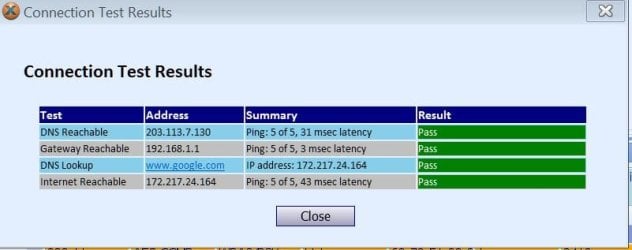
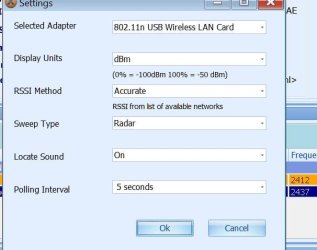
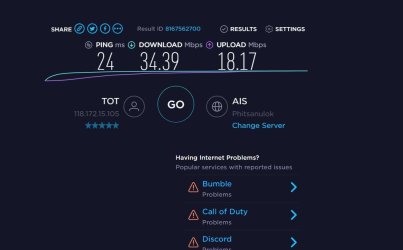
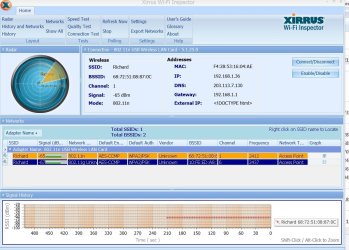
here is the info you asked for ..
thanks in advance
i have checked for new updated drivers with driver easy .. none avail
i have uninstalled wifi adaptor in device manager ( i think .. different name)
i have uninstalled toto app
wifi
satellite
totolink usb n150ua
avira free
tot thailand something something
Microsoft Windows [Version 6.1.7601]
Copyright (c) 2009 Microsoft Corporation. All rights reserved.
C:\Windows\system32>ipconfig /all
Windows IP Configuration
Host Name . . . . . . . . . . . . : w7pro64
Primary Dns Suffix . . . . . . . :
Node Type . . . . . . . . . . . . : Hybrid
IP Routing Enabled. . . . . . . . : No
WINS Proxy Enabled. . . . . . . . : No
Wireless LAN adapter Wireless Network Connection 3:
Media State . . . . . . . . . . . : Media disconnected
Connection-specific DNS Suffix . :
Description . . . . . . . . . . . : Microsoft Virtual WiFi Miniport Adapter #
2
Physical Address. . . . . . . . . : F4-28-53-16-04-AF
DHCP Enabled. . . . . . . . . . . : Yes
Autoconfiguration Enabled . . . . : Yes
Wireless LAN adapter Wireless Network Connection:
Connection-specific DNS Suffix . :
Description . . . . . . . . . . . : 802.11n USB Wireless LAN Card
Physical Address. . . . . . . . . : F4-28-53-16-04-AE
DHCP Enabled. . . . . . . . . . . : Yes
Autoconfiguration Enabled . . . . : Yes
Link-local IPv6 Address . . . . . : fe80::b805:a9ba:5803:e362%15(Preferred)
IPv4 Address. . . . . . . . . . . : 192.168.1.36(Preferred)
Subnet Mask . . . . . . . . . . . : 255.255.255.0
Lease Obtained. . . . . . . . . . : Saturday, April 06, 2019 11:33:19 AM
Lease Expires . . . . . . . . . . : Sunday, April 07, 2019 11:33:19 AM
Default Gateway . . . . . . . . . : 192.168.1.1
DHCP Server . . . . . . . . . . . : 192.168.1.1
DHCPv6 IAID . . . . . . . . . . . : 401877075
DHCPv6 Client DUID. . . . . . . . : 00-01-00-01-23-33-D1-DE-90-E6-BA-75-63-89
DNS Servers . . . . . . . . . . . : 203.113.7.130
8.8.8.8
NetBIOS over Tcpip. . . . . . . . : Enabled
Ethernet adapter Local Area Connection:
Media State . . . . . . . . . . . : Media disconnected
Connection-specific DNS Suffix . :
Description . . . . . . . . . . . : Realtek PCIe GbE Family Controller
Physical Address. . . . . . . . . : 90-E6-BA-75-63-89
DHCP Enabled. . . . . . . . . . . : Yes
Autoconfiguration Enabled . . . . : Yes
Tunnel adapter isatap.{D1DDF810-8C28-402D-A77F-8793FAD2F86A}:
Media State . . . . . . . . . . . : Media disconnected
Connection-specific DNS Suffix . :
Description . . . . . . . . . . . : Microsoft ISATAP Adapter
Physical Address. . . . . . . . . : 00-00-00-00-00-00-00-E0
DHCP Enabled. . . . . . . . . . . : No
Autoconfiguration Enabled . . . . : Yes
Tunnel adapter isatap.{56350A59-49D1-4558-A98A-131686299805}:
Media State . . . . . . . . . . . : Media disconnected
Connection-specific DNS Suffix . :
Description . . . . . . . . . . . : Microsoft ISATAP Adapter #2
Physical Address. . . . . . . . . : 00-00-00-00-00-00-00-E0
DHCP Enabled. . . . . . . . . . . : No
Autoconfiguration Enabled . . . . : Yes
Tunnel adapter isatap.{8E9FC4D5-83B2-4F47-AD66-3C70CD25220D}:
Media State . . . . . . . . . . . : Media disconnected
Connection-specific DNS Suffix . :
Description . . . . . . . . . . . : Microsoft ISATAP Adapter #3
Physical Address. . . . . . . . . : 00-00-00-00-00-00-00-E0
DHCP Enabled. . . . . . . . . . . : No
Autoconfiguration Enabled . . . . : Yes
C:\Windows\system32>
wireless issues
my wifi seems to disconnect whenever it is idling .. about 75% of the time 25% it will stop streaming netflix or you tube ... when it runs it is great fast downloads no no errors
here is the info you asked for ..
thanks in advance
i have checked for new updated drivers with driver easy .. none avail
i have uninstalled wifi adaptor in device manager ( i think .. different name)
i have uninstalled toto app
wifi
satellite
totolink usb n150ua
avira free
tot thailand something something
Microsoft Windows [Version 6.1.7601]
Copyright (c) 2009 Microsoft Corporation. All rights reserved.
C:\Windows\system32>ipconfig /all
Windows IP Configuration
Host Name . . . . . . . . . . . . : w7pro64
Primary Dns Suffix . . . . . . . :
Node Type . . . . . . . . . . . . : Hybrid
IP Routing Enabled. . . . . . . . : No
WINS Proxy Enabled. . . . . . . . : No
Wireless LAN adapter Wireless Network Connection 3:
Media State . . . . . . . . . . . : Media disconnected
Connection-specific DNS Suffix . :
Description . . . . . . . . . . . : Microsoft Virtual WiFi Miniport Adapter #
2
Physical Address. . . . . . . . . : F4-28-53-16-04-AF
DHCP Enabled. . . . . . . . . . . : Yes
Autoconfiguration Enabled . . . . : Yes
Wireless LAN adapter Wireless Network Connection:
Connection-specific DNS Suffix . :
Description . . . . . . . . . . . : 802.11n USB Wireless LAN Card
Physical Address. . . . . . . . . : F4-28-53-16-04-AE
DHCP Enabled. . . . . . . . . . . : Yes
Autoconfiguration Enabled . . . . : Yes
Link-local IPv6 Address . . . . . : fe80::b805:a9ba:5803:e362%15(Preferred)
IPv4 Address. . . . . . . . . . . : 192.168.1.36(Preferred)
Subnet Mask . . . . . . . . . . . : 255.255.255.0
Lease Obtained. . . . . . . . . . : Saturday, April 06, 2019 11:33:19 AM
Lease Expires . . . . . . . . . . : Sunday, April 07, 2019 11:33:19 AM
Default Gateway . . . . . . . . . : 192.168.1.1
DHCP Server . . . . . . . . . . . : 192.168.1.1
DHCPv6 IAID . . . . . . . . . . . : 401877075
DHCPv6 Client DUID. . . . . . . . : 00-01-00-01-23-33-D1-DE-90-E6-BA-75-63-89
DNS Servers . . . . . . . . . . . : 203.113.7.130
8.8.8.8
NetBIOS over Tcpip. . . . . . . . : Enabled
Ethernet adapter Local Area Connection:
Media State . . . . . . . . . . . : Media disconnected
Connection-specific DNS Suffix . :
Description . . . . . . . . . . . : Realtek PCIe GbE Family Controller
Physical Address. . . . . . . . . : 90-E6-BA-75-63-89
DHCP Enabled. . . . . . . . . . . : Yes
Autoconfiguration Enabled . . . . : Yes
Tunnel adapter isatap.{D1DDF810-8C28-402D-A77F-8793FAD2F86A}:
Media State . . . . . . . . . . . : Media disconnected
Connection-specific DNS Suffix . :
Description . . . . . . . . . . . : Microsoft ISATAP Adapter
Physical Address. . . . . . . . . : 00-00-00-00-00-00-00-E0
DHCP Enabled. . . . . . . . . . . : No
Autoconfiguration Enabled . . . . : Yes
Tunnel adapter isatap.{56350A59-49D1-4558-A98A-131686299805}:
Media State . . . . . . . . . . . : Media disconnected
Connection-specific DNS Suffix . :
Description . . . . . . . . . . . : Microsoft ISATAP Adapter #2
Physical Address. . . . . . . . . : 00-00-00-00-00-00-00-E0
DHCP Enabled. . . . . . . . . . . : No
Autoconfiguration Enabled . . . . : Yes
Tunnel adapter isatap.{8E9FC4D5-83B2-4F47-AD66-3C70CD25220D}:
Media State . . . . . . . . . . . : Media disconnected
Connection-specific DNS Suffix . :
Description . . . . . . . . . . . : Microsoft ISATAP Adapter #3
Physical Address. . . . . . . . . : 00-00-00-00-00-00-00-E0
DHCP Enabled. . . . . . . . . . . : No
Autoconfiguration Enabled . . . . : Yes
C:\Windows\system32>
wireless issues
Attachments
My Computer
At a glance
windows 7 32 bitintel dual core4 gb corsairnvidia geforce 480
- Computer type
- PC/Desktop
- Computer Manufacturer/Model Number
- clone
- OS
- windows 7 32 bit
- CPU
- intel dual core
- Motherboard
- SABERTOOTH 55i
- Memory
- 4 gb corsair
- Graphics Card(s)
- nvidia geforce 480
- Hard Drives
- wd 160 gb OS
wdc wd10ears storage SCSI
seagate usb 500 gb storage
- Antivirus
- avira pro
- Browser
- firefox
