Two connections

Asiyreh

New member
Local time
7:45 PM
Messages
22
Location
Derry Northern Ireland
Hi guys

This is probably going to seem like a very stupid question to whoever knows the answer, but please help.

Ok here’s the thing. I’ve got a wireless connection but I’ve also got the ability to connect a LAN cable to my router. I only ever use the Lan connection however when I’m playing online.

The thing is, under Network and Sharing Centre both connections are displayed. I have to disable the Wireless adaptor to ensure that my game is using the Lan connection.

What I’d like to know is when I’ve got both my connections available how can I tell the machine to use the Lan connection?
Maybe it does this by default or maybe it uses both connections, but i’m unsure.

Help a smelly old n00b, cheers guys. :D
 

My Computer

Computer Manufacturer/Model Number
6735s
OS
Win 7 Ult. 32bit
Hi Asiyreh :)

the simple answer is that if you are connected by Ethernet and Wireless, Windows will automatically favour the Ethernet connection (although Wireless may be displayed in the System Tray) you can see this happening if oyu open Task Manager (CTRL-Shift-Esc) and click the "Networking" Tab, only the Local Area Connection will actually spike on the usage graph.

There was actually an interesting discussion on here a few months back, about "load balancing" where someone was trying to run 2 seperate internet connections, one through Ethernet and one through Wireless, but Windows would only use the Ethernet connection. I'll post a link when I find it.

Anyway, hope that answered your question.
 

My Computer

Computer type
PC/Desktop
Computer Manufacturer/Model Number
Medion Erazer (note to self: insert model number) - with custom additions
OS
Windows 10 Pro x64
CPU
Intel Core i5 7400 @ 3.00GHz
Motherboard
OEM supllied with PC
Memory
8GB 2133Mhz DDR4 (OEM supplied)
Graphics Card(s)
Gygabyte Windforce GTX 1050Ti (Factory Overclocked)
Sound Card
Realtek
Monitor(s) Displays
Acer Al1980 + HKC
Screen Resolution
1360*768(HKC) / 1280*1024(Acer)
Hard Drives
1TB Toshiba
1TB WD Caviar Green
120GB Samsung Evo 840
PSU
OEM supplied (no power rating on case)
Case
OEM Supplied
Cooling
Stock
Keyboard
Logitech Wireless
Mouse
Logitect Wireless
Internet Speed
40Mb/s Down 10Mb/s Up
Antivirus
Defender
Browser
Firefox
Hi,

You can also tell Windows not to connect automatically.

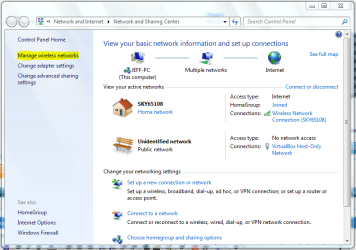
Right-click the network icon and select 'Open Network and Sharing centre'. With the centre open, click 'Manage wireless networks' (pic1 highlight)

Capture.PNG

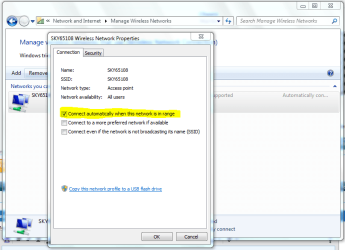
Then double click your wireless network and select properties.

Capture1.PNG

You'll see that under the 'Connection' tab there's an option to have Windows automatically connect, just un-check it and click ok.

Hope this helps :)


OS
 

My Computer

Computer Manufacturer/Model Number
Compaq Desktop
OS
Windows 7 Ultimate x64
CPU
AMD Sempron Dual Core
Memory
3GB
Graphics Card(s)
NVIDIA GeForce 6150SE nForce 430
Screen Resolution
1024x768
Hard Drives
150GB Sata
If this is a laptop there is usually a switch to turn the wifi adapter off...
 

My Computer

Computer type
PC/Desktop
Computer Manufacturer/Model Number
Home Built desktop, Dell G15 5511 Gaming laptop,MS Surface Pro 7 tablet
OS
W10 Pro desktop, W11 laptop, W11 Pro tablet (all 64-bit)
CPU
3.7Ghz 8700K i7, i7-11800H, i7-1065G7
Motherboard
ASUS TUF Z370-Pro Gaming in desktop
Memory
16G desktop, 16G laptop, 4G tablet
Graphics Card(s)
AMD Radeon RX580, RTX 3060, Intel Iris Plus
Sound Card
High Definition Audio (Built-in to mobo)
Monitor(s) Displays
Samsung U32J59 32" (2x), 15.6", 12"
Screen Resolution
3840x2160, 3840x2160, 1920x1080, 2160x1440
Hard Drives
500G SSD for OS; 2T, 10T & 15T HDDs for Data on Desktop, 1TB SSD laptop, 128G SSD tablet.
PSU
Corsair CX 750M
Case
Antec 100
Cooling
CM 212+
Keyboard
IBM Model M - used continuously since 1986
Mouse
Microsoft Pro IntelliMouse
Internet Speed
400M down 8M up
Antivirus
Windows Defender
Browser
FireFox
Other Info
Built my first computer (8Mhz 8088cpu, 640K RAM, 20MB HDD, 2 360K floppy drives) in 1985 and have been building them for myself, relatives and friends ever since.
It is best to keep the Wifi on For if the Ethernet Connection Fails for any Reason windows Will change to the Wireless connection more quickly than turning on the Wifi and Acquiring IP address and then Identifying the Network then Connecting to the Internet

Hope This Helps,
Josh
 

My Computer

Computer type
PC/Desktop
Computer Manufacturer/Model Number
Custom Built
OS
Windows 7 Professional x64 SP1 ; Windows Server 2012 R2 Standard
CPU
Intel Core i5 2400 @ 3.10GHz
Motherboard
Foxconn H67MP-S/-V/H67MP
Memory
8.0GB DDR3 @ 665MHz (2GBx4)
Graphics Card(s)
AMD Radeon HD 6870
Sound Card
Realtek High Definition Audio
Monitor(s) Displays
AOC 2243W & SMB1930NW
Screen Resolution
1440x900 & 1920x1080
Hard Drives
977GB Seagate ST31000524AS ATA Drive (SATA)
250GB WD iSCSI attached Drive
PSU
750W Gaming PSU
Case
Novatech Night
Cooling
Fan
Keyboard
Dell Standard PS/2 Keyboard
Mouse
R.A.T 07 Gaming Mouse
Internet Speed
Download: 10 Mbps Ping: 30ms Upload: 0.81 Mbps
Browser
Google Chrome
Other Info
Optiarc DVD RW AD-5260S ATA Device
I said it before and I’ll say it again. You are the best guys, simply the best. I freeking love you lil win seven dudes.

Excellent, thanks guys, Severedsolo actually answered my question however that might come in handy Orbital and thanks guys for the extra info.

Cheers dudes, laters... ;)
 

My Computer

Computer Manufacturer/Model Number
6735s
OS
Win 7 Ult. 32bit
Hi guys

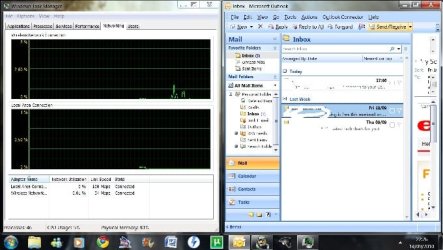
Soz to bother you again guys but I think I getting strange behaviour from the network management console in relation to the way that it's supposed to behave.

This is me doing a send receive in outlook.

attachment.php
 

Attachments

  • Untitled.jpg
    Untitled.jpg
    46.5 KB · Views: 187

My Computer

Computer Manufacturer/Model Number
6735s
OS
Win 7 Ult. 32bit
Back
Top