Two photos in Paint

pc inept 24

New member
Local time
2:47 AM
Messages
4
Is it possible to merge two photos (or side by side) in Windows 7 64 bit Paint?

Any help much appreciated.
 

My Computer My Computer

OS
w7 home premium 64bit
hi pc inept 24, and welcome to sevenforums,

no, it is not possible in mspaint - it's a very basic program and can only deal with one image at a time.

you'll need something a bit more sophisticated, like paint.net

simple tutorial for what you want to achieve:

1 - open the first image in paint.net

2 - increase the canvas size, so there's a blank area for picture 2

3 - import picture 2

4 - place it where you like.

a better tutorial, with pictures, can be found here
 

My Computer My Computer

Computer Manufacturer/Model Number
mickey megabyte 1234
OS
ultimate 64 sp1
CPU
i5 2500K [email protected]
Motherboard
MSI P67A-GD53
Memory
8 gigs GSkill Ripjaws 1600
Graphics Card(s)
amd hd6950
Sound Card
creative x-fi gamer
Monitor(s) Displays
samsung 24"
Screen Resolution
1920x1080
Hard Drives
ocz vertex 2e 60 gig, samsung f3 1tb, buffalo 2tb ext
PSU
antec 550
Case
antec three hundred
Cooling
i'm a cooling fan
Keyboard
saitek eclipse ii
Mouse
logitech g3
Internet Speed
about 4 Mbps
Other Info
i love win7
yes, yes you can, but it's quite difficult to do so. Sorry to prove you wrong mickey, but you can.

firstly, open up 2 versions of paint, 1st one is for the first image and the second one is the second image.

open the image you want on the left first, this will look like this:
paint 2.jpg

im using 7 forums for example.

now on the 2nd paint window, open up the other image that you want on the right, now on the first paint window, you need to resize the work area, otherwise the images won't fit in that space, so resize it by dragging the bottom right corner of the white workspace to a size that's bigger than the 2 images together.

now go back to the 2nd window and click on select > select all, then click cut, now open up the 1st window and paste, drag the new image to the desired position and resize the white workspace back to the outline of the two images otherwise it'll look like this :
paint 3.jpg

hope this helps :)

MrNeeds
 

My Computer My Computer

Computer type
PC/Desktop
Computer Manufacturer/Model Number
Custom Build
OS
Windows 7 Ultimate x64 SP1
CPU
Intel Q6600 @ 2.6Ghz
Motherboard
Evga NF78-CK-132-A 3-Way SLI
Memory
4Gb DDR2 Corsair Dominator @ 800Mhz 5-5-5-15
Graphics Card(s)
EVGA 560 GTX SC FTW 1GB
Sound Card
Realtek HD 7.1 Audio, Plantronics GameCom780 7.1 Headset
Monitor(s) Displays
Dell S2409W
Screen Resolution
1920 x 1080
Hard Drives
SanDisk SDSSDHII-120G-G25 120GB SSD
Samsung 7200RPM 750Gb SATA
Samsung 850 EVO 120GB SSD
Western Digital Green 1TB 7200RPM
PSU
Xigmatek 750W Quad sli quad core 80% eff
Case
Antec 900 Gaming Case
Cooling
Zalman CNPS9700-NT NVIDIA Tritium
Keyboard
Logitech generic keyboard, MS wireless keyboard
Mouse
Razor Lachesis Banshee V2 Blue, 4000DPI, MS wireless mouse
Internet Speed
152Mb Virgin Media Fibre Optic
Antivirus
Microsoft Security Essentials
Browser
Google Chrome
Other Info
Wireless Gaming Receiver for Windows, Wireless Xbox 360 Pad
well done MrNeeds!

i don't mind being proven wrong at all - i would much rather learn something new than be deluded all my life!
 

My Computer My Computer

Computer Manufacturer/Model Number
mickey megabyte 1234
OS
ultimate 64 sp1
CPU
i5 2500K [email protected]
Motherboard
MSI P67A-GD53
Memory
8 gigs GSkill Ripjaws 1600
Graphics Card(s)
amd hd6950
Sound Card
creative x-fi gamer
Monitor(s) Displays
samsung 24"
Screen Resolution
1920x1080
Hard Drives
ocz vertex 2e 60 gig, samsung f3 1tb, buffalo 2tb ext
PSU
antec 550
Case
antec three hundred
Cooling
i'm a cooling fan
Keyboard
saitek eclipse ii
Mouse
logitech g3
Internet Speed
about 4 Mbps
Other Info
i love win7
:) thanks for the rep +
 

My Computer My Computer

Computer type
PC/Desktop
Computer Manufacturer/Model Number
Custom Build
OS
Windows 7 Ultimate x64 SP1
CPU
Intel Q6600 @ 2.6Ghz
Motherboard
Evga NF78-CK-132-A 3-Way SLI
Memory
4Gb DDR2 Corsair Dominator @ 800Mhz 5-5-5-15
Graphics Card(s)
EVGA 560 GTX SC FTW 1GB
Sound Card
Realtek HD 7.1 Audio, Plantronics GameCom780 7.1 Headset
Monitor(s) Displays
Dell S2409W
Screen Resolution
1920 x 1080
Hard Drives
SanDisk SDSSDHII-120G-G25 120GB SSD
Samsung 7200RPM 750Gb SATA
Samsung 850 EVO 120GB SSD
Western Digital Green 1TB 7200RPM
PSU
Xigmatek 750W Quad sli quad core 80% eff
Case
Antec 900 Gaming Case
Cooling
Zalman CNPS9700-NT NVIDIA Tritium
Keyboard
Logitech generic keyboard, MS wireless keyboard
Mouse
Razor Lachesis Banshee V2 Blue, 4000DPI, MS wireless mouse
Internet Speed
152Mb Virgin Media Fibre Optic
Antivirus
Microsoft Security Essentials
Browser
Google Chrome
Other Info
Wireless Gaming Receiver for Windows, Wireless Xbox 360 Pad
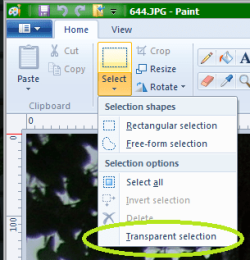
Since it took me forever to find where it was, I thought I'd show you. The use transparent selection is so very useful so many times.
 

Attachments

  • TisS.png
    TisS.png
    20.6 KB · Views: 3,865

My Computer My Computer

Computer Manufacturer/Model Number
Sager Midern Computer, Inc.
OS
Microsoft Windows 7 Home Premium x64
CPU
intel core i5 M560 @2.67 GHz
Memory
8192MB RAM
Graphics Card(s)
GeForce GT 425M (1024MB DDR3 RAM)
Sound Card
Creative Go!
Screen Resolution
1920 x 1080
Hard Drives
Hitachi
476939MB
Case
Laptop
Keyboard
It's got a number pad, not every laptop has that.
Mouse
HP laser mouse
Is it possible to merge two photos (or side by side) in Windows 7 64 bit Paint?

Any help much appreciated.

Royal%20Flush%20%232.jpg


This is done basically with the same method described by Mickey megabyte.

Send one picture to paint first > in the paint window, use the cursor and " stretch " the side towards the right side to make room for the next picture > go to the next picture folder > right click at the 2nd pic > Copy > return to Paint window > top left, click Paste > move the 2nd picture to the open slot > now you have 2 pic in one.
 

My Computer My Computer

Computer Manufacturer/Model Number
Acer Aspire 7741Z
OS
Windows 7 Home Premium 64-bit, SP1
CPU
Intel Pentium P6200, Cores 2, 2.13 GHz
Memory
4 GB
Graphics Card(s)
Intel HD
Sound Card
unknown
Monitor(s) Displays
17.3 inches
Screen Resolution
1600 x 900
Hard Drives
640 GB, 5400 PRM
Thank you all for your comments and advice.

Glad to say I have succeeded in placing two photos side by side with your invaluable help. And this for me (the name pcinept is not accidental!) is quite an achievement.

Thank you all once again.
 
Last edited:

My Computer My Computer

OS
w7 home premium 64bit
Thank you all for your comments and advice.

Glad to say I have succeeded in placing two photos side by side with your invaluable help. And this for me (the name pcinept is not accidental!) is quite an achievement.

Thank all once again.


You are welcome.
I shall ask the moderators to mark this thread as solved.
 

My Computer My Computer

Computer Manufacturer/Model Number
Acer Aspire 7741Z
OS
Windows 7 Home Premium 64-bit, SP1
CPU
Intel Pentium P6200, Cores 2, 2.13 GHz
Memory
4 GB
Graphics Card(s)
Intel HD
Sound Card
unknown
Monitor(s) Displays
17.3 inches
Screen Resolution
1600 x 900
Hard Drives
640 GB, 5400 PRM
Back
Top