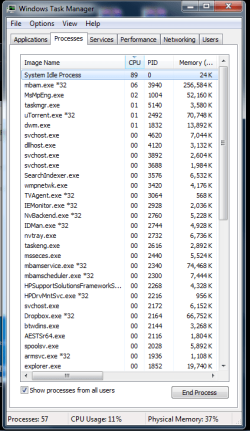
typical low cpu usage medium memory AND MORE!

Update Skype to 6.8
No idea about the torrent app, not using them.
as for the audio, it's either in my profile or i wrote it in one of my long long posts. i have two i believe. one i got as an update from microsoft while the other was from nvidia.
I can't see that you have listed the drivers anywhere. Sorry if I missed it. Can you check which driver is loaded for the sound card in Device manager?
 

My Computer

Computer type
PC/Desktop
OS
windows 7 ultimate x64
1. can i selectively choose which version to update to? can't unless i find the setup file myself. last time i made an update, i started getting those advertisements on skype :P u said 6.9 is bad. does that mean than an older version is bad too? :D

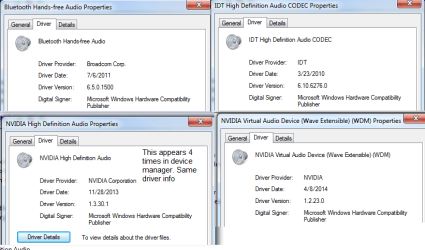
2. here's what i see in device manager:
bluetooth hands free audio
idt high definition audio codec
4 lines of nvidia high def audio
nvidia virtual audio device (wave extensible) (wdm)

will reply to other posts later
 

My Computer

Computer type
Laptop
Computer Manufacturer/Model Number
HP Pavilion dv6 2170ee Notebook PC
OS
windows 7 64 bit professional
CPU
intel (r) core (tm) i7 cpu q720 1.6GHz
Memory
6 GB
Graphics Card(s)
nvidia geforce gt 230m
Sound Card
NVIDIA High Definition Audio + IDT High Def Audio CODEC
Screen Resolution
1366x768
Hard Drives
toshiba mq01abd100 1 TB
Internet Speed
3 MB/s
Antivirus
ms security essentials + malwarebytes
Browser
chrome firefox and IE8
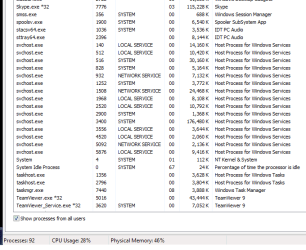
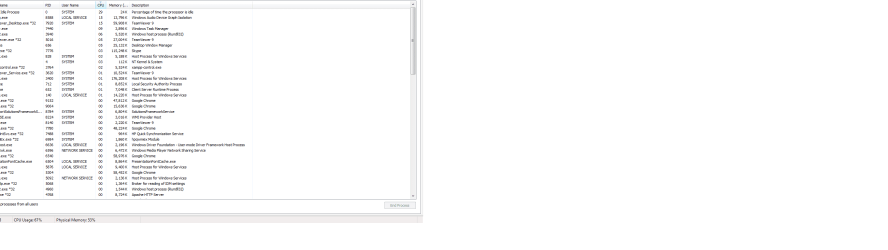
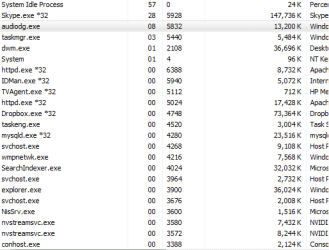
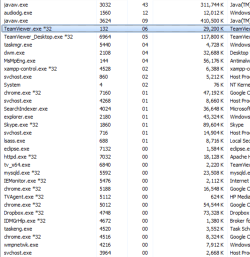
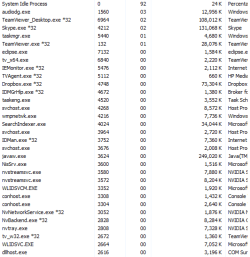
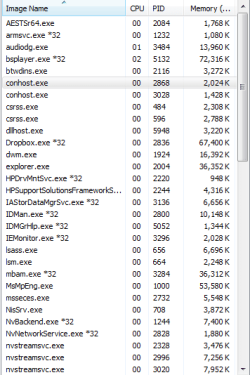
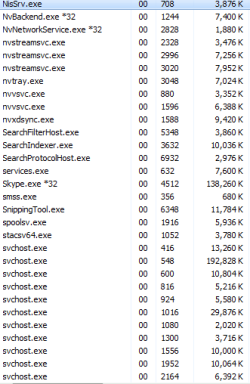
i took two ss. one is a few seconds after it acted up. i had to create an image file then edit it. the second is after closing teamviewer and skype. i wasn't doing anything with skype. teamviewer had a meeting but wasnnt doing anything there either.

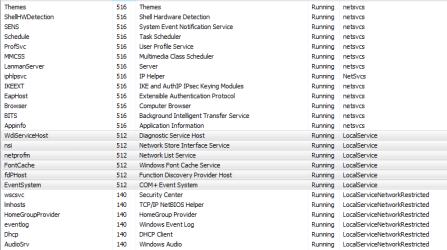
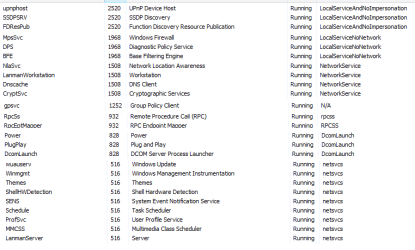
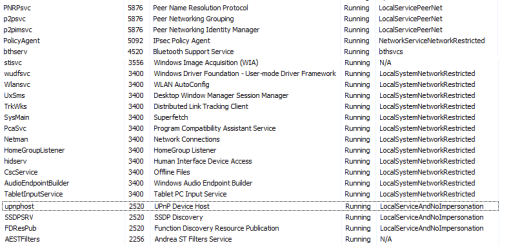
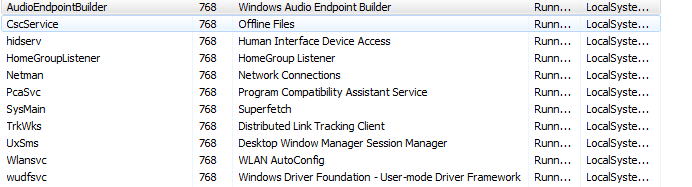
this is the services running under all svchost.exe processes.
i couldn't find 2900 :O
one svchost had pid of 2900. there was no such service with that pid

i deleted the services that weren't under svchost.exe to avoid confusion. but i find myself having deleted less than 5% of the services tab. So I do hope this helps.


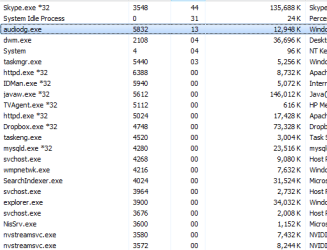
regarding audidag.exe (forgot its name), you said that it should be between 1 and 2. At some point, it was between 3 and 6. not just a fluke. It was like that for quite some time. I don't remember what I was running then. I forgot to take ss sorry.
 

Attachments

  • 1.PNG
    1.PNG
    38.5 KB · Views: 1
  • 2.PNG
    2.PNG
    40.4 KB · Views: 1
  • 3.PNG
    3.PNG
    45 KB · Views: 1
  • 20 seconds after it acted up.png
    20 seconds after it acted up.png
    60.6 KB · Views: 19
  • some seconds after it acted up.png
    some seconds after it acted up.png
    86.4 KB · Views: 3

My Computer

Computer type
Laptop
Computer Manufacturer/Model Number
HP Pavilion dv6 2170ee Notebook PC
OS
windows 7 64 bit professional
CPU
intel (r) core (tm) i7 cpu q720 1.6GHz
Memory
6 GB
Graphics Card(s)
nvidia geforce gt 230m
Sound Card
NVIDIA High Definition Audio + IDT High Def Audio CODEC
Screen Resolution
1366x768
Hard Drives
toshiba mq01abd100 1 TB
Internet Speed
3 MB/s
Antivirus
ms security essentials + malwarebytes
Browser
chrome firefox and IE8
my skype is 6.18.0.xxxx
what's behind the xxxx?

You have way too many drivers for audio. Which to keep and which to uninstall might be easier to determine if you actually told us what drivers are loaded rather than enumerating the devices....

Was there a screen shot with your previous post?
 

My Computer

Computer type
PC/Desktop
OS
windows 7 ultimate x64
We obviously don't communicate very well with each other.:(
The processes running under Svchost are only interesting if svchost is using a lot of CPU. You don't need to collect all the instances of svchost. Just the one that is misbehaving.
The screen shot with the processes shows two instances of Teamviewer of whic one is using 15% CPU.
Same screen shot also shows audiodg.exe at 15%.
Try this:

  1. Right-click on the speaker icon on the bottom right corner of the screen.
  2. Select Playback Devices.
  3. In the list look for the icon with the green check mark.
  4. Highlight the icon.
  5. Click Properties and then click on the Advanced tab.
  6. Uncheck the Enable Audio Enhancements checkbox.
It's almost certain this is on of the hdmi drivers that is causing trouble.
 

My Computer

Computer type
PC/Desktop
OS
windows 7 ultimate x64
Sorry you're right. I forgot u wanted the bad ones. My current playback is the TV I'm connecting my laptop to via hdmi. Clicking on advanced gives me two check boxes none of which you mentioned. My two options are allow app to take exclusive control and give exclusive mode app priority
Same for my laptop speakers which aren't selected of course. I do have an enhancements tab but none of the options are selected.
How do I tell u what drivers are loaded? I gave u the list from device manager as asked.
 

My Computer

Computer type
Laptop
Computer Manufacturer/Model Number
HP Pavilion dv6 2170ee Notebook PC
OS
windows 7 64 bit professional
CPU
intel (r) core (tm) i7 cpu q720 1.6GHz
Memory
6 GB
Graphics Card(s)
nvidia geforce gt 230m
Sound Card
NVIDIA High Definition Audio + IDT High Def Audio CODEC
Screen Resolution
1366x768
Hard Drives
toshiba mq01abd100 1 TB
Internet Speed
3 MB/s
Antivirus
ms security essentials + malwarebytes
Browser
chrome firefox and IE8
okay so torrrent is causing this. one of the causes. i just don't know why. it's never been like this before. it makes no sense. if torrent always causes a problem, no one would leave their torrent on ever.
is it torrent or is it my version of utorrent or is it utorrent?

anyways, i started utorrent and 5 minutes later it acted up. I checked svchost and there was one that was acting up going between 1 and 12.
I took a screenshot of the service it was for.

Furthermore, no one told me how to tell u what drivers are loading :D Do I open each line in device manager for sound and see what info they have?
 

Attachments

  • bad service.png
    bad service.png
    17.5 KB · Views: 16

My Computer

Computer type
Laptop
Computer Manufacturer/Model Number
HP Pavilion dv6 2170ee Notebook PC
OS
windows 7 64 bit professional
CPU
intel (r) core (tm) i7 cpu q720 1.6GHz
Memory
6 GB
Graphics Card(s)
nvidia geforce gt 230m
Sound Card
NVIDIA High Definition Audio + IDT High Def Audio CODEC
Screen Resolution
1366x768
Hard Drives
toshiba mq01abd100 1 TB
Internet Speed
3 MB/s
Antivirus
ms security essentials + malwarebytes
Browser
chrome firefox and IE8
okay so torrrent is causing this
How did you arrive at this conclusion?

Do I open each line in device manager for sound and see what info they have?
pretty much, yes: right click, properties, click on the driver tab, take a screenshot
 

My Computer

Computer type
PC/Desktop
OS
windows 7 ultimate x64
Layback Bear post 11:
yes it means the real problem isn't being taken care of by malwarebytes.
if that's true about torrents then why did it start now? it's been on my device for years and years and i can't say iv had one issue as a direct cause of having torrent. that's why i asked a few posts ago if it's my version of utorrent or utorrent itself (maybe another torrent app is better?)

Download Manager. I've been using Internet Download Manager for a few years and again, I can't say that any issue that occured is a direct result of using it.

Iastor: I googled it. A legit process but sometimes it's a virus disguised as it. I will deal with it later.

The startup section under msconfig is now unchecked. I did this a few days ago. No diff really. The issue is somewhere else :(


Tookeri post 20:
You'll need to sit with me and show me how this works and what i can really do with it. Sorry I didn't understand much. I did have a quick look at it though


Cyanna post 28:
I have new pics for you from yesterday. first time skype and teamviewer were on. audio skype meeting teamviewer. second time teamviewer was meeting but skype wasnt doing anything. at the time i decided to open a file using netbeans. my laptop lagged so bad it was ridiculous. third time teamviewer meeting skype closed. decided to skype via mobile. my audiolg was at 3%
i had to restart inorder to use skype again. ending explorer didnt work.

skype 6.18.0.106. do u really think that upgrading to a new version will be better?

torrent: it's one of the problems. torrent and skype. okay not the causes but the result of something else.
 

Attachments

  • sound drivers info.png
    sound drivers info.png
    77.2 KB · Views: 0
  • 3.png
    3.png
    30.2 KB · Views: 11
  • 4.png
    4.png
    30.1 KB · Views: 11
  • 2.png
    2.png
    44.1 KB · Views: 11
  • 1.png
    1.png
    43.2 KB · Views: 11

My Computer

Computer type
Laptop
Computer Manufacturer/Model Number
HP Pavilion dv6 2170ee Notebook PC
OS
windows 7 64 bit professional
CPU
intel (r) core (tm) i7 cpu q720 1.6GHz
Memory
6 GB
Graphics Card(s)
nvidia geforce gt 230m
Sound Card
NVIDIA High Definition Audio + IDT High Def Audio CODEC
Screen Resolution
1366x768
Hard Drives
toshiba mq01abd100 1 TB
Internet Speed
3 MB/s
Antivirus
ms security essentials + malwarebytes
Browser
chrome firefox and IE8
Well I thought you didn't read my post # 11.

It's not the torrent program itself. It's what you download using the torrent program.
You have no idea what is coming from where.

The bad guys like most everybody else know why you use torrent.
So what the bad guy's do is infect the feeds that you are downloading from.
Because you have given permission to do these downloads the security programs don't stop the bad things. You have basically told your security programs not to stop them.

These infections will come in pieces at times and be assembled by your torrent program and (bingo) you are infected again. Also because the infection can be in pieces it's very hard for any security program to recognize them on the way in your computer.
But once they are assembled you security scans finds them.

You are doing the same thing in the same way so you are ending up with the same results.
Infected.
No security system can protector the owner/operator of a computer from themselves.
 

My Computer

Computer type
PC/Desktop
Computer Manufacturer/Model Number
Home made Desktop
OS
Windows 10 Pro. 64/ version 1709 Windows 7 Pro/64
CPU
Intel i7-6800K @ 4.3
Motherboard
ASUS X-99 Deluxe II
Memory
Corsair Platinum 16 gig @2400
Graphics Card(s)
EVGA GTX 1070 OC
Monitor(s) Displays
Asus 27" LED LCD/VE278Q
Screen Resolution
1920-1080 or 1280-720 HDMI
Hard Drives
INTEL SSD 730-240 Gb Sata 3.0/
PSU
EVGA Platium 1200W
Case
Phanteks Luxe Tempered Glass 8 fans/ one radiator
Cooling
XSPC/ Water Cooled CPU
Keyboard
Das 4 Professional
Mouse
Logitech M705/MX Anywhere 2-S
Internet Speed
100 mbits
Antivirus
Microsoft Security Essentials/ Malwarebytes Premium 3.0/ SAS
Browser
I.E. 11 default/Firefox/ ISP Time Warner Cable/Spectrum
Other Info
LG BluRay Burner/
Sound system-KLipsch-THX/
Icy Dock ssd Hot Swap bays.
that's why i asked a few posts ago if it's my version of utorrent or utorrent itself (maybe another torrent app is better?)
not using any of those so can't help you there
Drivers: Set windows updated to only inform you but not install or download updates. Then unistall the virtual audio device, don't delete the driver. For the three identical devices uninstall and delete the driver for three of them and just uninstall the last one. Reboot and check what is happening in device manager. Do any of the uninstalled devices pop up again?
Skype: you have the latest version. What is your default browser and do you have several browsers installed?
 

My Computer

Computer type
PC/Desktop
OS
windows 7 ultimate x64
Sorry, I just noticed Chrome in your processes list. Try this: start Internet Explorer, make it your default browser. Then start Skype and start a call. Is the CPU use still going to over 20%?
 

My Computer

Computer type
PC/Desktop
OS
windows 7 ultimate x64
Ok. I began creating a Tutorial but then found out I didn't have enough rank here to publish it :o
I assume you know how to download the zip file and extract the files from here. Then you launch procexp.exe. It does not require an installation.

Then see this Youtube video that shows starting Process Explorer, enabling VirusTotal check, agree to the terms of service, then a new column is shown called VirusTotal and after a few seconds it will show a result in that column for all processes, for example 0/50 which means 0 out of 50 antivirus products detected something "bad".

In the video you can see that not all processes shows a result in the VirusTotal column, but a message instead. This is because Process Explorer was launched as a standard user. Go to the File menu and click "Show Details for All processes.

If you still have any process that doesn't show a result you go to the Options menu - VirusTotal.com - and select "Submit Unknown Executables".

You can ignore blue results that begin with a 0 and see if you have any results in red. That means one or more antivirus engines detected something. Click on the result(red link) to open the VirusTotal report for that file in a browser.
 

My Computer

Computer type
Laptop
Computer Manufacturer/Model Number
HP Elitebook 8540p
OS
Windows 7 Pro 32
CPU
Intel(R) Core(TM) i5 CPU M 540 @ 2.53GHz
Motherboard
Hewlett-Packard 1521
Memory
4,00 GB (Usable 2,98)
Graphics Card(s)
NVIDIA NVS 5100M
Sound Card
NVIDIA High Definition Audio
Screen Resolution
1600x900
Hard Drives
INTEL SSDSA2CW120G3
Antivirus
F-Secure Internet Security
Browser
IE, Firefox, Opera
Other Info
Sandboxie,
SRP (Software Restriction Policy),
EMET (Enhanced Mitigation Experience Toolkit),
WFC (Windows Firewall Control by BiniSoft),
Malwarebytes Premium
update on the sound drivers post
i uninstalled the virtual one
i attempted to uninstall and delete one of the 4 identical drivers but it removed all 4 of them. i guess because they're identical, then what happnes to one happens to all
i restarted
left for 5 minutes
came back and saw that plug n play window where 4 items were being searched for updates. yes i did set my windows updates to ask me what to download and install. of course, whenever one of them was done, i'd see the same nvidia name on the driver that i told u about before.
i uninstalled and deleted then restarted. soon as that window appeared again, i clicked on skip something something windows. something like skip windows updates.
it stopped but the drivers were still installed. but instead of being called nvidia something something, they erwe called high def audio device.
 

My Computer

Computer type
Laptop
Computer Manufacturer/Model Number
HP Pavilion dv6 2170ee Notebook PC
OS
windows 7 64 bit professional
CPU
intel (r) core (tm) i7 cpu q720 1.6GHz
Memory
6 GB
Graphics Card(s)
nvidia geforce gt 230m
Sound Card
NVIDIA High Definition Audio + IDT High Def Audio CODEC
Screen Resolution
1366x768
Hard Drives
toshiba mq01abd100 1 TB
Internet Speed
3 MB/s
Antivirus
ms security essentials + malwarebytes
Browser
chrome firefox and IE8
okay i think 4 days is enough of a break :D
here is what i did today
i started firefox and went to younow.com. i also had bsplayer playing a video. and i looked at my processes. 20-30% where audiodg is averaging 3% and i had to install flash plugin.
i did the same with chrome. audiodg never went past 2, the flashplayerplugin that appeared in processwes when i used ff didn't appear now AND my cpu % is less than 20.
so can we say that chrome isn't at fault?

As for layback, i can always use my security programs to check the newly assembled file. Isn't that what you're supposed to do anyways when you direct download or torrent a file? :D So torrent can't be affecting me over and over again.

Speaking of which, the malware detections were mostly in chrome directories. Don't know why but I recall they were mostly there.


Finally, putting aside (for now), the brief tutorial our friend put, is there anything else left for me to do? I had the same issue take place again. Took snapshots. Forgot what I was doing. Sorry. I also included snapshots where you'll see several processes appearing twice. When I checked their PIDs in the services list, I couldn't find them. I figured it's because they weren't a service :P The pics are BEFORE, AFTER, DOUBLE 1 and DOUBLE 2
 

Attachments

  • before.png
    before.png
    66.7 KB · Views: 0
  • after.png
    after.png
    83.4 KB · Views: 2
  • double1.PNG
    double1.PNG
    28.1 KB · Views: 9
  • double2.PNG
    double2.PNG
    22.2 KB · Views: 9

My Computer

Computer type
Laptop
Computer Manufacturer/Model Number
HP Pavilion dv6 2170ee Notebook PC
OS
windows 7 64 bit professional
CPU
intel (r) core (tm) i7 cpu q720 1.6GHz
Memory
6 GB
Graphics Card(s)
nvidia geforce gt 230m
Sound Card
NVIDIA High Definition Audio + IDT High Def Audio CODEC
Screen Resolution
1366x768
Hard Drives
toshiba mq01abd100 1 TB
Internet Speed
3 MB/s
Antivirus
ms security essentials + malwarebytes
Browser
chrome firefox and IE8

My Computer

Computer type
Laptop
Computer Manufacturer/Model Number
HP Elitebook 8540p
OS
Windows 7 Pro 32
CPU
Intel(R) Core(TM) i5 CPU M 540 @ 2.53GHz
Motherboard
Hewlett-Packard 1521
Memory
4,00 GB (Usable 2,98)
Graphics Card(s)
NVIDIA NVS 5100M
Sound Card
NVIDIA High Definition Audio
Screen Resolution
1600x900
Hard Drives
INTEL SSDSA2CW120G3
Antivirus
F-Secure Internet Security
Browser
IE, Firefox, Opera
Other Info
Sandboxie,
SRP (Software Restriction Policy),
EMET (Enhanced Mitigation Experience Toolkit),
WFC (Windows Firewall Control by BiniSoft),
Malwarebytes Premium
Back
Top